1. Einleitung
Thank you for choosing the MI MDZ-27-DI Wireless Bluetooth Soundbar. This soundbar is designed to enhance your audio experience for movies, gaming, and music playback. Featuring 8 sound drivers, it delivers rich and balanced audio. Its minimalist design integrates seamlessly with various home décors. This manual provides essential information for setup, operation, and maintenance of your new soundbar.
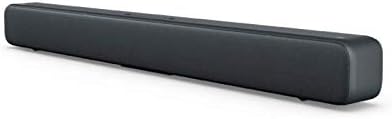
Figure 1.1: The MI MDZ-27-DI Wireless Bluetooth Soundbar, showcasing its sleek, dark grey design and compact form factor.
2. Sicherheitshinweise
- Do not expose the soundbar to water or moisture.
- Die Lüftungsöffnungen dürfen nicht blockiert werden. Die Installation muss gemäß den Anweisungen des Herstellers erfolgen.
- Installieren Sie das Gerät nicht in der Nähe von Wärmequellen wie Heizkörpern, Heizregistern, Öfen oder anderen Geräten (einschließlich ampKonverter (Lüfter), die Wärme erzeugen.
- Schützen Sie das Netzkabel vor Beschädigungen oder Beschädigungen durch Fußgänger, insbesondere an den Steckern, Steckdosen und an der Stelle, an der es aus dem Gerät austritt.
- Verwenden Sie nur vom Hersteller angegebene Zusatzgeräte/Zubehör.
- Trennen Sie das Gerät bei Gewitter oder längerer Nichtbenutzung vom Stromnetz.
- Überlassen Sie alle Wartungsarbeiten qualifiziertem Servicepersonal. Eine Wartung ist erforderlich, wenn das Gerät auf irgendeine Weise beschädigt wurde, z. B. wenn das Netzkabel oder der Stecker beschädigt sind, Flüssigkeit in das Gerät verschüttet wurde oder Gegenstände hineingefallen sind, das Gerät Regen oder Feuchtigkeit ausgesetzt war, nicht normal funktioniert oder fallengelassen wurde.
3. Packungsinhalt
Bitte prüfen Sie das Paket auf folgende Artikel:
- MI MDZ-27-DI Wireless Bluetooth Soundbar
- Netzteil/Kabel
- S/PDIF Cable (Note: Optical/Aux cables may need to be purchased separately depending on your TV model)
- Benutzerhandbuch (dieses Dokument)
4. Produktmerkmale
The MI MDZ-27-DI Soundbar offers a range of features designed for an immersive audio experience:
- 8 Sound Drivers: Equipped with multiple drivers for a rich and balanced audio profile.
- Mehrere Konnektivitätsoptionen: Supports S/PDIF, Optical, Aux-in, Line-in, and Bluetooth 4.2 LE for versatile connection to various devices.
- Minimalistisches Design: A sleek bar shape with a fabric mesh exterior that complements any décor.
- Verbesserter Bass: Delivers deep and clear bass for an improved listening experience.
- Einfache Einrichtung: Designed for a quick and hassle-free installation, whether on a table or wall-mounted.
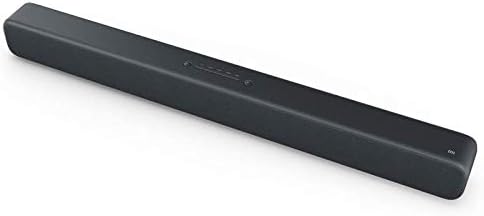
Figure 4.1: The soundbar's top panel, featuring integrated control buttons for power and input selection.
5. Einrichtung und Installation
5.1 Platzierungsoptionen
The MI Soundbar can be placed on a tabletop or mounted on a wall.
Platzierung der Tischplatte:
Place the soundbar on a stable, flat surface in front of your TV or desired listening area. Ensure there is adequate space around the soundbar for proper ventilation.
Wandmontage:
The soundbar is designed for easy wall mounting. To mount, determine the desired mounting height. Mark the position for the first wall hole (A1). Then, horizontally to the right of A1, mark the position for the second wall hole (A2) at a distance of 416 mm. Ensure the wall can support the weight of the soundbar (approximately 1.92 kg).
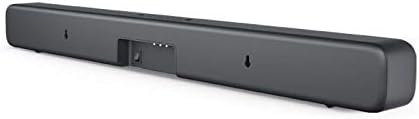
Figure 5.1: The rear of the soundbar, highlighting the input ports and the integrated wall mounting points.
5.2 Ersteinrichtung
- Strom anschließen: Plug the power cable into the soundbar's power input and then into a wall outlet.
- Audioquelle anschließen: Choose your preferred audio connection method (S/PDIF, Optical, Aux-in, or Bluetooth) and connect the soundbar to your TV, mobile device, or other audio source. Refer to Section 6 for detailed connectivity instructions.
- Einschalten: Drücken Sie den Netzschalter an der Soundbar, um sie einzuschalten.
6. Bedienungsanleitung
6.1 Bedienelemente
The MI Soundbar features integrated controls on its top panel:
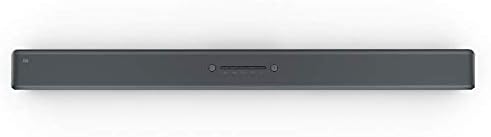
Figure 6.1: Close-up of the soundbar's top-mounted control buttons, including power, volume, and input selection.
- Netzschalter: Drücken Sie diese Taste, um die Soundbar ein- oder auszuschalten.
- Lautstärke erhöhen/verringern: Adjust the sound output level.
- Eingabe-/Quellenschaltfläche: Cycle through available input sources (Bluetooth, S/PDIF, Optical, Aux-in, Line-in).
Note: The MI MDZ-27-DI Soundbar does not include a remote control. Volume and source selection must be adjusted directly on the unit or via the connected device (e.g., TV remote for TV volume).
6.2 Konnektivitätsoptionen
The soundbar offers several ways to connect to your audio sources:
- Bluetooth:
- Stellen Sie sicher, dass die Soundbar eingeschaltet ist.
- Press the Input/Source button until the Bluetooth indicator light is active.
- On your mobile device or computer, enable Bluetooth and search for "MI Soundbar" (or similar).
- Select the soundbar from the list to pair. Once paired, the indicator light will become solid.
- S/PDIF (Coaxial Digital Audio):
Connect the provided S/PDIF cable from your TV's S/PDIF output to the soundbar's S/PDIF input. Select S/PDIF as the input source on the soundbar.
- Optisch (Digital Audio):
Connect an optical audio cable (not included) from your TV's Optical output to the soundbar's Optical input. Select Optical as the input source on the soundbar.
- Aux-in (3.5mm Analog Audio):
Connect a 3.5mm audio cable (not included) from your device's headphone jack or Aux output to the soundbar's Aux-in port. Select Aux-in as the input source on the soundbar.
- Line-in (RCA Analog Audio):
Connect an RCA audio cable (not included) from your device's Line-out to the soundbar's Line-in ports. Select Line-in as the input source on the soundbar.
7. Wartung
To ensure the longevity and optimal performance of your MI Soundbar, follow these maintenance guidelines:
- Reinigung: Use a soft, dry cloth to wipe the exterior of the soundbar. Do not use liquid cleaners, aerosols, or abrasive cleaning agents.
- Belüftung: Ensure that the ventilation openings are not blocked by dust or debris. Periodically clean around these areas.
- Lagerung: If storing the soundbar for an extended period, unplug it from the power outlet and store it in a cool, dry place away from direct sunlight and extreme temperatures.
8. Fehlerbehebung
If you encounter issues with your MI Soundbar, refer to the following common troubleshooting steps:
| Problem | Mögliche Ursache | Lösung |
|---|---|---|
| Kein Strom | Stromkabel nicht angeschlossen; Steckdose defekt. | Stellen Sie sicher, dass das Netzkabel fest angeschlossen ist. Versuchen Sie es mit einer anderen Steckdose. |
| Kein Ton | Incorrect input source selected; Volume too low; Cable not connected properly. | Press the Input/Source button to select the correct input. Increase the volume on the soundbar and your source device. Check all audio cable connections. |
| Probleme mit der Bluetooth-Kopplung | Soundbar not in pairing mode; Device too far; Previous device still connected. | Ensure soundbar is in Bluetooth pairing mode. Move device closer to soundbar. Disconnect from any previously paired devices. |
| Sound distortion at high volumes | Volume set too high; Poor audio source quality. | Reduce the volume. Try a different audio source to check if the issue persists. |
9. Spezifikationen
| Besonderheit | Detail |
|---|---|
| Technische Daten | 83 x 7.2 x 8.7 cm |
| Gewicht | 1.92 kg |
| Modellnummer | MDZ-27-DI |
| Marke | MI |
| Konnektivitätstechnologie | Bluetooth (4.2 LE), S/PDIF, Optical, Aux-in, Line-in |
| Audioausgabemodus | Stereo |
| Montagetyp | Wandmontage, Tischmontage |
| Material | Fabric mesh exterior |
| Hersteller | Xiaomi |
10. Garantie und Support
For warranty information and technical support, please refer to the warranty card included with your product or visit the official MI webBewahren Sie Ihren Kaufbeleg als Kaufnachweis für eventuelle Garantieansprüche auf.
For further assistance, you may contact MI customer service through their official channels.