1. Einleitung
Welcome to the user manual for your Nokia 216 Dual SIM mobile phone. This guide provides essential information to help you set up, operate, and maintain your device. The Nokia 216 (RM-1187) is a classic feature phone designed for reliable communication, featuring dual SIM capability, a 2.4-inch display, and a VGA camera.
Please read this manual carefully to ensure proper use and to get the most out of your phone.
2. Packungsinhalt
Stellen Sie sicher, dass alle Artikel in Ihrer Produktverpackung enthalten sind:
- Nokia 216 Dual SIM Mobile Phone (RM-1187)
- Batterie
- Netzteil
- USB-Kabel
3. Gerät überview
Familiarize yourself with the key components of your Nokia 216 phone.
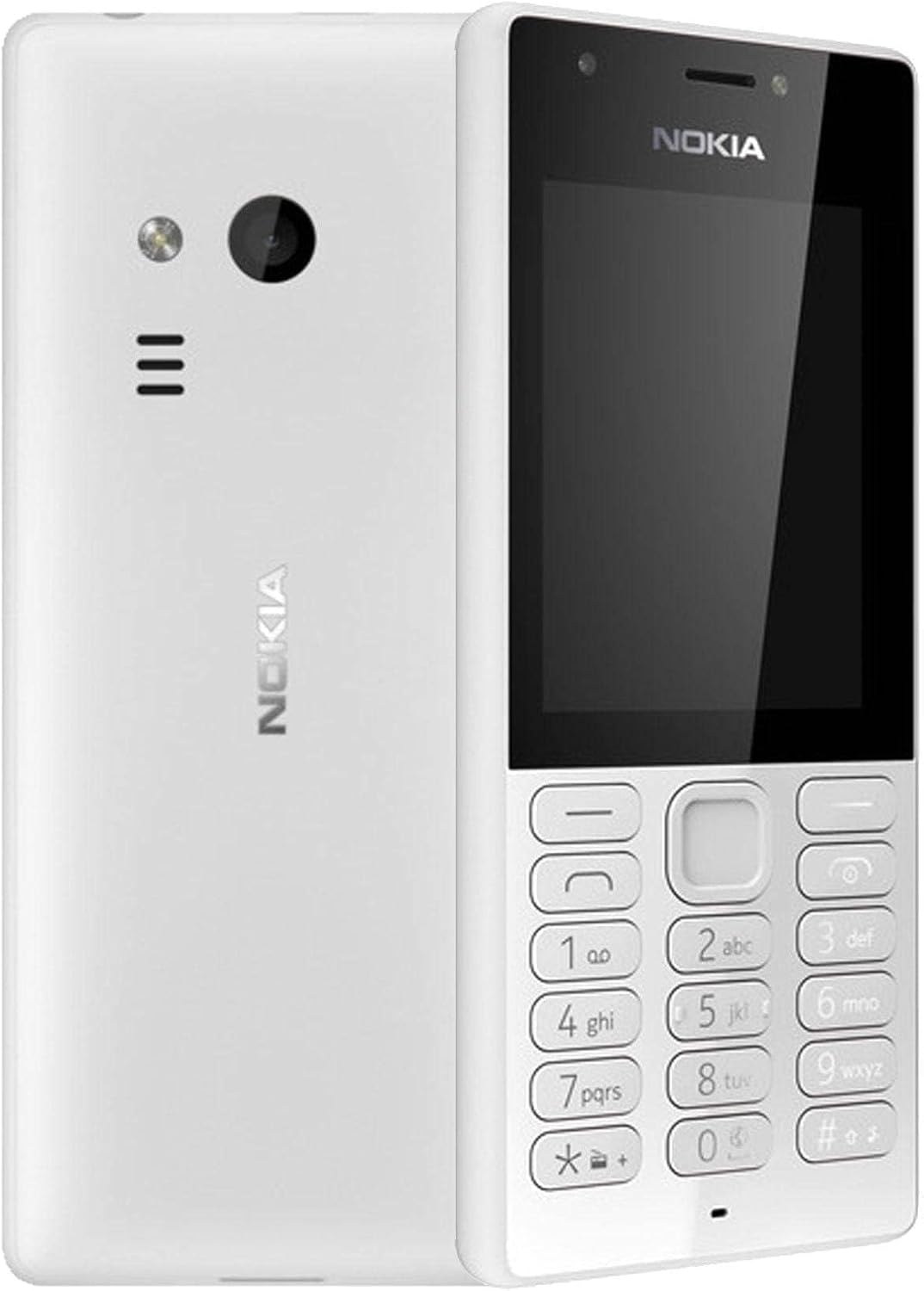
Abbildung 3.1: Vorder- und Rückseite view of the Nokia 216 Dual SIM mobile phone. The front shows the display, earpiece, and numeric keypad. The back features the rear camera, LED flash, and loudspeaker grille.

Abbildung 3.2: Front view of the Nokia 216 Dual SIM mobile phone. This image highlights the 2.4-inch display, the navigation keys, and the alphanumeric keypad for dialing and text input.

Abbildung 3.3: Zurück view of the Nokia 216 Dual SIM mobile phone. This view shows the rear VGA camera lens, the LED flash, and the Nokia branding.
Schlüsselkomponenten:
- Anzeige: 2.4-inch QVGA screen.
- Tastenfeld: Alphanumeric keypad for dialing and text entry, with navigation keys.
- Rückfahrkamera: VGA camera with LED flash.
- Lautsprecher: For audio playback and hands-free calls.
- Mikrofon: Zur Spracheingabe während Anrufen und Aufnahmen.
- 3.5-mm-Audiobuchse: Für Kopfhörer oder externe Lautsprecher.
- Ladeanschluss: Micro-USB port for charging and data transfer.
4. Einrichtung
4.1. SIM-Karte(n) einlegen
- Schalten Sie das Telefon aus und trennen Sie alle Ladegeräte.
- Carefully remove the back cover by prying it open from the notch.
- Wenn die Batterie eingelegt ist, heben Sie sie heraus.
- Insert the SIM card(s) into the designated slot(s) with the gold contacts facing down. For dual SIM models, ensure both SIMs are correctly seated.
- If applicable, insert a microSD card into its slot for additional storage.
- Ersetzen Sie die Batterie.
- Richten Sie die Rückseite aus und drücken Sie sie fest an, bis sie einrastet.
4.2. Lade die Batterie auf
- Schließen Sie das Netzteil an eine Wandsteckdose an.
- Plug the micro-USB end of the cable into the phone's charging port.
- Die Akkuanzeige auf dem Bildschirm zeigt den Ladestatus an.
- Sobald der Akku vollständig geladen ist, trennen Sie das Ladegerät vom Telefon und anschließend von der Steckdose.
5. Bedienungsanleitung
5.1. Ein-/Ausschalten
- So schalten Sie das Gerät ein: Halten Sie die Ein-/Aus-Taste (normalerweise die rote Taste „Anruf beenden“) gedrückt, bis das Telefon vibriert und das Nokia-Logo erscheint.
- So schalten Sie das Gerät aus: Halten Sie die Ein-/Aus-Taste gedrückt, bis die Option „Ausschalten“ auf dem Bildschirm erscheint, und wählen Sie diese dann aus.
5.2. Anrufe tätigen
- Geben Sie vom Startbildschirm aus die Telefonnummer über die numerische Tastatur ein.
- Drücken Sie die grüne „Anruf“-Taste, um den Anruf zu starten.
- Um einen Anruf zu beenden, drücken Sie die rote Taste „Anruf beenden“.
5.3. Versenden von Textnachrichten (SMS)
- Gehe zu Speisekarte > Nachrichten > Nachricht erstellen.
- Geben Sie Ihre Nachricht über die Tastatur ein.
- Geben Sie die Telefonnummer des Empfängers ein oder wählen Sie eine aus den Kontakten aus.
- Wählen Schicken.
5.4. Verwendung der Kamera
- Gehe zu Speisekarte > Kamera.
- Nutzen Sie das Display, um den Bildausschnitt festzulegen.
- Drücken Sie die mittlere Navigationstaste, um ein Foto aufzunehmen.
6. Wartung und Pflege
To ensure the longevity and optimal performance of your Nokia 216, follow these care guidelines:
- Halten Sie das Gerät trocken: Feuchtigkeit kann elektronische Schaltkreise beschädigen.
- Use original accessories: Only use batteries, chargers, and accessories approved by Nokia.
- Schonend reinigen: Use a soft, clean, dry cloth to clean the surface of the device.
- Vermeiden Sie extreme Temperaturen: Do not expose your device to very high or low temperatures.
- Vorsichtig handhaben: Lassen Sie das Gerät nicht fallen und setzen Sie es keinen starken Stößen aus.
7. Fehlerbehebung
If you encounter issues with your Nokia 216, try these common troubleshooting steps:
| Problem | Lösung |
|---|---|
| Das Telefon lässt sich nicht einschalten | Stellen Sie sicher, dass der Akku geladen ist. Schließen Sie das Ladegerät an und versuchen Sie es erneut. Prüfen Sie, ob der Akku richtig eingesetzt ist. |
| Kein Netzwerksignal | Prüfen Sie, ob die SIM-Karte richtig eingelegt ist. Begeben Sie sich in ein Gebiet mit besserem Netzempfang. Starten Sie das Telefon neu. |
| Akku wird nicht geladen | Ensure the charger is properly connected to both the phone and the power outlet. Try a different power outlet or charger. Check for any damage to the charging port. |
| Anrufe können weder getätigt noch empfangen werden. | Check network signal. Ensure your SIM card is active and has sufficient credit/plan. Verify that call barring is not enabled. |
8. Spezifikationen
| Besonderheit | Detail |
|---|---|
| Marke | Nokia |
| Modellname | RM-1187 |
| Betriebssystem | Symbian 9.1 (Series 30) |
| Bildschirmgröße | 2.4 Zoll |
| Bildschirmauflösung | 240 x 320 Pixel |
| Bildwiederholrate | 90 Hz |
| Installierte RAM-Größe | 256 MB |
| Speicherkapazität | 3.9 GB (Internal, likely for system/apps, expandable via microSD) |
| CPU Modell | A10 |
| Zellulartechnologie | 2G |
| Drahtlose Kommunikationstechnologien | Mobilfunk |
| Konnektivitätstechnologien | USB, Bluetooth, WLAN |
| GPS | Ein GPS |
| Primary Device User Interface | Tasten, Ziffernblock, Mikrofon |
| Weitere Kamerafunktionen | Rear Camera (VGA) |
| Audio-Buchse | 3.5 mm |
| Formfaktor | Klassiker |
| Farbe | Grau |
| Gesprächszeit | Bis zu 18 Stunden |
| Artikelgewicht | 339 Gramm |
| Verpackungsabmessungen | 13.4 x 12.6 x 3.6 cm |
| Lieferumfang | Netzteil, USB-Kabel |
9. Garantie und Support
For warranty information, please refer to the warranty card included in your product package or visit the official Nokia website. If you require further assistance or technical support, please contact Nokia customer service through their official channels.
Bewahren Sie Ihren Kaufbeleg als Kaufnachweis für Garantieansprüche auf.