Produkt überview
The Enbrighten 6-Outlet Wi-Fi Smart Yard Stake (Model 51492) provides wireless control for your outdoor electrical devices. This heavy-duty smart stake allows you to manage connected lights and appliances through a dedicated app or voice commands, offering convenience for landscape lighting, holiday decorations, and more.

Image: The Enbrighten Wi-Fi Smart Yard Stake, showing its six outlets and integrated ground stake.
Hauptmerkmale:
- Sprachsteuerung: Compatible with popular voice assistants (no hub required).
- Benutzerfreundliche App: Control and schedule devices from your smartphone.
- 2.4-GHz-WLAN-kompatibel: Stellt eine direkte Verbindung zu Ihrem WLAN-Heimnetzwerk her.
- Einfache Einrichtung: Quick and straightforward installation process.
- Robuste Ausführung: Built for outdoor use and durability.
Wichtige Sicherheitsinformationen
Please read and understand all safety instructions before installing or operating this device. Failure to follow these instructions may result in fire, electric shock, injury, or property damage.
- Nur für den Außenbereich: This product is designed for outdoor use. Do not immerse in water.
- Erdung: Ensure the product is properly grounded. Use only with a Ground Fault Circuit Interrupter (GFCI) protected outlet.
- Elektrische Wertung: Do not exceed the electrical ratings of the device or connected appliances.
- Platzierung: Place the stake in a location where it will not be a tripping hazard and is protected from direct water spray from sprinklers.
- Wartung: Unplug the device from the power source before performing any cleaning or maintenance.
- Kinder und Haustiere: Keep children and pets away from the device and connected cords.
- Schaden: Do not use if the cord, plug, or housing is damaged.
Installationsanweisungen
1. Physische Installation
- Ort wählen: Select a suitable outdoor location for the yard stake. Ensure it is within range of your 2.4GHz Wi-Fi network.
- Einsatz einfügen: Firmly push the integrated ground stake into soft soil. Ensure the main unit is upright and stable.
- Einstecken: Connect the yard stake's power cord to a GFCI-protected outdoor electrical outlet.
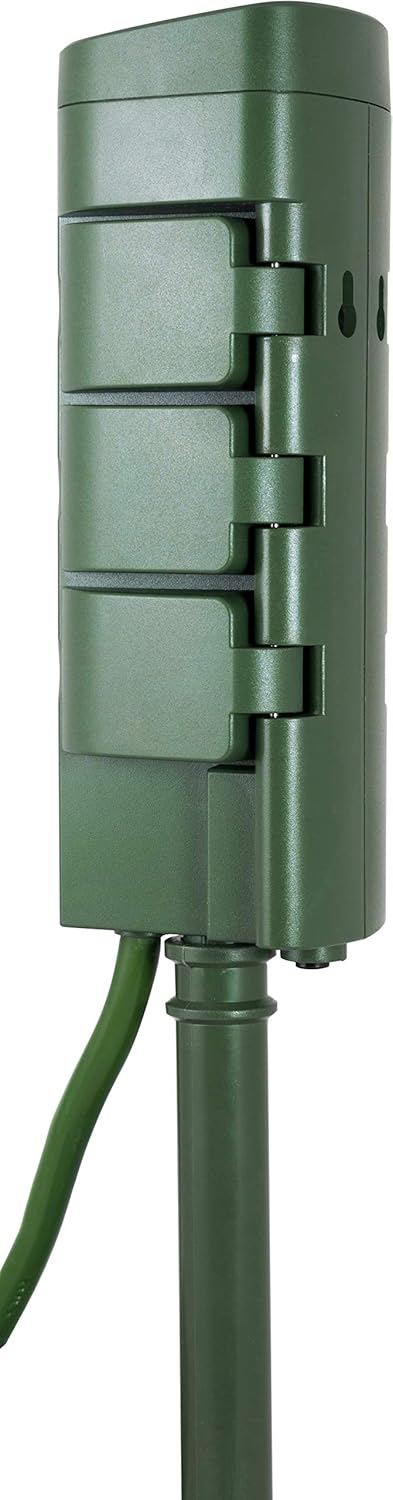
Image: The Enbrighten Wi-Fi Smart Yard Stake with its ground stake ready for insertion into the soil.
2. App-Installation und WLAN-Verbindung
- Lade App herunter: Download the Enbrighten app from your smartphone's app store (iOS or Android).
- Benutzerkonto erstellen: Öffnen Sie die App und folgen Sie den Anweisungen auf dem Bildschirm, um ein neues Konto zu erstellen oder sich anzumelden.
- Gerät hinzufügen: In the app, select the option to add a new device. Choose the 'Smart Yard Stake' or similar option.
- Mit WLAN verbinden: Follow the app's prompts to connect the yard stake to your 2.4GHz Wi-Fi network. Ensure your phone is also connected to the 2.4GHz network during setup. Note: This device is not compatible with 5GHz Wi-Fi networks.
- Gerätename: Assign a name to your yard stake for easy identification (e.g., "Backyard Lights").
3. Integration von Sprachassistenten (optional)
If you wish to use voice control, follow these steps:
- Konto verknüpfen: Open your voice assistant app (e.g., Amazon Alexa, Google Home).
- Fähigkeit aktivieren: Suchen nach and enable the "Enbrighten" skill or action.
- Autorisieren: Link your Enbrighten account with your voice assistant account.
- Geräte entdecken: Ask your voice assistant to discover new devices. Your yard stake should appear.
Bedienungsanleitung
1. Using the Enbrighten App
The Enbrighten app provides full control over your smart yard stake.
- Manuelle Kontrolle: Tap the device icon in the app to turn all connected outlets ON or OFF instantly.
- Terminplanung: Set custom schedules for your devices to turn ON or OFF at specific times, days of the week, or based on sunrise/sunset.
- Timer: Use countdown timers for temporary control.
- Wichtiger Hinweis: All six outlets on the Enbrighten 51492 Smart Yard Stake operate as a single unit. Individual outlets cannot be controlled independently. When you turn the device ON or OFF, all six outlets will respond simultaneously.

Bild: Eine detaillierte view of the six power outlets on the Enbrighten Wi-Fi Smart Yard Stake.
2. Sprachbefehle
Once integrated with a voice assistant, you can use simple commands:
- "Alexa, schalte [Gerätename] ein"
- "Hey Google, schalte [Gerätename] aus"
- Replace "[Device Name]" with the name you assigned in the Enbrighten app (e.g., "Backyard Lights").
Wartung
- Reinigung: Disconnect the yard stake from the power source before cleaning. Wipe the exterior with a damp Tuch. Verwenden Sie keine scharfen Chemikalien oder Scheuermittel.
- Wetterschutz: The heavy-duty design is built to withstand outdoor conditions. However, for prolonged periods of extreme weather (e.g., heavy snow, ice storms), consider temporarily relocating or covering the unit.
- Lagerung: Wenn Sie das Gerät längere Zeit nicht verwenden, ziehen Sie den Stecker und bewahren Sie es an einem kühlen, trockenen Ort auf.
Fehlerbehebung
- Gerät stellt keine Verbindung zum WLAN her:
- Stellen Sie sicher, dass Ihr WLAN-Netzwerk mit 2.4 GHz arbeitet. Das Gerät unterstützt keine 5-GHz-Netzwerke.
- Check that the yard stake is within range of your Wi-Fi router. Wi-Fi signal strength can be weaker outdoors.
- Restart your Wi-Fi router and try the connection process again.
- Confirm your smartphone is connected to the 2.4GHz network during setup.
- Gerät reagiert nicht:
- Verify the yard stake is plugged into a working GFCI outlet.
- Check the app for the device's status. Ensure it shows as online.
- If using voice control, ensure the Enbrighten skill/action is enabled and your accounts are linked.
- Unplug the yard stake for 10 seconds and plug it back in to perform a soft reset.
- Outlets Not Working:
- Confirm the yard stake is powered ON via the app or voice command.
- Ensure connected devices are properly plugged into the outlets and are functional.
- Remember that all six outlets operate together; individual control is not available.
- Intermittent Connection Issues:
- Poor Wi-Fi signal strength is a common cause. Consider moving the yard stake closer to your router or using a Wi-Fi extender.
- Obstructions like walls, trees, or other electronic devices can interfere with the Wi-Fi signal.
Technische Daten
| Modellnummer | 51492 |
| Hersteller | Jasco Products Company, LLC |
| Technische Daten | 2.6 x 3.15 x 6.1 Zoll |
| Artikelgewicht | 1.34 Pfund |
| Farbe | Grün |
| Stil | Schwerlast |
| Stromquelle | AC |
| Bandtage | 240 Volt (Note: Typically for US products, 120V is standard. Please verify compatibility with your local power supply.) |
| Plug-Format | Typ B |
| Besondere Merkmale | Kabellos |
| Im Lieferumfang enthaltene Komponenten | Hofpfahl |
Garantieinformationen
This Enbrighten product is backed by a 5 Jahr eingeschränkte Garantie. For detailed terms and conditions, please refer to the warranty documentation included with your purchase or visit the manufacturer's official webWebsite.
Unterstützung
For further assistance, technical support, or to report issues, please contact Enbrighten customer service. Contact information can typically be found on the product packaging or the official Enbrighten webWebsite.
Online-Ressourcen: Visit the Enbrighten support page for FAQs, additional guides, and software updates.


