Einführung
This manual provides detailed instructions for the safe installation, operation, and maintenance of your Hinkley Marquis 52-Inch 5-Blade Ceiling Fan. Please read all instructions carefully before beginning installation and retain this manual for future reference. Proper installation and operation are essential for optimal performance and safety.
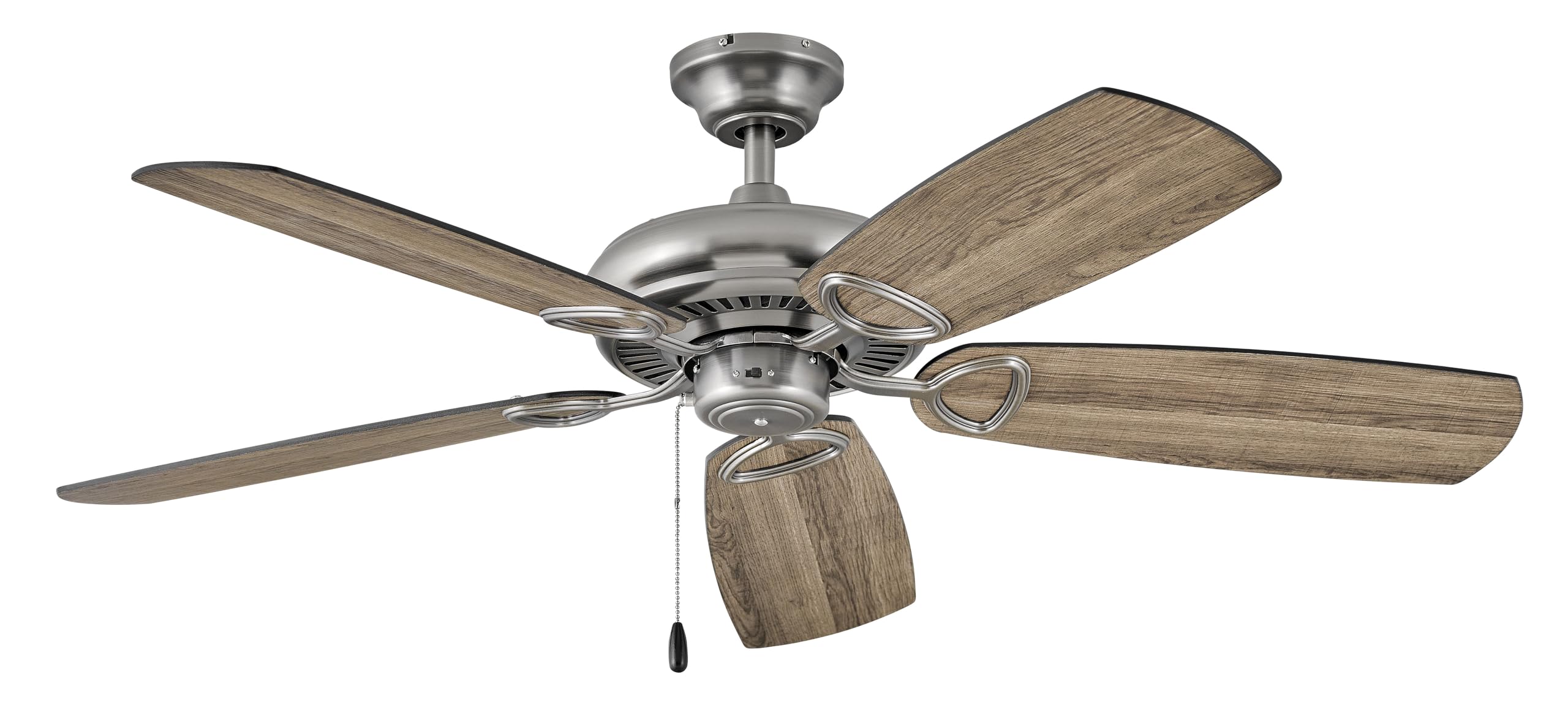
Image: Hinkley Marquis 52-Inch 5-Blade Ceiling Fan in Pewter finish with five wooden-look blades.
Sicherheitshinweise
WARNUNG: Um das Risiko von Bränden, Stromschlägen oder Verletzungen zu verringern, befolgen Sie stets diese Sicherheitsrichtlinien.
- Vor der Installation oder Wartung muss sichergestellt werden, dass die Stromzufuhr am Sicherungsautomaten bzw. Sicherungskasten unterbrochen ist.
- Sämtliche Elektroinstallationen müssen von einem qualifizierten Elektriker gemäß den nationalen und lokalen Elektrovorschriften durchgeführt werden.
- Die Montagekonstruktion muss in der Lage sein, das Gewicht des Ventilators (ca. 18.92 Pfund) zu tragen.
- Betreiben Sie den Ventilator nicht, wenn die Flügel oder das Gehäuse beschädigt sind.
- Halten Sie einen Mindestabstand von 7 Fuß (ca. 2,13 m) zwischen Boden und Unterkante der Lüfterflügel ein.
- Vermeiden Sie es, Gegenstände in den Weg der rotierenden Klingen zu legen.
Packungsinhalt
Vergewissern Sie sich vor Beginn der Installation, dass alle Komponenten vorhanden sind:
- Deckenventilator-Montage
- Lüfterblätter (5)
- Montagezubehör
- Fernbedienung
- Bedienungsanleitung
Technische Daten
| Marke | Hinkley |
| Modellnummer | 901352FPW-NIA |
| Farbe | Zinn |
| Elektrisches Ventilatordesign | Deckenventilator |
| Stromquelle | Kabelgebundene Elektrik |
| Zimmertyp | Dining Room, Bedroom, Living Room |
| Empfohlene Verwendung | Luftzirkulation, Kühlung |
| Ausführung | Fertig |
| Bandtage | 120 Volt |
| Schaltertyp | Pull Chain (Remote Control included) |
| Artikelgewicht | 18.92 Pfund |
| Im Lieferumfang enthaltene Komponenten | Fernbedienung |
| Verwendung im Innen- und Außenbereich | Im Freien |
| Kontrollmethode | Fernbedienung |
| Technische Daten | 52 x 52 x 13.25 Zoll |
| Aufbauhöhe | 13.25 Zoll |
| Zusammengebaute Länge | 52 Zoll |
| Zusammengebaute Breite | 52 Zoll |
| Schirmmaterial | Glas |
| Lichtrichtung | Downlight |
Energieinformationen
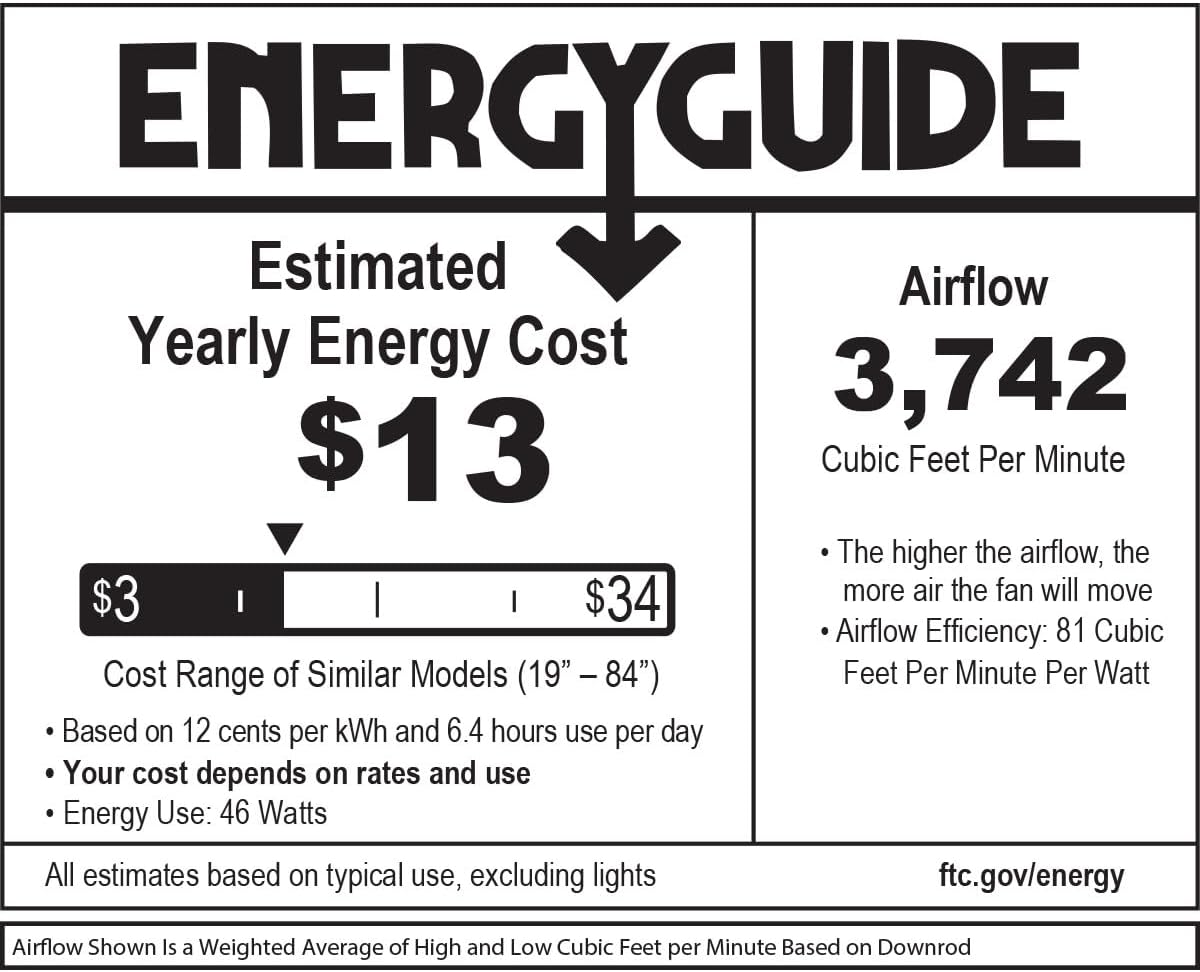
Image: EnergyGuide label indicating an estimated yearly energy cost of $13 and an airflow of 3,742 Cubic Feet Per Minute.
Setup und Installation
Professional installation by a qualified electrician is highly recommended for safety and proper function. Ensure all local electrical codes are followed.
Prüfungen vor der Installation
- Verify that the electrical box is securely mounted and rated for ceiling fan support.
- Confirm that the chosen location allows for proper blade clearance from walls and other obstructions.
Montage des Lüfters
- Secure the mounting bracket to the electrical outlet box using the provided screws.
- Heben Sie die Lüftermotoreinheit vorsichtig an und hängen Sie sie an die Montagehalterung.
Kabelverbindungen
Connect the fan's electrical wires to the household wiring according to the wiring diagram provided in the full installation guide (not included in this summary). Ensure all connections are secure and insulated.
Attaching Blades and Canopy
- Attach the fan blades to the motor housing using the blade screws. Ensure all blades are securely fastened.
- Install the canopy over the mounting bracket, securing it with the designated screws.
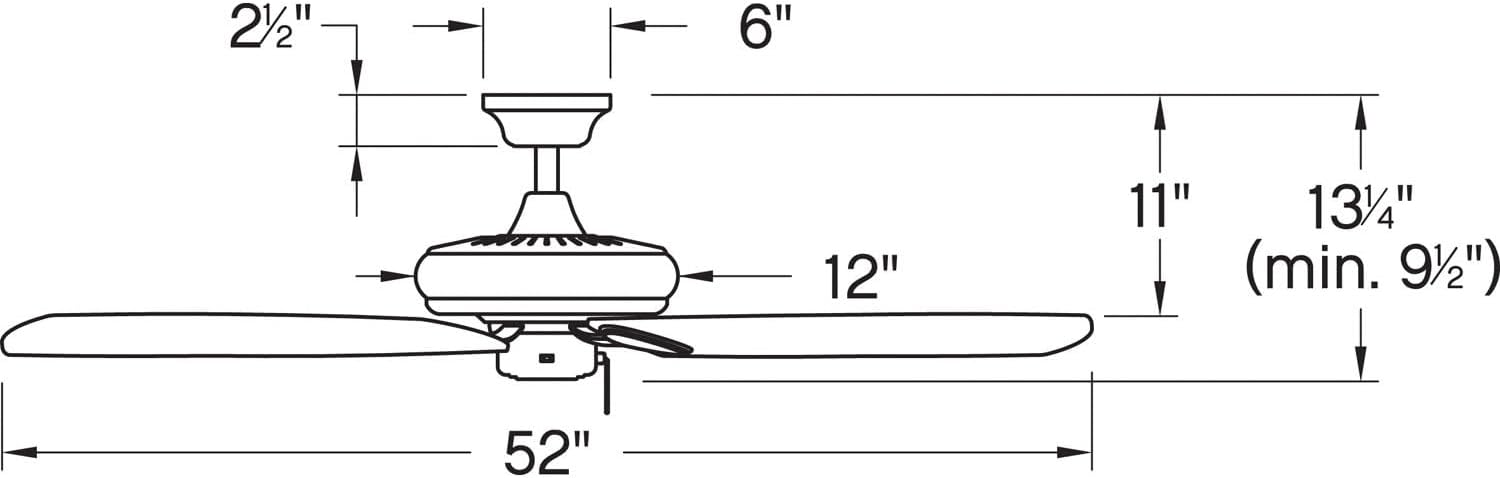
Image: Dimensional diagram of the ceiling fan, illustrating key measurements for installation.
Bedienungsanleitung
The Hinkley Marquis ceiling fan is operated using the included remote control. It also features smart home compatibility (WiFi accessory sold separately).
Fernbedienungsfunktionen
- Lüftergeschwindigkeit: Use the speed buttons to adjust the fan's rotation speed (typically low, medium, high).
- Lichtsteuerung: Press the light button to turn the light on or off. Hold the button to dim or brighten the light (if dimmable).
- Lüfterrichtung: A button may be present to reverse the fan's direction for seasonal use (downward airflow for cooling, upward for heat circulation).
Smart Home Kompatibilität
This fan is designed to be smart home compatible. A WiFi accessory, sold separately, is required to enable features such as speed, light, and seasonal mode control via a smart device or voice activation. This allows for setting schedules and preferences for enhanced convenience.

Image: WiFi compatibility features, highlighting smartphone control, voice activation, and scheduling options (requires separate accessory).
Wartung
Regular maintenance ensures the longevity and efficient operation of your ceiling fan.
Reinigung
- Vor der Reinigung muss immer die Stromzufuhr zum Ventilator am Sicherungskasten unterbrochen werden.
- Verwenden Sie ein weiches,amp cloth to clean the fan blades and motor housing. Avoid abrasive cleaners that may damage finishes.
- Do not use water directly on the fan motor or electrical components.
Verbindungen prüfen
Periodically check all screws and connections on the fan and mounting hardware to ensure they are secure. Tighten any loose screws as needed.
Fehlerbehebung
Sollten Sie Probleme mit Ihrem Deckenventilator haben, beachten Sie bitte die folgenden häufigen Probleme und Lösungen:
| Problem | Mögliche Ursache | Lösung |
|---|---|---|
| Lüfter startet nicht | Der Ventilator erhält keinen Strom; lose Kabelverbindungen; Batterie der Fernbedienung schwach. | Check circuit breaker/fuse; ensure all wiring connections are secure; replace remote control battery. |
| Lüfter wackelt | Lose Klingenschrauben; unausgewogene Klingen; lose Montagehalterung. | Tighten all blade screws; ensure blades are balanced (balancing kit may be required); check mounting bracket for secure attachment. |
| Lauter Betrieb | Loose screws; motor not seated properly; fan not broken in. | Check and tighten all screws; ensure motor housing is properly secured; allow for a break-in period (usually 24 hours). |
| Licht funktioniert nicht | Bulb needs replacement; loose wire connection; remote control issue. | Replace light bulb; check light kit wiring; ensure remote control battery is functional. |
Garantie und Support
For specific warranty information and details regarding your Hinkley Marquis ceiling fan, please refer to the warranty card included with your product or visit the official Hinkley website. For technical support or assistance with parts, contact Hinkley customer service directly.
You can find more information and contact details on the official Hinkley webWebsite: www.hinkley.com