1. Einleitung
The AOC Gaming C27G2Z is a 27-inch curved frameless ultra-fast gaming monitor designed to provide an immersive and responsive gaming experience. Featuring a Full HD 1080p resolution, an incredibly fast 0.5ms (MPRT) response time, and a 240Hz refresh rate, this monitor ensures smooth and fluid visuals. It supports AMD FreeSync technology to eliminate screen tearing and stuttering, offering a competitive edge. The 1500R super curved design wraps around your vision, placing you at the center of the action. The monitor also boasts a wide color gamut for vibrant imagery and an ergonomic stand for optimal viewKomfort.

Front view of the AOC C27G2Z 27-inch Curved Gaming Monitor.
2. Lieferumfang
Please check the contents of your product package for the following items:
- Monitor
- HDMI-Kabel
- Netzkabel
- Benutzerhandbuch (Schnellstartanleitung)
3. Einrichtung
3.1 Auspacken
Carefully remove the monitor and all accessories from the packaging. Due to the curved nature of the screen, handle the monitor with care to avoid damage.
3.2 Montage des Ständers
Assemble the monitor stand by following these steps:
- Attach the stand base to the stand column. Ensure it clicks securely into place or is fastened with screws as indicated in the quick start guide.
- Carefully attach the assembled stand to the back of the monitor. Align the mounting points and push until it locks into position.

Hinteren view des Monitors mit angebrachtem Ständer.
3.3 Anschlusskabel
Schließen Sie die erforderlichen Kabel an Ihren Monitor und Computer an:
- Verbinden Sie das Netzkabel mit dem Stromeingang des Monitors und anschließend mit einer Steckdose.
- For optimal performance, connect the DisplayPort cable from your computer's graphics card to the DisplayPort input on the monitor. This enables the 240Hz refresh rate.
- Alternatively, connect an HDMI cable from your computer or console (Xbox, PS5, Switch) to one of the HDMI 2.0 inputs on the monitor.
Close-up of the monitor's input ports, including HDMI and DisplayPort.
4. Bedienung Ihres Monitors
4.1 Ein-/Ausschalten
Press the power button located on the bottom right side of the monitor to turn it on or off. The power LED will indicate the monitor's status.
4.2 Navigation über das On-Screen-Display (OSD)
The monitor features an intuitive OSD menu for adjusting various settings. Use the joystick or buttons (depending on your model's specific design) located on the bottom or rear of the monitor to navigate the menu. Press the joystick/button to enter the menu, move it up/down/left/right to select options, and press again to confirm.
4.3 Anzeigeeinstellungen
Passen Sie die Anzeigeeinstellungen optimal an viewing and gaming:
- Helligkeit Kontrast: Adjust these to suit your lighting environment and personal preference.
- Farbeinstellungen: Fine-tune color temperature, gamma, and other color-related settings.
- Spieleinstellung: Access specific gaming features like Game Mode (FPS, RTS, Racing), Shadow Control, and Low Input Lag.
- Energiesparmodus: Select from various eco modes to optimize power consumption.
5. Hauptmerkmale
- 27" Full HD (1080P) Curved VA Panel: Experience crisp and clear visuals with a 1920x1080 resolution on a 27-inch curved VA panel, offering a wide viewing angle of 170 degrees and an aspect ratio of 16:9.
- 240 Hz Bildwiederholfrequenz & 0.5 ms MPRT Reaktionszeit: Achieve unprecedented smoothness and fluidity in your games with a 240Hz refresh rate (via DP1.4) and a rapid 0.5ms MPRT response time, ensuring virtually instantaneous response to your actions and precise targeting of moving opponents.
- 1500R Super Curved Design: The aggressive 1500R curvature of the monitor wraps around your vision, creating a deeply immersive gaming experience that pulls you into the action.
- AMD FreeSync Premium-Technologie: Synchronizes the display and AMD GPU to eliminate screen tearing, stuttering, and input lag, providing the smoothest, fastest, and most visually stunning gaming experience possible.
- Wide Color Gamut (119.9% sRGB, 89.8% DCI-P3): Enjoy vibrant and lifelike colors that bring characters and environments to life, creating stunning imagery with rich details and diverse contrast.
- Sleek 3-Sided Frameless Design: The monitor's design minimizes bezel distraction, making it ideal for seamless multi-monitor setups and providing a sleek aesthetic.
- Ergonomischer Ständer: The included stand is height-adjustable, allowing you to find the optimal viewing angle for comfortable long gaming and computing sessions. The monitor is also VESA compatible for alternative mounting solutions.
- Modus mit geringer Eingangsverzögerung: AOC's Low Input Lag mode bypasses extra image processing, delivering lag-free display from video signals and giving players a crucial advantage über Gegner.

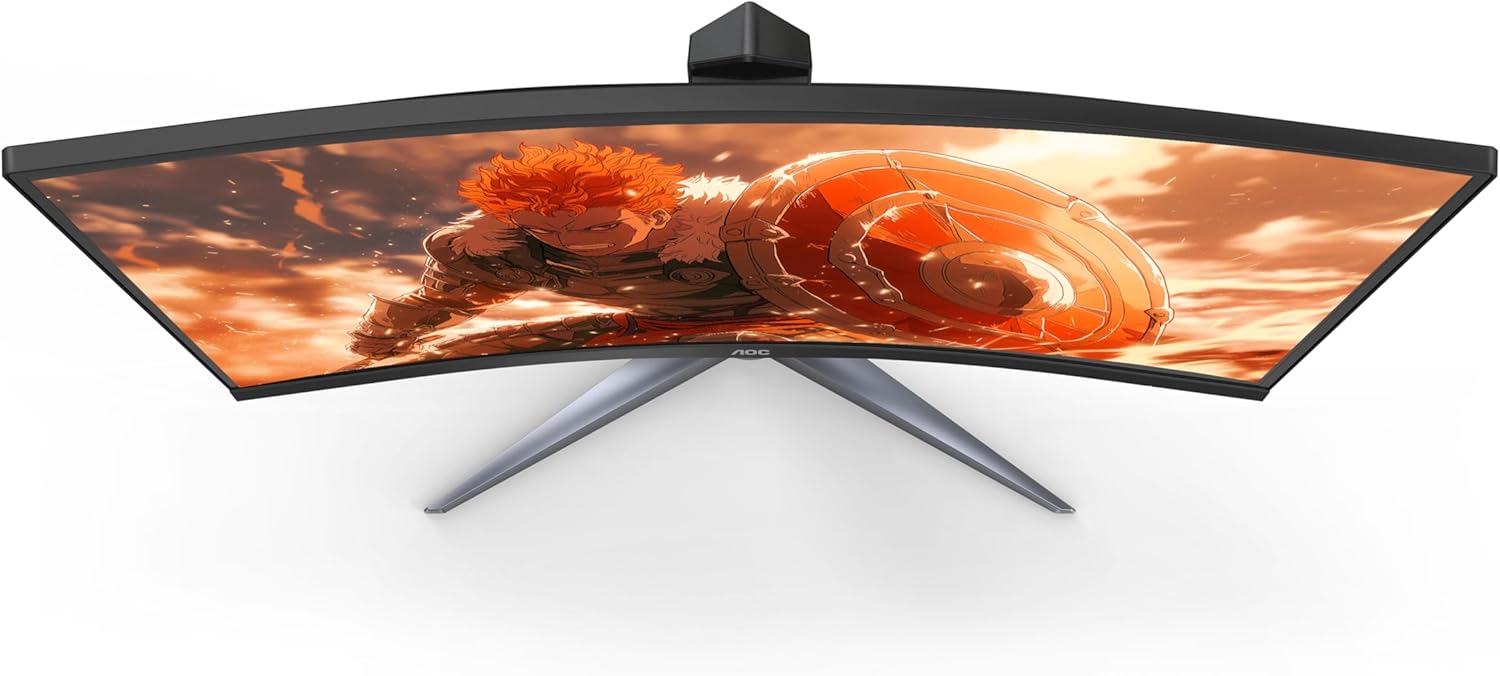
Seite view illustrating the curvature of the monitor.
6. Technische Daten
| Spezifikation | Wert |
|---|---|
| Stehbildschirm Displaygröße | 27 Zoll |
| Bildschirmauflösung | 1920x1080 (FHD 1080p) |
| Maximale Bildschirmauflösung | 1920 x 1080 |
| Marke | AOC |
| Serie | Gaming Monitor Curved |
| Artikelmodellnummer | C27G2Z |
| Artikelgewicht | 9.02 Pfund |
| Technische Daten | 8.96 x 24.1 x 20.81 Zoll |
| Farbe | Schwarz |
| Bandtage | 100-240 Volt |
| Hersteller | AOC |
| Ursprungsland | China |
| Seitenverhältnis | 16:9 |
| Beschreibung der Bildschirmoberfläche | Glänzend |
7. Wartung und Pflege
To ensure the longevity and optimal performance of your AOC C27G2Z monitor, follow these maintenance guidelines:
- Reinigen des Bildschirms: Benutzen Sie ein weiches, fusselfreies Tuch, dampened with a non-ammonia, non-alcohol based glass cleaner. Spray the cleaner onto the cloth, not directly onto the screen.
- Reinigung des Casing: Verwenden Sie ein weiches, trockenes Tuch, um den Monitor abzuwischen.asing. Vermeiden Sie die Verwendung von scheuernden Reinigungs- oder Lösungsmitteln.
- Handhabung: Always lift the monitor by its base or edges. Avoid applying pressure directly to the screen, especially the curved surface.
- Belüftung: Stellen Sie sicher, dass die Lüftungsöffnungen des Monitors nicht blockiert sind. Platzieren Sie den Monitor nicht in einem geschlossenen Raum ohne ausreichende Belüftung.
- Ausschalten: When not in use for extended periods, turn off the monitor and unplug it from the power outlet.
8. Fehlerbehebung
Sollten Sie Probleme mit Ihrem Monitor haben, beachten Sie bitte die folgenden häufig auftretenden Probleme und Lösungen:
- Kein Strom:
- Stellen Sie sicher, dass das Netzkabel sowohl am Monitor als auch an der Steckdose fest angeschlossen ist.
- Prüfen Sie die Funktionsfähigkeit der Steckdose, indem Sie ein anderes Gerät anschließen.
- Kein Bild/Schwarzer Bildschirm:
- Verify that the video cable (HDMI or DisplayPort) is securely connected to both the monitor and your computer's graphics card.
- Stellen Sie sicher, dass im OSD-Menü des Monitors die richtige Eingangsquelle ausgewählt ist.
- Starten Sie Ihren Computer neu.
- Flackernder Bildschirm:
- Prüfen Sie das Videokabel auf Beschädigungen oder lose Verbindungen. Versuchen Sie es gegebenenfalls mit einem anderen Kabel.
- Stellen Sie sicher, dass Ihre Grafikkartentreiber auf dem neuesten Stand sind.
- Disable or enable AMD FreeSync in the monitor's OSD or graphics card settings to see if it resolves the issue.
- No Sound (if using monitor speakers/audio out):
- Check the audio settings on your computer and ensure the monitor is selected as the output device.
- Adjust the volume on the monitor's OSD menu.
- Ensure the HDMI or DisplayPort cable is capable of transmitting audio.
9. Garantie und Support
AOC offers comprehensive support for its products, including a robust warranty program:
- Zero Bright Dot Coverage: For all AOC Gaming monitors, if a bright dot or dead pixel develops within 3 years of purchase, AOC will replace it for free.
- Vorabaustausch: If your monitor needs to be replaced, AOC ships a replacement monitor as soon as the Return Merchandise Authorization (RMA) is authorized, even before you ship the damaged monitor back. This minimizes downtime and gets you back to gaming quickly.
- Accidental Damage Coverage: Within the first year of purchase, AOC will replace any accidentally damaged units covered under the Re-Spawned program. (One replacement per product.)
For further assistance or detailed warranty information, please refer to the full User Manual PDF or visit the official AOC support webWebsite.
10. Zusätzliche Ressourcen
For a complete and detailed guide, including advanced settings and comprehensive troubleshooting, please download the full User Manual (PDF):


