Einführung
This manual provides detailed instructions for the safe and efficient operation of your Altec Lansing AL-1005 A BT Portable Speaker. Please read this manual thoroughly before using the product and retain it for future reference.
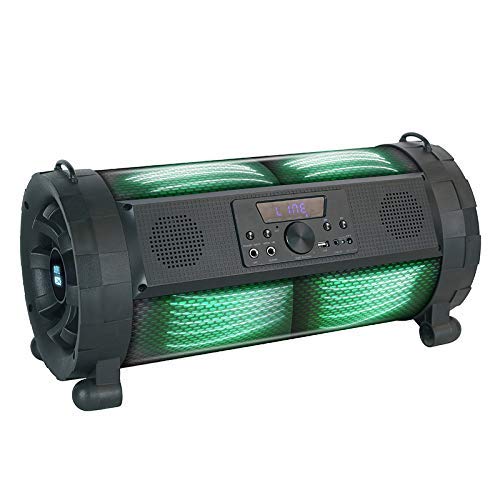
Image: The Altec Lansing AL-1005 A BT Portable Speaker, featuring a black barrel design with illuminated green DJ lights, a central control panel, and integrated handles.
Packungsinhalt
Überprüfen Sie, ob alle Artikel im Paket vorhanden sind:
- Altec Lansing AL-1005 A BT Portable Speaker
- Bedienungsanleitung
- Ladeadapter
- Fernbedienung
- Riemenhalter
- Drahtloses Mikrofon
Produkt überview
The AL-1005 A is a portable barrel-design speaker equipped with various features for an enhanced audio experience.
Hauptmerkmale:
- 80 W Lautsprecherausgang
- Drahtlose Bluetooth-Konnektivität
- AUX-Eingang
- USB-Wiedergabe
- Gitarreneingang
- Integrated DJ Lights
- 2000 mAh Battery (Up to 6 hours playtime)
- Drahtloses Mikrofon im Lieferumfang enthalten
- Fernbedienung im Lieferumfang enthalten
Aufstellen
Aufladen des Lautsprechers:
- Connect the charger adapter to the speaker's charging port.
- Stecken Sie den Adapter in eine normale Steckdose.
- Allow the speaker to charge fully before first use. The charging indicator light will change when charging is complete.
Attaching the Strap Holder:
The strap holder can be attached to the designated loops on the speaker for easier portability.
Mikrofon-Setup:
- Ensure the wireless microphone has fresh batteries (1 AA battery required, included).
- Turn on the microphone. It should automatically pair with the speaker.
Bedienungsanleitung
Ein-/Ausschalten:
Press and hold the Power button on the control panel or remote control to turn the speaker on or off.
Bluetooth-Pairing:
- Schalten Sie den Lautsprecher ein. Er wechselt automatisch in den Bluetooth-Kopplungsmodus.
- Aktivieren Sie auf Ihrem Gerät (Smartphone, Tablet usw.) Bluetooth und suchen Sie nach verfügbaren Geräten.
- Select "AL-1005 A" from the list of devices.
- Nach erfolgreicher Kopplung signalisiert der Lautsprecher eine erfolgreiche Verbindung.
AUX-Eingang:
Connect an audio device using a 3.5mm AUX cable to the AUX input port on the speaker. The speaker will automatically switch to AUX mode.
USB-Wiedergabe:
Stecken Sie einen USB-Stick mit Audio ein fileStecken Sie das Laufwerk in den USB-Anschluss. Der Lautsprecher erkennt das Laufwerk automatisch und beginnt mit der Musikwiedergabe.
Gitarreneingang:
Connect a guitar or other instrument to the dedicated guitar input port for amperleuchteter Klang.
Wiedergabe und Lautstärke steuern:
- Use the volume knob on the speaker or the volume buttons on the remote control to adjust the master volume.
- Use the Play/Pause, Next, and Previous buttons on the speaker's control panel or remote for media playback control.
DJ-Lichter:
The speaker features integrated DJ lights. These lights typically activate automatically with music playback or can be controlled via a dedicated button on the control panel or remote, if available.
Wartung und Pflege
- Reinigung: Reinigen Sie die Außenseite des Lautsprechers mit einem weichen, trockenen Tuch. Verwenden Sie keine Scheuermittel oder Lösungsmittel.
- Lagerung: Bewahren Sie den Lautsprecher an einem kühlen, trockenen Ort fern von direkter Sonneneinstrahlung und extremen Temperaturen auf.
- Batteriepflege: Um die Akkulaufzeit zu verlängern, vermeiden Sie häufiges vollständiges Entladen des Akkus. Laden Sie den Lautsprecher regelmäßig auf, auch wenn er längere Zeit nicht benutzt wird.
- Wasserbeständigkeit: Dieses Produkt ist nicht wasserdicht. Vor Wasser und übermäßiger Feuchtigkeit schützen.
Fehlerbehebung
| Problem | Mögliche Ursache | Lösung |
|---|---|---|
| Der Lautsprecher lässt sich nicht einschalten. | Schwache Batterie; Einschalttaste nicht richtig gedrückt. | Laden Sie den Lautsprecher auf; Halten Sie den Ein-/Ausschalter einige Sekunden lang gedrückt. |
| Aus dem Lautsprecher kommt kein Ton. | Lautstärke zu niedrig; Falscher Eingangsmodus; Gerät nicht gekoppelt (Bluetooth). | Increase volume; Select correct input (Bluetooth, AUX, USB); Re-pair Bluetooth device. |
| Bluetooth-Verbindung instabil. | Device too far from speaker; Interference. | Move device closer to speaker (within 1 foot for optimal range); Avoid obstacles between devices. |
| Mikrofon funktioniert nicht. | Microphone off; Low microphone battery. | Ensure microphone is turned on; Replace microphone batteries. |
Technische Daten
| Besonderheit | Detail |
|---|---|
| Modellname | AL-1005 A |
| Lautsprechertyp | Bookshelf (Portable Barrel Design) |
| Lautsprecherausgangsleistung | 80 Watt |
| Konnektivität | Bluetooth, AUX, USB |
| Batteriekapazität | 2000 mAh |
| Akkulaufzeit | Bis zu 6 Stunden |
| Im Lieferumfang enthaltene Komponenten | User manual, charger adapter, remote, strap holder, wireless mic |
| Abmessungen (LxBxH) | 28.5 x 25 x 60 cm |
| Artikelgewicht | 4.2 kg |
| Besondere Merkmale | DJ lights, Guitar Input |
| Drahtlose Kommunikationstechnologie | Bluetooth |
| Maximum Operating Distance (Bluetooth) | 1 Fuß |
Garantieinformationen
For warranty details and terms, please refer to the warranty card included with your product or contact Altec Lansing customer support. Extended warranty options may be available from your retailer.
Kundenservice
For technical assistance, service, or inquiries, please contact Altec Lansing customer support. Contact information can typically be found on the manufacturer's official webauf der Website oder auf der Produktverpackung.
Hersteller: Altec Lansing
Importer/Distributor (India): Compuage Infocom Limited
Adresse: Lotus Corporate Park Goregoan (E), Mumbai – 400 063
Telefon: +91-22-67114444


