1. Einleitung
Thank you for choosing the HANMATEK S1 DM20 Digital Multimeter. This intelligent multimeter is designed for safe and accurate measurements of various electrical parameters. Please read this manual thoroughly before use to ensure proper operation and to prevent potential hazards.
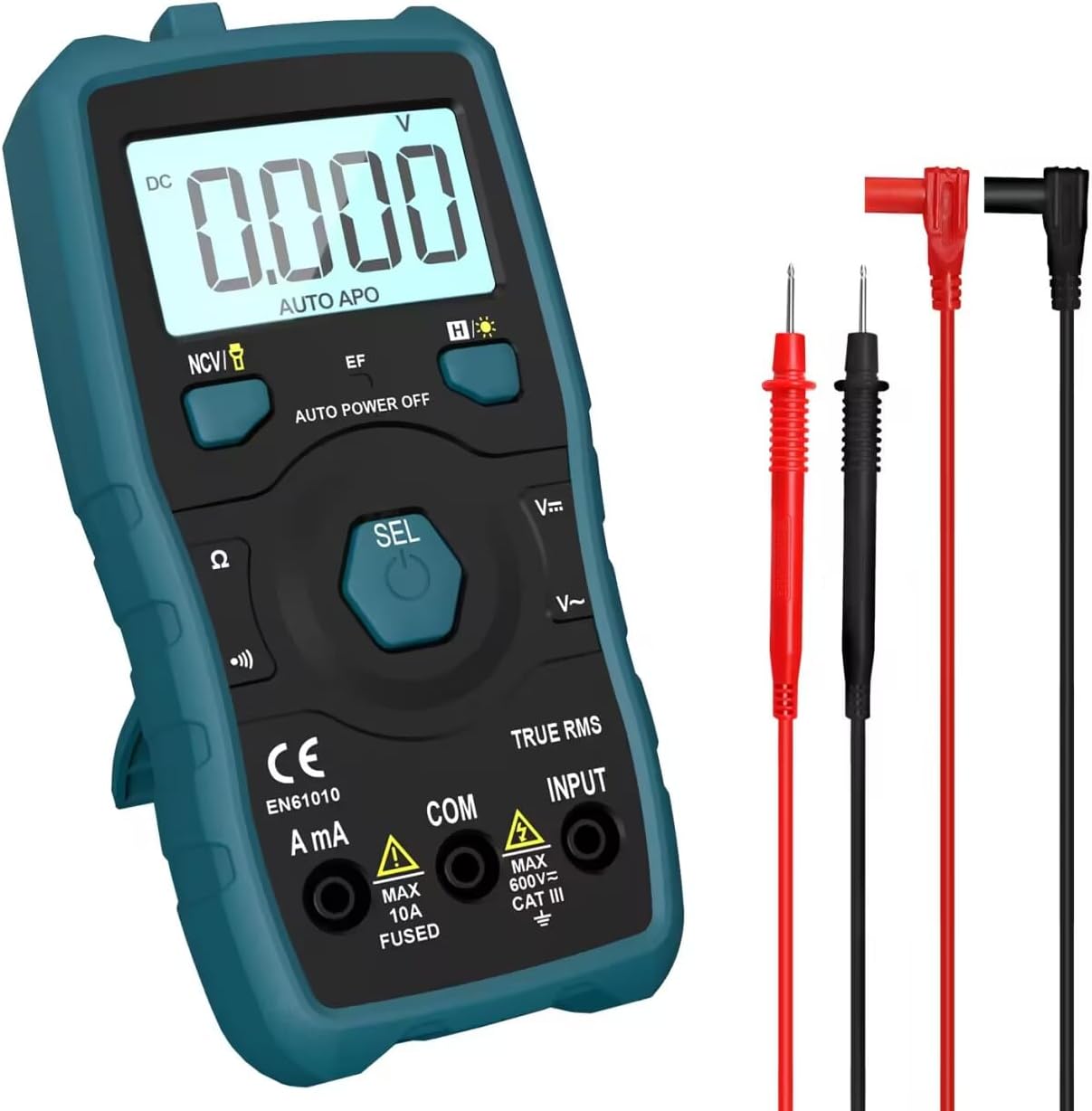
Image 1.1: HANMATEK S1 DM20 Digital Multimeter with included test leads.
2. Sicherheitshinweise
WARNUNG: Die Nichtbeachtung dieser Sicherheitshinweise kann zu Stromschlag, Brand oder Verletzungen führen.
- To prevent erroneous readings and avoid electric shock or personal injury, replace the battery as soon as the low battery voltagDas Symbol e erscheint.
- To prevent electric shock or personal injury, turn off the device and ensure test leads are disconnected from the circuit under test before opening the battery cover to replace the battery.
- Do not measure any AC or DC voltage exceeding 600V to prevent electric shock or damage to the instrument.
- Always inspect the multimeter and test leads for any damage before use. Do not use if damaged.
- Ensure your hands are dry when operating the multimeter.
- Das Multimeter darf nicht in explosionsgefährdeten Bereichen mit Gasen, Dämpfen oder Staub betrieben werden.
3. Produktmerkmale und Komponenten
The HANMATEK S1 DM20 Digital Multimeter is equipped with several features for versatile measurements. Familiarize yourself with the components shown below.
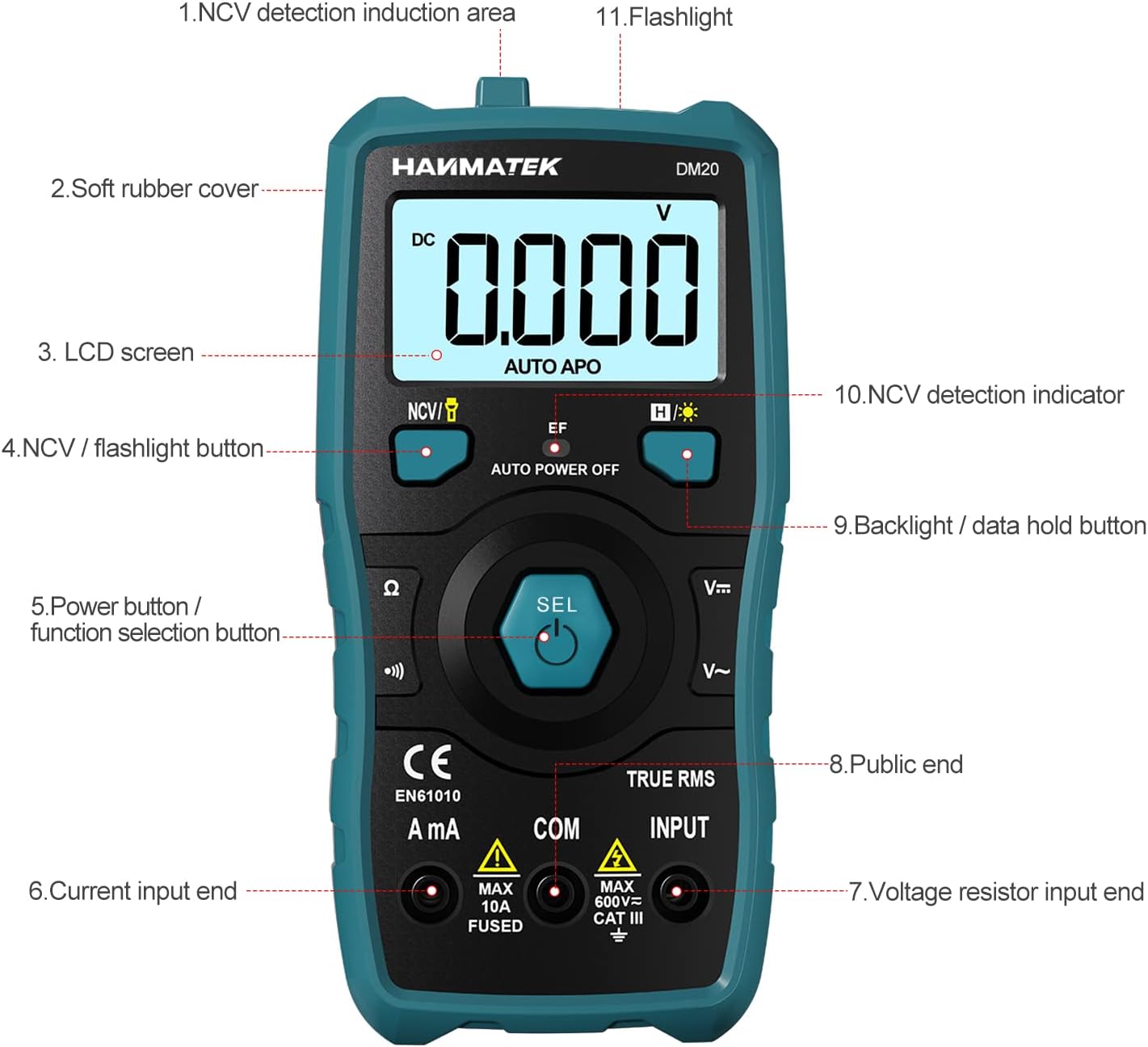
Bild 3.1: Vorderseite view des Multimeters mit beschrifteten Komponenten.
- NCV Detection Induction Area
- Soft Rubber Cover
- LCD Bildschirm
- NCV / Flashlight Button
- Power Button / Function Selection Button (SEL)
- Current Input End (A mA)
- Bandtage Resistor Input End (INPUT)
- Public End (COM)
- Backlight / Data Hold Button
- NCV Detection Indicator
- Taschenlampe

Bild 3.2: Überview of multimeter functions including AC/DC Voltage, AC/DC Current, Resistance, Continuity, Backlight, Data Hold, NCV, Flashlight, and 6000 Count display.
4. Einrichtung
4.1 Packungsinhalt
Vor Beginn der Arbeiten vergewissern Sie sich, dass alle Artikel im Paket vorhanden sind:
- HANMATEK S1 DM20 Digital Multimeter
- 3 x 1.5 V AAA-Batterien
- Messleitungen (rot und schwarz)
- Bedienungsanleitung

Image 4.1: Package contents including the multimeter, batteries, test leads, and manual.
4.2 Einlegen der Batterie
The multimeter requires 3 x 1.5V AAA batteries. Follow these steps to install them:
- Stellen Sie sicher, dass das Multimeter ausgeschaltet und die Messleitungen abgeklemmt sind.
- Suchen Sie das Batteriefach auf der Rückseite des Multimeters.
- Öffnen Sie die Batterieabdeckung mit einem Schraubendreher.
- Legen Sie die 3 AAA-Batterien unter Beachtung der richtigen Polarität (+/-) ein.
- Bringen Sie die Batterieabdeckung wieder an und sichern Sie sie mit der Schraube.

Abbildung 4.2: Detailansicht view of the multimeter's rear, showing the battery bay and stable holder.
5. Bedienungsanleitung
The HANMATEK S1 DM20 features auto-ranging for most measurements, simplifying operation.
5.1 Ein-/Ausschalten
- Drücken Sie die SEL button to power on the multimeter.
- Das Multimeter schaltet sich nach einer gewissen Zeit der Inaktivität automatisch aus, um die Batterielebensdauer zu verlängern.
- Zum manuellen Ausschalten die Taste gedrückt halten SEL Taste.
5.2 Funktionsauswahl
The multimeter automatically detects the measurement type (voltage, resistance, continuity) when test leads are connected. For specific functions or to switch between AC/DC, press the SEL Taste kurz drücken.
5.3 Grundlegende Messungen
Verbinden Sie das rote Prüfkabel mit dem EINGANG Klemme und die schwarze Messleitung zum COM terminal for most measurements.
- Bandtage (Wechselstrom/Gleichstrom): Connect test leads in parallel to the circuit or component. The multimeter will automatically detect AC or DC voltage.
- Strom (Wechsel-/Gleichstrom): Connect test leads in series with the circuit. Use the A mA terminal for current measurements. Ensure the circuit is de-energized before connecting.
- Widerstand: Connect test leads across the component. Ensure the component is isolated from power.
- Kontinuität: Connect test leads across the circuit. A buzzer will sound if continuity is detected.
- Diode: Connect test leads across the diode.
- Frequenz: Connect test leads to the signal source.

Image 5.1: Demonstrations of NCV testing, resistance test, current measuring, voltage measuring, and on-off test.
5.4 Berührungslose Voltage (NCV) Erkennung
Die NCV-Funktion ermöglicht die Erkennung von Wechselstromspannungen.tage ohne direkten Kontakt.
- Drücken Sie die NCV / Flashlight Taste zum Aktivieren des NCV-Modus.
- Place the NCV detection area (top of the multimeter) near the conductor.
- Wenn AC-Voltage is detected, the NCV LED will flash, and the buzzer will sound. The LCD screen will display segments ('-' to '----') indicating signal strength.

Image 5.2: NCV function detecting voltage in a live line versus a null line.
5.5 Hintergrundbeleuchtung und Datenspeicherung
- Hintergrundbeleuchtung: Drücken Sie die Backlight / Data Hold button briefly to turn the LCD backlight on/off.
- Daten halten: Halten Sie die Taste Backlight / Data Hold Drücken Sie diese Taste, um den aktuellen Messwert auf dem Display einzufrieren. Zum Entsperren erneut drücken.
5.6 Taschenlampe
- Halten Sie die NCV / Flashlight button to turn the built-in flashlight on/off.
6. Wartung
- Reinigung: Wipe the multimeter with a damp Tuch und mildem Reinigungsmittel. Keine Scheuer- oder Lösungsmittel verwenden.
- Lagerung: Store the multimeter in a dry, cool place away from direct sunlight. If storing for extended periods, remove the batteries to prevent leakage.
- Batteriewechsel: Replace batteries promptly when the low battery indicator appears to ensure accurate readings. Refer to Section 4.2 for instructions.
7. Fehlerbehebung
- No Display/Power On: Check battery installation and ensure batteries are not depleted. Replace if necessary.
- Ungenaue Messwerte: Ensure test leads are properly connected and not damaged. Verify the correct measurement function is selected (though auto-ranging handles most). Check battery level.
- No NCV Detection: Ensure NCV mode is activated. The detection area must be close to the AC voltagDie Quelle.
- Auto Power Off Too Soon: This is a power-saving feature. The device will power off after a period of inactivity.
8. Spezifikationen
| Besonderheit | Spezifikation |
|---|---|
| Modellnummer | DM20 |
| Anzahl anzeigen | 4000 |
| Sicherheitsbewertung | 600V CAT II, Pollution Degree 2, IEC61010 |
| Stromquelle | 3 x 1.5 V AAA-Batterien |
| Maße | 147 mm x 71 mm x 45 mm (7.1 x 4.5 x 14.7 cm) |
| Gewicht | 220 g |
| Besondere Merkmale | NCV, Auto-Ranging, Data Hold, Auto Power-Off, Backlight, Flashlight |
9. Garantie und Support
The HANMATEK S1 DM20 Digital Multimeter comes with a 24 Monate Garantie Ab Kaufdatum. Diese Garantie deckt Herstellungsfehler bei normalem Gebrauch ab.
For technical support, warranty claims, or any inquiries, please contact HANMATEK customer service through their official channels or the retailer where the product was purchased. You can find more information on the HANMATEK Brand Store.


