1. Produktüberschreitungview
The CATCHFACE TTLock Smart Lock offers advanced 4-in-1 keyless entry for enhanced security and convenience. It integrates fingerprint recognition, anti-peep virtual password entry, smartphone access via the TT Lock app, and traditional physical keys. This smart lock is designed for easy DIY installation and is suitable for various applications including homes, apartments, and co-working spaces.
Zu den Hauptmerkmalen gehören:
- Advanced 4-in-1 Keyless Entry: Fingerprint recognition, anti-peep virtual password entry, smartphone access, and physical keys (2 included).
- USB + Backup Key: Low battery alarms via the TT Lock app and a micro USB port for temporary power supply in emergencies. Physical keys provide a fail-safe option.
- Breite Kompatibilität: Fits door thicknesses from 1.38 to 1.97 inches (35 to 50mm) with an adjustable deadbolt size of 2.36 to 2.76 inches (60 to 70mm). Replaces standard single-cylinder U.S. door locks and fits both left and right-handed doors.
- Remote Control & Management: Ideal for rental hosts and homeowners, allowing creation and sharing of virtual keys (permanent or scheduled), monitoring access, and remote lock/unlock via the TT Lock App. Optional CATCHFACE WiFi Gateway (sold separately) enables Amazon Alexa and Google Home integration.
- Intelligentes Management: Supports fingerprints and multiple user codes, with options for one-time, permanent, scheduled, and recurring codes.
- App & Web Portal Control: Manage the smart lock via smartphone, generate eKeys, manage users, and view access records using the free app and website management system.
2. Packungsinhalt
Your CATCHFACE Smart Lock package includes all necessary components for installation and operation:

Figure 2.1: All components included in the CATCHFACE Smart Lock package.
- 1 x Smart Lock (Front Panel with keypad and fingerprint sensor)
- 1 x Back Panel (Interior handle with battery compartment)
- 1 x 60/70mm Adjustable Backset Latch
- 1 x Latch Box and Strike Plate
- 1 x Spindel
- 1 x Inbusschlüssel
- 1 x Installation Screws Bag
- 2 x Mechanische Schlüssel
- IC Cards (quantity may vary based on package)
- 1 x Benutzerhandbuch (gedruckte Version)
- 1 x Installation Manual (physical copy)
- 1 x Hole Template
3. Installationsanleitung
The CATCHFACE Smart Lock is designed for easy DIY installation. A physical installation pamphlet and a hole template are included in the box. For a visual step-by-step guide, please refer to the official installation video provided by the seller.
Video 3.1: CATCHFACE Smart Lock Unboxing and Overview
The lock is compatible with most standard U.S. door sizes. Ensure your door thickness and backset size match the product specifications for proper fit.
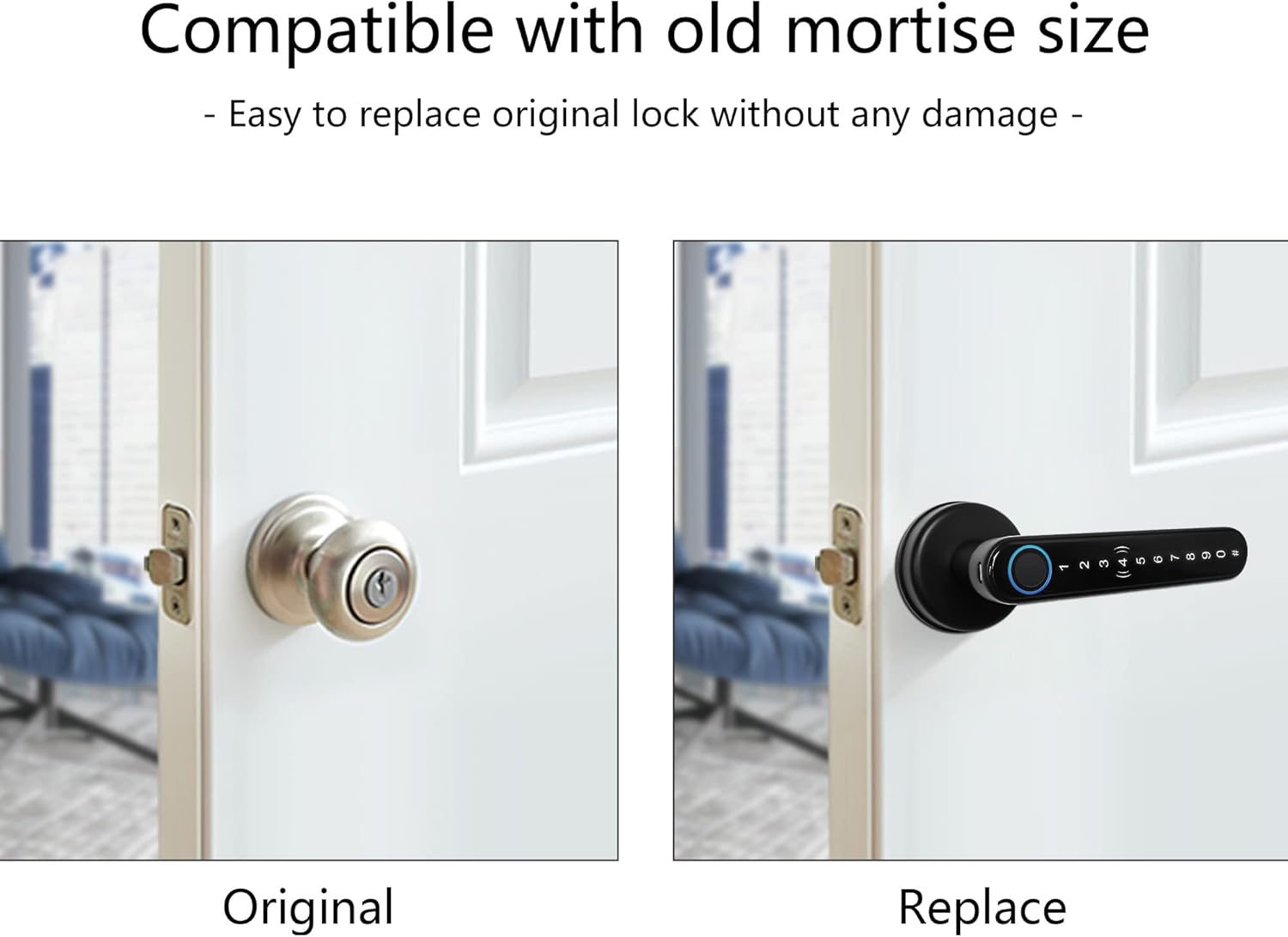
Figure 3.1: The CATCHFACE Smart Lock is designed to easily replace existing mortise locks without damage.

Figure 3.2: The smart lock is compatible with various door types and includes adjustable latch for easy installation.
For detailed installation steps, refer to the User Manual (PDF) provided with your product or available online: Benutzerhandbuch (PDF) Und Benutzerhandbuch (PDF).
4. Bedienung Ihres Smart Locks
The CATCHFACE Smart Lock offers multiple convenient ways to unlock your door:
4.1 Entsperren per Fingerabdruck
The biometric fingerprint sensor provides quick and secure access. Simply place your registered finger on the sensor for instant unlocking.

Figure 4.1: The fingerprint sensor offers sensitive recognition and fast unlocking in 0.3 seconds, with 360° fingerprint recognition and storage for up to 100 fingerprints.

Figure 4.2: Biometric fingerprint quick unlock with a low false recognition rate, suitable for all ages.
4.2. Entsperren per Passcode
Enter your unique numerical code on the backlit touch keypad. The anti-peep virtual password feature allows you to enter random numbers before or after your actual code to prevent others from guessing your password.

Figure 4.3: Anti-peeping password allows adding random numbers before or after your real password. The keypad is backlit for easy use at night.
4.3 Entsperren der IC-Karte
For users who prefer not to use a smartphone, IC cards provide a convenient and secure unlocking method. Simply tap the card on the lock to gain entry.

Figure 4.4: Smart Card Unlock is perfect for individuals who prefer not to use a smartphone, such as children and the elderly.
4.4 Physical Key Unlock
Two mechanical keys are included as a traditional backup method for unlocking the door.
4.5 Automatische Verriegelungsfunktion
The smart lock features an auto-lock function for added security. It will automatically lock after a set period of time.
5. Advanced Features & Management
5.1 TT Lock App Control
The TT Lock app allows comprehensive control over your smart lock from your smartphone. You can monitor lock status, send eKeys, manage users, and check operation logs.

Figure 5.1: The TTLock Smart APP allows you to manage your lock anywhere, anytime.
5.2 Multiple Passcode Types
Generate various types of passcodes to suit different needs:
- Permanent Passcode: Für langfristigen Zugriff.
- Timed Passcode: Valid for a specific duration, ideal for guests or service providers.
- One-Time Passcode: For single-use access.
- Recurring Passcode: For regular, repeated access on specific days/times.
- Custom Passcode: Create personalized codes.

Figure 5.2: The TT Lock app supports multiple passcode types for flexible access management.
5.3 Zugriffsprotokolle
Keep track of who enters and exits your property with real-time access logs available in the app.

Figure 5.3: Monitor who has accessed the door lock in real time with detailed unlock records.
5.4 Remote Control (Requires Gateway)
For remote lock/unlock functionality and integration with smart home systems like Amazon Alexa and Google Home, the optional CATCHFACE WiFi Gateway (ASIN: B085HFFF9T) is required.

Figure 5.4: The CATCHFACE WiFi Gateway (sold separately) enables remote control and voice commands via smart assistants.
5.5 Vielseitige Anwendungsmöglichkeiten
The smart lock's management features make it suitable for various environments, including Airbnb, homes, offices, and schools.

Figure 5.5: One-stop management for various applications.
6. Produktspezifikationen
| Besonderheit | Detail |
|---|---|
| Marke | CATCHFACE |
| Modellname | FBA-G01 |
| Farbe | Schwarz |
| Material | Zink |
| Artikelgewicht | 2 Pfund |
| Technische Daten | 5.8 x 2.5 x 2.8 Zoll |
| Sperrtyp | App control smart door lock, Biometric door lock with fingerprint, Digital touch screen door lock, Smart door lock with key |
| Besondere Merkmale | Anti-Peeping Password, Auto-Lock, Back-Lit Keypad, One-Touch Lock, Passcode Unlock |
| Im Lieferumfang enthaltene Komponenten | 1 x smart lock, 1x 60/70mm adjustable backset latch, 1x installation crews bag, 1x latch box and strike plate, 2 x mechanical keys |
| Controllertyp | Amazon Alexa, Android, Google Assistant, iOS |
| Konnektivitätsprotokoll | Bluetooth, Wi-Fi (mit optionalem Gateway) |
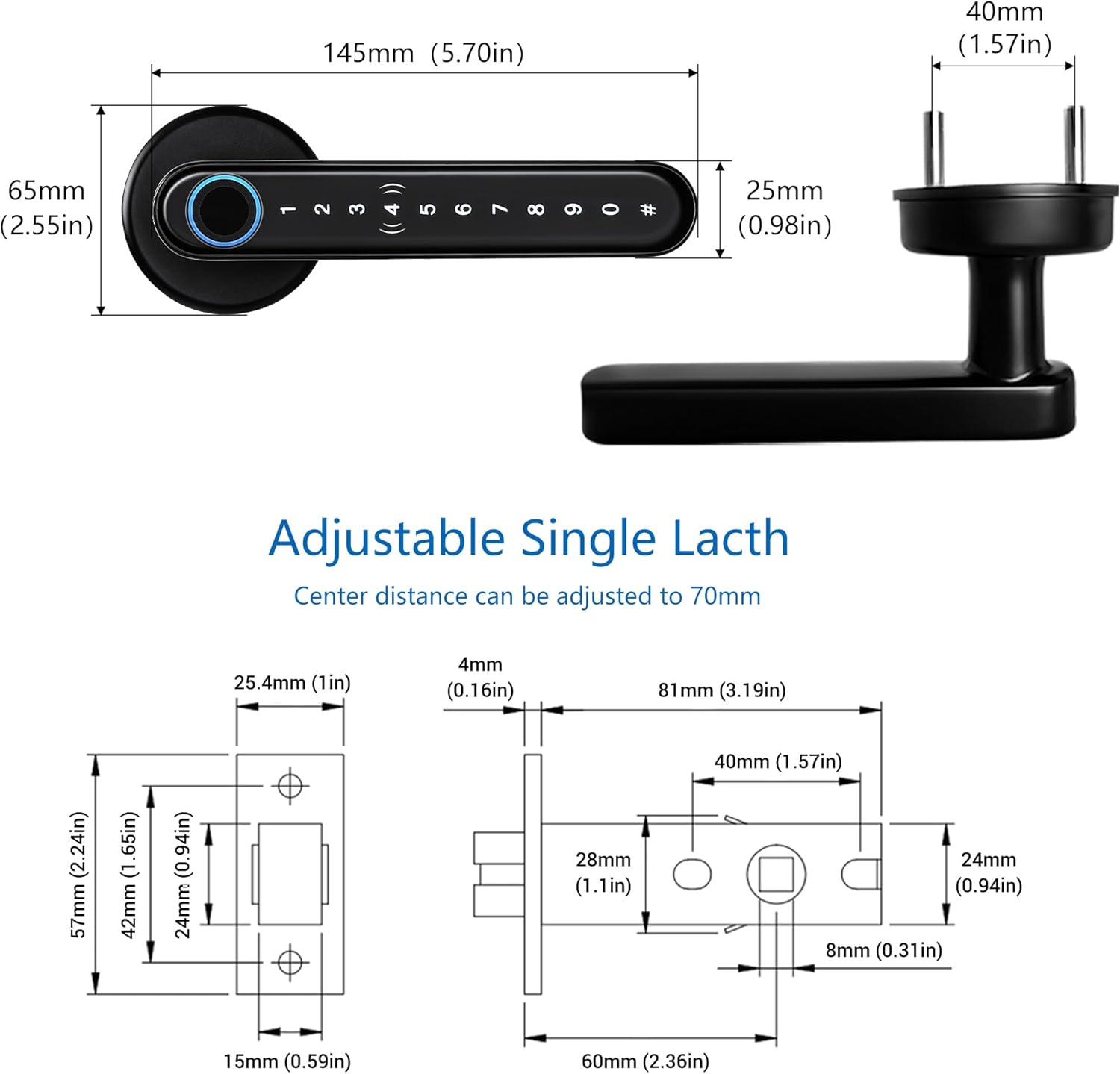
Figure 6.1: Detailed dimensions and adjustable single latch mechanism.
7. Wartung
To ensure optimal performance and longevity of your CATCHFACE Smart Lock, regular maintenance is recommended:
- Batteriewechsel: The lock is powered by 4 AAA alkaline batteries. The TT Lock app will provide low battery alerts. Replace batteries promptly when indicated.
- Notstrom: In case of complete battery drain, use a micro USB power bank to temporarily power the lock via the port located on the handle.
- Reinigung: Reinigen Sie die Schlossoberfläche mit einem weichen, trockenen Tuch. Vermeiden Sie die Verwendung von Scheuermitteln oder Lösungsmitteln, die die Oberfläche oder die elektronischen Bauteile beschädigen könnten.

Figure 7.1: The smart lock is powered by 4 AAA batteries and features a micro USB port for emergency charging.
8. Fehlerbehebung
If you encounter any issues with your CATCHFACE Smart Lock, consider the following general troubleshooting tips:
- Schloss reagiert nicht: Check battery levels in the TT Lock app. If batteries are low, replace them or use the micro USB port for temporary power.
- Fingerabdruck nicht erkannt: Stellen Sie sicher, dass Ihr Finger sauber und trocken ist. Sollte das Problem weiterhin bestehen, versuchen Sie, Ihren Fingerabdruck in der App erneut zu registrieren.
- Passcode Issues: Verify the correct passcode. Utilize the anti-peep virtual password feature correctly. If you suspect the passcode has been compromised, change it immediately via the app.
- Probleme mit der App-Konnektivität: Ensure Bluetooth is enabled on your smartphone and you are within range of the lock. If using a Gateway, ensure it is properly connected to Wi-Fi and powered on.
- Physischer Schlüssel funktioniert nicht: Ensure the key is fully inserted and turned correctly. If the lock is jammed, do not force it.
- Zurücksetzen des Schlosses: If persistent issues occur, you may need to perform a factory reset. Refer to the user manual for specific instructions on how to reset the device.
For further assistance, please consult the detailed user manual or contact CATCHFACE customer support.
9. Garantie und Support
For information regarding product warranty, please refer to the warranty section within the comprehensive User Manual (PDF) provided with your purchase. This document outlines the terms and conditions of the product warranty.
For technical support and customer service inquiries, please refer to the contact information provided in your User Manual or visit the CATCHFACE official webWebsite.
Benutzerhandbuch (PDF): Benutzerhandbuch (PDF) Und Benutzerhandbuch (PDF)


