1. Einleitung
The Epomaker Ajazz i610T is a compact 61-key mechanical keyboard designed for versatility and performance. It supports both Bluetooth wireless and wired (Type-C) dual-mode connectivity, allowing connection to up to three devices simultaneously. Featuring N-key rollover and 17 distinct backlight effects, this keyboard is suitable for various applications, including gaming and professional work environments.
This manual provides detailed instructions for setting up, operating, maintaining, and troubleshooting your Ajazz i610T keyboard.
2. Packungsinhalt
Bitte prüfen Sie das Paket auf folgende Artikel:
- 1 x Ajazz i610T Mechanical Keyboard
- 1 x Typ-C-Kabel
- 1 x Benutzerhandbuch
3. Einrichtung
3.1 Kabelgebundene Verbindung
- Locate the Type-C port on the keyboard, typically on the side or back.
- Verbinden Sie ein Ende des mitgelieferten USB-C-Kabels mit der Tastatur.
- Verbinden Sie das andere Ende des Typ-C-Kabels mit einem freien USB-Anschluss an Ihrem Computer.
- The keyboard will automatically be recognized and function in wired mode. The keyboard will also charge its internal battery while connected via USB.
3.2 Bluetooth Wireless Mode Connection
The Ajazz i610T supports connecting to up to three different Bluetooth devices.
- Ensure the keyboard is powered on. The power switch is usually located on the back or side of the keyboard.
- Drücken Fn + Q, Fn + W, oder Fn + E to select one of the three Bluetooth device channels. The corresponding key (Q, W, or E) will flash to indicate pairing mode.
- Aktivieren Sie auf Ihrem Gerät (Computer, Tablet, Smartphone) Bluetooth und suchen Sie nach neuen Geräten.
- Select "Ajazz i610T" (or similar name) from the list of available devices to pair.
- Once paired, the flashing light on the selected key will become solid, indicating a successful connection.
- Um zwischen gekoppelten Geräten zu wechseln, drücken Sie einfach Fn + Q, Fn + W, oder Fn + E für den gewünschten Kanal.

Abbildung: Seite view of the Epomaker Ajazz i610T keyboard, highlighting the Type-C port for wired connection and charging.
4. Bedienungsanleitung
4.1 Function Key (Fn) Combinations
Due to its compact 61-key layout, many functions are accessed via the Fn key in combination with other keys. Refer to the keycaps for specific markings indicating secondary functions.
- Fn + [Number Row]: Access F1-F12 functions (e.g., Fn + 1 = F1, Fn + 2 = F2, etc.).
- Fn + P: Druck-Bildschirm (PrtSc).
- Fn + ;: Scroll Lock (ScrlK).
- Fn + ': Pause.
- Fn + J: Einfügen.
- Fn + K: Heim.
- Fn + L: Bild auf (PgUp).
- fn+m: Löschen (Del).
- Fn + ,: Ende.
- Fn + .: Bild abwärts (PgDn).
- Fn + Pfeiltasten: Navigate (Up, Down, Left, Right).
- Fn + Spacebar (hold for 3 seconds): Reset to default mode or exit special modes.
4.2 Hintergrundbeleuchtungssteuerung
The keyboard features 17 monochrome backlight effects. Specific key combinations are used to cycle through these effects and adjust brightness.
- Fn + \|: Durchschalten verschiedener Hintergrundbeleuchtungseffekte.
- Fn + [: Hintergrundbeleuchtungshelligkeit verringern.
- Fn + ]: Helligkeit der Hintergrundbeleuchtung erhöhen.
4.3 N-Key-Rollover (NKRO)
The Ajazz i610T supports N-Key Rollover, meaning all keys pressed simultaneously will be registered accurately. This feature is particularly beneficial for fast typists and gamers, preventing ghosting or missed key presses.
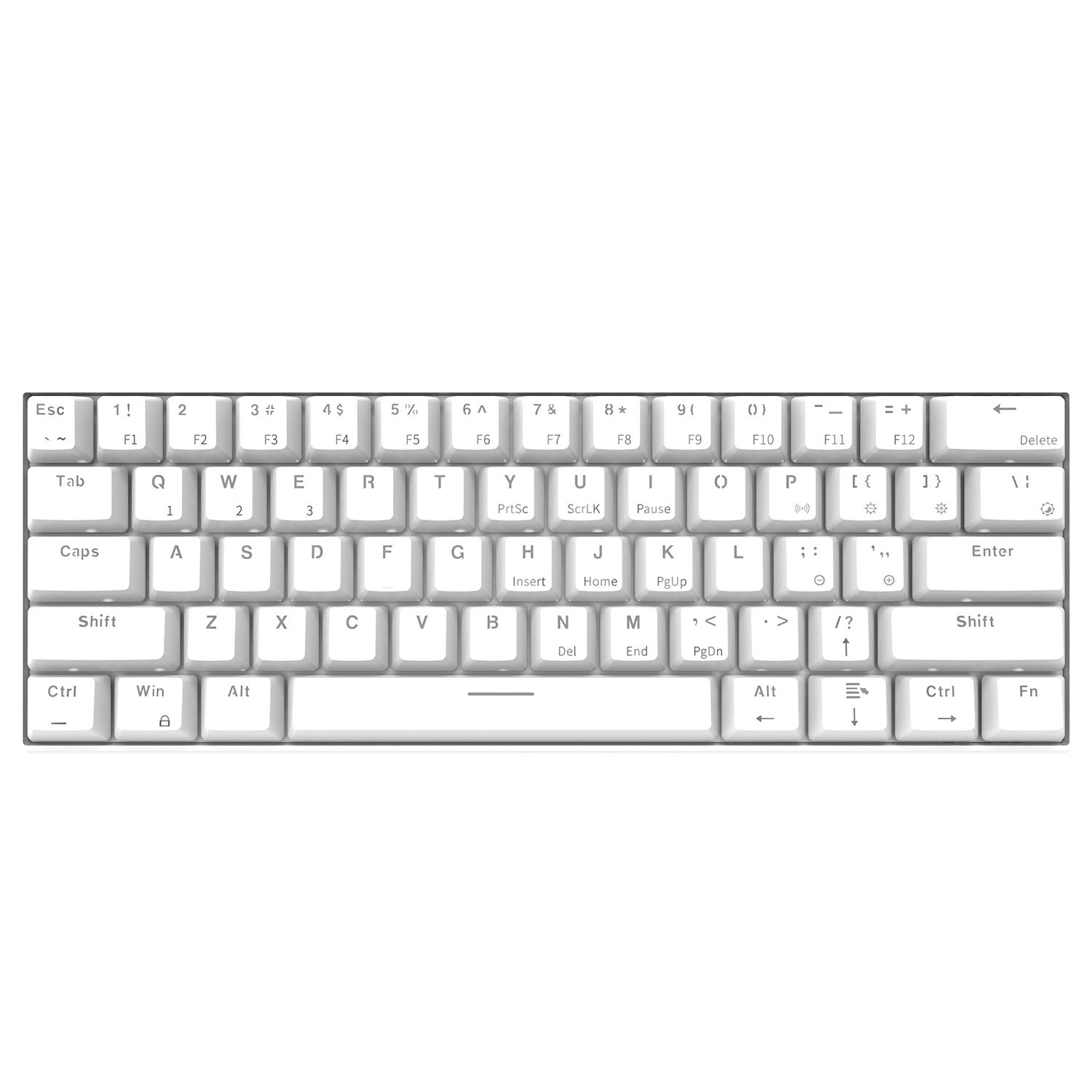
Bild: Draufsicht view of the Epomaker Ajazz i610T keyboard, showcasing its compact 61-key layout and keycap legends.
5. Wartung
Durch sachgemäße Wartung wird die Langlebigkeit und optimale Leistung Ihrer Tastatur gewährleistet.
- Reinigung: Use a soft, dry cloth to wipe the keyboard surface. For deeper cleaning, use a can of compressed air to remove dust and debris from between the keycaps. For stubborn stains, a slightly damp Man kann ein Tuch mit milder Seife verwenden, wobei darauf zu achten ist, dass keine Flüssigkeit auf die Tastatur gelangt.
- Lagerung: Bewahren Sie die Tastatur an einem kühlen, trockenen Ort fern von direkter Sonneneinstrahlung und extremen Temperaturen auf.
- Verschütten vermeiden: Um Schäden an den internen Bauteilen zu vermeiden, sollten Flüssigkeiten von der Tastatur ferngehalten werden.
- Kabelpflege: Avoid bending or twisting the Type-C cable excessively to prevent internal wire damage.
6. Fehlerbehebung
If you encounter issues with your Ajazz i610T keyboard, refer to the following common solutions:
| Problem | Mögliche Lösung |
|---|---|
| Tastatur reagiert im Kabelmodus nicht. |
|
| Die Tastatur verbindet sich nicht via Bluetooth. |
|
| Die Hintergrundbeleuchtung funktioniert nicht oder ist defekt. |
|
| Some keys are not responding. |
|
7. Spezifikationen
| Besonderheit | Detail |
|---|---|
| Marke | EPOMAKER / Ajazz |
| Modell | i610T |
| Layout | 61 Tasten (60 % Kompaktgröße) |
| Konnektivität | Bluetooth 3.0 Wireless / USB Type-C Wired Dual Mode |
| Hintergrundbeleuchtung | Monochrome Backlight (17 effects) |
| Schlüssel-Rollover | N-Key-Rollover (NKRO) |
| Schaltertyp | Mechanical (Black Switch, White color variant) |
| Material | ABS |
| Batteriekapazität | 1000mAh Lithium-Ionen |
| Kabellänge | Ca. 1.5m |
| Betriebssystemunterstützung | Windows 2000/XP/Vista/7/8/10 |
| Produktabmessungen (L*B*H) | 29.1 x 10.1 x 4 cm (11.46 x 3.98 x 1.57 in) |
| Produktgewicht | Ca. 580 g |

Bild: Abgewinkelt view of the Epomaker Ajazz i610T keyboard, demonstrating its compact form factor.
8. Garantie und Support
For warranty information and technical support, please refer to the documentation provided with your purchase or contact the manufacturer directly through their official webBewahren Sie Ihren Kaufbeleg für Garantieansprüche auf.