1. Einleitung
This instruction manual provides comprehensive information for the YOSUN Universal Replacement Remote Control, model RMT-TX100U. Designed for seamless compatibility with a wide range of Sony Bravia LCD LED HDTV Smart TVs, this remote offers a direct replacement solution without requiring complex programming. It aims to restore full control over your television with reliable performance and an intuitive layout.
2. Produktmerkmale
- Breite Kompatibilität: Fully compatible with all Sony Bravia LCD LED HDTV Smart TVs.
- Keine Programmierung erforderlich: Ready to use straight out of the box, eliminating the need for manual setup.
- Stabile Leistung: Equipped with an upgraded smart chip for consistent and reliable operation.
- Erweiterte Reichweite: Transmits signals effectively over long distances, up to 10 meters (33 feet).
- Schnelle Reaktionszeit: Features a rapid transmission response time of approximately 0.2 seconds for immediate command execution.
- Langlebige Konstruktion: Made from high-quality ABS and silicone materials for a sturdy, non-slip shell and comfortable, sensitive buttons.
- Identical Layout: Designed to be visually and functionally identical to the original Sony remote control.
- Netflix Shortcut: Includes a dedicated Netflix button for quick access to the streaming service.
3. Installationsanleitung
3.1 Einlegen der Batterie
Für den Betrieb der Fernbedienung werden zwei (2) AAA-Batterien (nicht im Lieferumfang enthalten) benötigt. Gehen Sie zum Einlegen der Batterien wie folgt vor:
- Suchen Sie die Batteriefachabdeckung auf der Rückseite der Fernbedienung.
- Schieben Sie den Deckel nach unten, um das Fach zu öffnen.
- Legen Sie zwei AAA-Batterien ein und achten Sie darauf, dass die Plus- (+) und Minus- (-) Anschlüsse mit den Markierungen im Batteriefach übereinstimmen.
- Schieben Sie die Batterieabdeckung wieder an ihren Platz, bis sie sicher einrastet.

Figure 3.1: Battery installation and remote dimensions. The remote is 7.8 inches long, 1.8 inches wide, and 0.7 inches thick. The diagram shows sliding the battery cover and inserting two AAA batteries.
3.2 Initial Use (No Programming Required)
This YOSUN replacement remote control is designed to work immediately with compatible Sony TVs without any programming or pairing. Once batteries are installed, point the remote towards your TV and begin using it.
Video 3.2: Demonstration of the remote control's simple operation, highlighting that no pairing is required for use with Sony TVs.
4. Bedienungsanleitung
The remote control features a standard layout with clearly labeled buttons for easy navigation and control of your Sony TV. Refer to the diagram below for button identification and their primary functions.
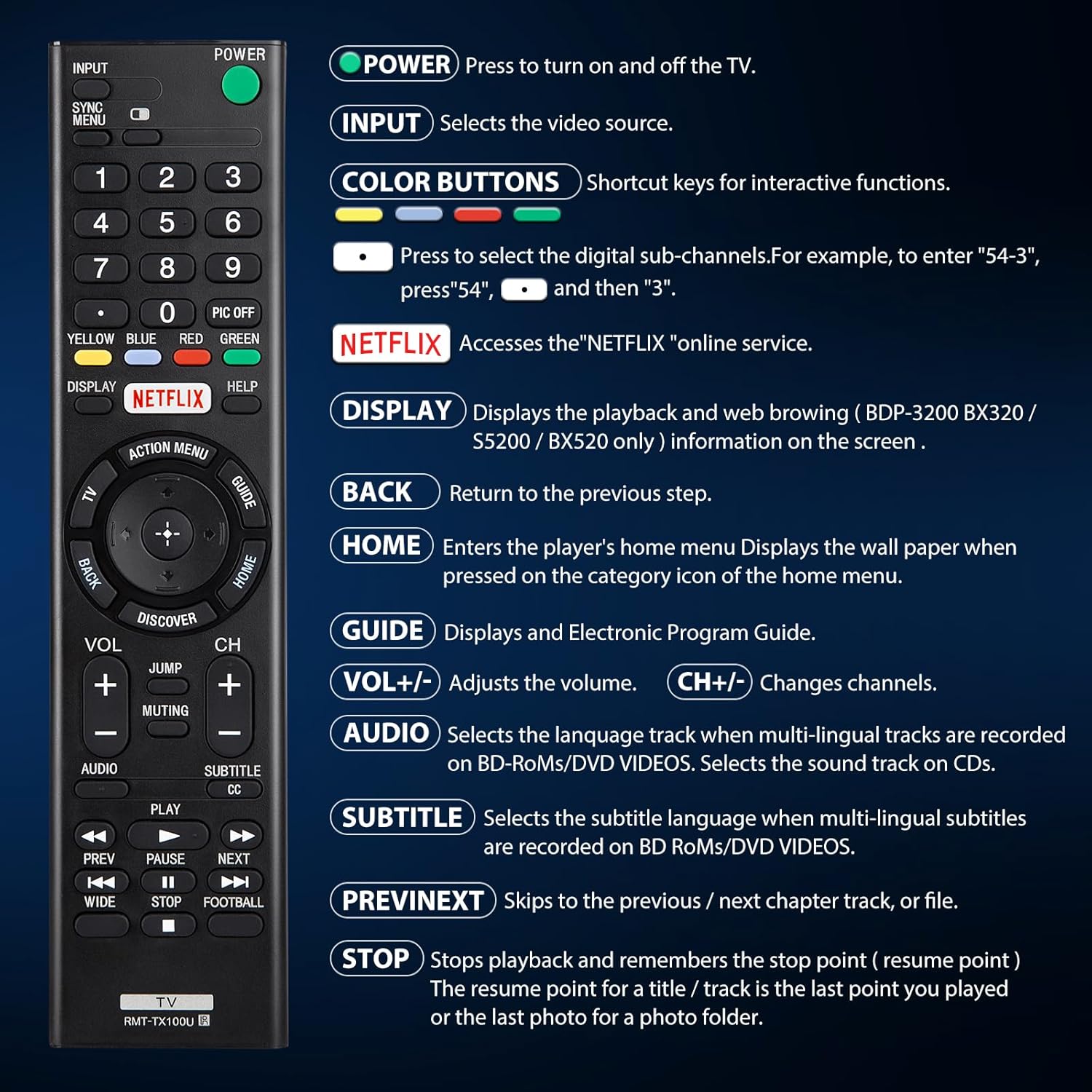
Abbildung 4.1: Überview von Fernbedienungstasten und ihren Funktionen.
| Taste | Funktion |
|---|---|
| LEISTUNG | Press to turn the TV on and off. |
| EINGANG | Selects the video source (e.g., HDMI 1, AV). |
| COLOR BUTTONS (Yellow, Blue, Red, Green) | Shortcut keys for interactive functions or digital sub-channels (e.g., to enter "5-4", press "5", then "4"). |
| NETFLIX | Directly accesses the Netflix online streaming service. |
| ANZEIGE | Displays playback and web browsing information on the screen (for compatible models like BDP-3200 BX320 / S5200 / BX520 only). |
| ZURÜCK | Kehrt zum vorherigen Schritt oder Menü zurück. |
| HEIM | Enters the player's home menu or displays the wallpaper when pressed on the category icon of the home menu. |
| FÜHRUNG | Zeigt den elektronischen Programmführer (EPG) an. |
| LAUTSTÄRKE +/- | Regelt die Lautstärke. |
| CH +/- | Wechselt die Fernsehkanäle. |
| AUDIO | Selects the language track when multi-lingual tracks are recorded on BD-ROMs/DVD VIDEOS. Selects the sound track on CDs. |
| SUBTITLE CC | Selects the subtitle language when multi-lingual subtitles are recorded on BD ROMs/DVD VIDEOS. |
| ZURÜCK/WEITER | Skips to the previous or next chapter, track, or file während der Medienwiedergabe. |
| STOPPEN | Stops playback and remembers the stop point (resume point) for a title/track, or the last photo for a photo folder. |
5. Kompatibilität
5.1 Kompatible Geräte
This remote control is specifically designed for and compatible with the following:
- All Sony Bravia LCD LED HDTV Smart TVs.

Figure 5.1: The remote is compatible with Sony Smart TVs, Sony Bravia TVs, and Sony Google TVs.
5.2 Nicht kompatible Geräte
Diese Fernbedienung ist NICHT compatible with the following devices:
- Blu-ray Disc Players
- DVD-Player
- AV-Receiver
- Subwoofer
- Soundbars
- Heimkinosysteme

Figure 5.2: The remote is not compatible with Blu-ray players, DVD players, AV receivers, subwoofers, sound bars, or home theater systems.
6. Fehlerbehebung
If you experience issues with your remote control, please consider the following common troubleshooting steps:
- Batterien prüfen: Ensure that the batteries are correctly installed with the proper polarity and are not depleted. Replace with fresh AAA batteries if necessary.
- Sichtlinie: Make sure there are no obstructions between the remote control and the TV's infrared receiver. The remote operates using an infrared signal, which requires a clear line of sight.
- Remote-Kompatibilität: Verify that your TV model is a compatible Sony Bravia LCD LED HDTV Smart TV. Refer to Section 5 for detailed compatibility information.
- Remote-Reset: Remove the batteries, press and hold any button on the remote for 5 seconds to discharge any residual power, then reinsert the batteries.
- TV-Neustart: Unplug your TV from the power outlet for 60 seconds, then plug it back in. This can sometimes resolve minor communication issues.
7. Wartung
Um die Langlebigkeit und optimale Leistung Ihrer Fernbedienung zu gewährleisten, beachten Sie bitte folgende Wartungshinweise:
- Reinigung: Wischen Sie die Fernbedienung regelmäßig mit einem weichen, trockenen Tuch ab. Bei hartnäckigem Schmutz leicht wischen.ampBefeuchten Sie das Tuch mit Wasser oder einem milden, nicht scheuernden Reinigungsmittel. Vermeiden Sie die Verwendung von scharfen Chemikalien oder scheuernden Materialien.
- Batteriewechsel: Tauschen Sie die Batterien umgehend aus, wenn die Fernbedienung nicht mehr richtig funktioniert oder nicht mehr reagiert. Entfernen Sie die Batterien, wenn die Fernbedienung längere Zeit nicht benutzt wird, um ein Auslaufen zu verhindern.
- Lagerung: Bewahren Sie die Fernbedienung an einem kühlen, trockenen Ort fern von direkter Sonneneinstrahlung, extremen Temperaturen und hoher Luftfeuchtigkeit auf.
- Vermeiden Sie Tropfen: While durable, repeated drops can damage internal components. Handle the remote with care.
8. Spezifikationen
| Attribut | Detail |
|---|---|
| Technische Daten | 7.87 x 1.89 x 0.78 Zoll |
| Artikelgewicht | 3.17 Unzen |
| Modellnummer | RMT-TX100U |
| Batterien erforderlich | 2 AAA-Batterien (nicht im Lieferumfang enthalten) |
| Besonderheit | Keine Programmierung erforderlich |
| Farbe | Schwarz |
| Maximale Anzahl unterstützter Geräte | 18 (Refers to the range of Sony TV models it can control) |
| Kompatible Geräte | Television (Sony Bravia LCD LED HDTV Smart TVs) |
| Hersteller | YOSUN |
9. Garantie und Support
YOSUN offers an unlimited return and refund service for this remote control within 30 days of purchase. If you have any questions, concerns, or require assistance with your order or the product, please do not hesitate to contact YOSUN customer service directly. Our team is committed to providing support and will respond to your inquiries within 12 hours during the work week.
For further assistance, please refer to the contact information provided with your purchase or visit the official YOSUN webWebsite.


