1. Einleitung
This manual provides detailed instructions for the installation, setup, operation, and maintenance of your Dioche DW80 Fingerprint Smart Lock. Please read this manual thoroughly before installation and use to ensure proper function and security. Keep this manual for future reference.
Hauptmerkmale
- Mehrere Entsperrmethoden: Fingerprint, IC Card, Password, Mechanical Key, and Mobile App (Wi-Fi).
- High-Performance Fingerprint Sensor: 550 DPI biometric sensor for accurate and fast recognition.
- Wi-Fi-Fernbedienung: Unlock remotely and view unlock history via the mobile application.
- Virtual Password Function: Enhance security by entering random digits before or after the correct password.
- Warnung bei niedrigem Batteriestand: Visual and audible alerts for timely battery replacement.
- Emergency Power & Key Access: Micro USB port for emergency power and mechanical keys for backup access.
2. Packungsinhalt
Vergewissern Sie sich vor der Installation, dass alle Komponenten im Paket vorhanden sind.

Image: Dioche DW80 Smart Lock package contents. Includes the main lock unit (front and rear panels), mortise, two mechanical keys, two IC cards, and various screws and pins for installation.
- Front Panel Assembly (with handle and keypad)
- Rear Panel Assembly (with handle and battery compartment)
- Einsteckschloss
- Schließplatte und Schließkasten
- Mechanische Tasten (2)
- IC-Karten (2)
- Befestigungsmaterial (Schrauben, Spindeln usw.)
- Installationsvorlage
- Bedienungsanleitung
3. Spezifikationen
| Besonderheit | Detail |
|---|---|
| Marke | Dioche |
| Modellname | DW80 |
| Sperrtyp | Biometrische |
| Material | Zinklegierung |
| Farbe | Schwarz |
| Besondere Merkmale | Fingerprint, Smart Lock, Touchscreen, Wi-Fi |
| Konnektivitätsprotokoll | W-lan |
| Kontrollmethode | Remote, Voice (via compatible smart home systems) |
| Stromquelle | 4 x AAA-Trockenbatterien (nicht im Lieferumfang enthalten) |
| Akkulaufzeit | Approximately 9+ months under normal use |
| Kompatibilität der Türstärke | 38mm - 55mm (1-3/8" to 2") |
| Betriebstemperatur | Approximately -4°F to 140°F (-20°C to 60°C) |
| Artikelgewicht | 4.14 Pfund |
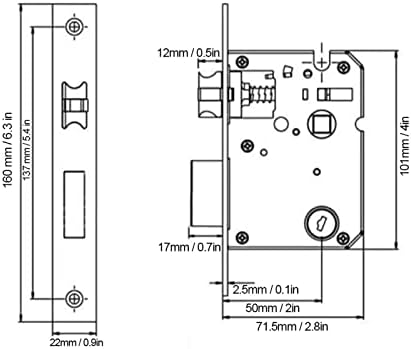
Image: Technical diagram illustrating the dimensions of the lock's mortise and faceplate, with measurements in millimeters and inches.
4. Installationsanleitung
Before installation, ensure your door meets the compatibility requirements (door thickness 38mm-55mm). Professional installation is recommended for optimal performance and security.
Vorbereitung
- Türkompatibilität prüfen: Confirm door thickness and backset (distance from door edge to center of door hole: 60mm or 70mm).
- Sammeln Sie Werkzeuge: You will need a screwdriver, drill, measuring tape, and pencil.
- Review Vorlage: Use the provided installation template to mark drilling points accurately.
Installationsschritte
- Einbau eines Einsteckschlosses: Setzen Sie die Aussparung in die Türkante ein und befestigen Sie sie mit Schrauben.
- Frontblende einbauen: Route the cable through the door hole and attach the front panel, ensuring the spindle is correctly aligned.
- Rückwand montieren: Connect the cable from the front panel to the rear panel. Secure the rear panel to the door using the provided screws.
- Batterien installieren: Open the battery compartment on the rear panel and insert 4 AAA batteries (ensure correct polarity).
- Testbetrieb: After installation, test the mechanical key and ensure the handles operate smoothly.

Image: The Dioche DW80 Smart Lock, showcasing its sleek black design with a keypad on the front panel and a fingerprint sensor integrated into the handle.
5. Ersteinrichtung und Benutzerverwaltung
After installation, you need to set up the lock and register users for various unlocking methods.
5.1 Mobile App Connection (Tuya Smart)
The Dioche DW80 Smart Lock supports Wi-Fi connectivity via the Tuya Smart app for remote control and monitoring.
- Lade App herunter: Scan the QR code or search for "Tuya Smart" in your app store. Tuya Smart-App herunterladen
- Registrieren/Anmelden: Erstellen Sie ein Konto oder melden Sie sich in der Tuya Smart App an.
- Gerät hinzufügen: Follow the in-app instructions to add your smart lock. Ensure your phone is connected to a 2.4GHz Wi-Fi network during pairing.

Image: QR code for quick download of the Tuya Smart mobile application, essential for Wi-Fi features.
5.2 Registrierung von Fingerabdrücken
- Access the lock's programming mode (refer to the specific instructions in your app or the lock's voice prompts).
- Place your finger on the fingerprint sensor multiple times as prompted, slightly shifting its position each time for comprehensive registration.
- Confirm successful registration via voice prompt or app notification.
5.3 Passwörter festlegen
- Wechseln Sie in den Programmiermodus.
- Input your desired password (typically 6-8 digits) and confirm.
- To use the virtual password feature, you can enter random digits before or after your actual password, then press '#' to confirm. This prevents others from guessing your code by observing finger movements.

Image: Demonstration of the virtual password feature, where a correct 6-digit password is embedded within a longer sequence of random numbers to deter observation.
5.4 Registering IC Cards
- Wechseln Sie in den Programmiermodus.
- Present the IC card to the designated sensing area on the lock.
- The lock will confirm successful registration.
6. Bedienung des Smart Locks
The Dioche DW80 offers multiple convenient ways to unlock your door.
6.1 Entsperren mit Fingerabdruck
- Place your registered finger on the fingerprint sensor located on the handle.
- The lock will emit a confirmation sound/light, and the handle will engage.
- Drücken Sie den Griff nach unten, um die Tür zu öffnen.
6.2 Entsperren mit Passwort
- Berühren Sie das Tastenfeld, um es zu aktivieren.
- Enter your registered password (or virtual password sequence).
- Press '#' to confirm. The lock will unlock if the password is correct.
6.3 Unlocking with IC Card
- Present the registered IC card to the card reader area on the lock.
- The lock will confirm and unlock.
6.4 Entriegeln mit mechanischem Schlüssel
- Insert the mechanical key into the keyhole located on the front panel.
- Drehen Sie den Schlüssel, um die Tür zu entriegeln.
6.5 Remote Unlocking via Mobile App
- Öffnen Sie die Tuya Smart App auf Ihrem Smartphone.
- Select your Dioche DW80 Smart Lock from the device list.
- Tap the unlock button within the app. Confirm the remote opening when prompted.

Image: A smartphone screen showing the Tuya Smart app, indicating a successful remote unlock command sent to the smart handle lock via Wi-Fi.

Image: An infographic highlighting the five primary unlocking methods: fingerprint, IC card, password, mechanical key, and mobile app, with Wi-Fi and Tuya integration.
7. Wartung
Regelmäßige Wartung gewährleistet die Langlebigkeit und optimale Leistung Ihres intelligenten Türschlosses.
7.1 Batteriewechsel
The lock will provide a low battery warning (red light flashing, audible beep) when the batteries are running low. Replace all four AAA batteries promptly.
- Open the battery compartment cover on the rear panel.
- Entfernen Sie die alten Batterien.
- Insert four new AAA batteries, ensuring correct polarity (+/-).
- Schließen Sie den Batteriefachdeckel.
Note: If you miss all low battery warnings, the lock can be temporarily powered via the Micro USB port for emergency access, or unlocked with a mechanical key.
7.2 Reinigung
- Wischen Sie die Oberfläche des Schlosses mit einem weichen, trockenen Tuch ab.
- Vermeiden Sie die Verwendung von Scheuermitteln, Lösungsmitteln oder aggressiven Chemikalien, da diese die Oberfläche und die elektronischen Bauteile beschädigen können.
- Keep the fingerprint sensor and keypad clean and free of debris for accurate recognition.
8. Fehlerbehebung
In diesem Abschnitt finden Sie Lösungen für häufig auftretende Probleme.
| Problem | Mögliche Ursache | Lösung |
|---|---|---|
| Schloss reagiert nicht. | Leere Batterien. | Replace batteries. Use emergency Micro USB power or mechanical key. |
| Fingerabdruck nicht erkannt. | Finger nicht richtig platziert; Sensor verschmutzt; Fingerabdruck nicht registriert. | Ensure finger covers the sensor completely. Clean the sensor. Re-register fingerprint, ensuring slight shifts during registration. |
| Passwort funktioniert nicht. | Incorrect password entered; keypad not active. | Ensure correct password is entered. Touch keypad to activate. Try virtual password method. |
| IC Card not recognized. | Karte nicht registriert; Karte beschädigt. | Register the IC card. Try a different registered card. |
| Verbindung zu WLAN/App nicht möglich. | Incorrect Wi-Fi password; 5GHz Wi-Fi network; poor signal; lock not in pairing mode. | Ensure 2.4GHz Wi-Fi. Check Wi-Fi password. Move closer to router. Re-enter pairing mode on the lock. |
9. Garantie und Support
Dioche products are designed for reliability and performance. For warranty information, technical support, or service inquiries, please refer to the contact information provided with your purchase documentation or visit the official Dioche website. Please have your model number (DW80) and purchase date ready when contacting support.