1. Einleitung
This manual provides essential information for the setup, operation, and maintenance of your Denon AVR-S960H 8K Ultra HD 7.2 Channel AV Receiver. Please read these instructions thoroughly to ensure proper use and to maximize your home theater experience.
2. Produktüberschreitungview
The Denon AVR-S960H is a high-performance 7.2 channel AV receiver designed to deliver immersive audio and video for your home theater. It supports advanced audio and video formats, offering versatile connectivity and smart features.
Hauptmerkmale:
- 7.2 Kanäle Amplifikation: Delivers 90W per channel for powerful and dynamic sound.
- 3D Audio Support: Compatible with Dolby Atmos, Dolby Atmos Height Virtualization Technology, DTS:X, and DTS Virtual:X for an immersive sound experience.
- 8K/4K Video Pass-through: Supports 8K/60Hz and 4K/120Hz* pass-through and upscaling, including Dynamic HDR, HDR10, HDR10+, and HLG. (*Does not support pass-through from all 4K/120Hz media sources.)
- Erweiterte Gaming-Funktionen: Includes Variable Refresh Rate (VRR), Quick Frame Transport (QFT), and Auto Low Latency Mode (ALLM) for a smooth, lag-free gaming experience.
- HDMI-Konnektivität: Features 6 HDMI inputs and 2 HDMI outputs, all with HDCP 2.3 support and eARC on one output.
- Drahtloses Musik-Streaming: HEOS Built-in for multi-room audio, AirPlay 2, and Bluetooth connectivity.
- Sprachsteuerung: Works with Amazon Alexa, Google Assistant, Apple Siri, and Josh.ai for hands-free operation.
- Setup Assistant & Audyssey MultEQ XT: Guides you through setup and optimizes speaker settings for your room acoustics.
Was ist in der Box:
- Denon AVR-S960H AV-Receiver
- Fernbedienung
- Mikrofon einrichten
- FM/AM-Antennen
- Netzkabel
- Kurzanleitung
- AAA-Batterien (x2)
Produktbilder:
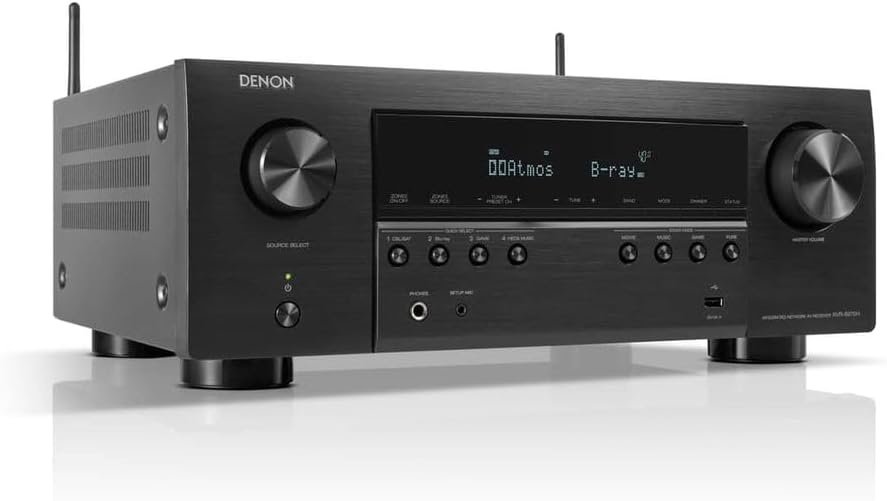
Abbildung 1: Vorderseite view of the Denon AVR-S960H AV Receiver, showcasing sein elegantes schwarzes Design und die Bedienknöpfe.

Figure 2: Denon AVR-S960H AV Receiver with its remote control and Audyssey setup microphone, illustrating the complete package.
Produktvideos:
Video 1: Denon AVR X Series - Teaser. This video provides a brief overview of the Denon AVR X Series, highlighting key features and design elements.
Video 2: Denon AVR-S960H - Product Overview. This video offers a detailed look at the Denon AVR-S960H, including its front panel controls, rear connections, and on-screen setup menus.
3. Einrichtung
3.1 Ersteinrichtung
The Denon AVR-S960H features an award-winning on-screen Setup Assistant to guide you through the initial configuration process. Connect your receiver to your TV via HDMI and follow the on-screen prompts.
3.2 Lautsprecheranschluss
The receiver supports a 7.2 channel speaker configuration. Connect your speakers to the corresponding terminals on the rear panel. For optimal sound quality and ease of connection, using banana plugs is recommended. Ensure correct polarity (positive to positive, negative to negative) for all speaker connections.
3.3 HDMI-Anschlüsse
Connect your video sources (e.g., Blu-ray player, gaming console, cable/satellite box) to the HDMI input ports (HDMI IN 1-6) on the rear of the receiver. Connect your TV or projector to one of the HDMI OUT ports. The HDMI OUT (MONITOR1) supports eARC for enhanced audio return from your TV.
3.4 Netzwerkeinrichtung
Connect the receiver to your home network via Wi-Fi (using the included antennas) or an Ethernet cable. Network connectivity enables firmware updates, access to streaming services, and HEOS multi-room audio functionality.
3.5 Audyssey MultEQ XT Calibration
Use the included Audyssey setup microphone to automatically calibrate your speakers for your listening environment. Place the microphone at your primary listening position and follow the on-screen instructions. This process optimizes speaker levels, distances, and crossovers for the best possible sound.
4. Bedienungsanleitung
4.1 Eingangsauswahl
Select your desired input source using the 'Source Select' knob on the front panel or the corresponding quick select buttons (CBL/SAT, DVD/Blu-ray, Game, HEOS Music) on the front panel or remote control.
4.2 Soundmodi
The receiver offers various sound modes to optimize audio for different content types. Use the 'Sound Mode' buttons (Movie, Music, Game, Pure) on the front panel or remote to switch between modes.
4.3 Sprachsteuerung
The Denon AVR-S960H is compatible with Amazon Alexa, Google Assistant, Apple Siri, and Josh.ai. Enable the Denon skill/action on your preferred voice assistant device and link your receiver to control functions like volume, input selection, and playback using voice commands.
4.4 HEOS Multi-Room Audio
Utilize HEOS Built-in to stream music wirelessly to other HEOS-enabled devices throughout your home. Download the HEOS app to control your music and create multi-room listening zones.
5. Wartung
- Reinigung: Wischen Sie das Gerät mit einem weichen, trockenen Tuch ab. Verwenden Sie keine Scheuer- oder Lösungsmittel.
- Belüftung: Sorgen Sie für ausreichende Belüftung des Empfängers, um eine Überhitzung zu vermeiden. Blockieren Sie die Belüftungsöffnungen nicht.
- Leistung: Ziehen Sie den Netzstecker aus der Steckdose, wenn das Gerät längere Zeit nicht benutzt wird.
6. Fehlerbehebung
If you encounter issues, first check all cable connections, ensuring they are secure. Verify power supply to the receiver and connected devices. For common issues, refer to the on-screen Setup Assistant. For persistent problems, consult the full user manual available online or contact Denon customer support.
7. Spezifikationen
| Besonderheit | Detail |
|---|---|
| Modellnummer | AVRS960H |
| Surround-Sound-Kanäle | 7.2 Kanäle |
| Leistungsabgabe | 90 Watts per channel (7 channels) |
| HDMI-Eingänge | 6 |
| HDMI-Ausgänge | 2 (1 mit eARC) |
| Video Support | 8K/60Hz, 4K/120Hz, HDR10+, Dynamic HDR, HLG, Dolby Vision, HDCP 2.3 |
| Audioformate | Dolby Atmos, DTS:X, Dolby Atmos Height Virtualization, DTS Virtual:X |
| Kabellose Konnektivität | Wi-Fi, Bluetooth, AirPlay 2, HEOS Built-in |
| Sprachsteuerung | Amazon Alexa, Google Assistant, Apple Siri, Josh.ai |
| Abmessungen (B x T x H) | 17.1 x 13 x 6.6 Zoll |
| Gewicht | 21 Pfund |
| Batterien erforderlich | 2 AAA-Batterien (für die Fernbedienung) |
8. Garantie und Support
8.1 Garantieinformationen
The Denon AVR-S960H AV Receiver comes with a 2-year limited warranty. Please retain your proof of purchase for warranty claims. For full warranty terms and conditions, refer to the documentation included with your product or visit the official Denon webWebsite.
8.2 Kundendienst
For technical assistance, product inquiries, or service requests, please contact Denon customer support. Contact information can typically be found on the Denon official webauf der Website oder in der Kurzanleitung Ihres Produkts.


