1. Einleitung
This manual provides essential instructions for the safe and efficient use of your LIFX Color Smart LED Bulb. The LIFX Color bulb offers a wide spectrum of colors and white tones, controllable via Wi-Fi without the need for a separate hub. It is designed to enhance your lighting experience with smart features and energy efficiency.

Image: The LIFX Color Smart LED Bulb alongside its product packaging, highlighting its features.
Hauptmerkmale:
- Billions of Colors: Access a vast range of colors and a wide cool-to-warm white spectrum (1500K to 9000K).
- 800 Lumen Helligkeit: Bietet ampLe-Beleuchtung für verschiedene Einstellungen.
- E26 Edison Screw Base: Standard fitting for easy installation.
- Wi-Fi-Konnektivität: Connects directly to your 2.4GHz Wi-Fi network, no hub required.
- Sprachsteuerung: Compatible with Alexa, Apple HomeKit/Siri, and Hey Google.
- Terminplanung & Szenen: Customize lighting schedules and create personalized scenes.
2. Sicherheitshinweise
Bitte lesen und befolgen Sie diese Sicherheitsrichtlinien, um Verletzungen oder Schäden am Produkt zu vermeiden.
- Nur zur Verwendung im Innenbereich: Diese Glühbirne ist für den Innenbereich in trockenen Räumen konzipiert.
- Richtige Installation: Stellen Sie sicher, dass der Strom abgeschaltet ist, bevor Sie die Glühbirne einsetzen oder entfernen.
- Bandtage Kompatibilität: Use only within the specified voltage range (AC 100-240V, 50/60 Hz).
- Vermeiden Sie geschlossene Vorrichtungen: Do not use in fully enclosed luminaires as this may reduce bulb life.
- Dimmerschalter: Do not use with standard dimmer switches. Dimming is controlled via the app or voice assistants.
- Entsorgung: Elektronikschrott muss gemäß den örtlichen Vorschriften verantwortungsvoll entsorgt werden.
3. Packungsinhalt
Your LIFX Color Smart LED Bulb package should contain the following:
- 1 x LIFX Color Smart LED Bulb (E26 Edison Screw)
4. Installationsanleitung
4.1 Physische Installation
- Stellen Sie sicher, dass die Stromzufuhr zur Leuchte am Schalter ausgeschaltet ist.
- Carefully screw the LIFX Color Smart LED Bulb into a standard E26 Edison screw socket. Do not overtighten.
- Turn the power back on at the switch. The bulb should illuminate with a default white light.

Image: A visual guide showing the three simple steps for setting up the LIFX bulb: screwing it into a lamp, downloading the app, and enjoying the light.
4.2 App-Download und Wi-Fi-Verbindung
- Download the official LIFX app from the Apple App Store or Google Play Store.
- Open the LIFX app and create an account or log in.
- Follow the in-app instructions to add your new LIFX bulb. This typically involves scanning a QR code on the bulb or its packaging and connecting to your home's 2.4GHz Wi-Fi network.
- Ensure your mobile device is connected to the 2.4GHz Wi-Fi network during the setup process.
4.3 Integration von Sprachassistenten
The LIFX Color bulb is compatible with popular voice assistants. Follow the instructions within your preferred voice assistant's app to link your LIFX account.
- Amazon Alexa: Enable the LIFX skill in the Alexa app and discover devices.
- Apple HomeKit/Siri: Use the Home app on your iOS device to add the accessory.
- Hey Google: Link your LIFX account in the Google Home app.

Image: A collage of logos indicating compatibility with various smart home platforms and voice assistants.
5. Bedienungsanleitung
5.1 Controlling Color and Brightness
Use the LIFX app to adjust the bulb's color and brightness. The app features a color wheel and sliders for precise control.
- Open the LIFX app and select your bulb.
- Drag your finger across the color wheel to choose a desired color.
- Adjust the brightness slider to set the light intensity from 1% to 100%.
- For white light, select from the warm to cool white spectrum options.

Image: A smartphone displaying the LIFX app interface, featuring a color wheel for selecting light colors and adjusting brightness.
5.2 Sprachsteuerung
Once integrated with a voice assistant, you can control your LIFX bulb using simple voice commands.
- "Alexa, schalte das Licht im Wohnzimmer ein."
- "Hey Google, set the kitchen light to blue."
- „Siri, dimme das Schlafzimmerlicht auf 50 %.“
- "Alexa, set the kitchen to 'Frozen'."

Image: A person in a kitchen interacting with a voice assistant to control the lighting, demonstrating hands-free operation.
5.3 Zeitplanung und Szenen
Automate your lighting to fit your daily routine or create custom ambiances.
- Termine: In the LIFX app, set specific times for your lights to turn on/off, change color, or adjust brightness. For example, schedule lights to gradually brighten in the morning for a gentle wake-up or dim in the evening for winding down.
- Szenen: Create and save custom lighting configurations (e.g., "Movie Night," "Relax," "Party"). Activate these scenes with a single tap in the app or via voice command.
- Sicherheit: Use scheduling to make it appear as if someone is home when you are away.

Bild: Außenansicht view of a house at dusk, illustrating how scheduled lighting can provide added security by making it appear occupied.

Image: A person waking up in bed as a smart light gradually brightens, demonstrating the use of light as an alarm clock replacement.
6. Wartung
The LIFX Color Smart LED Bulb requires minimal maintenance.
- Reinigung: Vor der Reinigung sicherstellen, dass die Glühbirne abgekühlt und der Strom abgeschaltet ist. Mit einem weichen, trockenen Tuch abwischen. Keine flüssigen Reiniger oder Scheuermittel verwenden.
- Lagerung: Wenn Sie die Glühbirne aufbewahren, bewahren Sie sie in ihrer Originalverpackung oder einem Schutzbehälter an einem kühlen, trockenen Ort auf.
7. Fehlerbehebung
If you encounter issues with your LIFX Color Smart LED Bulb, refer to the following common solutions:
| Problem | Mögliche Lösung |
|---|---|
| Glühbirne verbindet sich nicht mit WLAN/App |
|
| Bulb is unresponsive or offline |
|
| Sprachbefehle funktionieren nicht |
|
8. Spezifikationen
Detailed technical specifications for the LIFX Color Smart LED Bulb (Model: L3A19LC08E26US):
| Besonderheit | Detail |
|---|---|
| Modellname | LIFX Color – 800 Lumen |
| Modellnummer | L3A19LC08E26US |
| Lichtart | LED |
| Größe der Glühbirnenform | A19 |
| Lampensockel | E26 |
| Helligkeit | 800 Lumen |
| Wastage Verwendung | 9.0W at full brightness |
| Glühlampenäquivalent | 60 W |
| Bandtage Reichweite | AC 100-240V 50 / 60 Hz |
| Farbtemperatur | 1500K bis 9000K |
| Farbwiedergabeindex (CRI) | 80 |
| Abstrahlwinkel | 235° |
| Dimmen | Software dimming 1% - 100% |
| W-lan | 2.4GHz (WPA, WPA2 Security) |
| Abmessungen (B x H) | 2.36 Zoll x 4.13 Zoll (60 mm x 105 mm) |
| Material | Aluminium, Kunststoff |
| Durchschnittliches Leben | 206,432 Stunden (ca. 22.8 Jahre) |
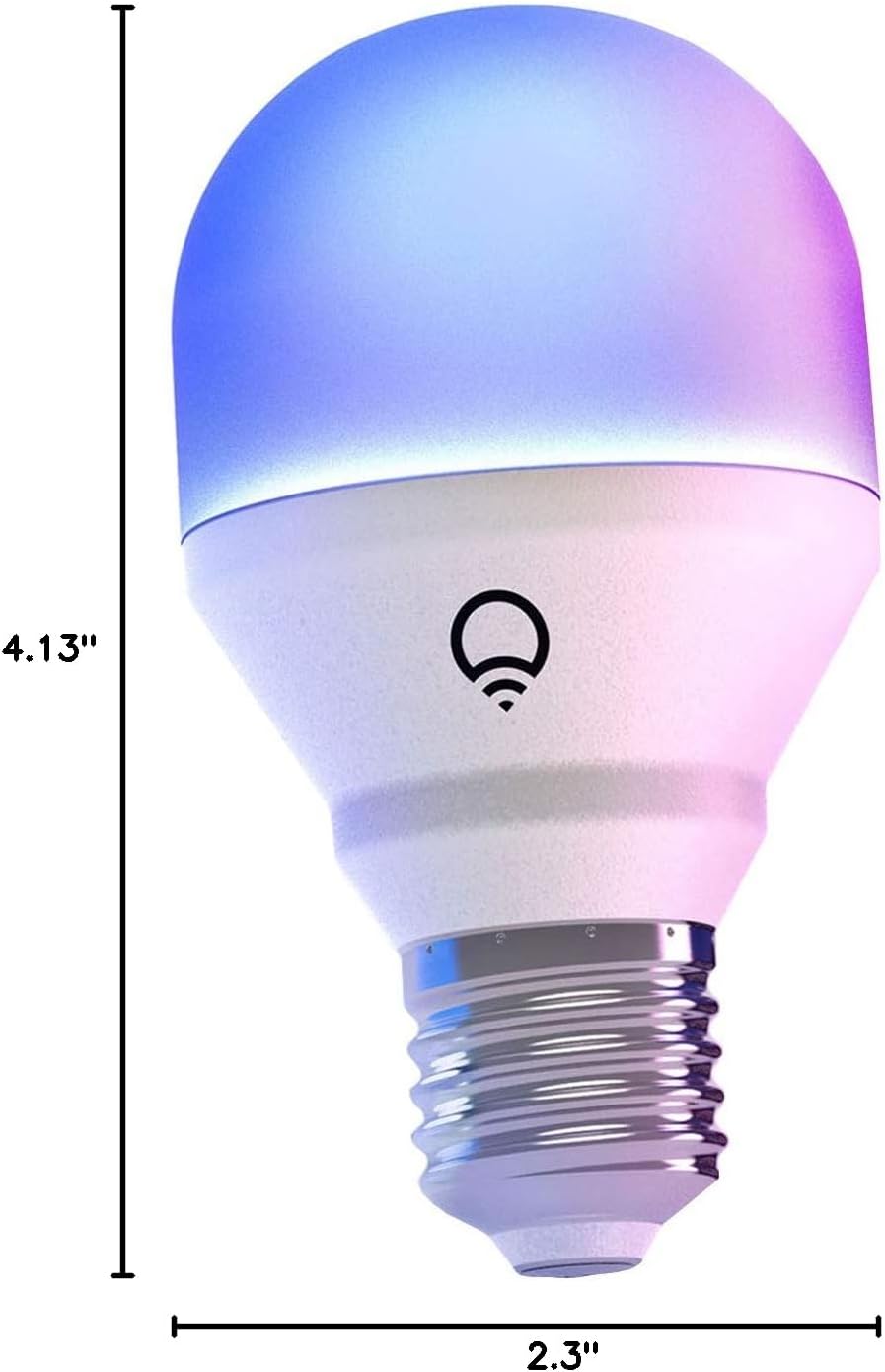
Image: A diagram illustrating the physical dimensions of the LIFX Color Smart LED Bulb.
9. Garantieinformationen
The LIFX Color Smart LED Bulb comes with a 2 Jahr Garantie. Please retain your proof of purchase for warranty claims. For specific terms and conditions, refer to the official LIFX webWebsite oder wenden Sie sich an den Kundendienst.
10. Unterstützung
Für weitere Unterstützung, technischen Support oder um view frequently asked questions, please visit the official LIFX support website. You can typically find contact information for customer service on their webWebsite auch.
Online-Ressourcen:
- LIFX Official WebWebsite: www.lifex.com
- Support Section: Refer to the support or FAQ section on the official website for troubleshooting guides and contact options.


