Einführung
This manual provides comprehensive instructions for the installation, operation, and maintenance of your Lepro LE 50ft RGB 5050 LED Strip Lights. Please read this manual thoroughly before installation and use to ensure proper function and safety. Keep this manual for future reference.
Sicherheitshinweise
- Stellen Sie vor der Installation oder Wartung sicher, dass die Stromversorgung unterbrochen ist.
- Dieses Produkt ist nur für den Gebrauch in Innenräumen bestimmt. Vermeiden Sie den Kontakt mit Wasser und hoher Luftfeuchtigkeit.
- Do not connect the LED strip to the power supply while it is still coiled on the reel. Unroll the strip completely before powering on to prevent overheating.
- Use only the provided 12V ETL-listed power adapter. Using an incompatible power supply may damage the product and void the warranty.
- Do not bend the LED strip at sharp angles (less than 90 degrees) to avoid damaging the circuit board or LEDs.
- Außerhalb der Reichweite von Kindern aufbewahren.
- If any damage is observed on the strip or power adapter, discontinue use immediately and contact customer support.
Packungsinhalt

Image: The complete package contents including two rolls of LED strip lights, a remote control, a power adapter, and fixing clips with screws.
Bitte überprüfen Sie, ob alle unten aufgeführten Artikel in Ihrem Paket enthalten sind:
- 2 x 24.6ft (total 50ft) RGB 5050 LED Strip Lights
- 1 x IR Remote Controller (44-key)
- 1 x 12V ETL-listed Power Adapter
- 1 x Steuerbox
- Befestigungsclips und Schrauben
- Benutzerhandbuch (dieses Dokument)
Technische Daten
| Modellnummer | 410105-RGB-US |
| Lichtfarbe | RGB (Rot, Grün, Blau) |
| Lichtquellentyp | 5050 LED |
| Gesamtlänge | 50 Feet (2 x 24.6ft rolls) |
| LEDs pro Meter | 30 LEDs |
| Stromquelle | Corded Electric, 12V Adapter |
| Wastage | 36 Watt |
| Controllertyp | Infrarot-Fernbedienung (44 Tasten) |
| Verwendung im Innen- und Außenbereich | Nur für den Innenbereich |
| Material | Plastik |
| Technische Daten | 5.31 x 3.15 x 5.35 Zoll (Verpackung) |
| Artikelgewicht | 14.72 Unzen |
Setup und Installation
Befolgen Sie diese Schritte für die korrekte Installation Ihrer LED-Streifen:
- Bereiten Sie die Oberfläche vor:
Before attaching the LED strip, ensure the installation surface is clean, dry, and smooth. Wipe the surface with a clean cloth to remove dust or debris. This ensures optimal adhesion of the 3M adhesive backing.

Image: A hand wiping a wooden surface with a cloth, illustrating the first step of surface preparation.
- Verbinden Sie die Komponenten:
Connect the 4-pin connector from the LED strip to the control box. Ensure the arrow mark on the strip's connector aligns with the arrow mark on the control box. Then, connect the DC wire from the power adapter to the control box. Finally, plug the power adapter into a standard electrical outlet.
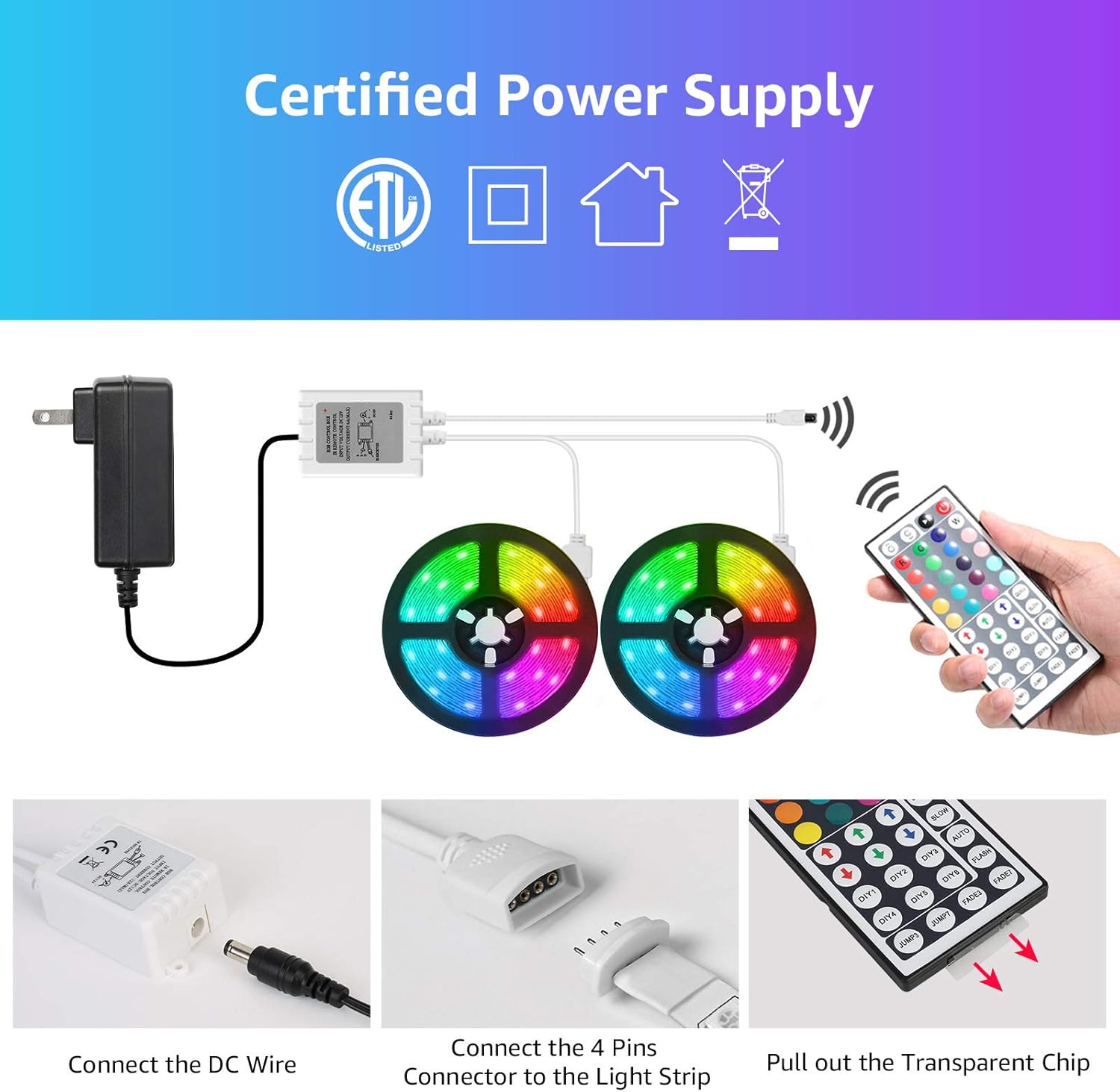
Image: A visual guide demonstrating how to connect the DC wire to the control box and the 4-pin connector to the LED strip, emphasizing arrow alignment.
Wichtig: Ensure the "arrow" mark on the LED strip connector and the "12V" mark on the control box are on the same side for correct polarity.

Image: Detail of the RGB light strip, highlighting the 10mm 4-pin connector and the strong 3M self-adhesive backing for installation.
- Befestigen Sie den LED-Streifen:
Peel off the protective backing from the 3M adhesive on the back of the LED strip. Carefully press the strip onto the prepared surface, applying firm and even pressure along its entire length. For added security, use the included fixing clips and screws at regular intervals, especially around corners or areas with less adhesion.
Image: A hand demonstrating how to peel and attach the LED strip to a surface, showing the adhesive backing.
- Vorbereitung der Fernbedienung:
Before using the remote control, pull out the transparent plastic chip from the battery compartment. This activates the battery.
Image: A close-up showing a hand pulling the transparent plastic chip from the remote control, indicating battery activation.
Installationsdemonstrationsvideo
Video: A demonstration of the Lepro LED Strip Lights in various indoor settings, showcasing color changes and potential applications. This video provides visual examples of how the lights can be installed and used to enhance different environments.
Betrieb
Your LED strip lights are controlled by the included 44-key IR remote control. Point the remote directly at the IR receiver on the control box for optimal response.
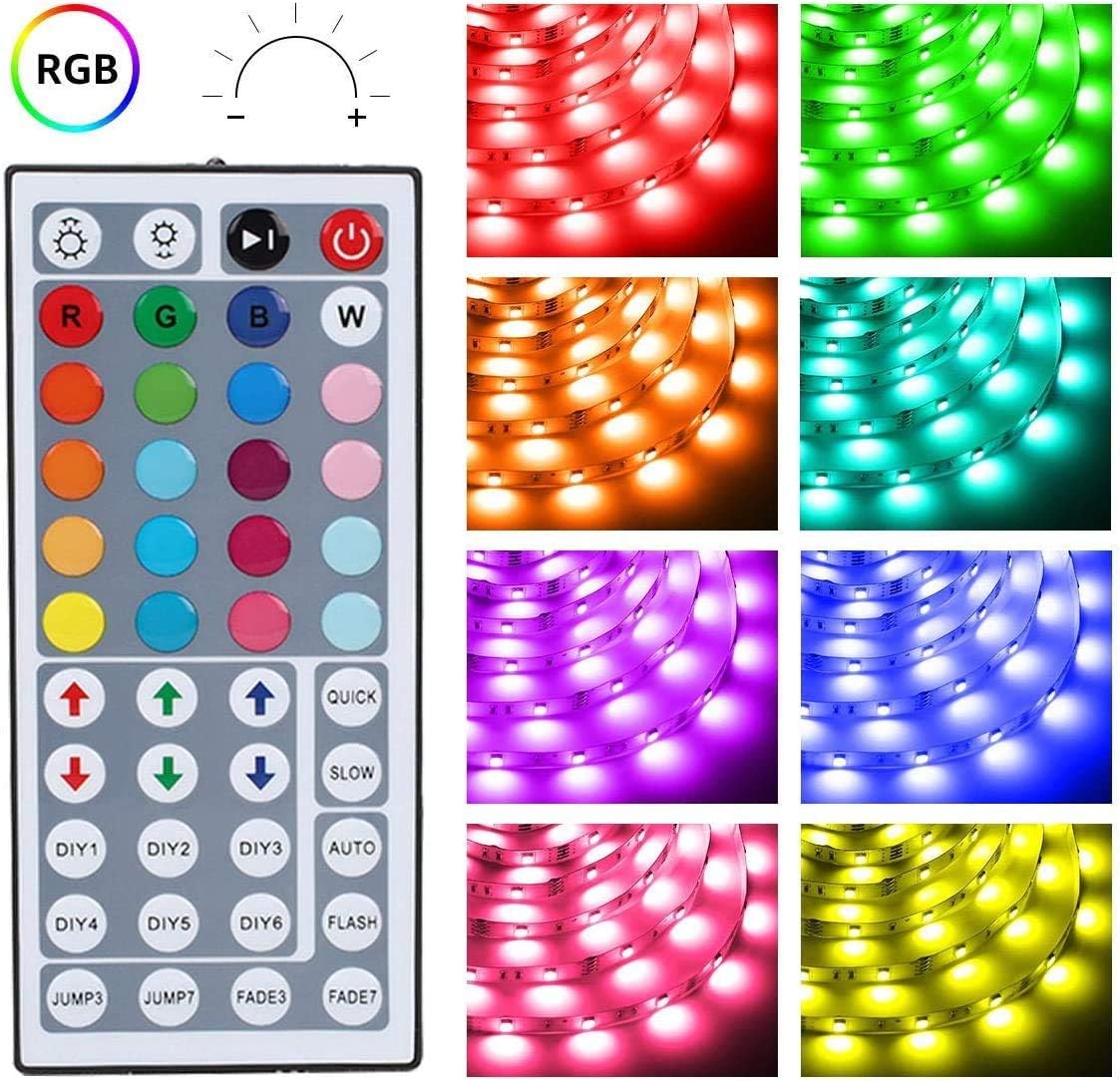
Bild: Eine detaillierte view of the 44-key remote control, showing buttons for power, brightness adjustment, RGB color selection, 6 DIY color buttons, and various dynamic modes like Jump, Fade, Quick, Slow, and Auto.
- Ein-/Ausschalten: Drücken Sie die roter Ein-/Ausschalter um das Licht ein- oder auszuschalten.
- Helligkeitsanpassung: Verwenden Sie die Pfeiltasten nach oben und unten (above the R, G, B, W buttons) to increase or decrease brightness.
- Farbauswahl: Drücken Sie eine der 20 color buttons to select a static color.
- DIY-Farben:
- Drücken Sie eine der DIY1-DIY6 buttons.
- Verwenden Sie die RGB up/down arrows to adjust the intensity of Red, Green, and Blue to create your desired custom color.
- Drücken Sie die gleiche DIY-Taste erneut, um die benutzerdefinierte Farbe zu speichern.
- Dynamische Modi:
- JUMP3 / JUMP7: Cycles through 3 or 7 colors with a jump effect.
- FADE3 / FADE7: Fades between 3 or 7 colors.
- QUICK / SLOW: Passt die Geschwindigkeit der dynamischen Modi an.
- WAGEN: Cycles through all available dynamic modes.
- BLITZ: Blitzt durch die Farben.
Wartung
- Reinigung: Ensure the power is off and unplugged before cleaning. Gently wipe the LED strip with a dry, soft cloth. Do not use liquid cleaners or abrasive materials.
- Lagerung: If storing the lights for an extended period, ensure they are clean and dry. Store in a cool, dry place away from direct sunlight.
- Haftung: If the adhesive begins to lose its stickiness, you can reinforce the strip with additional fixing clips or a suitable adhesive tape (not included).
Fehlerbehebung
| Problem | Mögliche Ursache | Lösung |
|---|---|---|
| Das Licht geht nicht an. |
|
|
| Fernbedienung reagiert nicht. |
|
|
| Die Farben sind falsch oder uneinheitlich. |
|
|
| Der LED-Streifen löst sich von der Oberfläche. |
|
|
Garantie und Support
Lepro products are designed for quality and reliability. For warranty information, technical support, or any questions regarding your LED strip lights, please contact Lepro customer service through the retailer where the product was purchased or visit the official Lepro webWebsite.
Please have your model number (410105-RGB-US) and purchase details ready when contacting support.