eKids LOL Surprise OMG Remix Toy Microphone
Bedienungsanleitung
Wichtige Sicherheitsinformationen
Please read these instructions carefully before using the eKids LOL Surprise OMG Remix Toy Microphone. Keep this manual for future reference.
- Dieses Produkt ist für Kinder im Alter von 36 Monaten bis 6 Jahren bestimmt.
- Setzen Sie das Gerät keinen extremen Temperaturen, direkter Sonneneinstrahlung oder Feuchtigkeit aus.
- Versuchen Sie nicht, das Gerät zu zerlegen oder zu verändern. Dadurch erlischt die Garantie.
- Verwenden Sie ausschließlich den angegebenen Batterietyp (2 x AAA-Batterien).
- Mischen Sie keine alten und neuen Batterien. Mischen Sie keine Alkali-, Standard- (Kohle-Zink) oder wiederaufladbaren (Nickel-Cadmium) Batterien.
- Entfernen Sie die Batterien, wenn das Gerät längere Zeit nicht verwendet wird.
- Batterien sind gemäß den örtlichen Vorschriften verantwortungsvoll zu entsorgen.
- Bei der Verwendung wird die Aufsicht von Erwachsenen empfohlen.
Packungsinhalt
- 1 x LOL Surprise Karaoke Microphone
Hinweis: Batterien sind nicht im Lieferumfang enthalten und müssen separat erworben werden.
Produkt überview

Bild: Front view of the eKids LOL Surprise OMG Remix Toy Microphone, highlighting the Microphone Button, Song Button, Speaker, and Flashing Lights area. Dimensions are also shown.
- Mikrofontaste: Drücken Sie zum amperlebe deine Stimme.
- Song-Taste: Press to play built-in music.
- Lautsprecher: Located at the bottom of the microphone head.
- Blinkende Lichter: Integrated into the microphone head, they flash to the music.
Einlegen der Batterie
The microphone requires 2 x AAA (R03) batteries (not included).
- Using a Phillips head screwdriver, locate and open the battery compartment door on the back of the microphone.
- Insert 2 x AAA (R03) batteries, ensuring the correct polarity (+/-) as indicated in the compartment.
- Replace the compartment door and tighten the screw with the Phillips screwdriver. Do not overtighten.

Bild: Back of the microphone packaging showing a diagram for battery installation, indicating the battery compartment and correct battery orientation.
Bedienungsanleitung
Once batteries are installed, the microphone is ready for use.
- So aktivieren Sie das Mikrofon: Drücken Sie die Mikrofontaste (top blue button). Speak or sing into the microphone head to amplify your voice through the built-in speaker.
- To Play Built-in Music: Drücken Sie die Song-Taste (bottom blue button). The microphone will play pre-recorded music.
- Blinkende Lichter: The lights on the microphone head will automatically flash in sync with the music or your amplified voice, enhancing the performance.
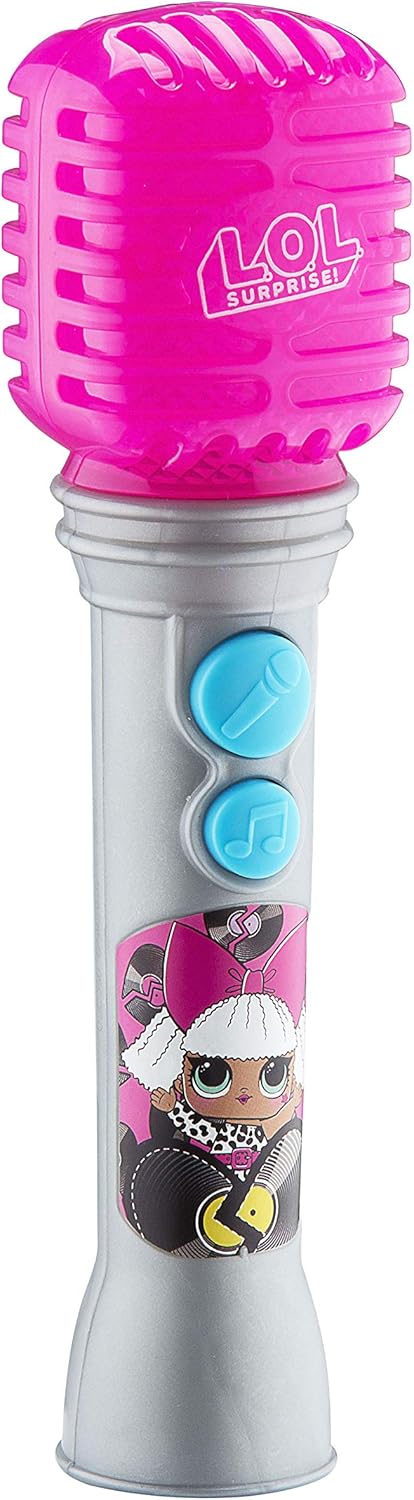
Bild: Eine vollständige view of the eKids LOL Surprise OMG Remix Toy Microphone, showcasing sein Design und seine Knöpfe.
Wartung und Pflege
- Wipe the microphone with a soft, dry cloth to clean. Do not use abrasive cleaners or immerse in water.
- Bewahren Sie das Mikrofon bei Nichtgebrauch an einem kühlen, trockenen Ort und vor direkter Sonneneinstrahlung geschützt auf.
- Entfernen Sie die Batterien, wenn Sie die Batterie über längere Zeit lagern, um ein Auslaufen zu verhindern.
Fehlerbehebung
| Problem | Mögliche Ursache | Lösung |
|---|---|---|
| Kein Ton vom Mikrofon/Lautsprecher. | Die Batterien sind schwach oder falsch eingesetzt. | Batteriepolung prüfen. Durch neue AAA-Batterien ersetzen. |
| Die Lichter blinken nicht. | Microphone is not active or music is not playing. | Ensure the Microphone Button or Song Button is pressed. Check batteries. |
| Verzerrter Ton. | Schwache Batterien. | Ersetzen Sie sie durch neue AAA-Batterien. |
Technische Daten
- Modellnummer: LL-070v0i
- Leistung: 2 x AAA (R03) batteries (not included)
- Empfohlenes Alter: 36 Monate – 6 Jahre
- Produktabmessungen: 9.7 x 7.2 x 26.7 Zoll (ungefähre Verpackungsmaße)
- Artikelgewicht: 4.6 Unzen
- Hersteller: EKIDS
Garantie und Support
Informationen zur Garantie oder zum technischen Support finden Sie in den auf der Produktverpackung angegebenen Kontaktdaten oder auf der offiziellen eKids-Website. webWebsite.
eKids WebWebsite: www.ekids.com
UPC: 0092298950808


