1. Einleitung
This manual provides detailed instructions for the setup, operation, maintenance, and troubleshooting of your Sceptre Curved 27" FHD 1080p Gaming Monitor. Please read this manual thoroughly before using your monitor to ensure proper functionality and safety.

Image: Sceptre Curved 27" FHD 1080p Gaming Monitor in a typical desk setup.
2. Packungsinhalt
Verify that all items listed below are included in your package. If any items are missing or damaged, please contact Sceptre customer support.
- Sceptre Curved 27" FHD 1080p Gaming Monitor
- Monitorständer (Fuß und Arm)
- HDMI-Kabel
- Netzteil und Adapter
- Philips Kopfschraubendreher
- Screws and Hardware Kit
- Bedienungsanleitung
- Warranty Information and Customer Service Card

Bild: Überview of all items included in the Sceptre monitor package, including the monitor, stand components, cables, tools, and documentation.
3. Montage
Befolgen Sie diese Schritte, um den Monitorständer zusammenzubauen:
- Attach the metal stand arm to the plastic base. Align the tabs and gently twist until secure.
- Use the provided Philips head screwdriver and the designated base screw to fasten the stand arm to the base.
- Richten Sie den zusammengebauten Ständer an den Befestigungspunkten auf der Rückseite des Monitors aus.
- Insert the two remaining Philips head screws into the designated holes on the monitor's back and tighten them securely.
- Place the plastic cover over the screws on the stand arm.

Image: The Sceptre Curved 27" monitor with its dimensions labeled, showing the curved screen and the stand.
4. Verbindungen
The monitor features various ports for connectivity. Ensure proper connection for optimal performance.
- DC IN: Schließen Sie hier das Netzteil an.
- Audio Ausgang: Schließen Sie externe Lautsprecher oder Kopfhörer an.
- Audioeingang: Connect an audio source for the built-in speakers.
- VGA: Connect to a computer's VGA port. Supports up to 75Hz refresh rate.
- HDMI 1.4 (x2): Connect to devices with HDMI output. Supports up to 75Hz refresh rate.
- Kensington-Sicherheitsschloss: For securing the monitor.
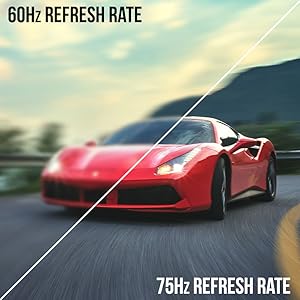
Bild: Detailliert view of the monitor's rear panel, highlighting the DC IN, Audio In/Out, VGA, and two HDMI 1.4 ports.
5. Bedienungsanleitung
Über das Bildschirmmenü (OSD-Menü) können Sie verschiedene Monitoreinstellungen anpassen. Verwenden Sie die Tasten auf der Rückseite des Monitors zur Navigation.
OSD-Menünavigation
- Schnellstart: Adjust basic settings like preset modes, aspect ratio, source, volume, Blue Light Shift, and Adaptive Sync.
- Bild: Fine-tune image settings including brightness, contrast, DCR, aspect ratio, and sharpness.
- Farbe: Adjust color temperature, gamma, tint, saturation, and Blue Light Shift.
- System: Configure overdrive, Adaptive Sync, sleep mode, language, OSD position, timer, transparency, mute, and factory reset.
Video: A user demonstrates the Sceptre monitor's OSD menu, showing navigation through settings like volume and input source while displaying gameplay.
6. Anzeigefunktionen
- 1500R Curved Display: The 1500R curvature immerses you into the content, providing a comfortable viewErfahrung.
- 100Hz Bildwiederholfrequenz: Experience smoother visuals with a refresh rate of up to 100Hz, reducing screen tearing.
- 98 % sRGB: Offers a wider color gamut for deeper and more accurate colors.
- Blaulichtverschiebung: Reduces blue light emission to protect your eyes from fatigue and strain during extended use.
- Adaptive Synchronisierung: Synchronisiert die Bildwiederholfrequenz des Monitors mit der Bildrate Ihrer Grafikkarte, um Bildrisse und Ruckler zu vermeiden.
- FPS-RTS Game Modes: Pre-set display modes optimized for First Person Shooter (FPS) and Real-Time Strategy (RTS) games.
- Eingebaute Lautsprecher: Integrated speakers provide audio without needing external devices.

Image: Visual representation of the 1500R curvature, highlighting its immersive design.

Image: A side-by-side comparison demonstrating the visual smoothness of 75Hz refresh rate versus 60Hz.

Image: A visual comparison highlighting the enhanced color accuracy of 98% sRGB compared to a conventional display.

Image: Split-screen view demonstrating the visual enhancements provided by FPS and RTS game modes.
7. Wartung
Um die Langlebigkeit und optimale Leistung Ihres Monitors zu gewährleisten, beachten Sie bitte folgende Reinigungsrichtlinien:
- Ziehen Sie vor der Reinigung immer den Netzstecker.
- Mit einem weichen, fusselfreien Tuch leichtampMit Wasser oder einem milden, nicht scheuernden Reinigungsmittel abspülen.
- Vermeiden Sie die Verwendung von Alkohol, Ammoniak oder Scheuermitteln, da diese die Bildschirmoberfläche beschädigen können.
- Wischen Sie den Bildschirm und die Außenflächen vorsichtig ab. Sprühen Sie kein Reinigungsmittel direkt auf den Bildschirm.
8. Fehlerbehebung
Sollten Sie Probleme mit Ihrem Monitor haben, beachten Sie bitte die folgenden gängigen Lösungsansätze:
- Kein Strom: Ensure the power cable is securely connected to both the monitor and a working power outlet. Check the power adapter and outlet.
- Kein Bild: Verify that the video cable (HDMI or VGA) is securely connected to both the monitor and your computer/device. Ensure the correct input source is selected in the OSD menu.
- Flackerndes/Verzerrtes Bild: Check the video cable for damage. Try a different cable or port. Ensure your graphics card drivers are up to date. Adjust refresh rate settings in your device's display settings.
- Kein Ton: Check the volume settings in the OSD menu and on your connected device. Ensure external speakers are properly connected if used.
- Schaltflächen reagieren nicht: Perform a factory reset through the OSD menu if accessible.
For further assistance, please refer to the full user manual or contact Sceptre customer support.
9. Spezifikationen
| Besonderheit | Spezifikation |
|---|---|
| Bildschirmgröße | 27 Zoll |
| Auflösung | 1920 x 1080 (FHD 1080p) |
| Bildwiederholrate | Up to 100Hz (75Hz via HDMI/VGA) |
| Krümmung | 1500R |
| Ansprechzeit | 3 ms (GtG) |
| Panel-Typ | VA |
| Helligkeit | 280 Nits |
| Farbumfang | 98 % sRGB |
| Videoeingänge | 2x HDMI 1.4, 1x VGA |
| Audio-Anschlüsse | Audio In, Audio Out |
| Lautsprecher | Eingebaut |
| VESA-Montierung | 100mm x 100mm |
| Abmessungen (LxBxH) | 15.09 x 19.97 x 7.02 Zoll |
| Gewicht | 5.5 Pfund |
10. Spielerlebnis
The Sceptre Curved 27" monitor is designed to enhance your gaming experience with its high refresh rate, low response time, and immersive curvature.
Video: Ein offizielles Sceptre-Video zeigtasing various gaming monitors, including the Curved 27" model, highlighting their features and performance in gaming scenarios.
For optimal gaming performance, ensure your device's display settings match the monitor's capabilities (e.g., 1920x1080 resolution at 75Hz).
11. Garantie und Support
Your Sceptre monitor comes with a 1 Jahre eingeschränkte Produktgarantie. For detailed terms and conditions, please refer to the included warranty information card in your package.
For technical support, troubleshooting, or warranty claims, please contact Sceptre Customer Service. Contact information is provided on the customer service card included with your monitor.


