Einführung
Vielen Dank für Ihren Einkauf.asing the EARISE M15 Karaoke Machine. This portable PA loudspeaker system is designed to provide high-quality audio for various entertainment and public address needs. Featuring powerful sound output, versatile connectivity options, and vibrant LED lights, the M15 is perfect for parties, gatherings, and karaoke sessions. Please read this manual thoroughly before operating the device to ensure proper use and to maximize its lifespan.
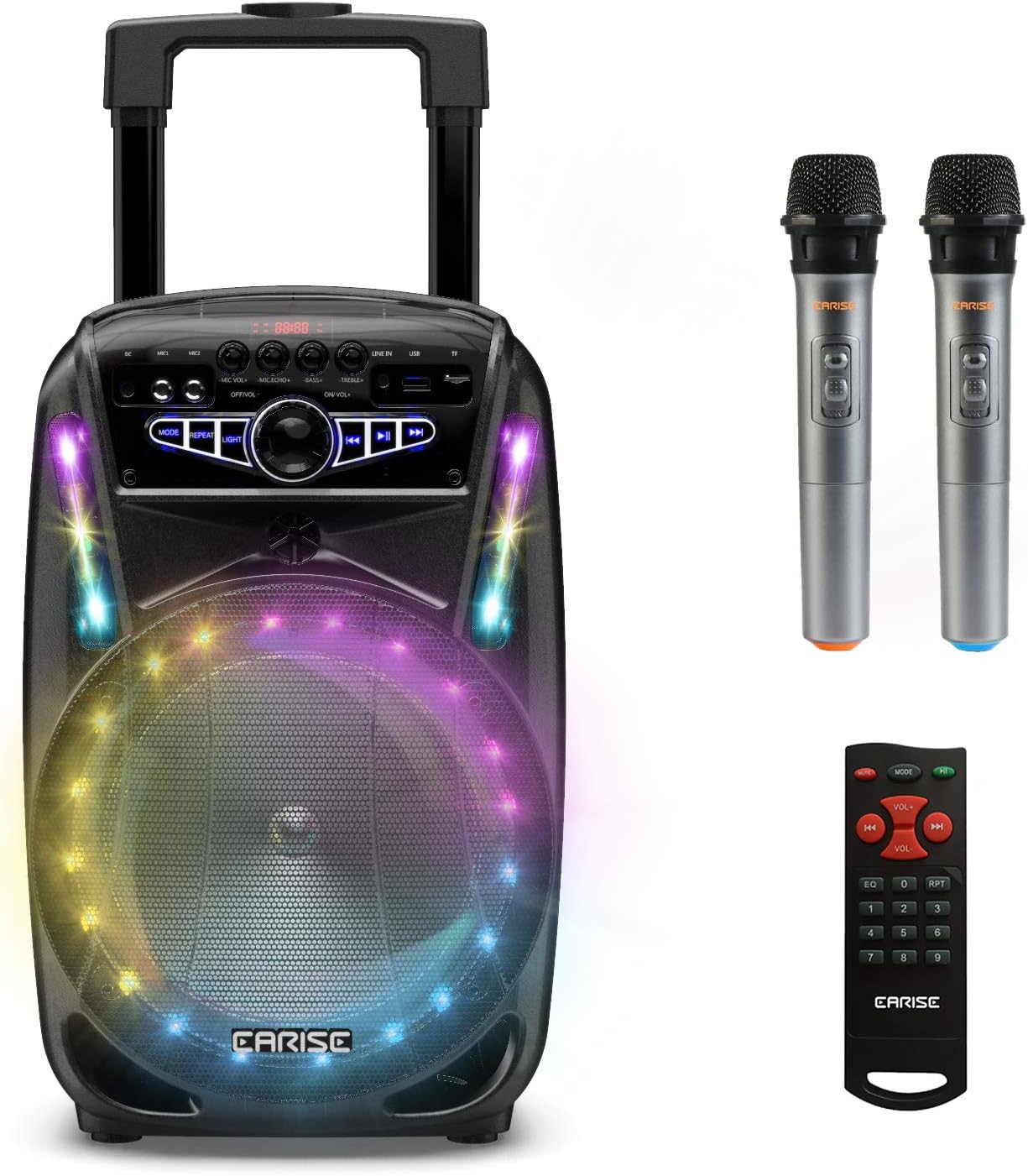
Image: The EARISE M15 Karaoke Machine, a black portable speaker with colorful LED lights on the front, shown with two wireless microphones and a remote control.
Lieferumfang
Bitte überprüfen Sie den Inhalt Ihres Pakets, um sicherzustellen, dass alle Artikel vorhanden und in gutem Zustand sind.
- 1 x M15 Trolley PA-System
- 2 x drahtlose Mikrofone (Batterien nicht im Lieferumfang enthalten)
- 1 x Fernbedienung
- 1 x Netzkabel
- 1 x AUX-Kabel
- 1 x Benutzerhandbuch (dieses Dokument)

Image: A visual representation of the package contents, showing the M15 speaker, two wireless microphones, a remote control, an AUX cable, and a charging cable.
Installationshandbuch
1. Aufladen des Geräts
Before first use, fully charge the M15 Karaoke Machine. The built-in 3600mAh 7.4V Lithium rechargeable battery provides portability. A full recharge takes approximately 3 hours.
- Connect the included power cord to the DC Charging Port (6) on the back of the unit.
- Plug the other end of the power cord into a standard AC 100-240V power outlet.
- The charging indicator light will illuminate. Once fully charged, the light may change color or turn off depending on the unit's design.
2. Einlegen der Mikrofonbatterien
The wireless microphones require batteries (not included). Open the battery compartment of each microphone and insert the required batteries, ensuring correct polarity.
3. Erstes Einschalten
Locate the Power On/Off switch (15) on the control panel. Turn the switch to the "ON" position to power on the unit.
Bedienungsanleitung
Systemsteuerung überview
Familiarize yourself with the control panel for optimal operation.

Image: Close-up of the M15's control panel, highlighting various buttons and ports with corresponding numbers for easy identification.
- Bildschirm: Zeigt den aktuellen Modus, die Titelnummer und weitere Informationen an.
- Mikrofonlautstärke: Regelt die Lautstärke angeschlossener Mikrofone.
- Mikrofonecho: Steuert den Echoeffekt für Mikrofone.
- Bass: Passt den Basspegel des Audioausgangs an.
- Verdreifachen: Passt den Höhenpegel des Audioausgangs an.
- DC-Ladeanschluss: Zum Anschließen des Netzteils zum Aufladen des Geräts.
- Mic 1 Port: Eingang für ein kabelgebundenes Mikrofon.
- Mic 2 Port: Input for a second wired microphone.
- Line In Port (AUX): Zum Anschluss externer Audiogeräte über ein AUX-Kabel.
- Steckplatz für USB-Flash-Laufwerk: Zum Abspielen von Audio files von einem USB-Laufwerk.
- TF/SD-Kartensteckplatz: Zum Abspielen von Audio files from a TF or SD card.
- Modus: Switches between Bluetooth, USB, TF, AUX, and FM Radio modes.
- Wiederholen: Wiederholt den aktuellen Titel oder die aktuelle Playlist.
- Licht: Schaltet die LED-Lichtmuster um oder ändert sie.
- Power On/Off, Master Volume: Turns the unit on/off and adjusts the overall volume.
- Vorheriges Lied: Springt zum vorherigen Titel.
- Abspielen/Pause: Spielt den aktuellen Titel ab oder pausiert ihn.
- Nächster Titel: Springt zum nächsten Titel.
1. Bluetooth-Kopplung
Connect your smartphone, tablet, or other Bluetooth-enabled device to the M15 for wireless audio streaming.
- Power on the M15 unit.
- Drücken Sie die Modus button (12) until "Bluetooth" or "BT" appears on the Display Screen (1).
- Enable Bluetooth on your device and search for "EARISE M15" in the list of available devices.
- Select "EARISE M15" to pair. A confirmation sound will indicate successful pairing.
- You can now play audio from your device through the M15.

Image: A person sitting outdoors, connecting their smartphone to the EARISE M15 speaker via Bluetooth, indicated by the Bluetooth logo.
2. Wiedergabe von USB-/TF-Karten
Audio wiedergeben files directly from a USB flash drive or TF/SD card.
- Insert a USB flash drive into the USB Flash Drive Slot (10) or a TF/SD card into the TF/SD Card Slot (11).
- The unit should automatically switch to USB or TF mode and begin playing compatible audio files. Falls nicht, drücken Sie die Taste Modus button (12) to select the correct mode.
- Verwenden Sie die Vorheriger Titel (16), Abspielen/Pause (17) und Nächster Titel (18) buttons to control playback.
3. AUX-Eingang
Connect external audio devices that do not have Bluetooth capability using the AUX cable.
- Connect one end of the included AUX cable to the Line In Port (9) on the M15.
- Connect the other end of the AUX cable to the audio output jack of your external device (e.g., MP3 player, laptop).
- Drücken Sie die Modus button (12) until "AUX" or "LINE" appears on the Display Screen (1).
- Steuern Sie die Wiedergabe von Ihrem externen Gerät.
4. Mikrofonnutzung
The M15 supports up to two wireless microphones and two wired microphones simultaneously for karaoke fun.
- Drahtlose Mikrofone: Turn on the wireless microphones. They should automatically connect to the M15.
- Kabelgebundene Mikrofone: Plug wired microphones into Mic 1 Port (7) or Mic 2 Port (8).
- Adjust the Microphone Volume (2) and Microphone Echo (3) knobs to achieve desired sound effects.

Image: A group of people enjoying karaoke, with the EARISE M15 speaker providing sound and multiple microphones in use, demonstrating its multi-user capability.
5. LED-Leuchten
Enhance your party atmosphere with the M15's colorful LED disco lights.
- Drücken Sie die Licht button (14) to toggle the LED lights on/off or to cycle through different light patterns.

Image: The EARISE M15 speaker with its front-facing LED lights glowing in multiple colors, creating a vibrant visual effect.
6. Verwendung der Fernbedienung
Die mitgelieferte Fernbedienung ermöglicht eine bequeme Bedienung aus der Ferne.
- Stellen Sie sicher, dass die Fernbedienung über funktionierende Batterien verfügt.
- Point the remote control towards the front of the M15 unit.
- Use the buttons on the remote to control volume, mode, track selection, EQ, and other functions.
Wartung
Proper maintenance will ensure the longevity and optimal performance of your EARISE M15 Karaoke Machine.
- Reinigung: Verwenden Sie ein weiches, trockenes Tuch, um die Außenseite des Geräts abzuwischen. Verwenden Sie keine Scheuermittel, Wachse oder Lösungsmittel, da diese die Oberfläche beschädigen können.
- Batteriepflege: Um die Akkulaufzeit zu verlängern, sollte der Akku nicht häufig vollständig entladen werden. Bei längerer Lagerung des Geräts sollte er alle paar Monate auf etwa 50 % aufgeladen werden.
- Lagerung: Lagern Sie das Gerät an einem kühlen, trockenen Ort, geschützt vor direkter Sonneneinstrahlung, extremen Temperaturen und hoher Luftfeuchtigkeit.
- Handhabung: While the unit is portable with wheels and a handle, avoid dropping or subjecting it to strong impacts.

Image: A person demonstrating the portability of the EARISE M15 by pulling it with its retractable handle and built-in wheels.
Fehlerbehebung
If you encounter issues with your M15, please refer to the following common problems and solutions.
| Problem | Mögliche Ursache | Lösung |
|---|---|---|
| Kein Strom / Gerät lässt sich nicht einschalten. | Batterie ist leer. Das Netzkabel ist nicht richtig angeschlossen. | Laden Sie das Gerät vollständig auf. Ensure power cord is securely connected to both the unit and the power outlet. |
| Aus dem Lautsprecher kommt kein Ton. | Die Lautstärke ist zu niedrig. Falscher Modus ausgewählt. External device volume is low. | Increase the Master Volume (15). Drücken Sie die Modus button (12) to select the correct input source (Bluetooth, USB, AUX). Increase volume on the connected external device. |
| Mikrofon funktioniert nicht. | Microphone batteries are dead or incorrectly inserted. Die Mikrofonlautstärke ist zu niedrig. Wireless microphone not paired. | Replace microphone batteries, ensuring correct polarity. Increase Microphone Volume (2). Ensure wireless microphones are turned on and within range. |
| Bluetooth-Kopplung fehlgeschlagen. | M15 is not in Bluetooth mode. Device is too far from M15. Bluetooth am Gerät ist ausgeschaltet. | Drücken Modus button (12) to select Bluetooth mode. Bringen Sie Ihr Gerät näher an den M15 heran. Aktivieren Sie Bluetooth auf Ihrem Gerät. |
| USB-/TF-Karte wird nicht wiedergegeben. | Falsch file Format. Karte/Laufwerk nicht korrekt eingelegt. Unit not in USB/TF mode. | Sicherstellen der Audioqualität fileDie Dateien liegen in einem kompatiblen Format vor (z. B. MP3). Stecken Sie den USB-Stick oder die TF-Karte wieder fest ein. Drücken Modus button (12) to select USB or TF mode. |
Technische Daten
Detailed technical specifications for the EARISE M15 Karaoke Machine.
| Besonderheit | Spezifikation |
|---|---|
| Modell | M15 |
| Leistungsabgabe | 400 W max. |
| R.Frequency | 90 Hz bis 20 kHz |
| Lithium-Ionen-Akku | 3.7V / 2600mAh (Built-in) |
| Batterie | 8" 4Ω*1 + 1" tweeter*1 |
| Signal-Rausch-Verhältnis | ≥60 dB |
| Stromversorgung | Wechselstrom 100-240 V |
| Produktabmessungen (L x B x H) | 27.94 x 25.4 x 40.64 cm (11 x 10.4 x 16.3 Zoll) |
| Artikelgewicht | 4.08 kg |
| Konnektivitätstechnologie | Bluetooth, USB, AUX |
| Kompatible Geräte | Laptops, Smartphones |

Image: A diagram illustrating the physical dimensions of the EARISE M15 speaker, showing its height, width, and depth.
Garantie und Support
For warranty information or technical support, please refer to the contact details provided with your purchase documentation or visit the official EARISE webBewahren Sie Ihren Kaufbeleg als Kaufnachweis für eventuelle Garantieansprüche auf.


