1. Einleitung
This user manual provides essential information for the safe and efficient operation of your Philips Audio HTL1020/94 Soundbar. Please read these instructions carefully before using the product and retain them for future reference.
The Philips HTL1020/94 is a 20W soundbar designed to enhance your audio experience with versatile connectivity options including Bluetooth 5.0, AUX, and USB. Its low-rise profile allows for flexible placement in various home entertainment setups.

Bild 1.1: Vorderseite view of the Philips HTL1020/94 Soundbar.
2. Sicherheitshinweise
Beachten Sie bei der Verwendung dieses Produkts stets die grundlegenden Sicherheitsvorkehrungen, um das Risiko von Bränden, Stromschlägen und Verletzungen zu verringern.
- Setzen Sie die Soundbar weder Regen noch Feuchtigkeit aus.
- Blockieren Sie keine Belüftungsöffnungen.
- Sorgen Sie für die richtige Stromversorgungtage wie auf dem Produkt angegeben.
- Keep the soundbar away from heat sources and direct sunlight.
- Verwenden Sie nur vom Hersteller angegebene Zusatzgeräte/Zubehör.
3. Lieferumfang
Packen Sie den Inhalt vorsichtig aus und vergewissern Sie sich, dass alle Artikel vorhanden sind:
- Philips Audio HTL1020/94 Soundbar
- Netzkabel
- Kurzanleitung
- Fernbedienung
- Benutzerhandbuch (dieses Dokument)
- Garantiekarte
4. Produktüberschreitungview
4.1. Bedienelemente und Anzeigen
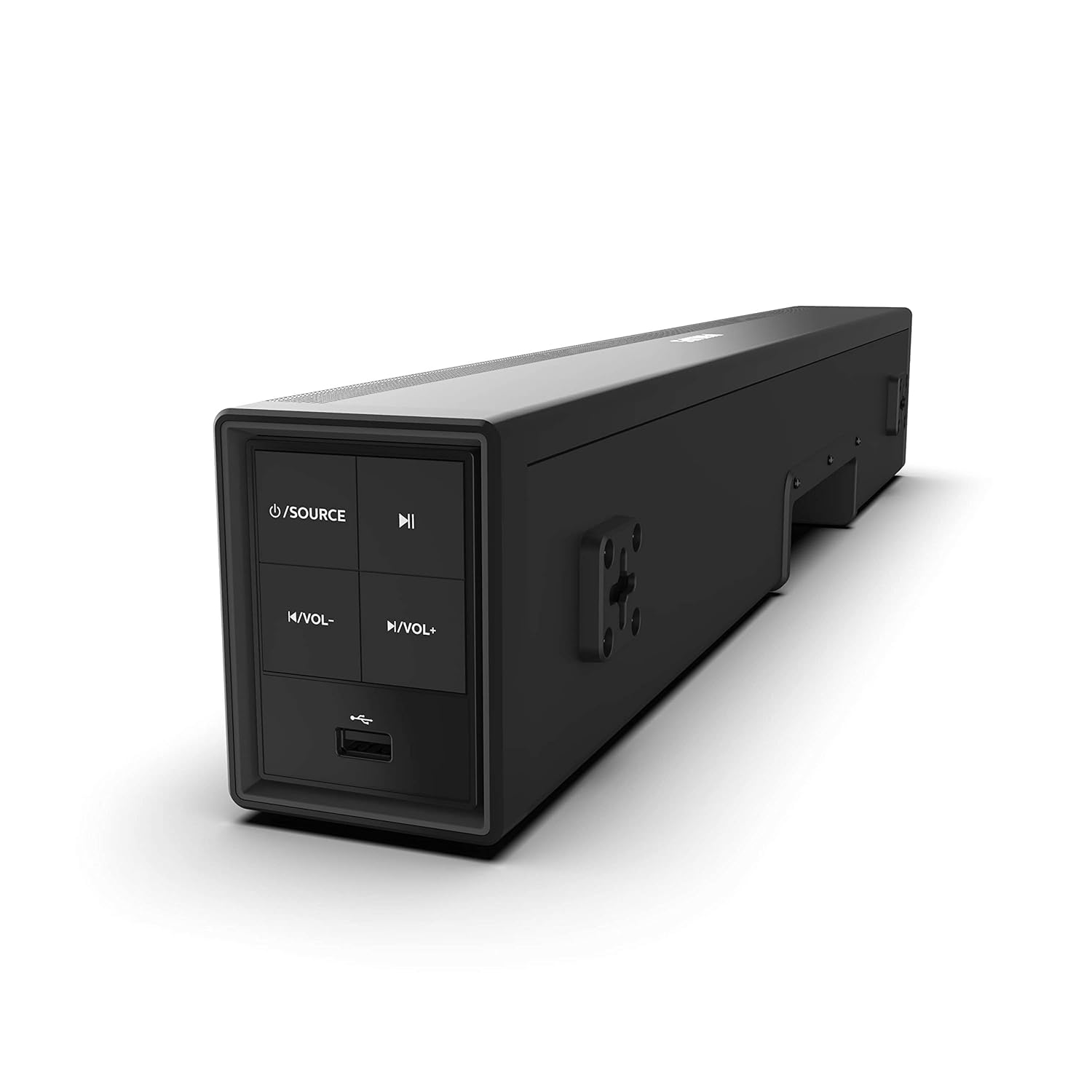
Image 4.1: Side panel controls of the Philips HTL1020/94 Soundbar.
- Ein-/Ausschalter/Quellentaste: Press to turn on/off or switch input sources (Bluetooth, AUX, USB).
- Wiedergabe-/Pause-Taste: Steuert die Medienwiedergabe im Bluetooth- oder USB-Modus.
- Leiser-Taste: Verringert die Lautstärke.
- Lauter-Taste: Erhöht die Lautstärke.
- USB-Anschluss: Zum Abspielen von Audiodateien von USB-Speichergeräten.
4.2. Anschlüsse auf der Rückseite
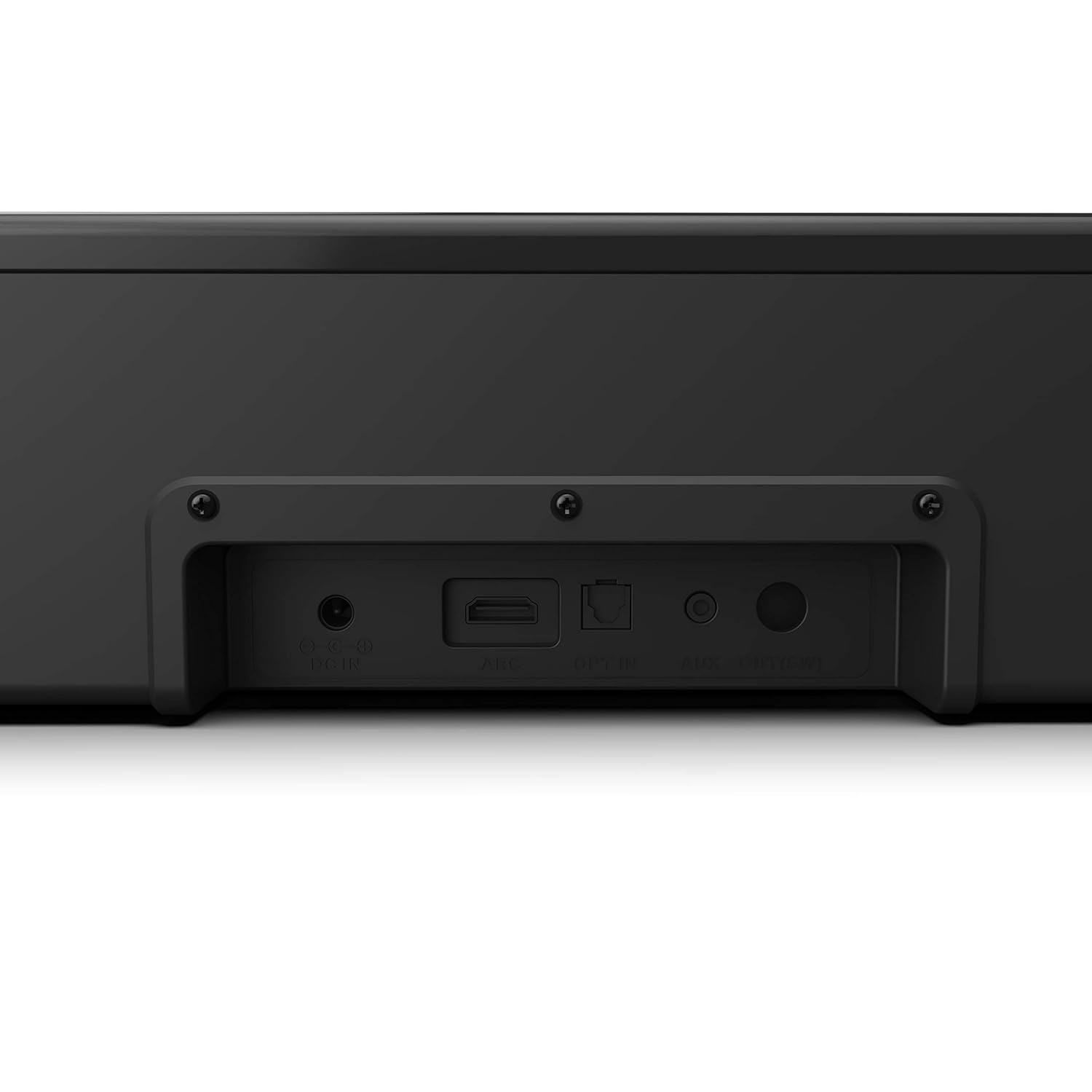
Image 4.2: Rear panel connections of the Philips HTL1020/94 Soundbar.
- DC IN: Schließen Sie hier das Netzteil an.
- ARC (HDMI): Connect to a TV's HDMI ARC port for audio input.
- ANMELDEN: Connect to a TV or audio device's optical digital output.
- AUX-IN: Connect to an audio device's analog output using a 3.5mm audio cable.
5. Einrichtung und Installation
5.1. Platzierung
The soundbar can be placed on a tabletop or mounted on a wall. Ensure it is positioned centrally in front of your television for optimal sound distribution.
- Platzierung der Tischplatte: Place the soundbar on a stable, flat surface below your TV.
- Wandmontage: Use appropriate wall mounting hardware (not included) and follow the instructions provided in the Quick Start Guide for secure installation.
5.2. An die Stromversorgung anschließen
- Schließen Sie das Netzkabel an den DC-Eingang Anschluss an der Rückseite der Soundbar.
- Stecken Sie das andere Ende des Netzkabels in eine Steckdose.
5.3. Audioquellen anschließen
Wählen Sie eine der folgenden Methoden, um Ihre Audioquelle anzuschließen:
5.3.1. Bluetooth-Verbindung
- Drücken Sie die Energiequelle button on the soundbar or remote control to select Bluetooth mode. The indicator light will flash.
- Aktivieren Sie auf Ihrem Mobilgerät Bluetooth und suchen Sie nach verfügbaren Geräten.
- Select "Philips HTL1020/94" from the list.
- Nach der Kopplung hört die Kontrollleuchte auf zu blinken und leuchtet konstant.
5.3.2. AUX-Anschluss
- Connect a 3.5mm audio cable (not included) from your audio device's headphone jack or AUX output to the AUX IN Anschluss an der Soundbar.
- Drücken Sie die Energiequelle Taste zur Auswahl des AUX-Modus.
5.3.3. USB-Verbindung
- Stecken Sie ein USB-Speichergerät (z. B. einen USB-Stick) in den USB-Anschluss on the side panel of the soundbar.
- Drücken Sie die Energiequelle button to select USB mode. The soundbar will automatically begin playing compatible audio files.
5.3.4. HDMI-ARC-Anschluss
- Connect an HDMI cable (not included) from your TV's HDMI ARC port to the BOGEN Anschluss an der Soundbar.
- Stellen Sie sicher, dass die HDMI-ARC-Funktion Ihres Fernsehers in den Einstellungen aktiviert ist.
- Drücken Sie die Energiequelle button to select ARC mode.
5.3.5. Optische Verbindung
- Connect an optical cable (not included) from your TV's optical digital output to the ANMELDEN Anschluss an der Soundbar.
- Drücken Sie die Energiequelle button to select OPTICAL mode.
6. Bedienung
6.1. Ein-/Ausschalten
Drücken Sie die Energiequelle Drücken Sie eine Taste an der Soundbar oder auf der Fernbedienung, um das Gerät ein- oder auszuschalten.
6.2. Quellenauswahl
Drücken Sie wiederholt die Energiequelle button on the soundbar or the remote control to cycle through available input sources: Bluetooth, AUX, USB, ARC, Optical.
6.3. Lautstärkeregelung
Verwenden Sie die Lautstärke erhöhen Und Lautstärke verringern buttons on the soundbar or the remote control to adjust the audio level.
6.4. Bluetooth Pairing (Re-pairing)
If the soundbar is not automatically connecting to a previously paired device, or if you wish to pair a new device:
- Ensure the soundbar is in Bluetooth mode (indicator light flashing).
- On your device, go to Bluetooth settings and select "Philips HTL1020/94" to connect.
7. Wartung
Um die Langlebigkeit und optimale Leistung Ihrer Soundbar zu gewährleisten, beachten Sie bitte folgende Wartungshinweise:
- Reinigung: Reinigen Sie die Oberfläche der Soundbar mit einem weichen, trockenen Tuch. Verwenden Sie keine flüssigen Reinigungsmittel oder Scheuermittel.
- Belüftung: Halten Sie die Lüftungsöffnungen frei, um eine Überhitzung zu vermeiden.
- Lagerung: Wenn Sie die Soundbar über einen längeren Zeitraum lagern, trennen Sie sie vom Stromnetz und bewahren Sie sie an einem kühlen, trockenen Ort auf.
8. Fehlerbehebung
Sollten Sie Probleme mit Ihrer Soundbar haben, beachten Sie bitte die folgenden häufig auftretenden Probleme und Lösungen:
| Problem | Mögliche Ursache | Lösung |
|---|---|---|
| Kein Strom | Netzkabel nicht angeschlossen; Steckdose nicht aktiv | Ensure power cord is securely connected; Test outlet with another device |
| Kein Ton | Incorrect source selected; Volume too low; Cables not connected | Select correct input source; Increase volume; Check all audio cables |
| Die Bluetooth-Kopplung schlägt fehl | Soundbar nicht im Kopplungsmodus; Gerät zu weit entfernt; Störungen | Ensure soundbar is in Bluetooth mode; Move device closer; Restart both devices |
| USB-Wiedergabeprobleme | Unvereinbar file format; USB device not recognized | Sicherstellen der Audioqualität files are compatible (e.g., MP3); Try a different USB device |
9. Spezifikationen
Technical specifications for the Philips Audio HTL1020/94 Soundbar:
| Besonderheit | Spezifikation |
|---|---|
| Modellname | HTL1020/94 |
| Lautsprechertyp | Soundbar |
| Audio-Ausgangskanäle | 2.0 |
| Gesamtausgangsleistung | 20 Watt |
| Konnektivitätstechnologie | Bluetooth 5.0, AUX, USB, HDMI ARC, Optical |
| Kontrollmethode | Berührung, Fernbedienung |
| Abmessungen (LxBxH) | 60 x 15 x 9.2 cm |
| Artikelgewicht | 2 kg |
| Stromquelle | Kabelgebundene Elektrik |
| Signal-Rausch-Verhältnis | 55 dB |
| Im Lieferumfang enthaltene Komponenten | Power cord, Quick Start Guide, Remote, User Manual, Warranty Card |
10. Garantie und Support
Your Philips Audio HTL1020/94 Soundbar comes with a 1-year warranty. Please refer to the included Warranty Card for detailed terms and conditions.
For technical support or service inquiries, please contact Philips Audio customer service. Contact information can typically be found on the Philips Audio official webauf der Website oder auf Ihrer Garantiekarte.


