Einführung
Vielen Dank für Ihren Einkauf.asing the Salange Mini Projector. This portable projector is designed to provide a versatile and immersive viewing experience for various applications, from home entertainment to outdoor movie nights. Featuring Full HD support, high brightness, and multiple connectivity options, it offers a convenient solution for projecting content from smartphones, gaming consoles, and other media devices. This manual provides detailed instructions for setup, operation, maintenance, and troubleshooting to ensure optimal performance and longevity of your device.
Sicherheitshinweise
Bitte lesen Sie vor der Benutzung des Projektors alle Sicherheitshinweise sorgfältig durch. Bewahren Sie diese Bedienungsanleitung zum späteren Nachschlagen auf.
- Die Lüftungsöffnungen dürfen nicht blockiert werden. Sorgen Sie für ausreichende Luftzirkulation um den Projektor herum, um eine Überhitzung zu vermeiden.
- Schauen Sie nicht direkt in die Projektorlinse, wenn der lamp ist eingeschaltet. Das helle Licht kann Augenschäden verursachen.
- Verwenden Sie ausschließlich das mit dem Projektor gelieferte Netzteil. Die Verwendung eines nicht autorisierten Netzteils kann zu Schäden oder Brand führen.
- Setzen Sie den Projektor weder Regen, Feuchtigkeit noch extremen Temperaturen aus.
- Stellen Sie den Projektor nicht auf instabile Oberflächen.
- Bei Gewittern oder längerer Nichtbenutzung sollte das Gerät vom Stromnetz getrennt werden.
- Versuchen Sie nicht, den Projektor selbst zu reparieren. Überlassen Sie alle Wartungsarbeiten qualifiziertem Fachpersonal.
Lieferumfang
Prüfen Sie beim Auspacken, ob alle Artikel vorhanden sind:
- 1 x Salange Mini Projector (Model P62H / HY300US)
- 1 x Fernbedienung
- 1 x HDMI-Kabel
- 1 x AV-Signalkabel
- 1 x Stromkabel
- 1 x Benutzerhandbuch (Dieses Dokument)

Figure 1: Salange Mini Projector with remote control.
Produkt überview
Familiarize yourself with the main components and ports of your Salange Mini Projector.

Abbildung 2: Draufsicht view of the Salange Mini Projector, highlighting its compact design.
Vorderseite
- Projektionsobjektiv: Projiziert das Bild auf den Bildschirm oder die Wand.
- Fokusring: Passt die Klarheit des projizierten Bildes an.
- Trapezkorrektur: Korrigiert die trapezförmige Verzerrung des Bildes.
Rear Panel (Connectivity)

Abbildung 3: Rückseite view of the projector, illustrating its multiple connection ports.
- HDMI-Anschluss: Connects to devices like laptops, gaming consoles (PS5), Fire TV Stick, Roku, etc.
- USB Ports (USB-1, USB-T): Verbindet USB-Laufwerke zur Medienwiedergabe.
- AV-Anschluss: Verbindet sich über ein AV-Kabel mit älteren Geräten.
- VGA-Anschluss: Anschlussmöglichkeit an Computer mit VGA-Ausgang.
- Audioausgang (3.5 mm): Anschlussmöglichkeit für externe Lautsprecher oder Kopfhörer.
- Leistungsaufnahme: Verbindet das Netzteil.
Aufstellen
1. Platzierung
Place the projector on a stable, flat surface. Ensure there are no obstructions to the projection path or the ventilation openings. The ideal projection distance ranges from 2.6 ft to 18.0 ft, yielding screen sizes from 30 inches to 176 inches. For optimal viewing, a darker environment is recommended.

Figure 4: Recommended projection distances and screen sizes for the projector.
3. Stromanschluss
Schließen Sie das Netzkabel an den Stromeingang des Projektors an und stecken Sie das andere Ende in eine Steckdose.
3. Fokus- und Trapezkorrektur
After powering on, adjust the focus ring on the top of the projector until the image is clear. If the image appears trapezoidal, use the keystone correction dial to square the image.
4. Geräte anschließen
Der Projektor unterstützt verschiedene Eingangsquellen:
- HDMI: Connect your laptop, gaming console, or streaming device (e.g., Fire TV Stick) using an HDMI cable.
- USB: Insert a USB flash drive into one of the USB ports for direct media playback.
- EIN V: Verwenden Sie das mitgelieferte AV-Kabel, um Geräte mit AV-Ausgang anzuschließen.
- VGA: Connect to a computer using a VGA cable.
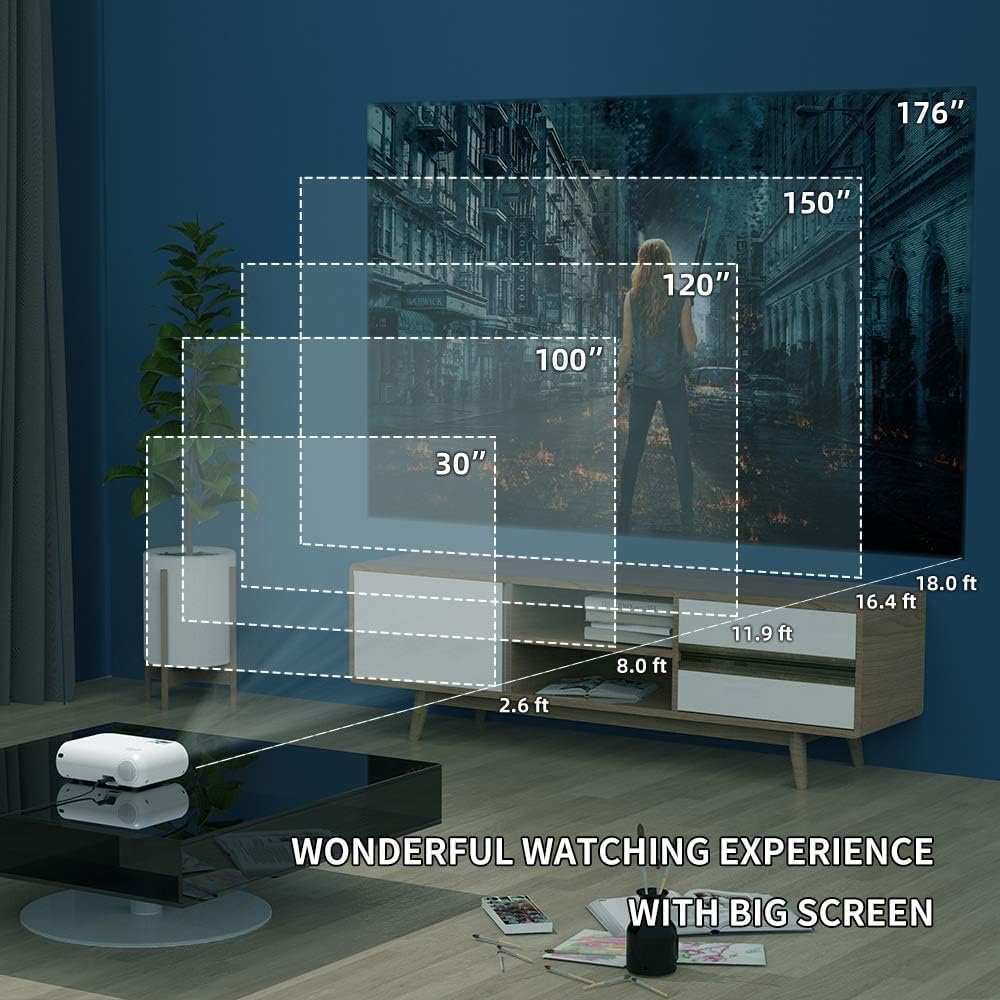
Figure 5: The projector's compatibility with multiple devices, including laptops, smartphones, and gaming consoles.
Bedienungsanleitung
1. Ein-/Ausschalten
Drücken Sie den Netzschalter am Projektor oder auf der Fernbedienung, um das Gerät ein- oder auszuschalten.
2. Auswahl der Eingangsquelle
Use the "Source" button on the remote or projector to cycle through available input sources (HDMI, USB, AV, VGA, WiFi).
3. Drahtlose Bildschirmspiegelung (WLAN)
The Salange Mini Projector supports wireless screen mirroring for both iOS and Android devices via WiFi connection.

Figure 6: Wireless screen mirroring in action, showing a smartphone's display projected.
Für iOS-Geräte:
- Select "Screen Mirroring for iOS System" on the projector's input menu.
- Connect your iOS device to the projector's WiFi network (e.g., "RKcast-xxxxxx"). The password is usually displayed on the projector screen.
- Öffnen Sie auf Ihrem iOS-Gerät das Kontrollzentrum und tippen Sie auf „Bildschirmspiegelung“ (oder „AirPlay-Spiegelung“).
- Select the projector's name (e.g., "RKcast-xxxxxx") from the list to begin mirroring.
Für Android-Geräte:
- Select "Screen Mirroring for Android System" on the projector's input menu.
- Aktivieren Sie auf Ihrem Android-Gerät „Drahtlose Anzeige“, „Mehrere Bildschirme“ und „Smart“. View," or similar function (names vary by device).
- Select the projector's name from the detected devices to connect.
Note: Due to copyright restrictions, direct screen mirroring of certain streaming services like Netflix, Amazon Prime Video, and Hulu is not supported. For these services, it is recommended to use an external streaming device like an Amazon Fire TV Stick connected via HDMI.
Video 1: Official demonstration of the Salange Mini Projector's wireless screen mirroring capabilities and general usage.
4. Audioausgang
The projector has built-in Hi-Fi dual stereo speakers. For enhanced audio, connect external speakers or headphones to the 3.5mm audio out port.
Wartung
1. Reinigung der Linse
Verwenden Sie ein weiches, fusselfreies Tuch, das speziell für optische Linsen entwickelt wurde. Verwenden Sie keine scheuernden Reinigungsmittel oder Tücher, die die Linse zerkratzen könnten.
2. Reinigung des Projektorgehäuses
Die Außenseite mit einem weichen, trockenen Tuch abwischen. Bei hartnäckigen Flecken leicht andrücken.amp Man kann ein Tuch verwenden und anschließend mit einem trockenen Tuch nachwischen.
3. Speicherung
When not in use, store the projector in a cool, dry place, away from direct sunlight and excessive dust. It is recommended to use the original packaging for storage.
Fehlerbehebung
| Problem | Mögliche Ursache | Lösung |
|---|---|---|
| Kein Bild projiziert | Keine Stromversorgung angeschlossen; Falsche Eingangsquelle; Objektivdeckel aufgesetzt. | Prüfen Sie die Stromverbindung; Wählen Sie die richtige Eingangsquelle; Entfernen Sie den Objektivdeckel. |
| Bild ist verschwommen | Unscharf; Falscher Projektionsabstand. | Fokusring einstellen; Projektionsabstand einstellen. |
| Das Bild ist trapezförmig | Projektor nicht senkrecht zur Leinwand. | Einstellknopf für die Trapezkorrektur. |
| Kein Ton | Volume too low; Muted; External audio device not connected or configured. | Lautstärke erhöhen; Stummschaltung aufheben; Externe Audioanschlüsse und -einstellungen prüfen. |
| Wireless mirroring not working | Incorrect WiFi connection; Device compatibility; App restrictions. | Ensure correct WiFi network and password; Verify device compatibility; Use HDMI for restricted content. |
Technische Daten
| Besonderheit | Detail |
|---|---|
| Marke | Salange |
| Modellnummer | HY300US |
| Unterstützte Auflösung | 1920 x 1080 Pixel |
| Helligkeit | 9600 Liter |
| Kontrastverhältnis | 10000:1 |
| Konnektivitätstechnologie | WIFI, HDMI, USB, AV, VGA |
| Lautsprechertyp | Built-In Hi-Fi Dual Stereo Speakers |
| Lamp Leben | Bis zu 60,000 Stunden |
| Technische Daten | 6.69 x 3.74 x 3.74 Zoll |
| Artikelgewicht | 3.08 Pfund |

Figure 7: Visual representation of the projector's upgraded brightness (9600 Lux) and color contrast.
Garantie und Support
Salange provides lifetime professional technical support for this product. For any questions, issues, or warranty claims, please contact Salange customer service through the retailer's platform or the official Salange website. Please have your model number (HY300US) and purchase details ready when contacting support.
Weitere Informationen finden Sie im Salange Store on Amazon.


