1. Einleitung
The Sonel MPI-540 is a multifunction electrical installation meter designed for comprehensive testing of home and industrial electrical installations. This device ensures the safety and proper functioning of electrical systems by performing a wide range of measurements. It features automated measurement sequences, including auto-tests for residual current circuit breakers (RCDs), and supports automatic insulation resistance measurements for 3-, 4-, and 5-wire conductors with the optional AUTO ISO-1000C adapter. This manual provides essential information for the safe and effective operation of your MPI-540 meter.
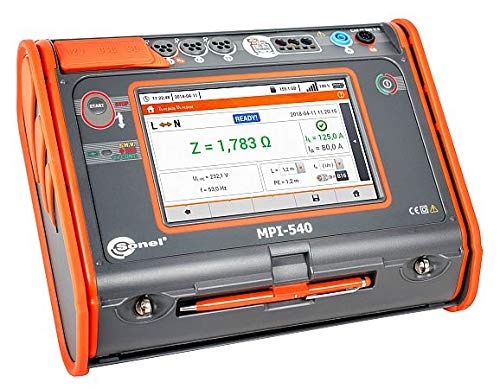
Figure 1: Sonel MPI-540 Multifunction Electrical Installation Meter. This image shows the front view of the meter with its color TFT LCD touchscreen displaying measurement results. The device has an orange and grey casing with various input ports and control buttons.
2. Hauptmerkmale
- Umfassende Messmöglichkeiten: Performs tests for short circuit loop impedance, RCD parameters, insulation resistance, earth resistance, continuity, and more.
- Automatisiertes Testen: Features Auto mode and pre-programmed sequences for RCD testing and other measurements.
- Advanced Insulation Resistance: Supports automatic measurement of 3-, 4-, and 5-wire conductors with the AUTO ISO-1000C adapter.
- F-3A ClampIm Lieferumfang enthalten: Comes with F-3A current clamps for enhanced measurement functionality.
- Benutzerfreundliche Oberfläche: Equipped with a color TFT LCD touchscreen for clear display of results and intuitive navigation.
- Data Logging and Communication: Built-in memory and communication options (USB, Bluetooth) for data transfer and report generation.
3. Sicherheitshinweise
Always adhere to local and national safety regulations when operating the Sonel MPI-540 meter. Failure to do so may result in injury, damage to the device, or damage to the installation being tested.
- Vergewissern Sie sich vor der Verwendung, dass das Gerät einwandfrei funktioniert.
- Do not use the meter in wet conditions or in the presence of explosive gases or dust.
- Always use the provided test leads and accessories.
- Verify that the measurement range is appropriate for the circuit being tested.
- Disconnect power to the circuit before connecting or disconnecting test leads for certain measurements, such as insulation resistance.
- Refer to the specific measurement instructions for detailed safety precautions.
4. Packungsinhalt
Prüfen Sie nach dem Auspacken, ob alle unten aufgeführten Artikel vorhanden und unbeschädigt sind. Sollten Artikel fehlen oder beschädigt sein, kontaktieren Sie bitte umgehend Ihren Lieferanten.
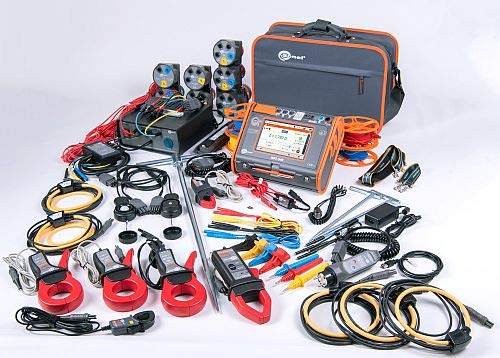
Figure 2: Sonel MPI-540 complete kit. This image displays the Sonel MPI-540 meter along with its comprehensive set of accessories, including various test leads, clamps, adapters, and a carrying bag, laid out on a white surface.
- Sonel MPI-540 Multifunction Electrical Installation Meter
- F-3A Current Clamps (3x)
- Test Leads (various types and lengths)
- Krokodilklammern
- Prüfspitzen
- Netzteil/Ladegerät
- Li-Ionen-Akku
- USB-Schnittstellenkabel
- Tragetasche
- Benutzerhandbuch (dieses Dokument)
- Software-CD (falls zutreffend)
- Micro SD Karte
5. Einrichtung und Inbetriebnahme
5.1. Laden des Akkus
Before first use, fully charge the Li-Ion battery. Connect the power adapter to the meter's charging port and then to a suitable power outlet. The charging indicator on the meter will show the charging status.
5.2. Ein-/Ausschalten
Um das Gerät einzuschalten, halten Sie die LEISTUNG button until the display illuminates. To power off, press and hold the LEISTUNG Drücken Sie die Taste so lange, bis sich das Display abschaltet.
5.3. Grundlegende Navigation
The MPI-540 features a color TFT LCD touchscreen. Navigate through menus and settings by touching the relevant icons or options on the screen. Physical buttons are also available for quick access to common functions.
6. Bedienungsanleitung
The MPI-540 offers a variety of measurement functions. Select the desired measurement mode from the main menu. Detailed instructions for each measurement type are provided below.
6.1. Short Circuit Loop Impedance Measurement
- Ensure the circuit is live and safe to test.
- Select "ZL-PE" or "ZLN" from the measurement menu.
- Connect the test leads according to the on-screen diagram.
- Drücken Sie die START drücken, um die Messung zu starten.
- Das Ergebnis wird auf dem Bildschirm angezeigt.
6.2. RCD Parameter Measurement (Auto Mode)
The Auto mode simplifies RCD testing by performing a sequence of measurements automatically.
- Select "RCD Auto" from the measurement menu.
- Connect the test leads to the RCD protected circuit.
- Configure RCD type and nominal current if necessary.
- Drücken Sie die START button. The meter will perform the sequence of tests.
- Observe the results and ensure the RCD trips within specified parameters.
6.3. Messung des Isolationswiderstandes
Warnung: Ensure the circuit is de-energized before performing insulation resistance tests.
- Select "RISO" from the measurement menu.
- Connect the test leads to the conductors to be tested. For 3-, 4-, or 5-wire automatic testing, use the AUTO ISO-1000C adapter.
- Wählen Sie den gewünschten Testband austage.
- Drücken Sie die START button. Hold until the measurement is stable.
- The insulation resistance value will be displayed.

Figure 3: Sonel MPI-540 in operation. This image shows the meter connected to an electrical outlet, actively displaying measurement data on its screen, indicating a live test in progress.
7. Wartung
7.1. Reinigung
Clean the meter's casing mit einem weichen, damp Mit einem Tuch abwischen. Keine Scheuermittel oder Lösungsmittel verwenden. Sicherstellen, dass keine Feuchtigkeit in das Gerät eindringt.
7.2. Batteriepflege
To prolong battery life, avoid fully discharging the battery frequently. If storing the device for an extended period, charge the battery to approximately 50% and store in a cool, dry place.
7.3. Kalibrierung
Regular calibration is recommended to ensure the accuracy of your Sonel MPI-540 meter. Refer to Sonel's official website or contact authorized service centers for calibration services.
7.4. Firmware-Updates
Periodically check the Sonel website for available firmware updates. Updates can improve functionality and address potential issues. Follow the instructions provided with the firmware update package carefully.
8. Fehlerbehebung
| Problem | Mögliche Ursache | Lösung |
|---|---|---|
| Das Messgerät lässt sich nicht einschalten. | Batterie entladen oder defekt. | Charge the battery. If problem persists, contact service. |
| Ungenaue Messwerte. | Incorrect connection, uncalibrated device, or damaged test leads. | Check connections. Perform calibration. Inspect and replace test leads if damaged. |
| Der Fehlerstromschutzschalter löst während des Tests nicht aus. | RCD faulty, incorrect test parameters, or incorrect connection. | Verify RCD parameters. Check connections. If RCD is faulty, it needs replacement. |
| Das Display reagiert nicht. | Software glitch or hardware issue. | Restart the meter. If problem persists, contact technical support. |
9. Technische Daten
Below are general technical specifications for the Sonel MPI-540. For detailed measurement ranges and accuracies, refer to the full technical data sheet available on the Sonel webWebsite.
- Energiequelle: Battery Powered (Li-Ion battery)
- Anzeige: Color TFT LCD Touchscreen
- Messfunktionen: Short Circuit Loop Impedance, RCD Parameters, Insulation Resistance, Earth Resistance, Continuity, Phase Sequence, Voltage, Current (with clamps), Frequency, Power (Active, Reactive, Apparent), Harmonics.
- Kommunikation: USB, Bluetooth
- Erinnerung: Internal memory, MicroSD card support
- Umweltschutz: IP54 (or similar, based on product details)
- Sicherheitsstandards: Conforms to IEC 61010, IEC 61557

Figure 4: Sonel MPI-540 technical data. This image shows a page from the product documentation detailing various technical specifications and measurement capabilities of the MPI-540 meter.
10. Garantie und Support
10.1. Garantieinformationen
The Sonel MPI-540 meter is covered by a manufacturer's warranty against defects in materials and workmanship. The specific warranty period and terms may vary by region. Please refer to the warranty card included with your product or visit the official Sonel webWebsite für detaillierte Garantieinformationen.
Notiz: The warranty does not cover damage caused by misuse, unauthorized modifications, or failure to follow the instructions in this manual.
10.2. Technischer Support
For technical assistance, troubleshooting, or service inquiries, please contact Sonel customer support or your authorized Sonel distributor. Before contacting support, please have your product model number (MPI-540) and serial number ready.
- Sonel Official WebWebsite: www.sonel.pl
- Kontaktinformationen: Refer to the Sonel webWebsite für regionale Kontaktdaten.


