Einführung
This manual provides comprehensive instructions for the installation, operation, maintenance, and troubleshooting of your XTRONS 19.5 Inch Car Overhead Player. Please read this manual thoroughly before using the product to ensure proper function and safety. Keep this manual for future reference.
Produkt überview
The XTRONS 19.5 Inch Car Overhead Player is designed to provide in-car entertainment with a large, high-resolution display and versatile connectivity options. Its ultra-thin design integrates seamlessly into various vehicle interiors.
Hauptmerkmale:
- 19.5-Zoll-Digitalbildschirm: A large 16:9 wide screen with 1600x900 resolution, ideal for larger vehicles.
- 1080p-Videowiedergabe: Supports full HD 1080P video for clear and vibrant visuals.
- HDMI/USB/AV Input: Multiple input options for connecting various external devices.
- Eingebaute Stereolautsprecher: Bietet direkte Audioausgabe ohne externe Lautsprecher.
- IR Sound Out: Kompatibel mit IR-Kopfhörern für ungestörtes Hören.
- Stilvolles Design: Features virtual touch buttons and atmospheric LED light strips.
- Maximaler Öffnungswinkel 170°: Einstellbarer Bildschirmwinkel für optimale viewKomfort.

Figure 1: The 19.5-inch screen is suitable for large vehicles like coaches, buses, and motor homes.

Figure 2: Vivid cinematic display with 1600x900 resolution for enhanced viewing.

Figure 3: Sleek virtual touch buttons that illuminate when the unit is powered on.

Figure 4: The monitor can be opened up to an angle of 170° for maximum view, um die Position zu ändern.
Aufstellen
Überlegungen zur Installation:
Professional installation is recommended for this product. Ensure the mounting location in your vehicle's roof is suitable and does not interfere with structural components or existing wiring. Verify the dimensions of the unit against the available space before proceeding with installation.

Figure 5: Product dimensions (525mm x 363mm x 35mm) and included accessories: 1x Remote Control, 6x Nuts, 1x User Manual.
Schaltplan:
Refer to the included user manual for a detailed wiring diagram. Key connections typically include:
- B+ (Battery Positive)
- ACC (Zubehörstromversorgung)
- GND (Masse)
- Door Control - (Negative Door Trigger)
- Door Control + (Positive Door Trigger)
- Audio Left Input 1 & 2
- Audio Right Input 1 & 2
- Video Input 1 & 2
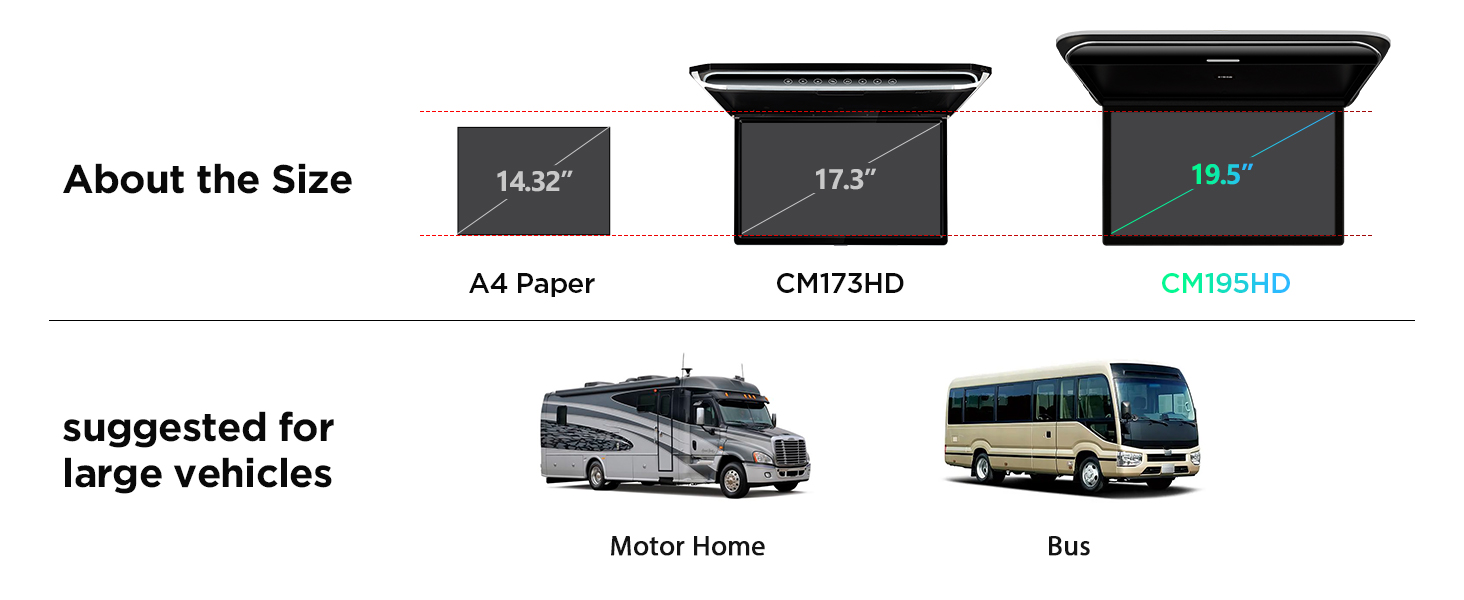
Abbildung 6: Bspample wiring diagram showing connections for power, door control, and audio/video inputs.
Betrieb
Ein-/Ausschalten:
Press the power button on the unit or remote control to turn the device on or off. The virtual touch buttons will illuminate upon power-on.
Media Playback & Connectivity:
Das Gerät unterstützt verschiedene Medienquellen und -formate:
- HDMI-Eingang: Connect devices like smartphones, game consoles, or other HDMI-enabled media players.
- USB-Anschluss: Medien abspielen files direkt von einem USB-Laufwerk.
- AV-Eingang: Connect external audio/video sources using RCA cables.
- SD-Kartensteckplatz: Medien abspielen files von einer SD-Karte.
Unterstützte Formate: AVI / 3GP / MPG / MPEG / MP4 / XVID / MP3 / WMA / WAV / AAC / JPG / JPEG / BMP / PNG.

Figure 7: Multiple sound output choices including FM-TX and IR-TX for headphones.
Audioausgabeoptionen:
Für die Audioausgabe stehen Ihnen mehrere Optionen zur Verfügung:
- Eingebaute Stereolautsprecher: For direct sound from the unit.
- IR-Sender: Connect compatible IR headphones for personal listening.
- FM Transmitter: Broadcast audio to your car's FM radio, allowing sound to play through the vehicle's speakers.
Automatische Lichtsteuerung:
The unit features integrated LED light strips that can be controlled by your car's door status (positive or negative door control wire). This allows the lights to automatically turn on or off when the car doors are opened or closed.

Figure 8: Automatic lighting control with door status integration, replacing your existing roof light.
Videodemonstration:
Video 1: This video demonstrates the features and operation of the XTRONS 19.5 Inch Car Overhead Player, including its sleek design, 1080P video playback, HDMI connectivity, soft-touch button panel, atmospheric LED light strips, and various sound output options.
Wartung
Um die Langlebigkeit und optimale Leistung Ihres XTRONS Autoradios zu gewährleisten, beachten Sie bitte folgende Wartungshinweise:
- Reinigung: Reinigen Sie den Bildschirm und die Außenseite mit einem weichen, trockenen Tuch. Vermeiden Sie Scheuermittel oder Lösungsmittel, die die Oberfläche beschädigen könnten.
- Staubentfernung: Regularly remove dust from vents and openings to prevent overheating.
- Kabelmanagement: Stellen Sie sicher, dass alle Kabel fest angeschlossen und nicht eingeklemmt oder überdehnt sind.
- Software-Updates: Besuchen Sie die offizielle XTRONS-Website. webWebsite für alle verfügbaren Firmware-Updates zur Leistungsverbesserung und zum Hinzufügen neuer Funktionen.
Fehlerbehebung
If you encounter issues with your XTRONS Car Overhead Player, refer to the following common troubleshooting steps:
| Problem | Mögliche Ursache | Lösung |
|---|---|---|
| Kein Strom | Lose Stromverbindung, durchgebrannte Sicherung, Problem mit der Fahrzeugbatterie. | Prüfen Sie die Stromkabel, kontrollieren Sie die Fahrzeugsicherungen und stellen Sie sicher, dass die Batterie geladen ist. |
| Kein Videosignal | Incorrect input source selected, loose AV/HDMI cable, incompatible video format. | Verify input source, check cable connections, ensure media format is supported. |
| Keine Audioausgabe | Volume too low, incorrect audio output setting (FM/IR), faulty speakers/headphones. | Increase volume, check audio settings, test with different output methods. |
| Fernbedienung funktioniert nicht | Leere Batterien, blockierter Infrarotsensor. | Replace batteries, ensure clear line of sight to the unit's IR sensor. |
Sollte das Problem nach Durchführung dieser Schritte weiterhin bestehen, wenden Sie sich bitte an den XTRONS-Kundendienst, um weitere Unterstützung zu erhalten.
Technische Daten
| Besonderheit | Detail |
|---|---|
| Modell | CM195HD |
| Anzeigegröße | 19.5 Zoll |
| Bildschirmauflösung | 1920 x 1080 |
| Artikelgewicht | 13.82 Pfund |
| Technische Daten | 19.5 x 19.5 x 19.5 Zoll |
| Speicherkartensteckplatz | SD |
| Medientyp | SD |
| Farbe | Schwarz |
| Anzeigetyp | LCD |
Garantie und Support
XTRONS bietet ein 1 Jahr Garantie for this car roof monitor. This warranty covers manufacturing defects and ensures professional technical support.
For technical assistance, warranty claims, or any product-related inquiries, please do not hesitate to contact XTRONS customer support via Amazon email. We are committed to responding promptly and ensuring your rights and interests are protected.


