Produkt überview
The IPEGA PG-9193 is a compact and versatile wireless gamepad designed for a wide range of gaming platforms. It supports Nintendo Switch, PlayStation 3, Android devices (version 6.0 and above), Steam, and PC (Windows 7 and above). Its mini size makes it highly portable, and it features six-axis motion sensing and vibration feedback for an immersive gaming experience. The ergonomic design ensures comfortable handling during extended play sessions.

Bild: Oben view of the IPEGA PG-9193 Wireless Gamepad, showing the D-pad on the left, action buttons (Y, X, B, A) on the right, and 'SELECT' and 'START' buttons in the center. The gamepad is yellow with white buttons.

Bild: Abgewinkelt view of the IPEGA PG-9193 Wireless Gamepad, highlighting its compact size and button layout. The yellow casing and white buttons are clearly visible.
Packungsinhalt
Prüfen Sie nach dem Öffnen des Pakets, ob alle unten aufgeführten Artikel vorhanden und in gutem Zustand sind:
- 1x IPEGA PG-9193 Wireless Mini Controller
- 1x Micro USB Cable (for charging)
- 1x Tragegurt
- 1x Benutzerhandbuch (dieses Dokument)

Image: All items included in the package: the yellow PG-9193 controller, a yellow lanyard, a white Micro USB charging cable, and the printed user manual.
Einrichtung und Anschluss
Aufladen des Controllers
Before first use, fully charge the controller. Connect the supplied Micro USB cable to the charging port on the controller and the other end to a USB power source (e.g., computer USB port, USB wall adapter). The charging time is approximately 2 hours.
Kopplung mit Geräten
The PG-9193 controller connects via Bluetooth 3.0. The transmission distance is up to 8 meters.
- Stellen Sie sicher, dass der Controller ausreichend geladen ist.
- Turn on the controller (specific power-on method not detailed in provided data, assume standard button press).
- On your device (Nintendo Switch, Android, PC, PS3), navigate to the Bluetooth settings.
- Suchen nach available Bluetooth devices. The controller should appear as "PG-9193" or similar.
- Select the controller to pair. Once paired, the indicator light on the controller will confirm connection.
Bedienungsanleitung
Grundlegende Bedienelemente
The controller features a D-pad (cross key) and standard action buttons (Y, X, B, A), along with SELECT and START buttons.
Switching D-pad Functionality
By default, the cross key (D-pad) functions as the left 3D joystick. To switch the cross key to its standard D-pad function, simultaneously press the Y Und X Tasten 2 Sekunden lang.
Spezielle Tastenkombinationen
- Durch Drücken der down key of the cross key und die WÄHLEN key simultaneously is equivalent to the HEIM Schlüsselfunktion.
- Durch Drücken der WÄHLEN Und START keys simultaneously is equivalent to pressing the ZL Und ZR keys on a standard controller.
Six-Axis and Vibration Function
The controller supports six-axis motion sensing and vibration feedback, enhancing the gaming experience. These functions are automatically enabled when supported by the game and connected device.

Image: A yellow IPEGA PG-9193 controller being used with a yellow Nintendo Switch Lite console, demonstrating its compatibility and compact size during gameplay.

Image: Two IPEGA PG-9193 controllers, one yellow and one green, being held by hands, illustrating multi-player use with a Nintendo Switch Lite console in the background.
Wartung
- Halten Sie den Controller sauber, indem Sie ihn mit einem weichen, trockenen Tuch abwischen.
- Vermeiden Sie es, den Controller extremen Temperaturen, direkter Sonneneinstrahlung oder hoher Luftfeuchtigkeit auszusetzen.
- Do not disassemble the controller, as this will void the warranty and may cause damage.
- Bewahren Sie den Controller bei Nichtgebrauch an einem sicheren Ort auf, um Beschädigungen zu vermeiden.
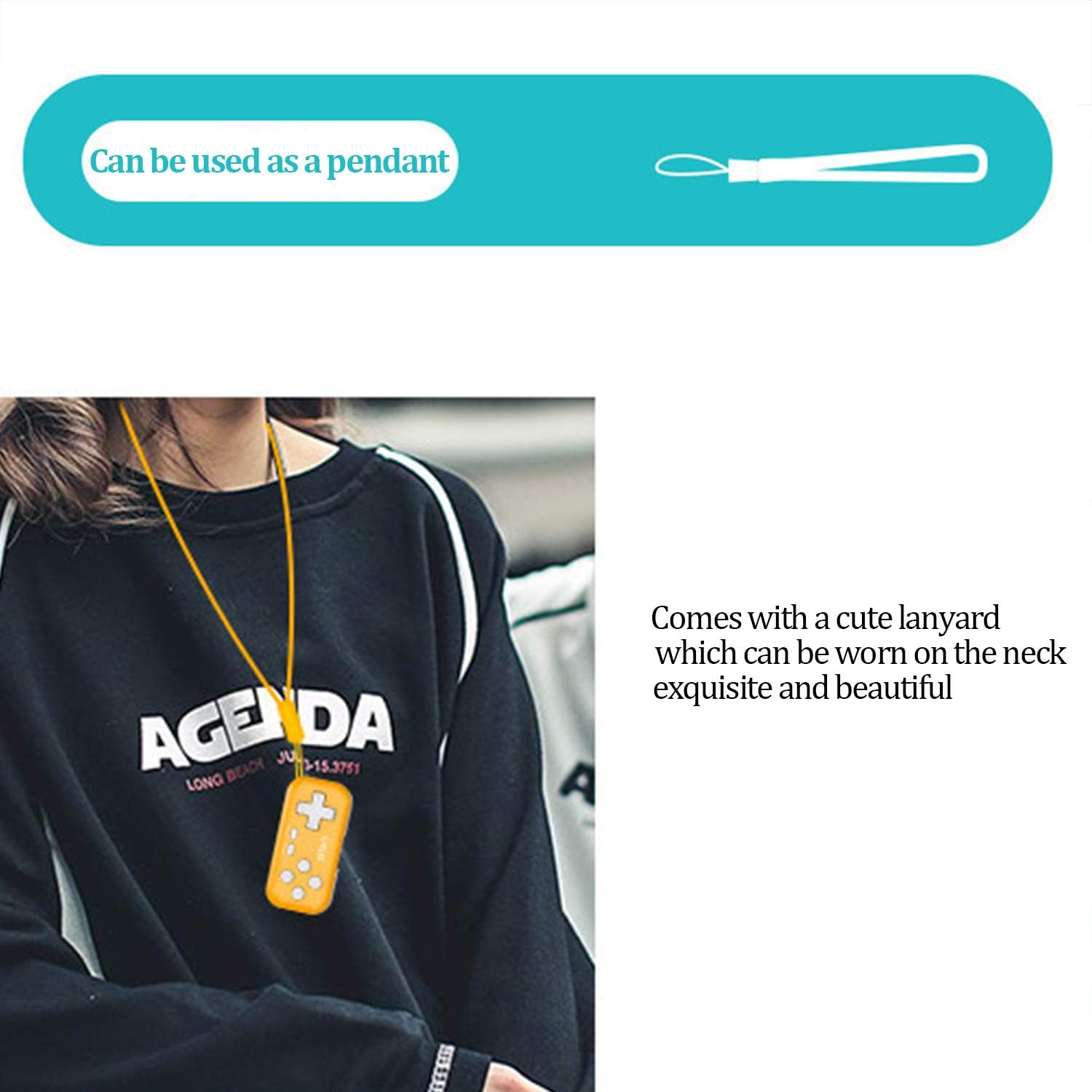
Image: The IPEGA PG-9193 controller shown with its included lanyard, demonstrating how it can be worn or carried for convenience and to prevent loss.
Fehlerbehebung
Controller verbindet sich nicht
- Stellen Sie sicher, dass der Controller vollständig aufgeladen ist.
- Stellen Sie sicher, dass Bluetooth auf Ihrem Gerät aktiviert ist.
- Move the controller closer to the device to ensure it is within the 8-meter transmission range.
- Versuchen Sie, den Controller über die Bluetooth-Einstellungen Ihres Geräts zu entkoppeln und anschließend erneut zu koppeln.
- Starten Sie sowohl den Controller als auch das Gerät neu.
Tasten reagieren nicht
- Prüfen Sie, ob der Controller ordnungsgemäß mit Ihrem Gerät verbunden ist.
- Vergewissern Sie sich, dass das Spiel, das Sie spielen, externe Controller unterstützt.
- If the D-pad is not functioning as expected, remember to switch its mode by pressing Y+X for 2 seconds if it's in joystick mode.
- Recharge the controller, as low battery can affect performance.
Technische Daten
| Arbeitsvolumentage | Gleichstrom 3.7 V |
| Arbeitsstrom | <15 mA |
| Ruhestrom | <10 uA |
| Dauergebrauchszeit | Ungefähr 8 Stunden |
| Eingangslautstärketage/Aktuell | DC 5V / 500MA |
| Ladezeit | Ungefähr 2 Stunden |
| Bluetooth-Version | BT 3.0 |
| Übertragungsdistanz | ≤8 Meter |
| Batteriekapazität | 130 mAh |
| Standby-Zeit | 30 Tage (bei voller Ladung) |
| Abmessungen (L x B x H) | 6.99 x 3.3 x 0.99 cm (2.75 x 1.30 x 0.39 Zoll) |
| Gewicht | 49.9 g (1.76 Unzen) |
| Kompatible Plattformen | Nintendo Switch, PS3, Android (6.0+), Steam, PC (Win 7+) |
Garantie und Support
The product typically comes with an 18-month worry-free product warranty. For any issues or support inquiries, please refer to the contact information provided by your retailer or the official IPEGA support channels.
For further assistance, please visit the official IPEGA website or contact customer service through the platform where the product was purchased.


