Einführung
Thank you for choosing the SBS Music Hero Wireless Bluetooth Earphones. This manual provides essential information for the proper setup, operation, and maintenance of your device. Please read it carefully before use.

Image: The SBS Music Hero Wireless Bluetooth Earphones, shown in their light blue charging case. The earbuds are partially visible, indicating their in-ear design.
Packungsinhalt
- SBS Music Hero Wireless Bluetooth Earphones
- Ladeetui
- Ear tips/earpads
- USB-Ladekabel
- Bedienungsanleitung

Bild: Eine Nahaufnahme view of the two individual SBS Music Hero wireless earphones, highlighting their design and earbud shape.
Installationshandbuch
1. Aufladen der Kopfhörer und des Ladecase
Vor dem ersten Gebrauch die Ohrhörer und das Ladecase vollständig aufladen.
- Connect the Micro-USB charging cable to the charging port on the bottom of the case.
- Verbinden Sie das andere Ende des Kabels mit einer USB-Stromquelle (z. B. Computer, Wandadapter).
- The LED indicator on the case will illuminate during charging and turn off when fully charged.
- Place the earphones into the charging case. The earphones will begin charging automatically.

Image: The bottom of the earphone charging case, showing the Micro-USB charging port and an LED indicator light.
A full charge for the case and earphones typically takes approximately 1 hour. The earphones provide about 2-3 hours of play time on a single charge, with the case offering additional charges for up to 24 hours of standby time.

Image: The open charging case, illustrating the estimated battery life: 2-3 hours play time, 24 hours standby time, and 1 hour charge time.
2. Kopplung mit einem Bluetooth-Gerät
The earphones use Bluetooth technology for wireless connection.
- Stellen Sie sicher, dass die Ohrhörer aufgeladen sind.
- Open the charging case and remove both earphones. They will automatically enter pairing mode. The LED on one earphone will flash, indicating it's ready to pair.
- Aktivieren Sie auf Ihrem Gerät (Smartphone, Tablet, Laptop) Bluetooth und suchen Sie nach neuen Geräten.
- Select "SBS Music Hero" or a similar name from the list of available devices.
- Once connected, the LED indicator on the earphone will stop flashing and remain solid or turn off, depending on the model.
If pairing fails, place the earphones back into the case, close it, and then repeat the steps.
Bedienungsanleitung
The earphones feature a multifunction button for controlling various functions.
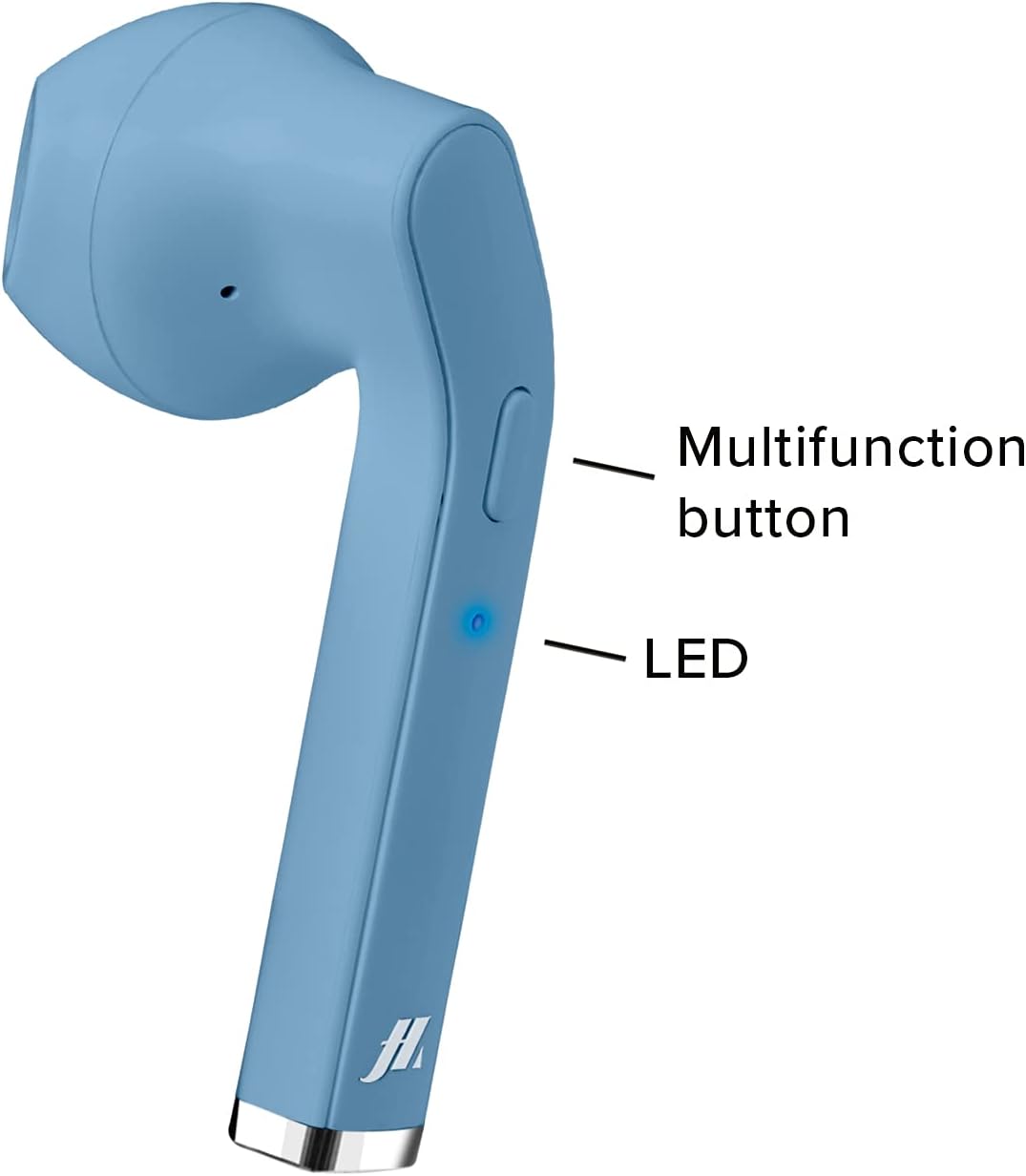
Image: A close-up of one earphone, pointing out the location of the multifunction button and the LED indicator light.
Musikwiedergabe
- Abspielen/Pause: Drücken Sie einmal die Multifunktionstaste.
- Nächster Titel: Double-press the right earphone's multifunction button.
- Vorheriges Lied: Double-press the left earphone's multifunction button.
Anruf-Management
- Anruf annehmen/beenden: Press the multifunction button once during an incoming call or during an active call.
- Eingehenden Anruf abweisen: Press and hold the multifunction button for approximately 2 seconds during an incoming call.
- Wahlwiederholung letzte Nummer: Die Multifunktionstaste dreimal drücken.

Image: An earphone accompanied by icons illustrating its control functions: play/pause, answer/end call, reject incoming call, and redial last number.
Ein-/Ausschalten
- Einschalten: The earphones power on automatically when removed from the charging case. Alternatively, press and hold the multifunction button for 3 seconds.
- Ausschalten: Place the earphones back into the charging case. They will power off automatically. Alternatively, press and hold the multifunction button for 5 seconds.
Wartung und Pflege
- Reinigen Sie die Ohrhörer und das Ladecase regelmäßig mit einem weichen, trockenen Tuch.
- Keine Scheuer- oder Lösungsmittel verwenden.
- Keep the charging contacts on the earphones and inside the case clean to ensure proper charging.
- Avoid exposing the device to extreme temperatures, humidity, or liquids, as it is not water-resistant.
- Bewahren Sie die Ohrhörer bei Nichtgebrauch im Ladecase auf, um sie zu schützen und geladen zu halten.
Fehlerbehebung
| Problem | Mögliche Ursache | Lösung |
|---|---|---|
| Die Kopfhörer lassen sich nicht einschalten. | Schwache Batterie. | Laden Sie die Ohrhörer und das Ladecase vollständig auf. |
| Kopplung mit dem Gerät nicht möglich. | Bluetooth is off on device; earphones not in pairing mode; too far from device. | Ensure Bluetooth is enabled. Place earphones back in case, then remove to re-enter pairing mode. Move closer to the device. |
| Kein Ton oder schlechte Tonqualität. | Volume too low; earphones not properly connected; ear tips not sealed. | Increase volume on your device. Reconnect earphones. Adjust ear tips for a better fit. |
| Nur ein Ohrhörer funktioniert. | One earphone not charged; pairing issue. | Ensure both earphones are charged. Place both earphones back in the case, then remove them together to re-establish stereo pairing. |
Produktspezifikationen
| Besonderheit | Detail |
|---|---|
| Modellnummer | MHTWSSTYLEBTB |
| Konnektivität | Drahtlose Bluetooth-Technologie |
| Earphone Style | In-Ear |
| Material | Plastik |
| Frequenzbereich | 20 Hz – 20,000 Hz |
| Empfindlichkeit | 90 dB |
| Akku-Typ | Lithium-Polymer (3 erforderlich, im Lieferumfang enthalten) |
| Average Battery Life (Play Time) | 2 Stunden |
| Ladezeit | Approx. 1 Hour (Fast Charging) |
| Maße | 4 x 18 x 9 cm |
| Gewicht | 90 g |
| Wasserbeständigkeit | Nein (Nicht wasserfest) |
| Kompatible Geräte | Smartphones, Tablets, Laptops, Desktop Computers |
| Lärmschutz | Aktive Geräuschunterdrückung |
Garantieinformationen
Specific warranty details are not provided in the product data. Please refer to the retailer's return policy or contact the manufacturer directly for warranty information.
Kundenservice
For technical support or further assistance, please contact the manufacturer or your point of purchase. Keep your product model number (MHTWSSTYLEBTB) and purchase details ready when contacting support.


