Einführung
Thank you for choosing the Mount Plus MP-L28-600 Long Arm Full Motion TV Wall Bracket. This manual provides essential information for safe installation, operation, and maintenance of your new TV mount. Please read it thoroughly before beginning installation and keep it for future reference.
This full motion TV wall bracket is designed to fit most 32-inch to 70-inch flat or curved TVs, including popular brands like Samsung, Sony, Panasonic, TCL, and LG. It supports VESA patterns from 100x100mm up to 600x400mm and can hold TVs weighing up to 77 lbs (35 kg).
Sicherheitshinweise
- Ensure the mounting surface can safely support the combined weight of the mount and the TV. Consult a professional if unsure.
- Die maximale Tragfähigkeit von 77 lbs (35 kg) darf nicht überschritten werden.
- Always use a stud finder to locate wood studs for secure mounting. For concrete walls, use appropriate anchors (not always included, verify package contents).
- Improper installation may result in serious injury or damage to your TV and property.
- Halten Sie Kinder und Haustiere während der Installation fern.
- Tragen Sie geeignete Schutzausrüstung, einschließlich Augenschutz.
- Alle Schrauben fest anziehen, aber nicht zu fest.
Packungsinhalt
Verify that all components are present and undamaged before beginning installation. If any parts are missing or damaged, contact Mount Plus customer support.
| Komponente | Beschreibung | Menge |
|---|---|---|
| Wandplattenbaugruppe | Main wall-mounted arm and plate. | 1 |
| TV-Halterungsarme | Vertical bars that attach to the TV. | 2 |
| Hardware Pack | Assorted screws, washers, spacers, and anchors for TV and wall. | 1 Satz |
| Installationsvorlage | Paper template for drilling holes. | 1 |
Setup und Installation
This section outlines the general steps for installing your Mount Plus MP-L28-600 TV wall bracket. Always refer to the detailed instruction manual included in your package for specific drilling measurements and hardware selection.
1. Prepare the Wall and Mount
Identify the desired mounting location. For wood stud walls, use a reliable stud finder to locate the center of two adjacent studs (16-inch on center spacing is common). For solid concrete walls, ensure you have appropriate concrete anchors (sold separately if not included). Use the provided drilling template to mark pilot holes.

Image: The Mount Plus MP-L28-600 TV wall mount, showing its articulating arm and wall plate. This image illustrates the full range of motion of the mount.

Image: The Mount Plus MP-L28-600 TV wall mount fully extended, highlighting its 29-inch extension capability from the wall.
2. Attach Wall Plate to Wall
Secure the wall plate assembly to the wall using the appropriate lag bolts and washers. Ensure the mount is level before fully tightening all bolts. The offset wall plate design allows for corner installation, maximizing space utilization.

Image: A diagram illustrating the mount's extension up to 29 inches and retraction to 2.2 inches from the wall, providing flexibility for various viewing-Bedürfnisse.
3. Befestigen Sie die TV-Halterungen am Fernseher.
Select the correct screws, washers, and spacers for your TV's VESA mounting holes. Attach the two vertical TV bracket arms to the back of your television. Ensure they are securely fastened and evenly spaced.
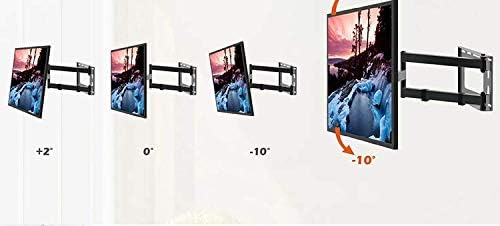
Image: A diagram demonstrating the tilt functionality of the TV mount, allowing for adjustments from +2 degrees to -10 degrees for optimal viewing.
4. Hang TV on Wall Mount
Carefully lift the television with the attached brackets and hook them onto the wall plate assembly. Secure the TV to the mount using the locking screws or mechanisms provided. It is recommended to have at least two people for this step to prevent injury or damage.

Bild: Ein Example of the Mount Plus TV mount installed in a room, showcasing its discreet profile when retracted and its ability to blend with home decor.
Bedienungsanleitung
The Mount Plus MP-L28-600 offers a complete range of adjustments for optimal viewing.
- Aus-/Einfahren: Gently pull or push the TV to extend it up to 29 inches from the wall or retract it to a mere 2.2 inches.
- Schwenken: The articulating arm allows for wide swivel angles, up to 90 degrees left or right, depending on TV size and wall clearance. This is ideal for viewing from multiple positions in a room or for corner installations.
- Neigung: Adjust the vertical tilt from +2 degrees (upward) to -10 degrees (downward) to reduce glare and achieve the perfect viewing-Winkel.
- Pegeleinstellung: After installation, you can fine-tune the TV's level by rotating it slightly, typically within a range of +/- 3 degrees, to ensure a perfectly horizontal display.

Image: A diagram illustrating the swivel capability of the TV mount, allowing for a wide range of horizontal adjustments to optimize viewing angles from different positions.
For a visual guide on the mount's capabilities, please watch the official product video:
Video: Official product video demonstrating the full motion capabilities of the Mount Plus 29-inch Extension Wall Mount for 32 to 70 inch TVs, including extension, retraction, swivel, and tilt.
Wartung
- Periodically check all screws and bolts to ensure they remain tight. Loose connections can compromise safety and stability.
- Reinigen Sie die Halterung mit einem weichen, trockenen Tuch. Vermeiden Sie scheuernde Reiniger oder Lösungsmittel, die die Oberfläche beschädigen könnten.
- Do not apply lubricants to the articulating joints unless specifically instructed by the manufacturer, as this could affect the tension and movement.
Fehlerbehebung
| Problem | Mögliche Ursache | Lösung |
|---|---|---|
| Der Fernseher ist nicht waagerecht. | Minor rotational misalignment. | Use the level adjustment feature to rotate the TV slightly until it is level. Refer to the operating instructions. |
| Mount feels wobbly or unstable. | Lose Befestigungsschrauben oder falsche Wandart. | Check all wall mounting bolts and TV attachment screws for tightness. Ensure the mount is installed into solid wood studs or concrete. Do not use on drywall alone. |
| Difficulty moving the arm. | Joints may be too tight or require breaking in. | Gently work the arm through its full range of motion several times. If persistent, check for any obstructions. Do not force movement. |
Technische Daten
- Modell: MP-L28-600
- Kompatibilität mit Bildschirmgrößen: 32 bis 70 Zoll
- Gewichtskapazität: Bis zu 77 kg (35 Pfund)
- VESA-Kompatibilität: 100x100mm, 200x100mm, 200x200mm, 300x300mm, 400x400mm, 600x400mm
- Verlängerung von der Wand: 2.2 Zoll (eingefahren) bis 29 Zoll (ausgefahren)
- Neigungsbereich: +2° bis -10°
- Schwenkbereich: Up to ±90° (depending on TV size)
- Pegeleinstellung: ±3°
- Material: Hochleistungsfähiger Kohlenstoffstahl
- Montageart: Wall Mount (Dual Stud for 16" wood studs, also suitable for solid concrete walls)
Garantie und Support
Mount Plus products are designed for durability and reliability. For specific warranty information, please refer to the warranty card included with your product or visit the official Mount Plus website. If you encounter any issues or have questions regarding installation or operation, please contact Mount Plus customer support for assistance.
Weitere Ressourcen und häufig gestellte Fragen finden Sie auch auf der Mount Plus Store on Amazon.
Eine herunterladbare PDF-Version des Benutzerhandbuchs finden Sie hier: Benutzerhandbuch (PDF)


