1. Einleitung
The Nikon WR-R11b is a wireless remote controller designed to provide remote shutter release functionality for compatible Nikon cameras and control for radio-controlled flash units like the SB-5000 Speedlight. This device operates using radio frequencies, offering enhanced range and reliability compared to infrared systems. It can function as a transceiver, allowing it to be triggered by other Nikon wireless remote controllers or to act as a master unit for controlling multiple WR-R11b units.
This manual provides detailed instructions for the proper setup, operation, and maintenance of your WR-R11b to ensure optimal performance and longevity.
2. Sicherheitshinweise
Please read all safety instructions carefully before using the WR-R11b. Failure to follow these instructions could result in injury or damage to the product or other equipment.
- Nicht zerlegen oder verändern: Unauthorized disassembly or modification can lead to electric shock or malfunction.
- Bleib trocken: This product is not waterproof. Do not expose it to water or high humidity.
- Vermeiden Sie extreme Temperaturen: Do not use or store the device in extremely hot or cold environments.
- Vorsichtig handhaben: Vermeiden Sie es, das Gerät fallen zu lassen oder starken Stößen auszusetzen.
- Interferenz: This device operates on radio frequencies. Be aware of potential interference with other electronic devices.
3. Packungsinhalt
Bitte prüfen Sie, ob alle unten aufgeführten Artikel in Ihrem Paket enthalten sind. Sollte ein Artikel fehlen oder beschädigt sein, wenden Sie sich bitte an Ihren Händler.
- WR-R11b Remote Controller
- Small strap (for attaching to camera strap)
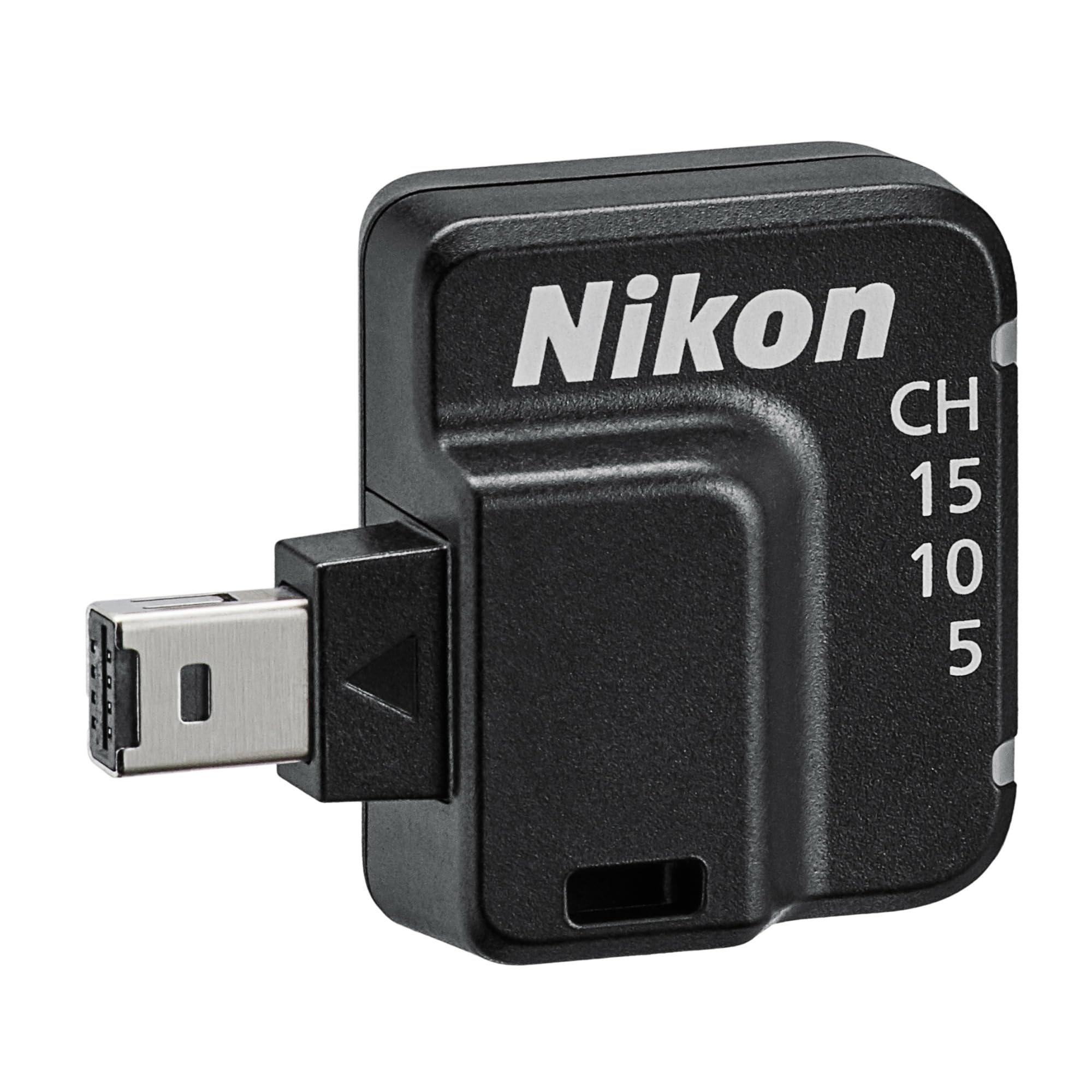
Bild 1: The Nikon WR-R11b Wireless Remote Controller, shown with its compact design and the included small strap for convenient attachment to a camera strap.
4. Einrichtung
4.1 Attaching the WR-R11b to the Camera
The WR-R11b connects to your Nikon camera via its accessory port.
- Locate the accessory port on your compatible Nikon camera (e.g., Z 7II, Z 6II).
- Align the connector on the WR-R11b with the camera's accessory port.
- Gently push the WR-R11b into the port until it is securely seated. Do not force the connection.
- Use the provided small strap to secure the WR-R11b to your camera strap or another convenient location to prevent accidental disconnection or loss.
4.2 Pairing with a Transmitter (WR-T10 or WR-1)
To enable wireless control, the WR-R11b must be paired with a compatible transmitter unit such as the WR-T10 or WR-1.
- Ensure both the camera (with WR-R11b attached) and the transmitter (WR-T10 or WR-1) are powered on.
- Refer to your camera's manual for specific instructions on enabling remote control functionality.
- On the WR-R11b, press and hold the pairing button (refer to the device for exact location, typically a small recessed button).
- While holding the WR-R11b pairing button, initiate the pairing process on your WR-T10 or WR-1 transmitter according to its instruction manual.
- A successful pairing will typically be indicated by a status light on both units.
4.3 Kanalauswahl
The WR-R11b supports three radio frequency channels (5, 10, and 15) to minimize interference when multiple photographers are operating in the same area or when controlling multiple units.
- The channel selection is typically performed on the master unit (WR-T10, WR-1, or a WR-R11b acting as master).
- Ensure that all WR-R11b units and the transmitting unit are set to the same channel for proper communication.
- Consult the manual for your specific transmitter or camera for detailed instructions on changing the operating channel.
5. Bedienungsanleitung
5.1 Grundlegender Auslöser
Once the WR-R11b is connected and paired, you can remotely trigger your camera's shutter.
- Press the shutter release button on your WR-T10 or WR-1 transmitter.
- The camera connected to the WR-R11b will respond as if its own shutter button was pressed.
- Half-press for autofocus, full-press for shutter release, depending on your camera's settings and the transmitter's capabilities.
5.2 Controlling Multiple Units
The WR-R11b system allows for simultaneous control of multiple cameras or flash units.
- A single WR-T10 or WR-1 can trigger multiple cameras, each equipped with a WR-R11b, provided they are all paired and on the same channel.
- A WR-R11b unit attached to a designated master camera can trigger up to 64 other transceiver units (WR-R11b, WR-R10, or WR-11a/b).
5.3 Controlling Speedlights
The WR-R11b can also be used to control radio-controlled flash units, such as the Nikon SB-5000 Speedlight.
- Up to 18 Speedlights can be paired to the WR-R11b on the camera.
- The communication distance between the WR-R11b on the camera and a Speedlight is approximately 98 feet (30 meters).
- Refer to your Speedlight's manual for specific pairing and control instructions.
5.4 Betriebsbereich
The effective operating range of the WR-R11b system depends on the configuration:
- WR-T10 to WR-R11b: Approximately 66 feet (20 meters) line of sight.
- WR-R11b (master) to other WR-R10/WR-11a/b units: Approximately 164 feet (50 meters) line of sight.
- WR-R11b (on camera) to Speedlight: Ungefähr 98 Fuß (30 Meter).
Notiz: Actual range may vary depending on environmental conditions, obstacles, and radio interference.
6. Wartung
6.1 Reinigung
To maintain the performance and appearance of your WR-R11b:
- Wischen Sie das Gerät vorsichtig mit einem weichen, trockenen Tuch ab.
- Do not use alcohol, thinners, or other volatile chemicals, as these can damage the finish.
- Avoid getting moisture into the accessory port.
6.2 Speicherung
When not in use for extended periods, store the WR-R11b in a cool, dry place away from direct sunlight and extreme temperatures.
7. Fehlerbehebung
If you encounter issues with your WR-R11b, refer to the following common problems and solutions:
| Problem | Mögliche Ursache | Lösung |
|---|---|---|
| Gerät reagiert nicht. |
|
|
| Intermittent connection or poor range. |
|
|
| Cannot control Speedlights. |
|
|
8. Spezifikationen
| Besonderheit | Detail |
|---|---|
| Modellname | WR-R11b |
| Nikon Model Number | 4239 |
| Typ | Wireless Remote Controller (Transceiver) |
| Kommunikation | Radio Frequency (2.4 GHz band) |
| Kanäle | 3 (5, 10, 15) |
| Range (WR-T10 to WR-R11b) | Approx. 66 ft (20 m) line of sight |
| Range (WR-R11b master to other units) | Approx. 164 ft (50 m) line of sight |
| Range (WR-R11b to Speedlight) | Ca. 98 m (30 Fuß) |
| Max Supported Transceiver Units (as master) | 64 |
| Max Supported Speedlights | 18 |
| Stromquelle | Supplied by camera via accessory port |
| Kompatible Kameras | Nikon cameras with an accessory port (e.g., Z 7II, Z 6II) |
| Technische Daten | 6.1 x 8 x 1.8 Zoll |
| Artikelgewicht | 6.1 Unzen |
9. Garantie und Support
For information regarding the product warranty, please refer to the warranty card included with your purchase or visit the official Nikon webWebsite.
For technical support, service, or additional product information, please contact Nikon customer support through their official channels.


