1. Einleitung
The Vgate VR800 OBD2 Scanner is a powerful and user-friendly diagnostic tool designed for automotive enthusiasts and professional mechanics alike. It provides comprehensive diagnostic functions for OBD-II/EOBD compliant vehicles, enabling users to quickly identify and resolve issues related to the Check Engine Light (CEL). This manual provides detailed instructions on how to set up, operate, and maintain your VR800 scanner to ensure optimal performance and accurate vehicle diagnostics.
2. Produktüberschreitungview
The Vgate VR800 is a handheld diagnostic device featuring a color LCD display, intuitive button layout, and a durable OBD-II connector cable. Its compact design allows for easy portability and use in various automotive environments.
2.1 Schlüsselkomponenten
- LCD-Farbdisplay: Provides clear and detailed diagnostic information.
- Navigationstasten: Menünavigation mit Pfeiltasten (oben, unten, links, rechts).
- OK-Taste: Bestätigt die Auswahl.
- I/M-Taste: Shortcut for I/M Readiness status.
- Question Mark (?) Button: Provides help and DTC lookup information.
- Zurück-Taste: Navigiert zurück zum vorherigen Bildschirm.
- OBD-II-Anschluss: Connects the scanner to the vehicle's diagnostic port.
- USB-Anschluss: Für Software-Updates und Datendruck.

3. Funktionen
The Vgate VR800 OBD2 Scanner offers a comprehensive set of features for vehicle diagnostics:
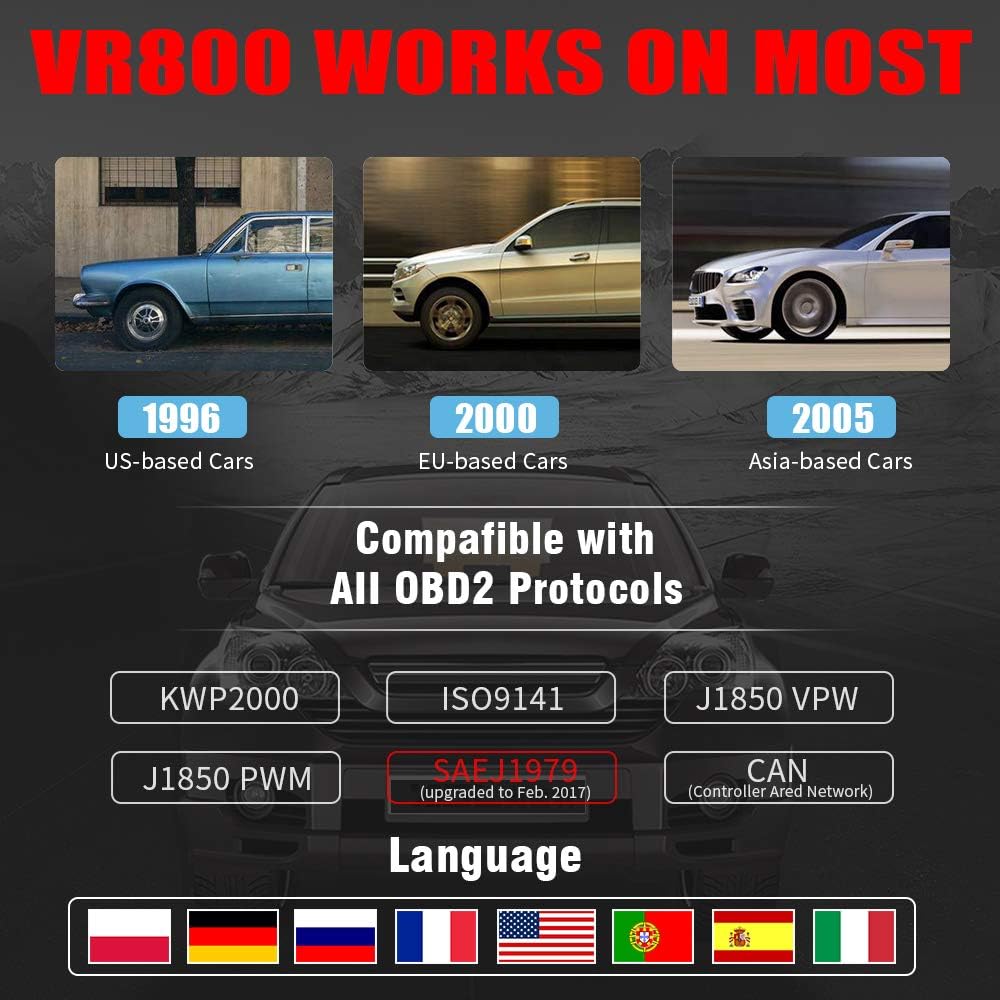
- All OBD2 Protocols Support: Compatible with ISO9141, KWP2000, J1850 PWM, J1850 VPW, and CAN protocols. Compliance with SAEJ1979 has been upgraded to the latest standards (February 2017).
- Breite Fahrzeugkompatibilität: Works with most American vehicles manufactured after 1996, European vehicles after 2000, and Asian vehicles after 2005. Applicable to OBD-II/CAN/EOBD-compliant vehicles, including light-duty trucks (6.5T or less), SUVs, and minivans.
- Smog Check Helper (I/M Readiness): Features Red-Yellow-Green LEDs and a built-in speaker to indicate readiness status for emissions testing. Dedicated I/M and '?' shortcut keys provide quick access to readiness checks.
- Full OBD Service Modes: Quickly reads and checks Diagnostic Trouble Codes (DTCs), views freeze frame data, reads live PCM data stream, performs On-Board Monitor tests, and displays live O2 sensor test data.
- Built-in DTC Lookup Library: Allows accurate determination of the causes of the Check Engine Light.
- Accurate Battery Status Check: Reads real-time battery and voltage Informationen.
- Mehrsprachige Unterstützung: Available in English, French, German, Italian, Spanish, Russian, Polish, and Portuguese.
- Data Logging and Printing: Supports data logging and connection to a PC for printing diagnostic data files.



4. Einrichtung
Follow these steps to set up your Vgate VR800 OBD2 Scanner:
- Suchen Sie den OBD-II-Anschluss: Der OBD-II-Anschluss befindet sich üblicherweise unter dem Armaturenbrett auf der Fahrerseite. Sollten Sie ihn nicht finden, konsultieren Sie die Bedienungsanleitung Ihres Fahrzeugs.
- Schließen Sie den Scanner an: Plug the VR800's OBD-II connector cable firmly into the vehicle's OBD-II port.
- Einschalten: The scanner will automatically power on once connected to the vehicle's OBD-II port. No external power source or batteries are required as it draws power directly from the vehicle.
- Ersteinrichtung (falls dazu aufgefordert): If this is your first time using the scanner or after a factory reset, you may be prompted to select a language. Use the navigation buttons to select your preferred language and press OK.

5. Bedienungsanleitung
Once the scanner is connected and powered on, you can begin diagnosing your vehicle.
5.1 Navigation im Menü
Verwenden Sie die UP Und RUNTER Drücken Sie die Pfeiltasten, um durch die Menüoptionen zu blättern. OK Drücken Sie die Taste, um eine Option auszuwählen. Zurückkehren Taste, um zum vorherigen Bildschirm zurückzukehren.
5.2 Auslesen von Diagnosefehlercodes (DTCs)
- Wählen Sie im Hauptmenü DTCs lesen.
- The scanner will display any active or pending DTCs. Each code will have a brief description.
5.3 Clearing DTCs
Warning: Clearing DTCs will erase all diagnostic trouble codes from the vehicle's computer and may reset readiness monitors. Ensure you have addressed the underlying issue before clearing codes.
- Wählen Sie im Hauptmenü Löschen von DTCs.
- Confirm your selection when prompted. The scanner will attempt to clear the codes.
5.4 I/M-Bereitschaftsfunktion
The I/M Readiness function checks if the various emissions-related systems on the vehicle are operating correctly and if they have completed their self-tests.
- Drücken Sie die entsprechende ICH BIN Knopf am Scanner.
- The display will show the status of various monitors (e.g., O2 Sensor, EVAP, Catalyst). A green light indicates ready, yellow indicates pending, and red indicates not ready or a fault.
5.5 ViewLive-Daten
Live-Daten ermöglichen Ihnen view real-time sensor data from the vehicle's engine control unit (ECU).
- Wählen Sie im Hauptmenü Live-Daten.
- Choose the specific data parameters you wish to view (e.g., engine RPM, vehicle speed, O2 sensor voltagUnd).
5.6 DTC-Suche
If you have a DTC and need more information, use the built-in DTC lookup library.
- Wählen Sie im Hauptmenü DTC-Suche oder drücken Sie die ? button when a DTC is displayed.
- Enter the DTC code (if not already displayed) to get a detailed description and possible causes.
5.7 Überprüfung des Batteriestatus
To check your vehicle's battery voltage and status:
- Wählen Sie im Hauptmenü Batterie.
- Der Scanner zeigt den aktuellen Akkustand an.tage and an estimated charge percentage.
6. Wartung
Proper maintenance ensures the longevity and accuracy of your Vgate VR800 scanner.
- Reinigung: Reinigen Sie die Außenseite des Scanners mit einem weichen, trockenen Tuch. Verwenden Sie keine Scheuermittel oder Lösungsmittel.
- Lagerung: Bewahren Sie den Scanner in einer sauberen, trockenen Umgebung fern von extremen Temperaturen und direkter Sonneneinstrahlung auf.
- Software-Updates: Regularly check for software updates to ensure compatibility with the latest vehicle models and diagnostic protocols. Updates can typically be performed by connecting the scanner to a PC via the USB port and using the provided update software.
7. Fehlerbehebung
If you encounter issues while using your Vgate VR800 scanner, refer to the following common problems and solutions:
- Scanner lässt sich nicht einschalten:
- Stellen Sie sicher, dass der OBD-II-Stecker fest mit der entsprechenden Buchse des Fahrzeugs verbunden ist.
- Verify the vehicle's ignition is in the ON position (engine can be off).
- Prüfen Sie die Sicherung des OBD-II-Anschlusses am Fahrzeug (siehe Fahrzeughandbuch).
-
Zugehörige Dokumente - VR800

Vgate iCar Pro BLE 4.0 Schnellstartanleitung für iOS & Android
Starten Sie schnell mit Ihrem Vgate iCar Pro BLE 4.0 OBD-II-Scanner. Diese Anleitung behandelt die Fahrzeugkonformität, die App-Installation, die Bluetooth-Kopplung für iOS und Android, unterstützte OBD-Parameter und die Fehlerbehebung für Ihr Kfz-Diagnosegerät.
Vgate vLinker BM+ Bluetooth OBD2-Scanner – Kurzanleitung
Schritt-für-Schritt-Anleitung zum Verbinden des Vgate vLinker BM+ Bluetooth OBD2-Scanners mit Ihrem Fahrzeug zur Diagnose und App-Integration. Unterstützt Android- und iOS-Geräte.
Vgate iCar Pro BT3.0 Kurzanleitung für Android
Starten Sie schnell mit Ihrem Vgate iCar Pro BT3.0 OBD-II-Scanner für Android. Dieses Handbuch behandelt Fahrzeugkonformität, unterstützte Protokolle, App-Einrichtung, Kopplung, Fehlerbehebung und das Verständnis von Diagnosecodes.
Vgate iCar OBD II Adapter Benutzerhandbuch - Handbuch zum Diagnosetool
Umfassendes Benutzerhandbuch für den Vgate iCar OBD II-Adapter mit detaillierten Angaben zu seinen Funktionen, Spezifikationen, unterstützten Protokollen, Einrichtungsanleitung und Warnungen zur Fahrzeugdiagnose.
Vgate iCar2 BT3.0 Kurzanleitung und OBDII-Informationen
Eine umfassende Anleitung zum Vgate iCar2 BT3.0 Bluetooth-OBDII-Scanner mit Informationen zu Fahrzeugkompatibilität, App-Unterstützung, Verbindungsschritten, Fehlerbehebung und Erklärungen zum OBDII-Code.
Vgate vLinker FD OBD-Scanner Bluetooth-Schnellstartanleitung
Kurzanleitung zur Einrichtung und Verwendung des Vgate vLinker FD OBD-Scanners mit Bluetooth-Verbindung für Android- und Windows-Geräte. Erfahren Sie, wie Sie die App herunterladen, die Verbindung herstellen und das Gerät koppeln.