Einführung
Thank you for choosing the AUNA Microstar Sing Vertical Karaoke Micro System. This manual provides essential information for the safe and efficient operation of your device. Please read it thoroughly before use and retain it for future reference.
Sicherheitshinweise
- Lesen Sie alle Anweisungen sorgfältig durch, bevor Sie das Gerät in Betrieb nehmen.
- Das Gerät sollte vor Wasser, Feuchtigkeit und direkter Sonneneinstrahlung geschützt werden.
- Blockieren Sie keine Lüftungsöffnungen. Sorgen Sie für ausreichend Platz um das Gerät herum, um eine ordnungsgemäße Luftzirkulation zu gewährleisten.
- Verwenden Sie nur das mit dem Gerät mitgelieferte Netzteil.
- Versuchen Sie nicht, das Gerät selbst zu reparieren oder zu modifizieren. Überlassen Sie alle Wartungsarbeiten qualifiziertem Fachpersonal.
- Reinigen Sie das Gerät nur mit einem trockenen, weichen Tuch. Verwenden Sie keine flüssigen Reiniger oder Sprays.
- Kleinteile und Verpackungsmaterialien für Kinder unzugänglich aufbewahren.
Packungsinhalt
Bitte prüfen Sie das Paket auf folgende Artikel:
- AUNA Microstar Sing Main Unit
- Stereolautsprecher (2 Stück)
- Kabelgebundenes Mikrofon
- Netzteil
- Benutzerhandbuch (dieses Dokument)
Produkt überview
The AUNA Microstar Sing is a versatile micro system designed for karaoke and audio playback. It features a compact design, multiple input options, and integrated LED lighting.

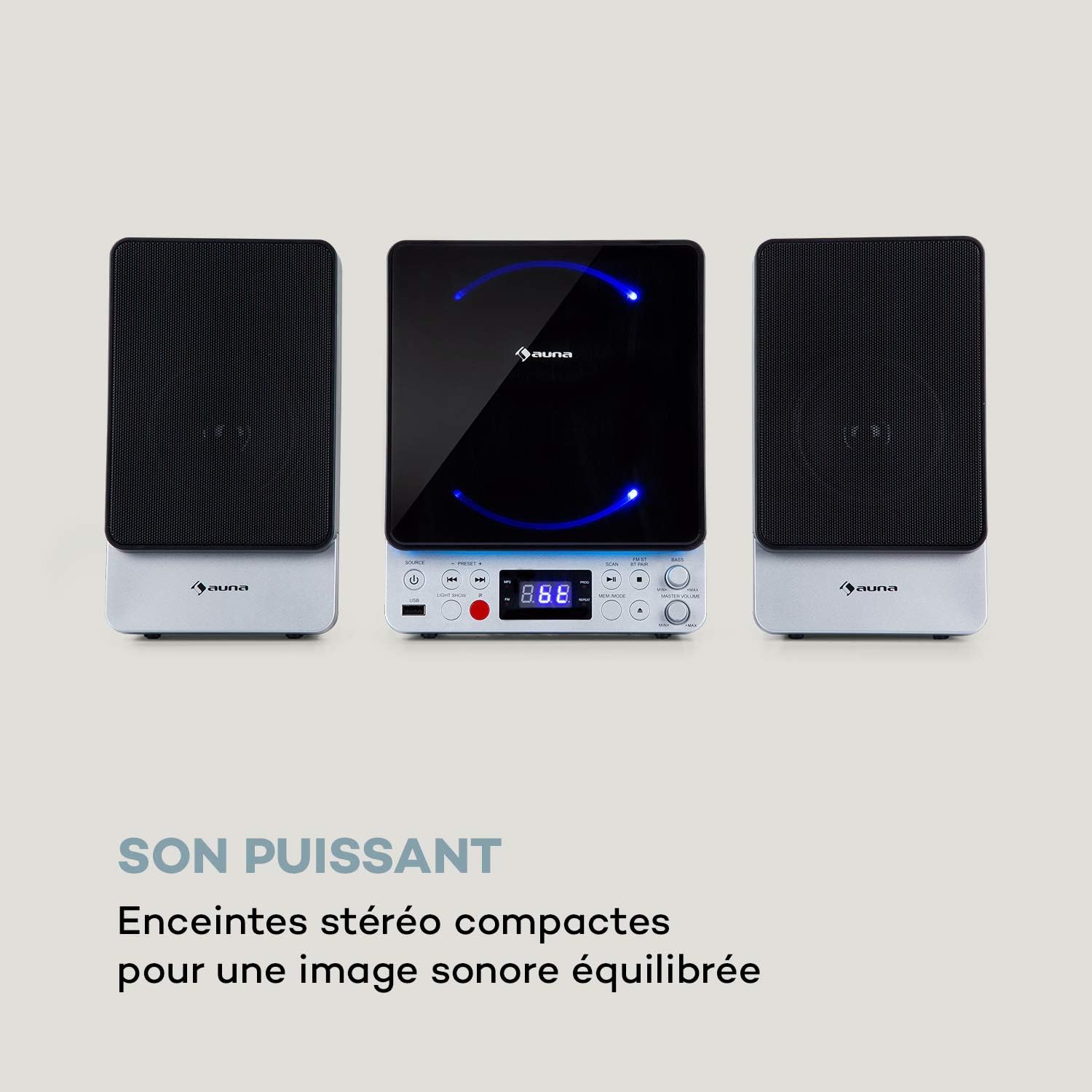

Hauptmerkmale:
- Platzsparendes vertikales Design
- CD player compatible with standard audio CDs, CD-R, CD-RW, MP3 CDs, and CD-G (Karaoke CDs with graphics)
- Video output (composite PAL) for displaying CD-G lyrics on an external screen
- Bluetooth interface for wireless audio streaming
- USB port for MP3 playback from USB storage devices
- FM radio tuner with 30 preset stations
- Two microphone inputs for duets
- Integrated LED lighting for ambiance
- AUX-In for connecting external audio sources
Aufstellen
1. Auspacken und Aufstellen:
Carefully remove all components from the packaging. Place the main unit and speakers on a stable, flat surface. Ensure there is adequate ventilation around the unit.
2. Die Lautsprecher verbinden:
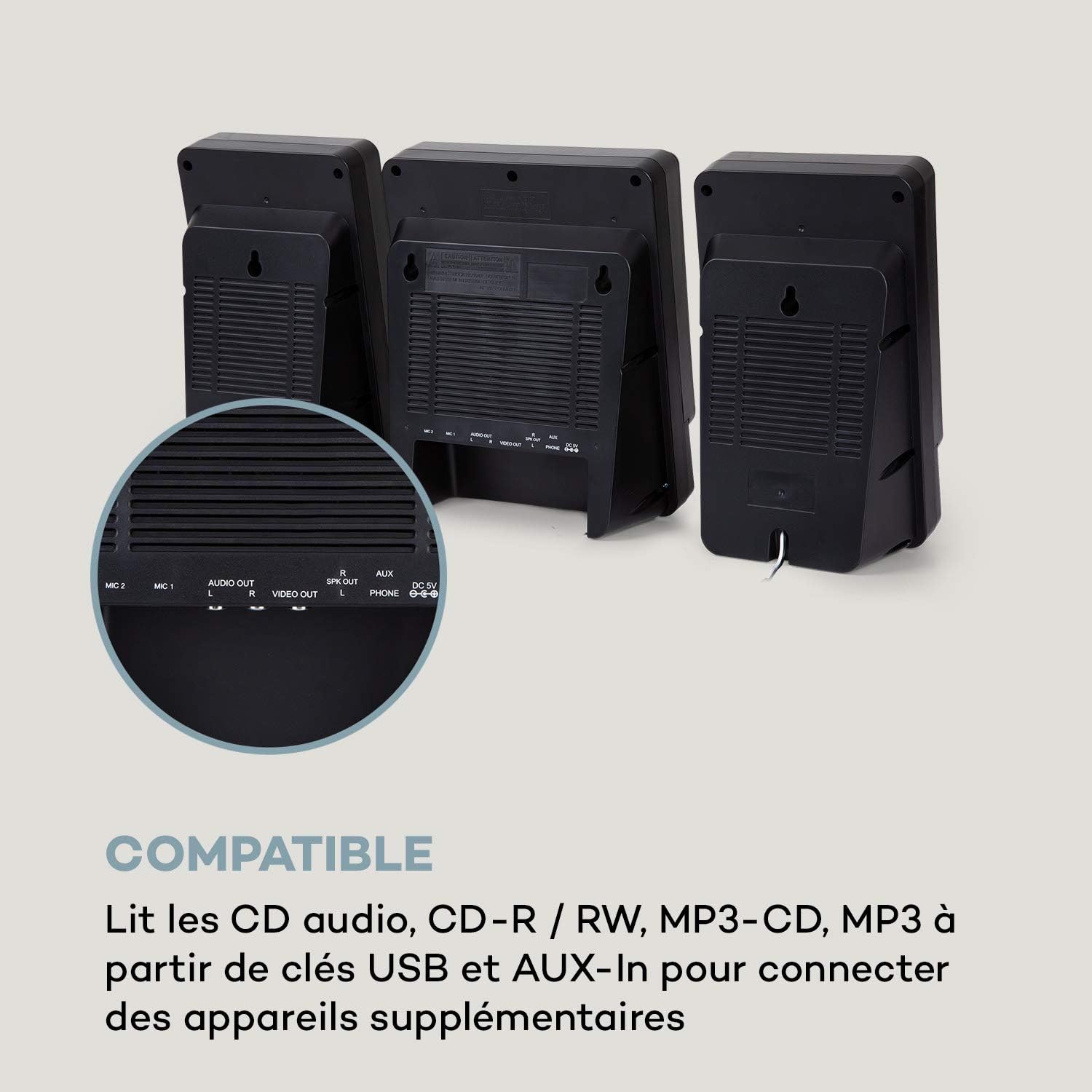
Connect the two stereo speakers to the speaker output ports on the main unit. Ensure a secure connection for optimal sound quality.
3. Stromanschluss:
Connect the supplied power adapter to the DC 5V input on the main unit, then plug the adapter into a wall outlet.
4. Mikrofonanschluss:
Plug the wired microphone into one of the MIC input jacks (MIC 1 or MIC 2) on the main unit.
5. Video Output (for CD-G):
If using CD-G discs, connect a composite video cable (not included) from the VIDEO OUT port on the main unit to the video input of your TV or monitor.
Bedienungsanleitung
1. Ein-/Ausschalten:
Drücken Sie die LEISTUNG Taste, um das Gerät ein- oder auszuschalten.
2. Quellenauswahl:
Drücken Sie die QUELLE button repeatedly to cycle through available modes: CD, Bluetooth (BT), USB, FM, AUX.
3. CD-Wiedergabe:
- Wählen Sie den CD-Modus mit dem QUELLE Taste.
- Öffnen Sie das CD-Fach.
- Place a CD (audio CD, CD-R, CD-RW, MP3 CD, or CD-G) onto the spindle with the label side facing up.
- Close the CD compartment. The disc will begin playing automatically or after pressing WIEDERGABE/PAUSE.
- Verwenden VORHERIGE Und NÄCHSTE Tasten zum Überspringen von Titeln.

4. Bluetooth-Kopplung:
- Select BT mode using the QUELLE button. The display will show "BT" and flash, indicating pairing mode.
- Aktivieren Sie Bluetooth auf Ihrem Mobilgerät (Smartphone, Tablet usw.).
- Suchen nach "AUNA Microstar Sing" in your device's Bluetooth settings and select it to pair.
- Once paired, you can stream audio wirelessly from your device to the Microstar Sing.

5. USB-Wiedergabe:
- Stecken Sie einen USB-Stick mit MP3-Audiodateien ein. files in den USB-Port.
- Wählen Sie den USB-Modus mit dem QUELLE Taste.
- Das Gerät erkennt automatisch MP3-Dateien und beginnt mit der Wiedergabe. files.
- Verwenden VORHERIGE Und NÄCHSTE Schaltflächen zum Navigieren in den Tracks.
6. UKW-Radio:
- Wählen Sie den FM-Modus mit dem QUELLE Taste.
- Drücken Sie die SCAN Taste zum automatischen Scannen und Speichern verfügbarer FM-Sender.
- Verwenden Sie die VOREINSTELLUNG + Und VOREINSTELLUNG - Tasten zum Durchschalten der gespeicherten Sender.
7. Karaoke-Funktion:
With a CD-G disc playing and connected to a TV, or any audio source playing, adjust the microphone volume using the dedicated LAUTSTÄRKE VON DEM MIKROFON knob. Sing along with the music. The LED lighting will enhance the karaoke experience.
8. Lautstärkeregelung:
Passen Sie die Gesamtlautstärke mit dem/der/dem … an. MASTERLAUTSTÄRKE Knopf. Das BASS knob allows for bass level adjustment.
9. LED Light Show:
Drücken Sie die LICHTVORFÜHRUNG button to activate or deactivate the integrated LED lighting effects.
Wartung
Reinigung:
Wischen Sie das Gerät mit einem weichen, trockenen Tuch ab. Verwenden Sie keine Scheuermittel, Wachse oder Lösungsmittel, da diese die Oberfläche beschädigen können. Stellen Sie sicher, dass das Gerät vor der Reinigung vom Stromnetz getrennt ist.
Lagerung:
If not in use for an extended period, unplug the unit and store it in a cool, dry place, away from direct sunlight and extreme temperatures.
Fehlerbehebung
| Problem | Mögliche Ursache | Lösung |
|---|---|---|
| Kein Strom | Netzteil nicht angeschlossen oder Steckdose defekt. | Stellen Sie sicher, dass das Netzteil fest mit dem Gerät und einer funktionierenden Steckdose verbunden ist. |
| Kein Ton | Volume too low; incorrect source selected; speakers not connected. | Increase master volume. Select the correct input source. Check speaker connections. |
| CD wird nicht abgespielt | CD inserted incorrectly; disc scratched/dirty; incorrect mode. | Ensure CD is inserted correctly. Clean or replace the disc. Select CD mode. |
| Bluetooth stellt keine Verbindung her | Unit not in pairing mode; device too far; Bluetooth off on source device. | Ensure unit is in BT mode and flashing. Move device closer. Enable Bluetooth on your device. |
| Mikrofon funktioniert nicht | Microphone not connected; MIC volume too low. | Ensure microphone is securely plugged in. Increase MIC volume. |
| Schlechter UKW-Radioempfang | Schwaches Signal; Antenne nicht richtig positioniert. | Adjust the position of the unit or external antenna (if applicable) for better reception. |
Technische Daten
| Besonderheit | Spezifikation |
|---|---|
| Marke | auna |
| Modellnummer | MG3-9200-hghg |
| Farbe | Silber |
| Konnektivitätstechnologie | Bluetooth, USB |
| Anschlüsse | USB, AUX-In, Microphone (2), Video Out (Composite) |
| Anzahl USB-Anschlüsse | 1 |
| Medientyp | CD-RW, USB, MP3 CD, CD-G |
| Anzahl der Lautsprecher | 2 (Stereo) |
| Bestandteile umfaßten | Mikrofon |
| Empfohlene Verwendung | Heim |
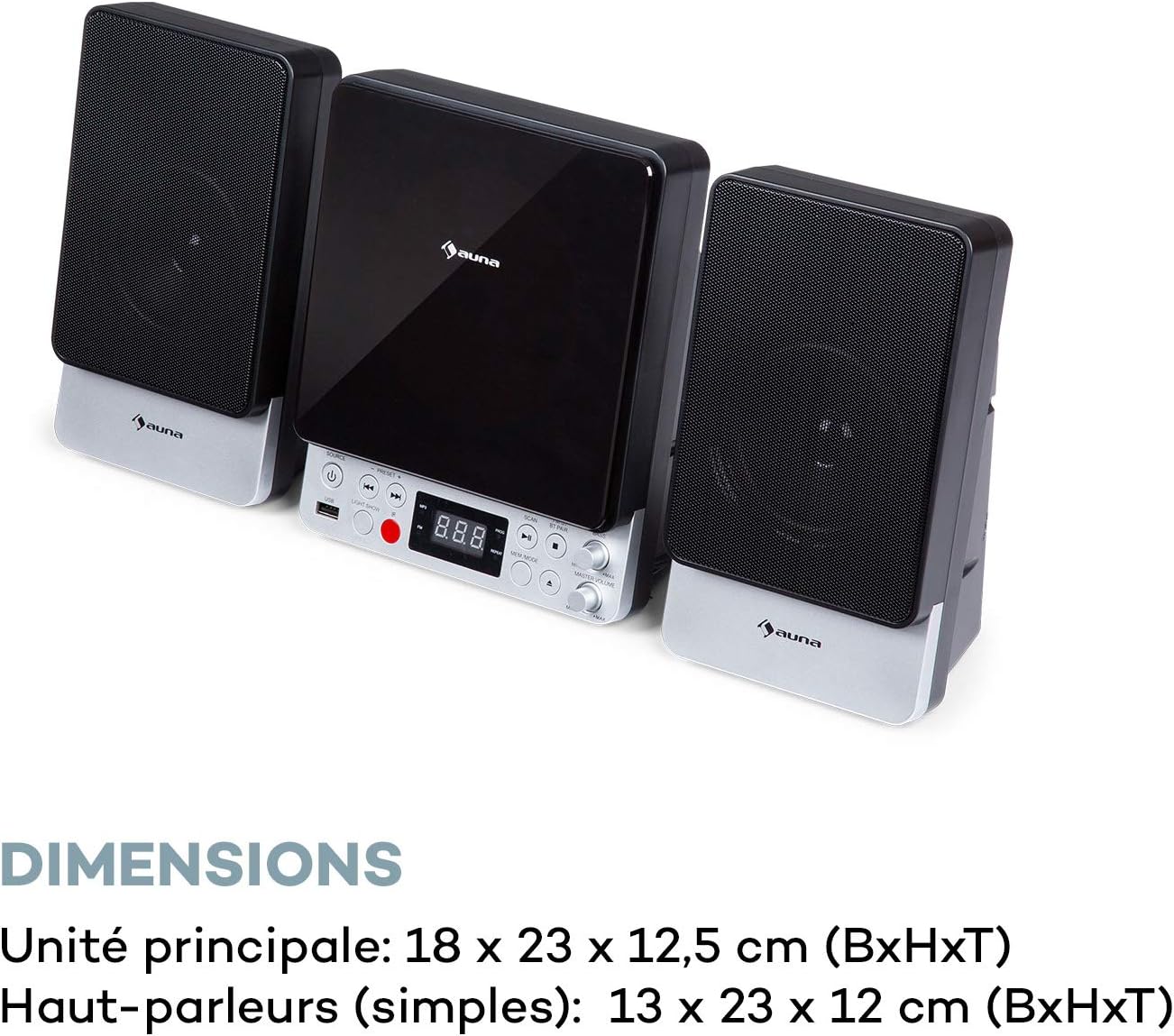
| Main Unit Dimensions (WxHxD) | 18 x 23 x 12.5 cm |
| Speaker Dimensions (WxHxD, each) | 13 x 23 x 12 cm |
Garantie und Support
For warranty information and technical support, please refer to the warranty card included with your product or contact AUNA customer service directly. Keep your proof of purchase for any warranty claims.
For further assistance, please visit the official AUNA webBesuchen Sie die Website oder kontaktieren Sie deren Supportkanäle.


