Produkt überview
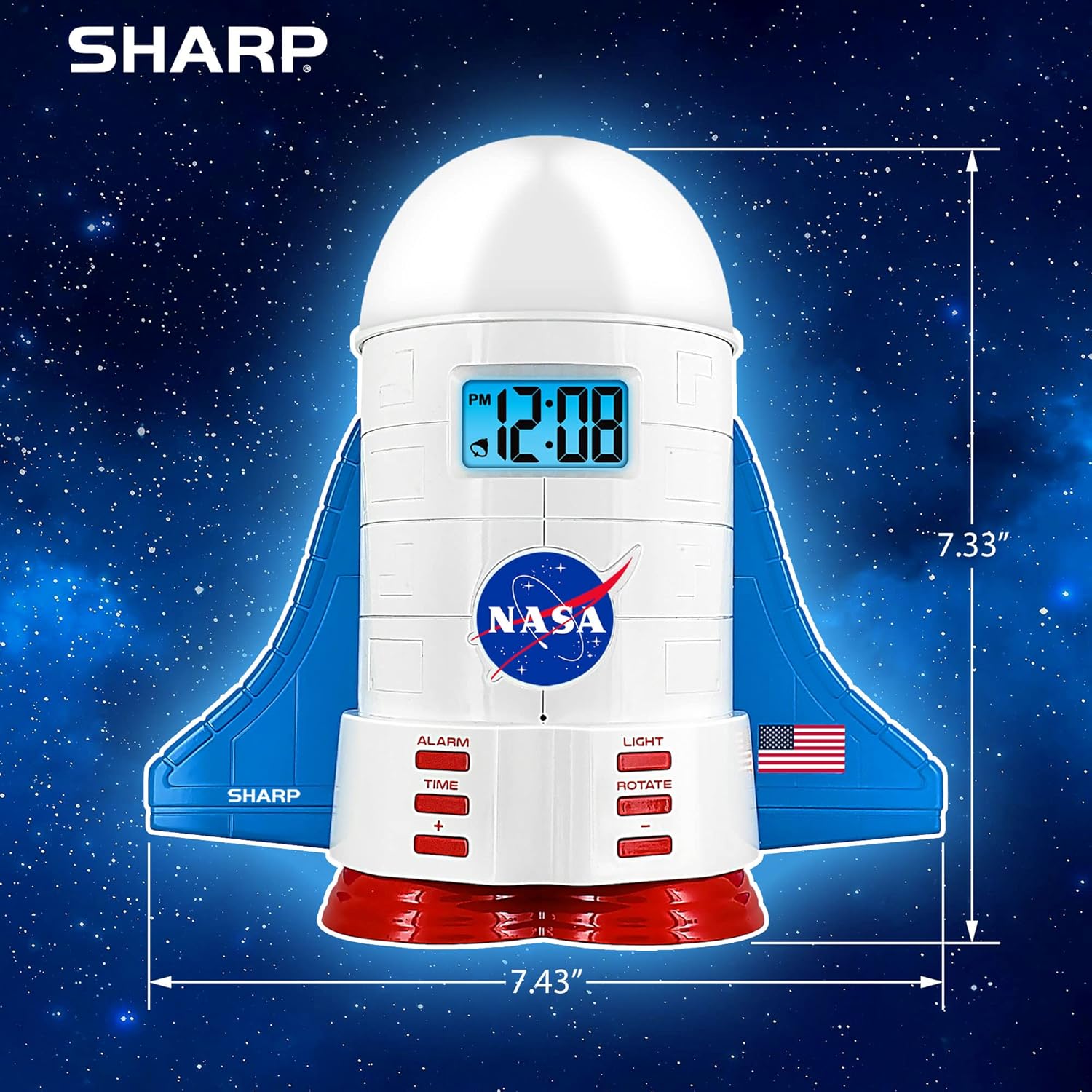
This manual provides instructions for the Sharp NASA Space Shuttle Night Light Alarm Clock. This device combines an alarm clock with a space-themed nightlight and projection feature, designed to enhance a child's bedroom environment.

Aufstellen
Auspacken
- Entnehmen Sie vorsichtig alle Komponenten aus der Verpackung.
- Prüfen Sie, ob alle im Abschnitt „Was ist in der Box?“ aufgeführten Artikel vorhanden sind.
Stromanschluss
The alarm clock can be powered via the included electric adapter. For continuous operation of all features, including the nightlight and projection, direct power is recommended.
For battery backup, insert appropriate batteries (not included) into the battery compartment located at the base of the unit. This ensures timekeeping and alarm function during power outages.

Bedienungsanleitung
Einstellen der Uhrzeit
- Drücken Sie die ZEIT Taste.
- Verwenden Sie die + Und - Tasten zum Einstellen von Stunde und Minute.
- Drücken ZEIT zur Bestätigung erneut.
Einstellen des Alarms
- Drücken Sie die ALARM Taste.
- Verwenden Sie die + Und - Tasten zum Einstellen der gewünschten Weckzeit.
- Drücken ALARM again to activate the alarm. An alarm icon will appear on the display.
Schlummerfunktion
To temporarily silence the alarm, tap the top of the unit. The alarm will sound again after a short interval.
Nightlight and Projection Features
The unit features light-up wings and a rocket booster base, along with a rotating projection cap.

Lichter aktivieren
Drücken Sie die LICHT button to cycle through the 4 color options for the wings and booster lights.
Projection Caps
The device includes two interchangeable space-themed projection caps and a frosted nightlight cap. Twist counter-clockwise to attach or remove caps.

Rotierende Projektion
Drücken Sie die DREHEN button to activate or deactivate the rotation of the projected images.
Wartung
- Clean the unit with a soft, dry cloth. Avoid abrasive cleaners or solvents.
- Ensure the projection caps are free from dust or smudges for clear image projection.
- Replace batteries in the backup compartment as needed to maintain time settings during power interruptions.
Fehlerbehebung
| Problem | Mögliche Ursache | Lösung |
|---|---|---|
| Clock not displaying time | Kein Strom | Ensure the electric adapter is securely plugged in. Check battery backup. |
| Der Alarm ertönt nicht | Alarm not set or deactivated | Verify alarm time is set and activated (alarm icon visible). |
| Projection unclear or dim | Dust on cap or insufficient darkness | Clean the projection cap. Ensure the room is sufficiently dark for optimal projection. |
| Projektion dreht sich nicht | Rotate function off | Drücken Sie die DREHEN button to activate the rotation feature. |
Technische Daten
- Marke: Scharf
- Modellnummer: Sharp NASA e Shuttle Alarm Clock
- Energiequelle: Electric Adapter (Battery backup for timekeeping)
- Lichtquellentyp: LED
- Nachtlichtfarben: 4 Optionen
- Projection Themes: 2 interchangeable space scenes
- Anzeige: LCD mit blauer Hintergrundbeleuchtung
- Abmessungen: 7.43 x 1.5 x 7.43 Zoll
- Gewicht: 1.33 Pfund
- Material: Plastik
- Besondere Merkmale: Color Changing, Snooze Function, Rotating Projection
Garantie und Support
Informationen zur Garantie oder technische Unterstützung erhalten Sie auf der offiziellen Website des Herstellers. webWebsite oder wenden Sie sich an den Kundendienst.
Hersteller: Scharf
UPC: 049353005447
ASIN: B08PL6K2C5


