1. Einleitung
This instruction manual provides detailed guidance for the installation, operation, and maintenance of your Beghelli Dom-e Wi-Fi Full HD Pan/Tilt Surveillance Camera. Please read this manual thoroughly before using the product to ensure proper functionality and safety. Keep this manual for future reference.

Figure 1: Beghelli Dom-e Wi-Fi Full HD Pan/Tilt Surveillance Camera.
2. Produktüberschreitungview
The Beghelli Dom-e Wi-Fi Camera is a versatile surveillance device designed for indoor use, offering Full HD 1080p resolution and comprehensive monitoring capabilities. It integrates seamlessly into your smart home system via the Dom-e Beghelli application.
Hauptmerkmale:
- Full HD 1080p-Auflösung: Bietet klare und detaillierte Video-Footage.
- Schwenk- und Neigefunktion: Motorized rotation of 355° horizontally and 85° vertically, controllable via the app.
- Nachtsicht: Equipped with IR LEDs for clear visibility up to 10 meters in low-light conditions.
- Bewegungserkennung: Sends real-time push notifications to your smartphone upon detecting movement, including specific person detection.
- Automatische Nachverfolgung: The "Tracking" function enables the camera to automatically follow moving subjects.
- Zweiwege-Audio: Built-in microphone and speaker allow for hands-free communication.
- Flexible Aufnahmeoptionen: Record directly to your smartphone, to a MicroSD card (up to 128GB, not included), or via optional cloud storage.
- Wi-Fi-Konnektivität: Connects to your home Wi-Fi network (2.4 GHz).
- Datenverschlüsselung: Ensures the security of your video data.
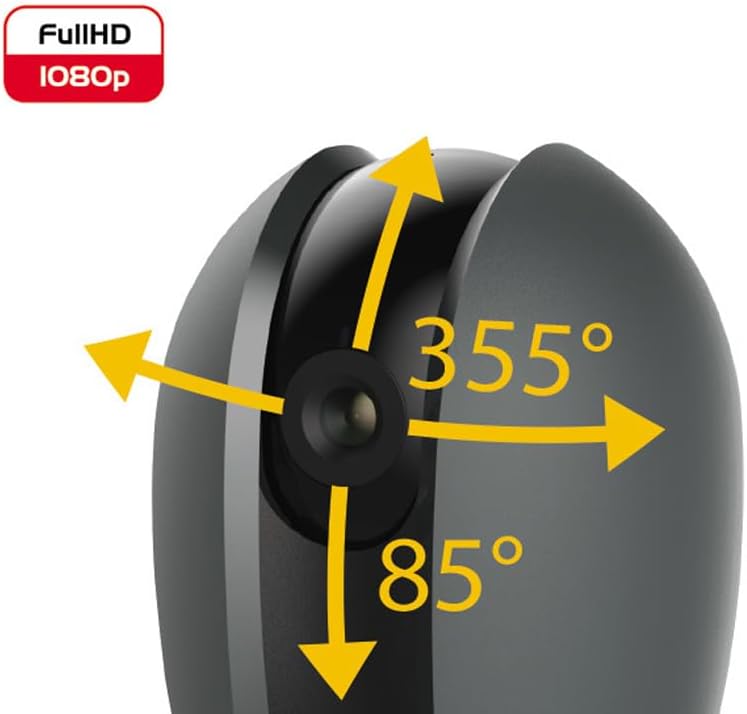
Figure 2: Camera's pan and tilt capabilities.
3. Packungsinhalt
Überprüfen Sie, ob alle Artikel im Paket vorhanden sind:
- Beghelli Dom-e Wi-Fi Full HD Pan/Tilt Surveillance Camera
- USB Power Adapter (230V – DC 5V/1A)
- Mounting accessories (if included, not explicitly listed but implied by "wall or ceiling installation")
- Bedienungsanleitung (dieses Dokument)

Figure 3: Product packaging for the Beghelli Dom-e Camera.
4. Einrichtung
4.1 Stromversorgung der Kamera
- Connect the provided USB power adapter to the camera's power input.
- Plug the adapter into a standard 230V power outlet. The camera will power on and initiate its startup sequence.
4.2 Installation der mobilen Anwendung
The Beghelli Dom-e camera is controlled via the dedicated "Dom-e Beghelli" mobile application.
- Download the "Dom-e Beghelli" app from the Apple App Store (for iOS 8.0 or later) or Google Play Store (for Android 4.2 or later).
- Installieren Sie die Anwendung auf Ihrem Smartphone oder Tablet.
- Registrieren Sie sich für ein neues Konto oder melden Sie sich an, falls Sie bereits eines besitzen.
4.3 Connecting to Wi-Fi and Pairing
Ensure your Wi-Fi network is 2.4 GHz (IEEE802.11 b/g/n). The camera does not support 5 GHz networks.
- Open the Dom-e Beghelli app and follow the on-screen instructions to add a new device.
- Select the Beghelli Dom-e camera from the list of available devices.
- Geben Sie bei Aufforderung Ihren WLAN-Netzwerknamen (SSID) und Ihr Passwort ein.
- The app will guide you through the pairing process, which typically involves scanning a QR code displayed on your phone with the camera, or listening for an audio prompt.
- Sobald die Kopplung erfolgreich war, ändert sich die Statusanzeige der Kamera, und Sie sehen den Live-Feed in der App.

Figure 4: Simplified setup steps via the Dom-e Beghelli app.
4.4 Montage der Kamera
The camera can be installed on a wall or ceiling. Choose a location that provides the desired viewDer Standort muss sich in einem bestimmten Winkel befinden und innerhalb der Reichweite Ihres WLAN-Netzwerks und einer Steckdose liegen.
- Mark the drilling points on the desired surface using the mounting template (if provided).
- Bohren Sie gegebenenfalls Löcher und setzen Sie Dübel ein.
- Secure the mounting bracket (if provided) to the surface.
- Befestigen Sie die Kamera an der Montagehalterung.
- Adjust the camera's angle manually or via the app after installation.
5. Bedienungsanleitung
5.1 Live View und Schwenk-/Neigesteuerung
- Open the Dom-e Beghelli app and select your camera to view das Live-Feed.
- Verwenden Sie die Richtungssteuerung in der App, um die Kamera horizontal (355°) zu schwenken und vertikal (85°) zu neigen, um die Kamera anzupassen. viewing-Bereich.
5.2 Bewegungserkennung und Benachrichtigungen
- Navigieren Sie in der App zu den Kameraeinstellungen, um die Bewegungserkennung zu aktivieren.
- Configure sensitivity levels and detection zones as needed.
- Aktivieren Sie Push-Benachrichtigungen, um auf Ihrem Smartphone Warnmeldungen zu erhalten, sobald eine Bewegung erkannt wird.
- The camera also features person detection for more accurate alerts.
5.3 Zwei-Wege-Audio
- Während viewing the live feed, tap the microphone icon in the app to speak through the camera's speaker.
- The camera's built-in microphone will capture audio from the monitored area, allowing you to listen in.
5.4 Aufzeichnung und Speicherung
- Aufzeichnung auf microSD-Karte: Insert a MicroSD card (up to 128GB, not included) into the camera's slot for continuous recording or event-triggered recording.
- Smartphone Recording: You can manually record video clips directly to your smartphone while viewden Live-Feed.
- Cloud-Speicher: An optional cloud storage service is available via subscription for off-site video backup. Refer to the app for details.
- Geplante Aufnahme: Set up specific times for the camera to record automatically through the app settings.
5.5 Nachtsicht
The camera automatically switches to night vision mode in low-light conditions, utilizing its IR LEDs to provide clear black-and-white footagbis zu 10 Meter.
6. Mobile Application (Dom-e Beghelli App)
The Dom-e Beghelli app is the central control interface for your camera and other compatible smart home devices. It allows for:
- Remote control of camera pan and tilt.
- Access to live video feed and recorded footage.
- Configuration of motion detection, notifications, and recording schedules.
- Zweiwege-Audiokommunikation.
- Integration with other Dom-e smart home devices (e.g., alarms, smart plugs, lighting).
- Voice control compatibility with Google Assistant and Amazon Alexa (if associated with a compatible smartphone).

Figure 5: The Dom-e Beghelli app interface for camera control.
7. Spezifikationen
| Besonderheit | Spezifikation |
|---|---|
| Modellnummer | 60021 |
| Auflösung | Full HD 1080p (2 Megapixels) |
| Sensor | CMOS 1/2.9" |
| Linse | 3.6 mm / f2.0 / 105° |
| Verschlusszeit | 1/25 - 1/100,000 sec |
| Schwenk-Drehung | 355 ° horizontal |
| Neigungsdrehung | 85 ° vertikal |
| Nachtsichtbereich | Bis zu 10 Meter (IR-LEDs) |
| Audio | Two-way, hands-free (in/out) |
| Lagerung | MicroSD card up to 128GB (not included), Smartphone, Cloud (optional subscription) |
| Wi-Fi-Standard | IEEE802.11 b/g/n (2.4 GHz) |
| Frequenzband | 2.4 GHz – 2.4835 GHz |
| Leistungsaufnahme | 230V – DC 5V/1A (USB adapter included) |
| Maximaler Stromverbrauch | 4.5 Watt |
| Abmessungen (L x B x H) | 63 x 58 x 96 mm (Product description) / 7 x 7 x 11 cm (Specifications) |
| Gewicht | 330 Gramm |
| Material | Plastik |
| Betriebssystemkompatibilität | Apple iPhone iOS 8.0 or later / Android 4.2 or later |
| Empfohlene Verwendung | Sicherheit in Innenräumen |
Note: Some dimensions may vary slightly between product description and specifications list.
8. Wartung
8.1 Reinigung
- Vor der Reinigung sicherstellen, dass die Kamera ausgeschaltet und vom Stromnetz getrennt ist.
- Verwenden Sie ein weiches, trockenes Tuch, um das Kameragehäuse abzuwischen.
- Verwenden Sie für die Linse ein spezielles Linsenreinigungstuch, um Kratzer zu vermeiden.
- Verwenden Sie keine flüssigen Reiniger, Aerosole oder aggressive Lösungsmittel.
8.2 Softwareaktualisierungen
Periodically check the Dom-e Beghelli app for firmware updates. Keeping your camera's firmware updated ensures optimal performance, security, and access to new features.
9. Fehlerbehebung
| Problem | Lösung |
|---|---|
| Kamera lässt sich nicht einschalten | Ensure the USB power adapter is securely connected to the camera and a working power outlet. Verify the outlet has power. |
| Keine Verbindung zum WLAN möglich |
|
| Kein Live-Videostream |
|
| Bewegungserkennung funktioniert nicht |
|
| Cannot reconnect after Wi-Fi password change | If your Wi-Fi password changes, you will likely need to reset the camera and re-pair it with the app using the new Wi-Fi credentials. Refer to the app for device reset instructions. |
10. Garantie und Support
For warranty information and technical support, please refer to the documentation provided with your purchase or contact Beghelli customer service directly. You can typically find contact details on the Beghelli official website or within the Dom-e Beghelli application.
Manufacturer: Beghelli
Modell: 60021