1. Einleitung
The ULANZI U200 Light Smartphone Video Rig is a versatile handheld stabilizer and ring light designed to enhance your smartphone video recording and photography. It features adjustable lighting, multiple mounting options, and a built-in power bank for extended use and device charging.
2. Produktüberschreitungview
The ULANZI U200 Light combines a smartphone video rig with an integrated ring light, offering a compact and efficient solution for content creation. Key features include:
- Breiter Farbtemperaturbereich: Stepless adjustment from 2500K (warm) to 8500K (cool) with a dimming range of 20%-100%.
- Hohe Farbwiedergabe: CRI 96+ for natural and accurate color reproduction, featuring 200 high-brightness LED beads.
- Eingebauter 8000-mAh-Akku: Provides up to 2.5 hours of continuous use at maximum brightness and can function as a temporary power bank for mobile devices.
- Mehrere Montageoptionen: Equipped with 3 cold shoe mounts for attaching accessories like microphones or additional lights, and a 1/4-inch thread at the bottom for tripod mounting.
- Adjustable Light-Emitting Surfaces: Four light-emitting surfaces can be freely switched to adapt to different shooting scenarios.
- Vielseitige Kompatibilität: Universal phone clamp compatible with most smartphones (e.g., iPhone 12-17, Samsung, Huawei Mate) and supports horizontal and vertical shooting.
- Integrierter Ständer: Concealable pop-out legs with non-slip padding allow the rig to stand independently on a desktop.
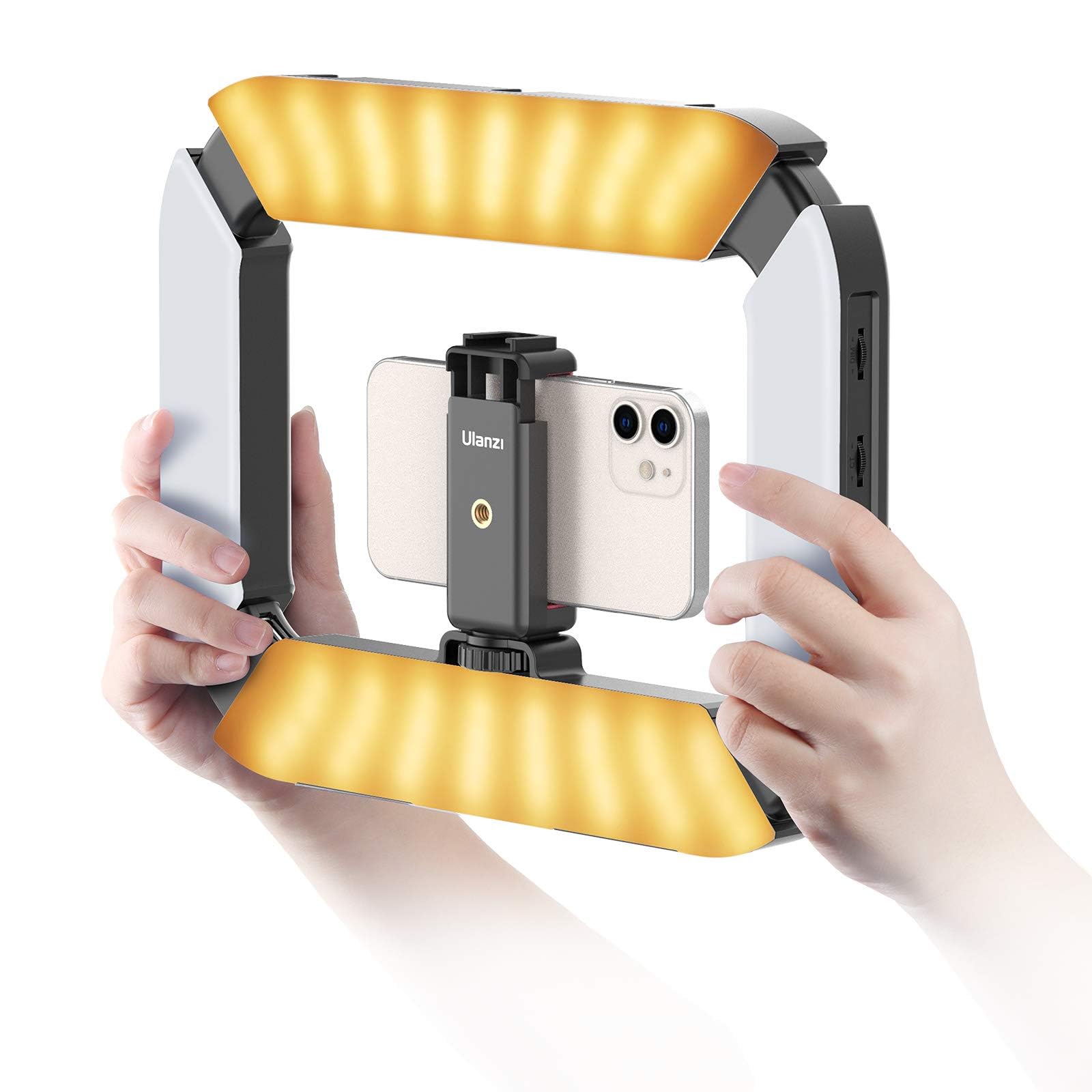
Figure 2.1: ULANZI U200 Light Smartphone Video Rig.
3. Einrichtung
- Auspacken: Carefully remove the ULANZI U200 Light, phone clamp, USB charging cable, and remote control from the packaging.
- Attach Phone Clamp: Secure the phone clamp to the 1/4-inch screw thread located in the center of the rig. Ensure it is tightened firmly.
- Smartphone einlegen: Den Telefonstecker vorsichtig aufziehenamp and insert your smartphone. The clamp supports both horizontal and vertical orientations.
- Optionales Zubehör: If desired, attach external microphones, additional lights, or other accessories to the three cold shoe mounts on the top of the rig.
- Stativmontage (optional): For stationary shooting, attach the rig to a tripod using the 1/4-inch thread at the bottom.
- Desktop Stand (Optional): Extend the pop-out legs on the bottom of the rig to stand it independently on a flat surface.

Figure 3.1: The ULANZI U200 Light with a smartphone mounted, showcasing the bottom support design and horizontal/vertical shooting capabilities.

Figure 3.2: The ULANZI U200 Light demonstrating compatibility with various devices including cameras, smartphones, and action cameras.
4. Bedienungsanleitung
- Ein-/Ausschalten: Long press the power button located on the side handle to turn the device on or off.
- Helligkeit anpassen: Use the dedicated dial on the side handle to steplessly adjust the light brightness from 20% to 100%.
- Farbtemperatur anpassen: Use the dedicated dial on the side handle to steplessly adjust the color temperature from 2500K (warm) to 8500K (cool).
- Switch Light-Emitting Surfaces: Short press the power button to cycle through the four adjustable light-emitting surfaces, allowing you to control the direction and spread of light.
- Fernbedienung: The included remote control can be used to trigger your smartphone's camera shutter for photos or start/stop video recording. It can be stored in the rubber compartment on the handle.
- Charging the Rig: Connect the provided USB Type-C cable to the charging port on the rig. The 8000mAh battery provides ample Macht.
- Verwendung als Powerbank: The rig can act as a temporary power bank. Connect your smartphone or other USB-powered device to the appropriate USB output port on the rig to charge it.

Figure 4.1: Adjustable color temperature from 2500K to 8500K and dimming range from 20% to 100%.

Figure 4.2: The power button allows switching between four adjustable light-emitting surfaces.
5. Media Integration Examples
The ULANZI U200 Light is designed for various content creation scenarios. Below are examples of its application:
Video 5.1: Ein überview of the ULANZI U200 Hand Held Ring Light, demonstrating its features and ease of use. This video highlights the product's design and functionality for various shooting needs.
Video 5.2: A demonstration of the ULANZI Smartphone Video Rig with Light Handheld Stabilizer in action. This video illustrates how the rig can be used to stabilize a smartphone while providing illumination for video recording.

Abbildung 5.1: Bspamples of the ULANZI U200 Light being used for different types of content creation, including vlogging, product photography, and live streaming.
6. Spezifikationen
| Besonderheit | Detail |
|---|---|
| Modellnummer | 2245-CA2 |
| Farbtemperatur | 2500K-8500K (Bi-color adjustable) |
| Dimmbereich | 20 % – 100 % |
| CRI (Farbwiedergabeindex) | 96+ |
| LED Perlen | 200 high-brightness |
| Batteriekapazität | 8000 mAh (eingebaut) |
| Akkulaufzeit (Maximale Helligkeit) | 2.5 Stunden |
| Ladeschnittstelle | USB Typ C |
| Befestigungspunkte | 3 Cold Shoes, 1/4-inch Thread |
| Technische Daten | 11.36 Zoll L x 8.61 Zoll B x 1.22 Zoll H |
| Artikelgewicht | 10.6 Unzen |
7. Wartung
- Reinigung: Use a soft, dry cloth to clean the surface of the rig. Avoid using abrasive cleaners or solvents.
- Lagerung: Bewahren Sie das Gerät an einem kühlen, trockenen Ort fern von direkter Sonneneinstrahlung und extremen Temperaturen auf.
- Batteriepflege: To prolong battery life, fully charge the device before first use and recharge it regularly, even if not in frequent use. Avoid completely draining the battery.
- Handhabung: Handle the rig with care to prevent damage to the LED panels or internal components.
8. Fehlerbehebung
- Licht geht nicht an:
- Ensure the battery is charged. Connect the rig to a power source using the USB Type-C cable.
- Long press the power button to ensure it is properly activated.
- Lichtflimmern:
- Check battery level; low battery can cause flickering.
- Ensure the charging cable is securely connected if operating while charging.
- Fernbedienung funktioniert nicht:
- Stellen Sie sicher, dass die Fernbedienung über eine funktionierende Batterie verfügt.
- Verify Bluetooth connection between the remote and your smartphone.
- Device Not Charging from Rig:
- Ensure the rig's battery has sufficient charge.
- Check that the charging cable between the rig and your device is correctly connected.
9. Garantie und Support
For warranty information, technical support, or service inquiries, please refer to the official ULANZI webBesuchen Sie die Website oder kontaktieren Sie direkt den Kundenservice. Bewahren Sie Ihren Kaufbeleg als Kaufnachweis für eventuelle Garantieansprüche auf.


