1. Einleitung
Vielen Dank für Ihren Einkauf.asing the RHM K666 Karaoke Machine. This portable system is designed to deliver powerful and clear sound with rich, deep bass, perfect for various occasions including home entertainment, parties, weddings, picnics, and outdoor activities. It features two wireless microphones, a long-lasting rechargeable battery, and multiple connectivity options. This manual will guide you through the setup, operation, maintenance, and troubleshooting of your new karaoke machine.
2. Packungsinhalt
Bitte vergewissern Sie sich, dass alle Artikel in Ihrem Paket vorhanden sind:
- 1 x RHM K666 Karaoke Machine
- 2 x Drahtlose Handmikrofone
- 1 x Netzteil
- 1 x Ladekabel (USB)
- 1 x AUX-Kabel
- 1 x Benutzerhandbuch

Image: The RHM K666 Karaoke Machine along with its included accessories: two wireless microphones, power adapter, charging cable, AUX cable, and user manual.
3. Produktüberschreitungview
3.1 Hauptmerkmale der Einheit
The RHM K666 is a compact yet powerful karaoke machine. Its dimensions are approximately 13.86 x 7.87 x 6.89 inches, making it highly portable with a sturdy built-in handle. It features 2x15W tweeters and a 30W subwoofer for clear, loud sound and deep bass. A DSP chip ensures full-range surround stereo sound.

Bild: Vorderseite view of the RHM K666 Karaoke Machine with a smartphone placed in the integrated holder, showcasing dank seines kompakten Designs.

Image: An exploded diagram illustrating the internal components of the RHM K666, highlighting the 15W tweeters and 30W subwoofer for high-quality stereo sound.
Video: Ein überview of the RHM K666 Karaoke Machine, highlighting its clear sound quality and various features.
3.2 drahtlose Mikrofone
The system includes two wireless microphones made of metal material. Each microphone features controls for speaker volume, microphone volume, echo effect, and voice enhancement, allowing for convenient adjustments without needing to access the main unit. They are equipped with a 400mAh rechargeable battery, providing up to 6 hours of use.

Bild: Eine Nahaufnahme view of the two wireless microphones, showing their control buttons for volume, echo, and voice enhancement, along with an LED display.
3.3 Konnektivitätsoptionen
The RHM K666 supports multiple connection methods:
- Bluetooth: Für die drahtlose Verbindung mit Smartphones, Tablets und anderen Bluetooth-fähigen Geräten.
- 3.5mm AUX In: Für den kabelgebundenen Anschluss an Audioquellen.
- USB Laufwerk: For playing music directly from a USB storage device.
- PC: Zum Anschluss an einen Computer.
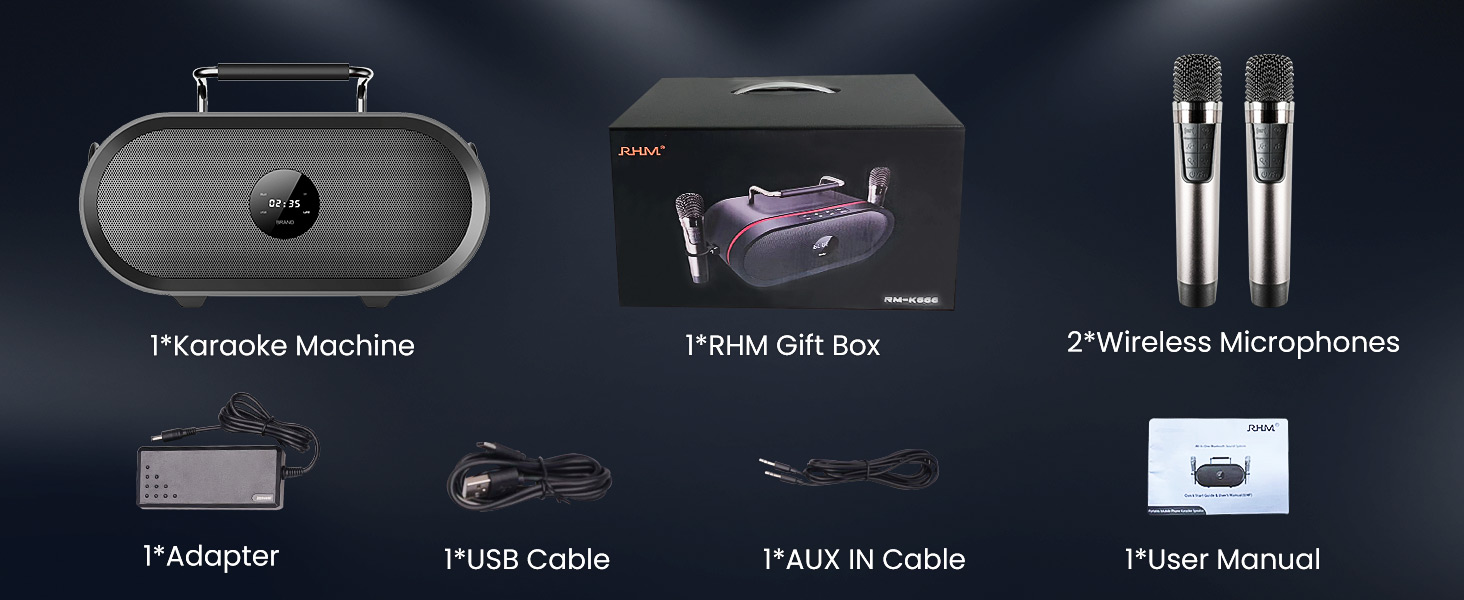
Image: A graphic illustrating the various connectivity options of the RHM K666 Karaoke Machine, including Bluetooth, AUX, USB, and PC.
4. Einrichtung
4.1 Erstaufladung
Before first use, fully charge the karaoke machine and both wireless microphones. The main unit's 4400mAh battery takes approximately 3 hours to fully charge and provides up to 8 hours of playtime. The microphones' 400mAh batteries last up to 6 hours.
4.2 Ein-/Ausschalten
- To power on the main unit, press and hold the power button on the top panel.
- To power on the microphones, press and hold the power button on each microphone.
- To power off, repeat the process for both the main unit and microphones.
4.3 Mikrofonkopplung
The microphones are typically pre-synced with the speaker. If re-pairing is needed:
- Stellen Sie sicher, dass der Lautsprecher ausgeschaltet ist.
- Turn off one of the microphones.
- Hold the music decrease button and the power button on the remaining microphone to switch it between Mic 1 and Mic 2. Confirm one is Mic 1 and the other is Mic 2.
- With both microphones on, hold the music decrease button and the power button on both microphones simultaneously. The icons on both mics will flash.
- While the mic icons are still blinking (for approximately 20 seconds), turn on the speaker.
- The icons on both microphones will stop blinking after successful pairing. If not, please try to re-sync again.
Video: This video demonstrates the process of re-syncing the RHM K666 wireless microphones with the main speaker unit, providing a solution if the microphones are not working correctly.
4.4 Connecting Audio Source
- Bluetooth: Activate Bluetooth on your device and select "RM-K666" from the available devices list.
- AUX-Eingang: Connect one end of the 3.5mm AUX cable to your audio source and the other end to the "AUDIO IN" port on the back of the karaoke machine.
- USB Laufwerk: Stecken Sie einen USB-Stick mit Musik ein. files into the USB port on the back of the machine.
- PC: Connect the machine to your PC using a compatible cable.
5. Bedienungsanleitung
5.1 Basic Controls (Main Unit)
The top panel of the RHM K666 features intuitive controls:
- Lautstärke +/-: Regelt die Gesamtlautstärke der Lautsprecher.
- Vorheriger/Nächster Titel: Springt zum vorherigen oder nächsten Lied.
- Abspielen/Pause: Steuert die Musikwiedergabe.
- Modus (M): Switches between input modes (Bluetooth, AUX, USB, PC).
- Power/Bluetooth (BT): Powers the unit on/off and activates Bluetooth pairing mode.
5.2 Mikrofonsteuerung
Each wireless microphone offers the following controls:
- Lautsprecherlautstärke +/-: Adjusts the main speaker's volume directly from the microphone.
- Mikrofonlautstärke +/-: Regelt die Ausgangslautstärke des Mikrofons.
- Echo-Effekt: Cycles through different echo levels (up to 5 levels) or turns it off.
- Sprachverbesserung: Activates special voice effects.
- Power/Function (U/Fn): Powers the microphone on/off and may switch between functions.
Video: A demonstration of the echo effect feature on the RHM K666 Karaoke Machine's wireless microphones, showing how to adjust the echo levels.
5.3 Verwendung der Telefon-/Tablet-Halterung
The integrated handle on the top of the unit doubles as a convenient stand for your smartphone or tablet, allowing you to easily view lyrics or control music while performing.
Image: The RHM K666 Karaoke Machine with a smartphone securely placed in the built-in holder on top of the unit, ready for use.
6. Wartung
- Keep the unit and microphones clean by wiping with a soft, dry cloth.
- Setzen Sie das Gerät keinen extremen Temperaturen, direkter Sonneneinstrahlung oder Feuchtigkeit aus.
- Bei Nichtgebrauch an einem kühlen, trockenen Ort aufbewahren.
- Versuchen Sie nicht, das Gerät selbst zu zerlegen oder zu reparieren. Wenden Sie sich an den Kundendienst.
7. Fehlerbehebung
| Problem | Lösung |
|---|---|
| Kein Ton vom Lautsprecher |
|
| Mikrofone funktionieren nicht |
|
| Probleme mit der Bluetooth-Verbindung |
|
Video: A detailed guide on troubleshooting microphone issues, specifically addressing scenarios where the RHM K666 wireless microphones may not be functioning as expected.
8. Spezifikationen
| Besonderheit | Detail |
|---|---|
| Modell | K666 |
| Ausgangsleistung | 55W (2x15W tweeters + 30W subwoofer) |
| Frequenzgang | 35Hz - 20KHz |
| Elektrische Impedanz | 4 Ω |
| Leistungsvorgabe | 15V 4ADC adaptor (110-240V, 50/60Hz) |
| Battery (Main Unit) | Wiederaufladbarer Lithium-Akku mit 4400 mAh |
| Playtime (Main Unit) | Bis zu 8 Stunden |
| Battery (Microphones) | 400mAh wiederaufladbarer Akku |
| Playtime (Microphones) | Bis zu 6 Stunden |
| Maße | 13.86 x 7.87 x 6.89 Zoll |
| Gewicht | 11.13 Pfund |
| Konnektivität | Bluetooth, 3.5mm AUX In, USB, PC |
9. Garantie und Support
For warranty information and customer support, please refer to the contact details provided in your product packaging or visit the official RHM webWebsite. Bewahren Sie Ihren Kaufbeleg für Garantieansprüche auf.