1. Einleitung
The Lepro PR902103-US Smart Table Lamp offers versatile lighting solutions for your home. This LED touch lamp features RGB color changing capabilities, tunable warm to cool white light, and dimmable brightness. It is designed for seamless integration with smart home ecosystems, supporting both Amazon Alexa and Google Assistant for voice control, as well as control via a dedicated mobile application. This manual provides comprehensive instructions for setup, operation, and maintenance.

Figure 1: Lepro Smart Table Lamp showcasing its app control interface.
2. Lieferumfang
Bitte überprüfen Sie, ob alle Komponenten in der Verpackung vorhanden sind:
- 1 x Lepro Smart Table Lamp (Model: PR902103-US)
- 1 x 4.9 ft USB Cable
- 1 x Netzteil
- 1 x Benutzerhandbuch (dieses Dokument)
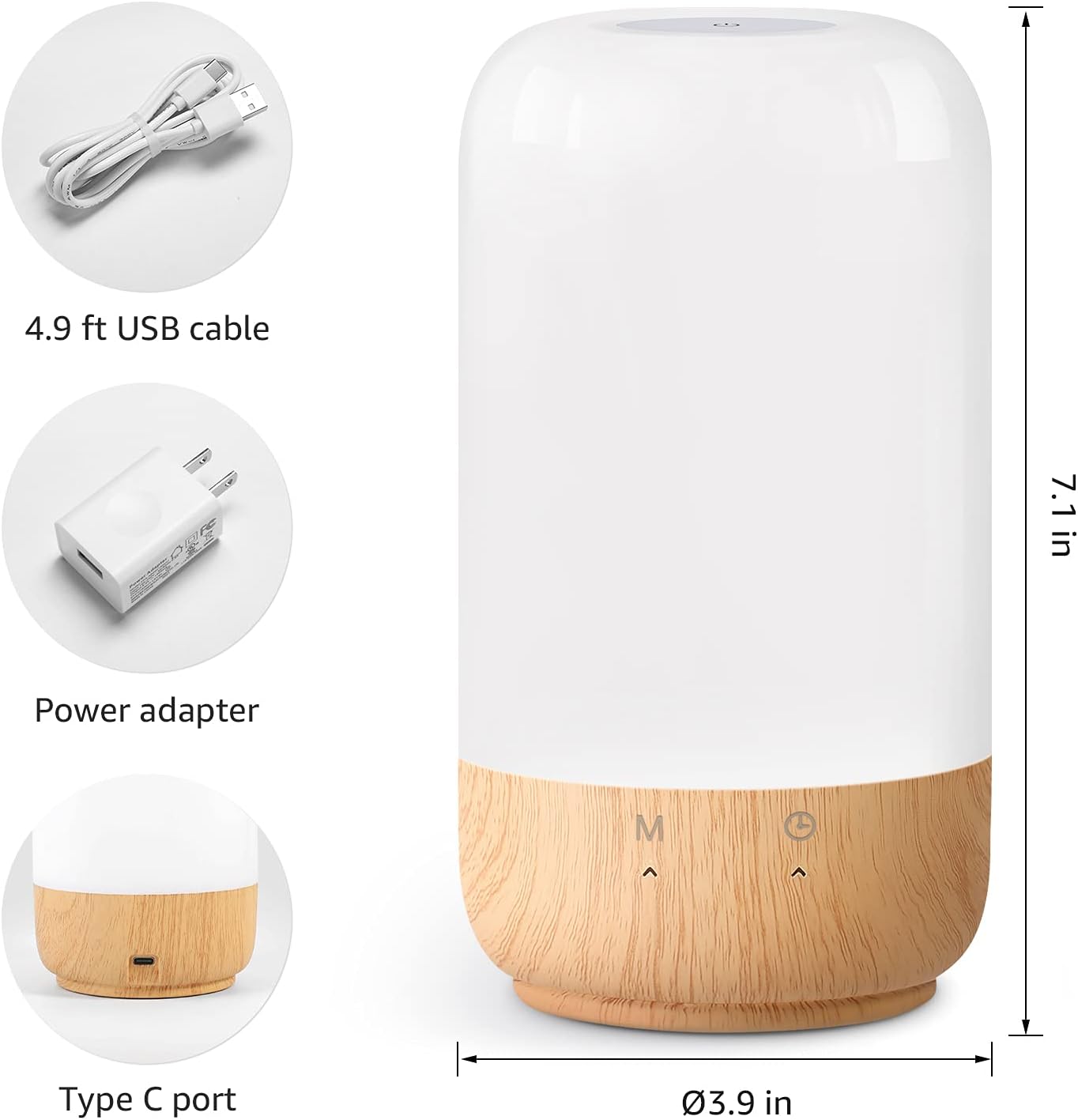
Abbildung 2: Enthaltene Komponenten und Produktabmessungen.
3. Einrichtung
Follow these steps to set up your Lepro Smart Table Lamp:
- Stromanschluss: Schließen Sie das mitgelieferte USB-Kabel an denamp's Type-C port and the power adapter. Plug the power adapter into a standard wall outlet. The lamp leuchtet auf.
- App herunterladen: Download the 'Lepro LampUX' app from your mobile device's App Store (iOS) or Google Play Store (Android).
- Kontoregistrierung: Open the 'Lepro LampUX' app and register a new account or log in if you already have one.
- Gerätepaarung:
- Tippe in der App auf „Gerät hinzufügen“ oder auf das Symbol „+“.
- Select 'Table Lamp' from the lighting category.
- Stellen Sie sicher, dass die lamp is powered on. Long press the timer button on the lamp's base for at least 5 seconds until the indicator light blinks rapidly.
- Confirm the indicator light is blinking rapidly in the app and proceed.
- Select your 2.4 GHz Wi-Fi network and enter the password. (Note: The lamp only supports 2.4 GHz Wi-Fi networks. If your router is 5 GHz, please set it to 2.4 GHz during setup.)
- The app will begin adding the device. Once successfully added, you can rename your lamp zur einfacheren Identifizierung.
Video 1: Detailed steps on how to set up your Lepro Smart Lamp mithilfe der mobilen Anwendung.
4. Bedienungsanleitung
The Lepro Smart Table Lamp can be controlled via touch, the mobile app, or voice commands.
4.1. Tippen Sie auf Steuerung
- Ein-/Ausschalten: Short press the power button (marked 'M') on the lamp's Basis.
- Helligkeitsanpassung: Slide your finger along the left side of the lamp's base to adjust brightness.
- Farbänderung (RGB): Slide your finger along the right side of the lamp's base to cycle through RGB colors.
- Modusschalter: Short press the timer button (clock icon) to switch between white light modes (warm white, cool white) and RGB color mode.
4.2. Mobile App Controls
The 'Lepro LampUX' app provides comprehensive control over your lamp:
- Brightness & Color Temperature: Adjust the brightness level and select color temperatures from 2700K (warm white) to 5700K (cool white).
- RGB-Farbauswahl: Wählen Sie mithilfe des Farbrads in der App aus 16 Millionen Farben.
- Szenen: Select from pre-set scenes like 'Night', 'Read', 'Meeting', 'Leisure', or customize your own scenes with specific colors and effects.
- Timer & Wake-up: Legen Sie Zeitpläne für die l festamp to turn on/off automatically. Utilize the 'Sunrise Simulation' feature to gradually increase light for a gentle wake-up.

Figure 3: Mobile application interface for controlling lamp Einstellungen.

Abbildung 4: Die lamp's timer and wake-up functions in use.
4.3. Sprachsteuerung
The Lepro Smart Table Lamp is compatible with Amazon Alexa and Google Assistant. To enable voice control:
- Stellen Sie sicher, dass Ihr lamp is successfully paired with the 'Lepro LampUX' app.
- Öffnen Sie die Amazon Alexa oder Google Home App.
- Navigieren Sie zum Abschnitt „Skills & Spiele“ (Alexa) bzw. „Funktioniert mit Google“ (Google Home).
- Suchen nach and enable the 'Lepro LampUX' skill/service.
- Link your 'Lepro LampUX' account with your Alexa/Google account.
- Sobald die Verbindung hergestellt ist, können Sie Sprachbefehle wie die folgenden verwenden:
- "Alexa, schalte [L einamp Name]."
- "Hey Google, setze [Lamp Name] zu warmweiß."
- "Alexa, ändere [Lamp Name] zu blau."
- "Hey Google, dim [Lamp Name] auf 50 %."

Figure 5: Voice control integration with Amazon Alexa.
Video 2: Demonstration of the Lepro Smart Table Lamp working with Alexa and Google Home.
5. Wartung
To ensure the longevity and optimal performance of your Lepro Smart Table Lamp, please follow these maintenance guidelines:
- Reinigung: Vor der Reinigung die Stromzufuhr unterbrechen. Verwenden Sie ein weiches, trockenes Tuch, um die Oberfläche abzuwischen.amp's surface. Avoid using abrasive cleaners, solvents, or harsh chemicals, as these may damage the finish or electronic components.
- Lagerung: Bei der Lagerung des lamp Für eine längere Lagerung sollte es sauber und trocken sein. Bewahren Sie es an einem kühlen, trockenen Ort fern von direkter Sonneneinstrahlung und extremen Temperaturen auf.
- Handhabung: Behandeln Sie das lamp Vorsichtig behandeln. Nicht fallen lassen oder starken Stößen aussetzen.
6. Fehlerbehebung
If you encounter issues with your Lepro Smart Table LampBeachten Sie die folgenden häufigen Probleme und Lösungen:
| Problem | Mögliche Ursache | Lösung |
|---|---|---|
| Lamp geht nicht an. | Keine Stromversorgung. | Prüfen Sie, ob das Netzteil fest in die Steckdose eingesteckt ist.amp und die Wandsteckdose. Stellen Sie sicher, dass die Steckdose funktionsfähig ist. |
| Es kann keine Verbindung zum WLAN hergestellt werden. | Incorrect Wi-Fi band (5 GHz). Falsches Passwort. Schwaches Wi-Fi-Signal. | Ensure your Wi-Fi network is 2.4 GHz. Verify the Wi-Fi password. Move the lamp closer to your router. |
| Sprachsteuerung funktioniert nicht. | Skill not enabled/linked. Falscher Gerätename. | Ensure the 'Lepro LampUX' skill is enabled and linked in your Alexa/Google Home app. Use the exact device name configured in the app. |
| Lamp reagiert nicht. | Vorübergehender Softwarefehler. | Ziehen Sie den Stecker aus deramp from the power outlet for 10 seconds, then plug it back in to perform a soft reset. |
7. Spezifikationen
| Besonderheit | Detail |
|---|---|
| Marke | Lepro |
| Modellnummer | PR902103-US |
| Technische Daten | 3.9"T x 3.9"B x 7.1"H |
| Artikelgewicht | 1.19 Pfund |
| Material | Kunststoff, Holz |
| Lichtquellentyp | LED |
| Wastage | 7 Watt |
| Helligkeit | 350 Lumen |
| Lichtfarbe | RGB + CCT (Tunable White 2700-5700K) |
| Kontrollmethode | App, Touch, Voice (Alexa, Google Assistant) |
| Konnektivität | 2.4 GHz WiFi Only |
| Verwendung im Innen- und Außenbereich | Innenbereich |
8. Garantie und Support
Lepro products are designed and manufactured to the highest quality standards. For warranty information and technical support, please refer to the contact details provided on the product packaging or visit the official Lepro webBewahren Sie Ihren Kaufbeleg als Kaufnachweis für Garantieansprüche auf.


