Einführung
This manual provides detailed instructions for the installation, operation, maintenance, and troubleshooting of the ADVANTECH PS8-500FATX-GB 80+ Gold Flex ATX Power Supply. This power supply unit (PSU) is designed to deliver stable and efficient power to your system, featuring 500W output with 3.3V, 5V, 12V, and -12V outputs, and RoHS compliance.
Sicherheitshinweise
Please read all safety instructions carefully before installing or operating the power supply. Failure to follow these instructions may result in electric shock, fire, or damage to the product and connected equipment.
- Ensure the power supply is disconnected from the AC power source before installation or maintenance.
- Öffnen Sie nicht das Netzteil casing. Hohes Volumentage components inside pose a risk of electric shock.
- Installieren Sie das Netzteil in einem gut belüfteten Bereich, um eine Überhitzung zu vermeiden.
- Use only the cables provided or approved by ADVANTECH for this power supply.
- Dieses Produkt ist nur für die Verwendung in Innenräumen bestimmt.
Packungsinhalt
Überprüfen Sie, ob alle Artikel im Paket vorhanden sind:
- ADVANTECH PS8-500FATX-GB Power Supply Unit
- Netzkabel
- Befestigungsschrauben
- Benutzerhandbuch (dieses Dokument)
Setup und Installation
Follow these steps to properly install the power supply into your system:
- Bereiten Sie Ihr System vor: Ensure your computer system is powered off and disconnected from the AC outlet. Open the computer case.
- Altes Netzteil entfernen (falls zutreffend): Disconnect all cables from the old power supply. Unscrew and remove the old PSU from the chassis.
- Neues Netzteil einbauen: Carefully place the ADVANTECH PS8-500FATX-GB into the power supply bay of your computer case. Ensure the fan is facing the correct direction for optimal airflow (usually facing down or out of the case). Secure the PSU with the provided mounting screws.
- Hauptstromkabel anschließen:
- Connect the 20+4 pin ATX main power connector to the motherboard.
- Connect the 4+4 pin EPS/ATX 12V connector to the motherboard CPU power socket.
- Peripheriekabel anschließen: Connect SATA power connectors to hard drives, SSDs, and optical drives. Connect PCIe power connectors to graphics cards if required. Connect Molex connectors to other peripherals as needed.
- Kabelmanagement: Verlegen Sie die Kabel ordentlich, um die Luftzirkulation und die Optik zu verbessern.
- Gehäuse schließen und Netzstrom anschließen: Close your computer case. Connect the AC power cord to the power supply and then to a wall outlet or surge protector.
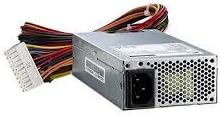
Bild 1: The ADVANTECH PS8-500FATX-GB 500W Flex ATX Power Supply, showing its compact form factor and various power connectors. This image illustrates the physical appearance of the unit and its attached cabling.
Bedienungsanleitung
Once installed, operating the power supply is straightforward:
- Einschalten: After connecting all necessary cables and the AC power cord, press the power button on your computer case. The power supply will automatically provide power to your system.
- Ausschalten: Shut down your computer through the operating system. The power supply will enter a low-power state. For complete power disconnection, switch off the power supply's main switch (if present) or unplug the AC power cord.
- Überwachung: Modern motherboards and operating systems often provide tools to monitor power supply voltages. Refer to your motherboard manual for details.
Wartung
Durch sachgemäße Wartung wird die Langlebigkeit und optimale Leistung Ihres Netzteils gewährleistet:
- Staubreinigung: Periodically clean the power supply fan and vents to prevent dust buildup, which can impede airflow and cause overheating. Use compressed air for this purpose, ensuring the system is powered off and unplugged.
- Kabelinspektion: Regularly check all power cables for any signs of wear, fraying, or damage. Replace damaged cables immediately.
- Umgebungsbedingungen: Operate the power supply within its specified temperature and humidity ranges. Avoid extreme conditions.
Fehlerbehebung
Sollten Sie Probleme mit Ihrem Netzteil haben, beachten Sie bitte die folgenden häufig auftretenden Probleme und Lösungen:
| Problem | Mögliche Ursache | Lösung |
|---|---|---|
| Das System lässt sich nicht einschalten. |
|
|
| Das System schaltet sich ein, schaltet sich aber sofort wieder ab. |
|
|
| Ungewöhnliche Geräusche vom Netzteil. |
|
|
If the problem persists after trying these solutions, contact ADVANTECH customer support for further assistance.
Technische Daten
| Besonderheit | Detail |
|---|---|
| Modell | PS8-500FATX-GB |
| Marke | ADVANTECH |
| Formfaktor | Flex ATX |
| Ausgang Wattage | 500 Watt |
| Effizienzbewertung | 80+ Gold |
| Ausgangsvolumentages | 3.3V, 5V, 12V, -12V |
| Steckertyp | ATX (20+4 pin, 4+4 pin EPS/ATX 12V, SATA, PCIe, Molex) |
| Einhaltung | RoHS |
| Artikelgewicht | 12.99 Pfund |
| Hersteller | Advantech Co |
| ASIN | B08SMRH5V8 |
| UPC | 040048829683 |
Garantie und Support
ADVANTECH products are designed for reliability and performance. For warranty information and technical support, please refer to the official ADVANTECH webWebsite oder wenden Sie sich an die Kundendienstabteilung.
- Offiziell WebWebsite: www.advantech.com
- Kundendienst: Siehe den Abschnitt „Kontakt“ auf der offiziellen Website. webWebsite für Details zum regionalen Support.
Bitte bewahren Sie Ihren Kaufbeleg für Garantieansprüche auf.


