1. Einleitung
The FeinTech VAX01202 is an advanced HDMI eARC audio extractor designed to integrate modern televisions with eARC capabilities into existing audio systems, particularly older AV receivers. It allows for the extraction of high-quality audio formats, including Dolby Atmos, TrueHD, and DTS-HD, from your TV's eARC output and delivers them to your AV receiver via a standard HDMI input. Additionally, the VAX01202 can function as an HDMI splitter, separating audio and video signals from an HDMI source to a TV/projector and an AV receiver.
2. Sicherheitshinweise
- Do not cover the device or its power supply to prevent overheating. Ensure adequate ventilation.
- Keep the device away from heat sources, fire, water, and humidity.
- Do not place heavy objects on the device or its connection cables.
- Öffnen Sie nicht das casing or drill holes into it. Unauthorized modifications can void the warranty and pose safety risks.
- Use only appropriate USB ports or a compatible 5V DC, 350mA power adapter (not included) for power supply.
- Clean the device surface only with a soft, dry cloth. Do not use strong detergents, gasoline, or similar substances.
- If the device is not used for a long period or if it malfunctions, disconnect the power cable.
3. Produktmerkmale
- eARC Audio Extraction: Extracts audio from a TV's eARC port and converts it to a standard HDMI audio signal for an AV receiver.
- HDMI Splitter Functionality: Splits an HDMI source signal into separate video (for TV/projector) and audio (for AV receiver) outputs.
- Breite Unterstützung für Audioformate: Compatible with Dolby Digital Plus, Dolby TrueHD, DTS-HD, PCM5.1, Dolby MAT, and Dolby Atmos.
- High Video Compatibility: Supports video signals up to 4K 60Hz Dolby Vision in splitter mode.
- Gaming Console Friendly: Allows full HDMI 2.1 features (4K 120Hz, ALLM, VRR) from gaming consoles (e.g., PS5, Xbox Series X) when connected directly to the TV, while still extracting high-quality audio.
- Kompaktes Design: Small form factor for easy integration into any home theater setup.
4. Packungsinhalt
- 1x FeinTech VAX01202 HDMI eARC Audio Extractor
- Note: A USB power adapter (5V DC, 350mA minimum) is required but not included.
5. Gerätelayout
Familiarize yourself with the ports and switches on your VAX01202 unit:

Abbildung 1: Vorder- und Rückseite view of the FeinTech VAX01202 device.
- PWR (DC 5V): USB-C port for power input.
- Ein / Aus Schalter: Ein-/Ausschalter für das Gerät.
- eARC | EDID Switch (DIP Switch): Configures the operating mode.
- INPUT (HDMI): HDMI input port for source devices when operating in splitter mode.
- OUT 1 (eARC/ARC): HDMI output port, primarily for connecting to the TV's eARC/ARC input.
- OUT 2 (Audio): HDMI output port, primarily for connecting to an AV receiver's HDMI input for audio extraction.
6. Einrichtung und Verbindung
6.1. Mode 1: eARC Audio Extractor
This mode is used to extract audio from your modern TV's eARC port and send it to an older AV receiver that may not support eARC or the latest video formats.

Image 2: Connection diagram for eARC Audio Extractor mode.
- Connect your gaming console (e.g., PS5, Xbox Series X) or other HDMI source directly to an HDMI input on your TV.
- Connect an HDMI cable from your TV's eARC/ARC Hafen zum OUT 1 (eARC/ARC) port on the VAX01202.
- Connect an HDMI cable from the VAX01202's OUT 2 (Audio) port to a standard HDMI input on your AV receiver.
- Set the DIP switch on the VAX01202 to eARC ON Und EDID OFF (refer to device markings for exact switch positions).
- Connect a 5V DC USB power adapter (not included) to the PWR port on the VAX01202 and plug it into a power outlet.
- Ensure your TV's audio settings are configured to output audio via eARC/ARC and set to 'Passthrough' or 'Bitstream' for optimal audio formats.
Important Notes for Mode 1:
- Avoid any direct HDMI connection between your AV receiver and the TV when using this mode, as it can create an audio loop and cause malfunctions.
- If you experience issues, disable HDMI-CEC (Consumer Electronics Control) on your AV receiver.
- Your audio system (AV receiver) must have a real HDMI input. Es wird nicht work with an HDMI-ARC output on a soundbar.
6.2. Mode 2: HDMI Audio Splitter
This mode is used to split an HDMI signal from a source device, sending video and audio to a TV/projector, and audio only (with a black screen) to an AV receiver.

Image 3: Connection diagram for HDMI Audio Splitter mode.
- Connect your HDMI source device (e.g., Blu-ray player) to the EINGANG port on the VAX01202.
- Connect an HDMI cable from the VAX01202's AUS 1 port to an HDMI input on your TV or projector. This output will carry both video and audio.
- Connect an HDMI cable from the VAX01202's OUT 2 (Audio) port to a standard HDMI input on your AV receiver. This output will carry audio with a black screen.
- Set the DIP switch on the VAX01202 to eARC OFF Und EDID ON (refer to device markings for exact switch positions).
- Connect a 5V DC USB power adapter (not included) to the PWR port on the VAX01202 and plug it into a power outlet.
Important Notes for Mode 2:
- This mode allows older AV receivers (even HDMI 1.3/1.4) to process audio formats they support, as they do not need to handle the video signal.
- The TV's eARC/ARC port is not necessary for this mode.
6.3. Compatibility with Sound Systems
The VAX01202 is compatible with AV receivers and soundbars that have two or more HDMI ports, including at least one dedicated HDMI input. It is nicht kompatibel with soundbars that only have a single HDMI-ARC port, as this port is an output, not an input for the audio signal from the extractor.
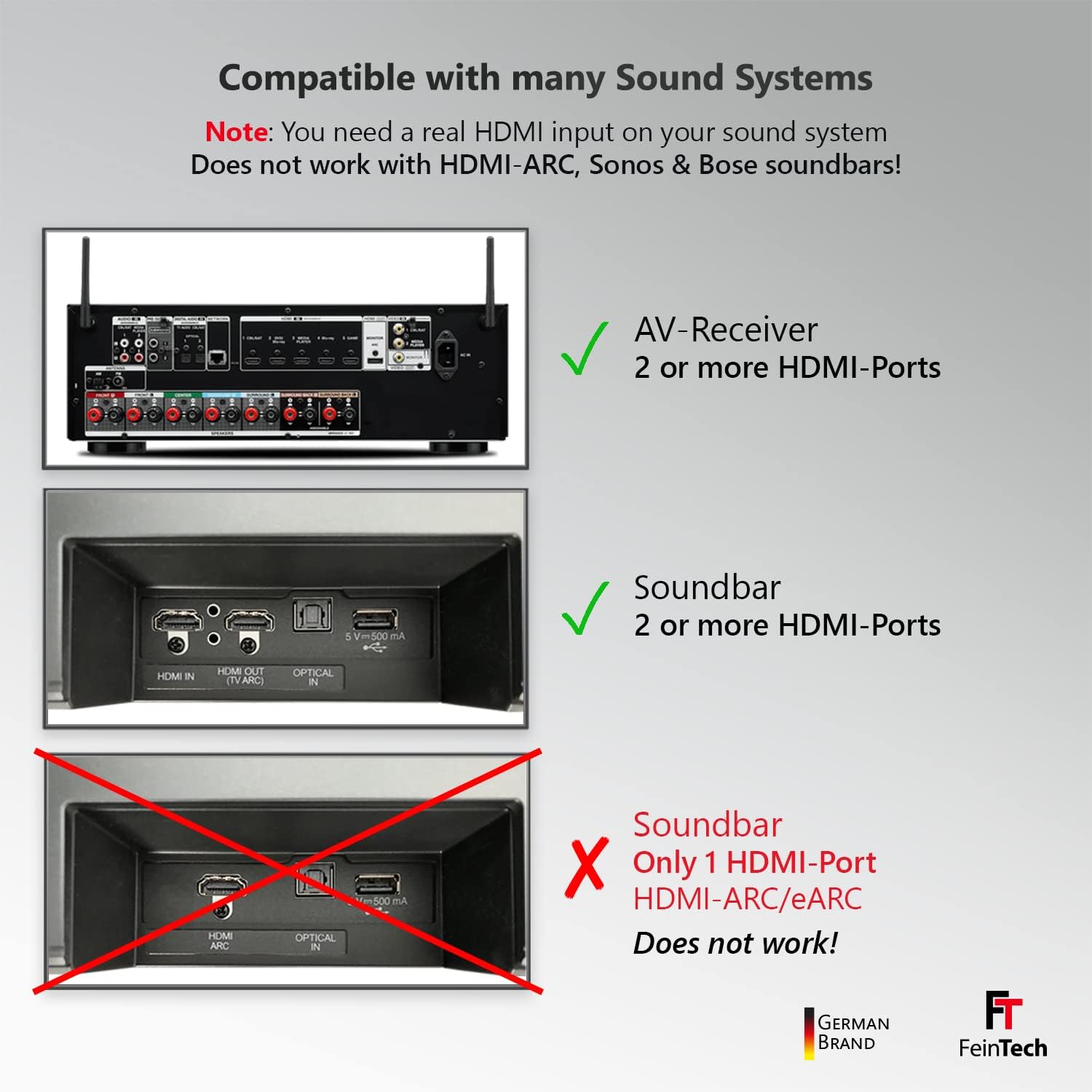
Image 4: Sound system compatibility overview.
7. Bedienungsanleitung
- Ein-/Ausschalten: Use the ON/OFF switch on the device to power it on or off. The PWR LED will illuminate when powered.
- Modusauswahl: Ensure the eARC | EDID DIP switch is correctly set for your desired operating mode (eARC Audio Extractor or HDMI Splitter).
- TV-Einstellungen: For eARC Audio Extractor mode, verify that your TV's eARC function is enabled and the audio output is set to 'Passthrough' or 'Bitstream' to allow the VAX01202 to receive the raw audio signal.
- AV Receiver Input: Select the correct HDMI input on your AV receiver to receive the audio signal from the VAX01202.
- Audioformate: The VAX01202 supports a wide range of audio formats. The actual format played will depend on your source content, TV capabilities, and AV receiver's decoding capabilities.
8. Fehlerbehebung
- Kein Ton:
- Check all HDMI cable connections. Ensure they are securely plugged in.
- Verify the VAX01202 is powered on and the PWR LED is lit.
- Confirm the correct operating mode is selected via the DIP switch.
- Check your TV's audio output settings: eARC/ARC enabled, output set to 'Passthrough' or 'Bitstream'.
- Ensure your AV receiver is set to the correct HDMI input.
- If in eARC Audio Extractor mode, ensure there is no direct HDMI connection between the TV and AV receiver, or disable HDMI-CEC on the AV receiver.
- Intermittent Sound or Audio Dropouts:
- This can sometimes occur when switching between content with different audio formats. The device may take a moment to re-sync.
- Ensure all HDMI cables are high-quality and certified for the bandwidth required (e.g., HDMI 2.0 or 2.1 for 4K content).
- Check for any HDMI-CEC conflicts and disable CEC on the AV receiver if necessary.
- No Video (in Splitter Mode):
- Ensure the HDMI source is active and outputting a signal.
- Check the HDMI cable from VAX01202 OUT 1 to the TV/projector.
- Verify the TV/projector is on the correct HDMI input.
- Compatibility Issues with Soundbar:
- The VAX01202 requires a dedicated HDMI input on your audio system. It is not compatible with soundbars that only have an HDMI-ARC output.
- Überhitzung:
- Stellen Sie sicher, dass das Gerät in einem gut belüfteten Bereich aufgestellt und nicht abgedeckt wird.
9. Spezifikationen
| Marke | FeinTech |
| Modellnummer | VAX01202 |
| Anschlüsse | HDMI, USB (zur Stromversorgung) |
| Besondere Merkmale | ARC, eARC Audio Extraction, HDMI Splitter |
| Kompatible Geräte | TVs, Projectors, AV Receivers, PlayStation, Xbox |
| Stromversorgung | 5V DC, 350mA (USB power adapter not included) |
| Energieaufnahme | <1.75 W |
| Maximale Videoauflösung | 4K 60Hz Dolby Vision (in splitter mode) |
| Unterstützte Audioformate | Dolby Digital Plus, Dolby TrueHD, DTS-HD, PCM5.1, Dolby MAT, Dolby Atmos |
10. Wartung
- Reinigung: Reinigen Sie die Außenseite des Geräts mit einem weichen, trockenen Tuch. Verwenden Sie keine flüssigen Reiniger oder Sprays.
- Lagerung: If the device will not be used for an extended period, disconnect it from the power supply and store it in a cool, dry place.
11. Garantie und Support
For warranty information or technical support, please refer to the documentation provided with your purchase or visit the official FeinTech webBewahren Sie Ihren Kaufbeleg für eventuelle Garantieansprüche auf.


