1. Einleitung
The Waveshare 1.28inch Round LCD Display Module is a compact, high-resolution display designed for various embedded applications. It features a 240x240 pixel resolution with 65K RGB colors, providing a clear and vibrant visual experience. The module utilizes an SPI interface, minimizing the number of required I/O pins for connection to microcontrollers and single-board computers. It is embedded with the GC9A01 driver and is compatible with popular development boards such as Raspberry Pi, Jetson Nano, Arduino, and STM32.
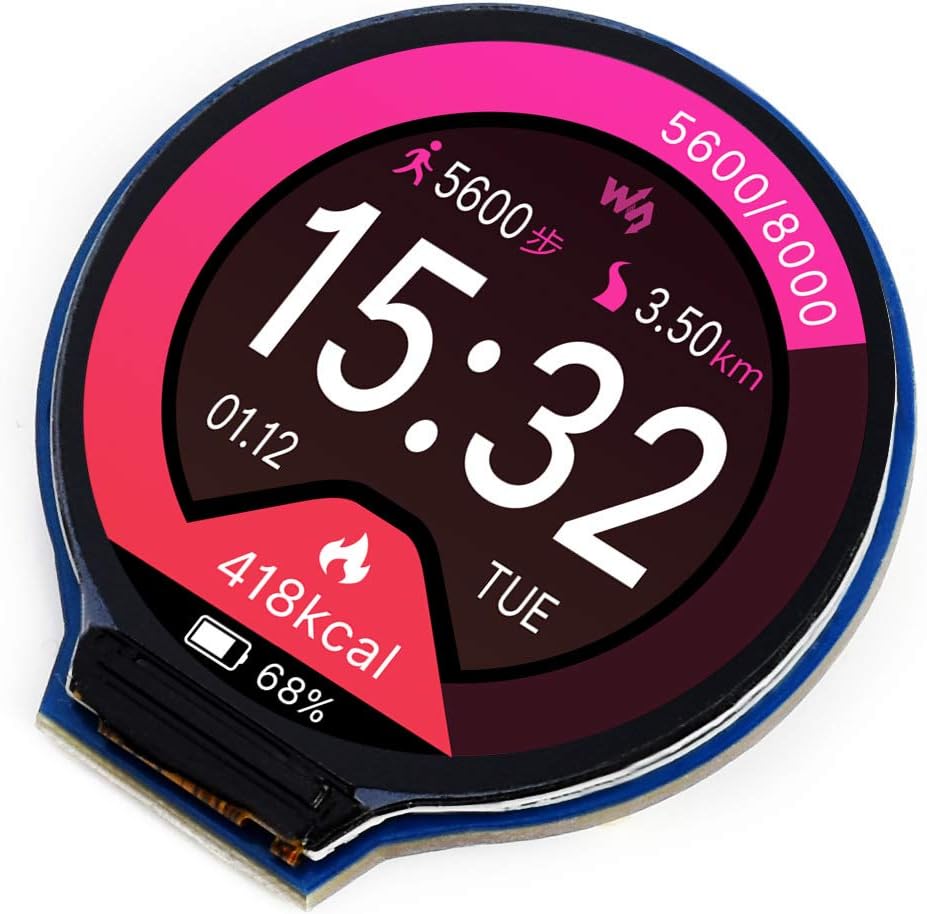
Abbildung 1: Front view of the Waveshare 1.28inch Round LCD Display Module displaying a watch face with time, date, steps, distance, and calorie information.
2. Hauptmerkmale
- Auflösung: 240x240 pixels, offering clear and detailed visuals.
- Farbtiefe: 65K RGB colors for rich and vibrant display effects.
- Schnittstelle: SPI (Serial Peripheral Interface) for efficient data transfer and reduced pin count.
- Treiber: Embedded GC9A01 display driver.
- Kompatibilität: Supports various controller boards including Raspberry Pi, Jetson Nano, Arduino, and STM32.
- Entwicklungsressourcen: Comes with example code and documentation for Raspberry Pi, Arduino, and STM32.

Abbildung 2: Überview of the 1.28inch Round LCD Display Module highlighting its main features and specifications.
3. Packungsinhalt
Beim Öffnen des Pakets sollten Sie die folgenden Artikel finden:
- 1x Waveshare 1.28inch Round LCD Display Module
- 1x PH2.0 8PIN 20cm cable

Abbildung 3: Im Produktpaket enthaltene Inhalte.
4. Einrichtung und Hardwareanschluss
This section details the physical connection of the 1.28inch Round LCD Display Module to compatible development boards. The module uses an SPI interface for communication.
4.1 Pinbelegungsbeschreibung

Abbildung 4: Zurück view of the display module showing the 8-pin connector and pin labels.
| Pin-Etikett | Beschreibung |
|---|---|
| VCC | Power supply (3.3V / 5V input) |
| Masse | Boden |
| LÄRM | SPI data input (MOSI) |
| CLK | SPI clock input (SCK) |
| CS | Chipauswahl, niedrig aktiv |
| DC | Daten-/Befehlsauswahl (hoch für Daten, niedrig für Befehl) |
| RST | Zurücksetzen, niedrig aktiv |
| BL | Steuerung der Hintergrundbeleuchtung |
4.2 Verbindung mit Raspberry Pi
Follow the diagram below to connect the display module to a Raspberry Pi board. Ensure correct pin mapping for VCC, GND, DIN (MOSI), CLK (SCK), CS, DC, RST, and BL.

Abbildung 5: Hardware connection diagram for Raspberry Pi.
4.3 Connecting with Arduino Board
Refer to the diagram for connecting the display module to an Arduino board. Pay attention to the specific digital and analog pins used for SPI communication and control signals.

Abbildung 6: Hardware connection diagram for Arduino.
For other compatible boards like Jetson Nano or STM32, consult the respective board's documentation and the Waveshare product wiki for specific wiring instructions and exampder Code.
5. Betrieb und Programmierung
The Waveshare 1.28inch Round LCD Display Module requires programming to display content. Waveshare provides comprehensive development resources, including example code and libraries, for various platforms.
5.1 Software-Setup
- Obtain Resources: Visit the official Waveshare product wiki page for the 1.28inch Round LCD Display Module to download the latest development resources, including drivers, libraries, and example code for Raspberry Pi, Arduino, and STM32.
- Bibliotheken installieren: Follow the instructions provided in the downloaded resources to install the necessary libraries for your chosen development environment (e.g., Arduino IDE, Python for Raspberry Pi).
- Laden ExampCode: Open and compile the provided example code to verify the display's functionality and understand basic operations.
5.2 Basic Display Control
The display is controlled via the SPI protocol. Key functions typically include:
- Initialisierung: Sending a sequence of commands to the GC9A01 driver to configure the display.
- Drawing Pixels/Shapes: Writing pixel data to the display memory.
- Textdarstellung: Using fonts to render text on the screen.
- Bildanzeige: Loading and displaying bitmap images.
- Steuerung der Hintergrundbeleuchtung: Adjusting the brightness of the display backlight via the BL pin.
Beziehen Sie sich auf das bereitgestellte Beispielample code for detailed implementation of these functions.
6. Wartung und Pflege
To ensure the longevity and optimal performance of your Waveshare 1.28inch Round LCD Display Module, follow these general maintenance guidelines:
- Handhabung: Handle the module by its edges to avoid touching the display surface or electronic components.
- Reinigung: Verwenden Sie ein weiches, fusselfreies Tuch, leicht feucht.ampened with water or a mild screen cleaner, to gently wipe the display surface. Avoid abrasive materials or harsh chemicals.
- Lagerung: Store the module in a dry, dust-free environment, away from direct sunlight and extreme temperatures.
- Stromversorgung: Stellen Sie sicher, dass die Stromversorgungslautstärketage is within the specified range (3.3V / 5V) to prevent damage.
- Statische Elektrizität: Beim Umgang mit dem Modul sind Vorsichtsmaßnahmen gegen elektrostatische Entladung (ESD) zu treffen, da elektronische Bauteile empfindlich auf statische Aufladung reagieren.
7. Fehlerbehebung
If you encounter issues with your display module, consider the following troubleshooting steps:
- Keine Anzeige/leerer Bildschirm:
- Verify all connections (VCC, GND, DIN, CLK, CS, DC, RST, BL) are secure and correctly wired according to the diagrams.
- Check the power supply to the module and the host board.
- Ensure the backlight (BL) pin is correctly controlled and receiving power.
- Confirm that the initialization code for the GC9A01 driver is correctly executed in your program.
- Incorrect or Garbled Display:
- Double-check your SPI communication settings (mode, clock speed).
- Ensure the data format and command sequences sent to the GC9A01 driver match the specifications.
- Verify that the display buffer is being updated correctly in your code.
- Langsame Bildwiederholfrequenz:
- SPI communication speed can impact refresh rates. Ensure your host board is configured for the fastest stable SPI clock speed.
- Optimize your drawing routines to minimize the amount of data sent over SPI.
- Module Gets Warm:
- Some heat generation is normal, especially with continuous operation. Ensure adequate ventilation.
- Überprüfen Sie, ob die Eingangslautstärketage überschreitet nicht 5 V.
- Kompatibilitätsprobleme:
- While compatible with many boards, specific libraries or pin mappings might be required. Consult Waveshare's documentation for your exact host board. (Note: Some users reported issues with Teensy 4, while it worked with Arduino Nano/Teensy 3.2/3.5).
8. Technische Daten
| Besonderheit | Spezifikation |
|---|---|
| Anzeigegröße | 1.28 Zoll (rund) |
| Auflösung | 240 x 240 Pixel |
| Farbtiefe | 65K RGB colors |
| Treiber-IC | GC9A01 |
| Schnittstelle | 4-Draht-SPI |
| Betriebslautstärketage | 3.3 V / 5 V |
| Maße | 40.4 x 37.5mm (overall), φ32.4mm (display area) |
| Pixelgröße | 0.135 x 0.135 mm |
| Artikelgewicht | 0.704 Unzen |
| Hersteller | Wellenanteil |

Abbildung 7: Detailed technical specifications and pin descriptions.
9. Support und Ressourcen
For further assistance, detailed documentation, and the latest development resources, please visit the official Waveshare website or product wiki page for this module. You can typically find:
- Detailed tutorials and guides.
- Example code for various programming languages and platforms.
- Datasheets for the GC9A01 driver IC.
- Community forums or contact information for technical support.
Hersteller: Wellenanteil
Offiziell WebWebsite: www.waveshare.com
For specific product support, search for "1.28inch Round LCD Display Module" on the Waveshare wiki.


