MOUNTUP MU0034 Einzelmonitor-Tischhalterung – Bedienungsanleitung
Marke: MOUNTUP | Modell: MU0034
1. Einleitung
This manual provides detailed instructions for the installation, operation, and maintenance of your MOUNTUP MU0034 Single Monitor Desk Mount. Please read this manual thoroughly before installation to ensure correct setup and safe operation. This monitor mount is designed to enhance your workspace ergonomics by providing adjustable positioning for a single monitor.
2. Sicherheitshinweise
- Vor der Installation sicherstellen, dass alle Komponenten vorhanden und unbeschädigt sind. Nicht verwenden, wenn Teile fehlen oder defekt sind.
- This product is intended for monitors weighing up to 17.6 lbs (8 kg) and screen sizes from 17 to 32 inches. Do not exceed the maximum weight capacity.
- Compatible VESA patterns are 75x75mm and 100x100mm. Verify your monitor's VESA pattern before proceeding.
- Ensure the desk surface is stable and strong enough to support the combined weight of the mount and monitor.
- Tighten all screws firmly, but do not overtighten to avoid stripping threads or damaging components.
- Halten Sie Kinder und Haustiere während der Installation fern.
- Sollten Sie Zweifel am Installationsprozess haben, konsultieren Sie einen qualifizierten Fachmann.
3. Packungsinhalt
Bitte überprüfen Sie, ob alle Teile in Ihrem Paket enthalten sind:
- Monitorarm-Baugruppe
- Schreibtisch Clamp Base
- Komponenten der Ösenbasis
- VESA-Platte
- Hardware-Set (Schrauben, Unterlegscheiben, Inbusschlüssel)
- Bedienungsanleitung
4. Spezifikationen
| Besonderheit | Spezifikation |
|---|---|
| Modellnummer | MU0034 |
| Material | Poliertes Aluminium |
| Kompatibilität mit Bildschirmgrößen | 17" to 32" (flat or curved) |
| Gewichtskapazität | Bis zu 17.6 kg (8 Pfund) |
| VESA-Kompatibilität | 75x75mm, 100x100mm |
| Höhenverstellung | Up to 11" (16.3" total height adjustment range) |
| Neigungsbereich | +45° bis -45° |
| Schwenkbereich | 360° (arm), 180° (monitor plate) |
| Drehung | 360° (landscape to portrait) |
| Max Desk Thickness (C-clamp) | 3.35 Zoll |
| Durchmesser der Tüllenöffnung | 0.39" - 3.1" |
5. Einrichtung und Installation
The MOUNTUP MU0034 offers two installation options: C-clamp mounting and Grommet mounting. Choose the method suitable for your desk.
5.1. C-Clamp Montage
This method is for desks without existing grommet holes, or if you prefer clamping to the edge of your desk. Ensure your desk thickness is no more than 3.35 inches.
- Befestigen Sie die C-clamp: Montieren Sie die C-Cl-Verbindung.amp components to the base of the monitor arm. Position the base on the edge of your desk and tighten the clamp screw until it is secure.
- Befestigen Sie die VESA-Platte am Monitor: Secure the VESA plate to the back of your monitor using the appropriate screws from the hardware kit. Ensure the screws are tightened securely.
- Slide Monitor onto Arm: Carefully slide the monitor (with the attached VESA plate) onto the monitor arm's VESA head. Ensure it clicks into place or is secured with the provided locking mechanism.
- Spannung einstellen: Refer to Section 6.1 for adjusting the gas spring tension to match your monitor's weight.

Figure 1: Illustration of C-clamp and Grommet mounting options. The C-clamp is shown securing the mount to the desk edge, while the grommet mount uses a desk hole.
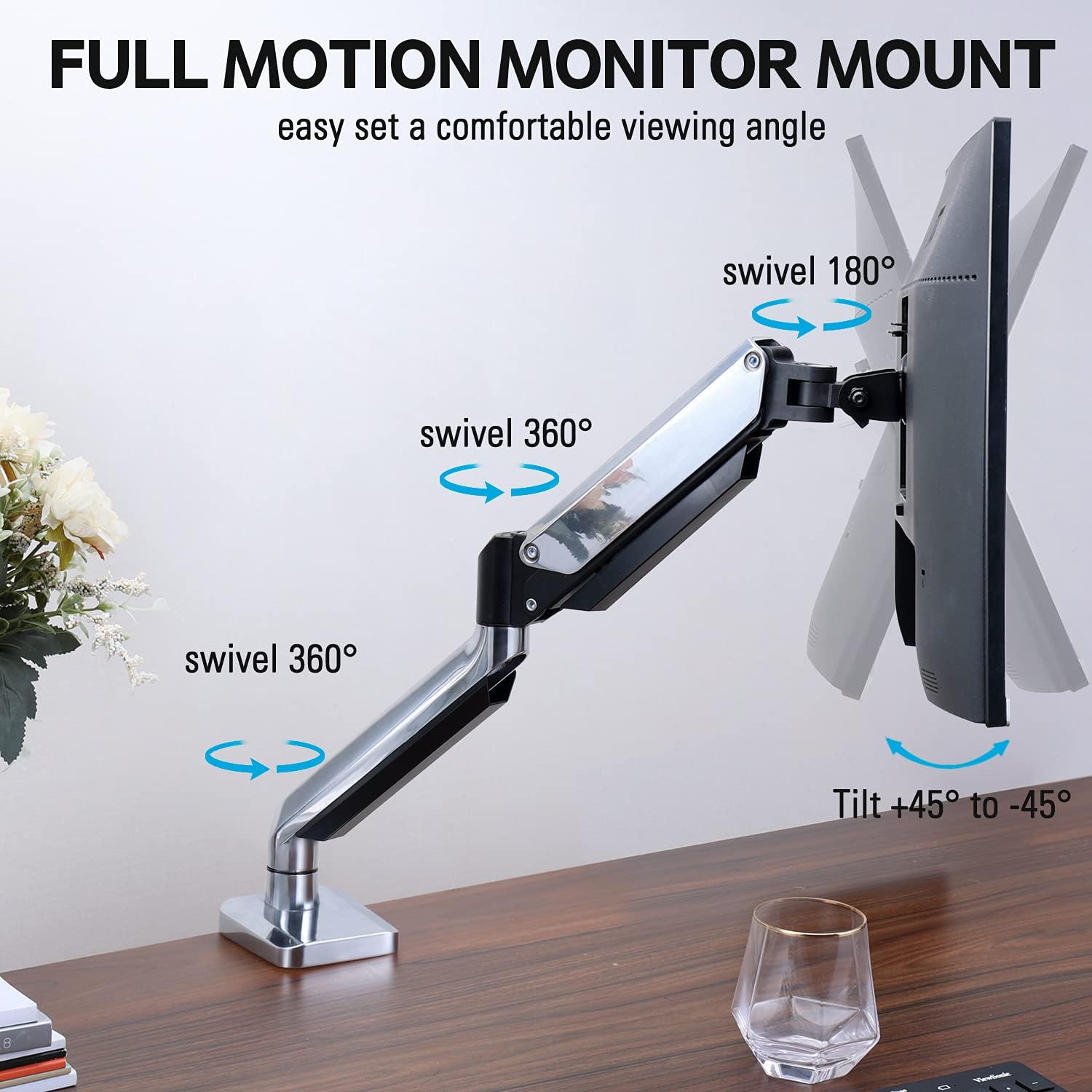
Figure 2: The removable VESA plate being attached to the back of a monitor, then sliding onto the monitor arm for easier installation.
5.2. Montage der Tülle
This method utilizes an existing hole in your desk. Ensure your desk thickness is no more than 3.35 inches and the grommet hole diameter is between 0.39 and 3.1 inches.
- Assemble Grommet Base: Insert the grommet base components through the desk hole and secure them from underneath the desk using the provided plate and nut.
- Befestigen Sie die VESA-Platte am Monitor: Secure the VESA plate to the back of your monitor using the appropriate screws from the hardware kit. Ensure the screws are tightened securely.
- Slide Monitor onto Arm: Carefully slide the monitor (with the attached VESA plate) onto the monitor arm's VESA head. Ensure it clicks into place or is secured with the provided locking mechanism.
- Spannung einstellen: Refer to Section 6.1 for adjusting the gas spring tension to match your monitor's weight.
6. Betrieb und Anpassungen
The MOUNTUP MU0034 monitor arm offers various adjustments for optimal viewKomfort.
6.1. Einstellung der Gasfederspannung
The gas spring tension needs to be adjusted to match the weight of your monitor. This ensures the monitor stays in position once adjusted.
- If the monitor drifts down, turn the adjustment screw (usually located on the arm joint) clockwise ("+") to increase tension.
- If the monitor floats up, turn the adjustment screw counter-clockwise ("-") to decrease tension.
- Adjust gradually until the monitor remains stable at any height.
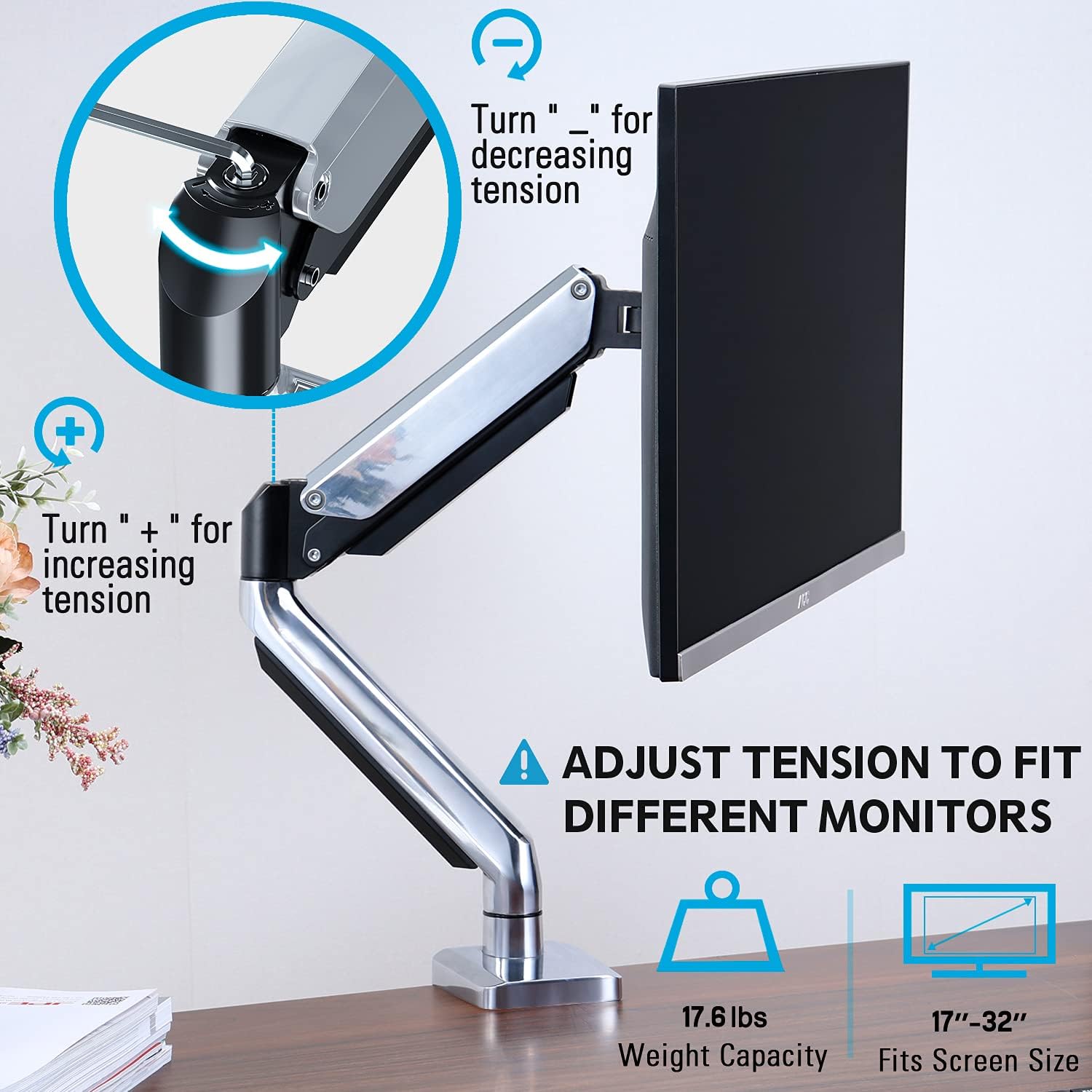
Figure 3: Instructions for adjusting the gas spring tension using an Allen key. Turning clockwise increases tension, counter-clockwise decreases it.
6.2. Höhenverstellung
Once the gas spring tension is correctly set, you can easily raise or lower your monitor to your desired ergonomic height. The arm allows for up to 11 inches of vertical adjustment.

Figure 4: Diagram illustrating the maximum height adjustment of 11 inches and maximum extension of 17.5 inches.
6.3. Neigen, Schwenken und Drehen
The monitor arm provides full motion capabilities:
- Neigung: Adjust the monitor screen +45° to -45° to reduce glare or find a comfortable viewing-Winkel.
- Schwenken: The arm can swivel 360° at the base and 360° at the middle joint. The monitor plate itself can swivel 180°. This allows for easy screen sharing or repositioning.
- Drehung: Drehen Sie den Monitor um 360°, um zwischen Quer- und Hochformat zu wechseln.

Figure 5: Visual representation of the monitor arm's full motion capabilities, including 360° swivel, 180° swivel at the monitor plate, and +45° to -45° tilt.

Figure 6: An image demonstrating the monitor's ability to rotate 360 degrees, allowing for both landscape and portrait viewing-Modi.
7. Kabelmanagement
The MOUNTUP MU0034 features integrated cable management to keep your workspace tidy.
- Route your monitor cables (power, video, etc.) along the underside of the arm.
- Use the provided cable clips or covers to secure the cables within the arm channels.
- Ensure cables have enough slack to allow for full range of motion without tension.

Figure 7: Illustration of how cables are routed and organized through the integrated channels on the monitor arm, keeping the desk clear.
8. Wartung
- Überprüfen Sie regelmäßig alle Schrauben und Verbindungen, um sicherzustellen, dass sie fest sitzen.
- Reinigen Sie die Halterung mit einem weichen, fusselfreien Tuch.amp Mit einem Tuch abwischen. Vermeiden Sie scheuernde Reiniger oder Lösungsmittel.
- Den Gasfedermechanismus nicht schmieren.
9. Fehlerbehebung
| Problem | Mögliche Ursache | Lösung |
|---|---|---|
| Monitor sags or won't stay up | Die Gasfederspannung ist für das Gewicht des Monitors zu gering. | Increase gas spring tension by turning the adjustment screw clockwise ("+"). |
| Der Monitor schwebt nach oben oder lässt sich nur schwer herunterdrücken. | Die Gasfederspannung ist für das Gewicht des Monitors zu hoch. | Decrease gas spring tension by turning the adjustment screw counter-clockwise ("-"). |
| Monitor is wobbly | Mount not securely fastened to desk or VESA plate not tight. | Alle Schrauben prüfen und festziehenamp/grommet screws and VESA plate screws. |
| Difficulty rotating/tilting monitor | Die Gelenke sind zu eng. | Loosen the corresponding joint screws slightly (do not remove). |
10. Garantie und Support
The MOUNTUP MU0034 Single Monitor Desk Mount is backed by a 3-year support period. For technical assistance, missing parts, or warranty claims, please contact MOUNTUP customer support through their official channels or the retailer where the product was purchased.
Bitte bewahren Sie Ihren Kaufbeleg für Garantiezwecke auf.


