1. Einleitung
The TechniSat DIGITRADIO 21 is a compact DAB+ and FM radio designed for under-cabinet installation, ideal for kitchens or other spaces where a space-saving audio solution is desired. It features digital radio reception (DAB+), traditional FM radio, Bluetooth audio streaming, and a clear color display. This manual provides essential information for the safe and efficient use of your device.
2. Sicherheitshinweise
- Lesen Sie alle Anweisungen sorgfältig durch, bevor Sie das Gerät in Betrieb nehmen.
- Halten Sie das Gerät von Wasser, Feuchtigkeit und direkten Wärmequellen fern.
- Sorgen Sie für eine ausreichende Belüftung rund um das Gerät, um eine Überhitzung zu vermeiden.
- Verwenden Sie nur das mitgelieferte Netzteil.
- Versuchen Sie nicht, das Gerät selbst zu öffnen oder zu reparieren. Überlassen Sie alle Wartungsarbeiten qualifiziertem Fachpersonal.
- Reinigen Sie das Gerät mit einem weichen, trockenen Tuch. Verwenden Sie keine flüssigen Reinigungsmittel.
3. Packungsinhalt
Überprüfen Sie, ob alle Artikel im Paket vorhanden sind:
- TechniSat DIGITRADIO 21 Unit
- Netzteil
- Mounting Material (screws, mounting plate)
- Benutzerhandbuch (dieses Dokument)
4. Produktüberschreitungview
4.1 Bedienelemente und Anzeige auf der Vorderseite
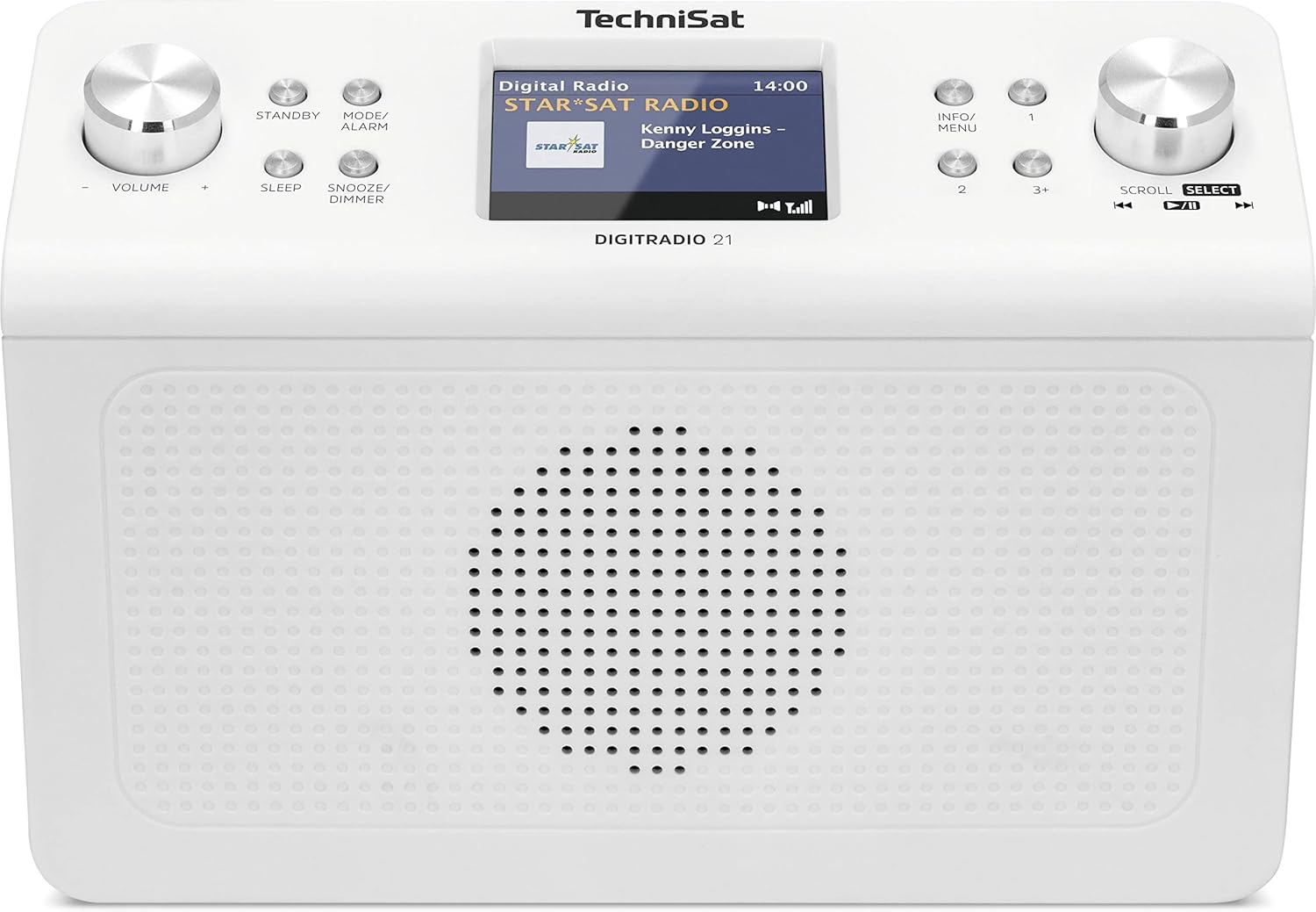
Bild 4.1: Front view of the TechniSat DIGITRADIO 21. This image displays the central 2.8-inch color TFT display, the large volume knob on the left, and the scroll/select knob on the right. Surrounding buttons include Standby, Mode/Alarm, Sleep, Snooze/Dimmer, Info/Menu, and preset buttons 1, 2, 3+.
- Anzeige: 2.8-inch TFT color display for showing station information, time, and menu options.
- Lautstärkeregler: Drehen, um die Lautstärke anzupassen.
- Standby-Taste: Schaltet das Gerät ein oder aus.
- Mode/Alarm Button: Switches between radio modes (DAB+, FM, Bluetooth) and accesses alarm settings.
- Sleep-Taste: Aktiviert die Sleep-Timer-Funktion.
- Schlummer-/Dimmtaste: Schlummermodus für den Alarm oder Anpassung der Displayhelligkeit.
- Info-/Menütaste: Displays additional information or accesses the main menu.
- Voreingestellte Tasten (1, 2, 3+): Quickly access stored favorite stations.
- Scroll/Select Knob: Rotate to navigate menus or tune stations, press to confirm selection.
4.2 Anschlüsse auf der Rückseite

Bild 4.2: Hinteren view of the TechniSat DIGITRADIO 21. This image highlights the power input port (DC IN) and the 3.5mm headphone jack located on the back of the unit.
- DC IN: Anschlussbuchse für Netzteil.
- Kopfhöreranschluss (3.5 mm): Zum Anschluss von Kopfhörern für privates Musikhören.
5. Einrichtung
5.1 Montage des Radios
The DIGITRADIO 21 is designed for under-cabinet mounting. The included mounting plate and screws facilitate installation.
- Select a suitable location under a cabinet or shelf, ensuring sufficient space for the unit and access to controls.
- Position the mounting plate and mark the screw holes.
- Bohren Sie bei Bedarf Führungslöcher.
- Secure the mounting plate to the underside of the cabinet/shelf using the provided screws.
- Slide the DIGITRADIO 21 onto the mounted plate until it clicks securely into place.
Alternatively, the radio can be used as a standalone unit on a flat surface.
5.2 Stromanschluss
- Connect the power adapter cable to the "DC IN" port on the rear of the DIGITRADIO 21.
- Stecken Sie das Netzteil in eine geeignete Steckdose.
- Das Gerät schaltet sich ein oder wechselt in den Standby-Modus.
6. Bedienungsanleitung
6.1 Ein-/Ausschalten
- Drücken Sie die Stehen zu Knopf zum Ein- und Ausschalten des Radios.
6.2 Modusauswahl
- Drücken Sie die Mode/Alarm button repeatedly to cycle through available modes: DAB+, FM, Bluetooth.
6.3 DAB+ Radiobetrieb
- Wählen Sie den DAB+-Modus mit dem Mode/Alarm Taste.
- Das Radio sucht beim ersten Einschalten oder falls keine Sender gefunden werden, automatisch nach verfügbaren DAB+-Sendern.
- Drehen Sie den Scrollen/Auswählen Drehknopf zum Durchsuchen der Liste der verfügbaren Sender.
- Drücken Sie die Scrollen/Auswählen Drehknopf zum Auswählen und Abhören eines Senders.
- To store a favorite station: While listening, press and hold one of the Preset buttons (1, 2, 3+) until "Preset Saved" appears on the display.
- To recall a favorite station: Briefly press the corresponding Preset-Taste.
6.4 FM-Radiobetrieb
- Wählen Sie den FM-Modus mit dem Mode/Alarm Taste.
- Drehen Sie den Scrollen/Auswählen Drehknopf zur manuellen Frequenzeinstellung.
- Um automatisch nach dem nächsten verfügbaren Sender zu suchen, halten Sie die Taste gedrückt. Scrollen/Auswählen Knopf.
- To store a favorite station: While listening, press and hold one of the Preset buttons (1, 2, 3+) until "Preset Saved" appears on the display.
- To recall a favorite station: Briefly press the corresponding Preset-Taste.
6.5 Bluetooth-Audiostreaming
- Wählen Sie den Bluetooth-Modus mithilfe der Mode/Alarm button. The display will show "Bluetooth Pairing".
- Aktivieren Sie Bluetooth auf Ihrem Bluetooth-fähigen Gerät (z. B. Smartphone, Tablet) und suchen Sie nach verfügbaren Geräten.
- Select "DIGITRADIO 21" from the list of devices to pair.
- Sobald die Kopplung hergestellt ist, können Sie Audio von Ihrem Gerät an das Radio streamen.
6.6 Alarm, Sleep Timer, and Snooze
- Alarm: Halten Sie die Mode/Alarm button to enter alarm settings. Use the Scrollen/Auswählen knob to set time, source, and volume.
- Schlaf-Timer: Drücken Sie die Schlafen button repeatedly to set a sleep timer (e.g., 15, 30, 60 minutes) after which the radio will automatically turn off.
- Schlummern: Wenn der Alarm ertönt, drücken Sie die Schlummer/Dimmer Taste zum vorübergehenden Stummschalten für einen festgelegten Zeitraum.
6.7 Anzeigeeinstellungen
- Drücken Sie die Schlummer/Dimmer button (when not snoozing an alarm) to adjust the display brightness.
- Drücken Sie die Info/Menü button to cycle through different display information (e.g., program type, frequency, date/time).
7. Wartung
- Reinigung: Reinigen Sie das Radio mit einem weichen, trockenen und fusselfreien Tuch. Verwenden Sie keine Scheuermittel, Wachse oder Lösungsmittel.
- Lagerung: Wenn Sie das Gerät über einen längeren Zeitraum lagern, trennen Sie es vom Stromnetz und bewahren Sie es an einem kühlen, trockenen Ort auf.
8. Fehlerbehebung
| Problem | Mögliche Ursache | Lösung |
|---|---|---|
| Kein Strom | Netzteil nicht angeschlossen oder Steckdose defekt. | Vergewissern Sie sich, dass das Netzteil fest angeschlossen und die Steckdose funktionsfähig ist. |
| Schlechter DAB+ / FM-Empfang | Weak signal, antenna position. | Adjust the position of the wire antenna for better reception. Perform a full scan for stations. |
| Probleme mit der Bluetooth-Kopplung | Gerät nicht im Kopplungsmodus, Funkmodul nicht auffindbar. | Ensure the radio is in Bluetooth pairing mode. Check your device's Bluetooth settings and try re-pairing. |
| Kein Ton | Lautstärke zu niedrig, Kopfhörer angeschlossen. | Increase volume. Disconnect headphones if external sound is desired. |
9. Spezifikationen
- Modell: DIGITRADIO 21
- Marke: TechniSat
- Modellnummer: 0001/3964
- Radiobänder: DAB+, FM (with RDS and PLL)
- Bluetooth-Version: 4.2
- Lautsprecher: 2 W (RMS) Mono Speaker
- Anzeige: 2.8-Zoll-TFT-Farbdisplay
- Favorite Station Memory: 10 für DAB+, 10 für FM
- Verbindungen: 3.5mm Headphone Jack, DC IN
- Besondere Merkmale: Clock, Alarm, Sleep Timer, Snooze Function, Display Dimmer, Bluetooth Audio Streaming
- Stromversorgung: External Power Adapter (DC 5.9 V / 1000 mA)
- Abmessungen (B x H x T): 22.5 x 7.2 x 15.1 cm (ca. 8.86 x 2.83 x 5.94 Zoll)
- Farbe: Weiß (neutral)
10. Garantie und Support
Specific warranty details are not provided in the product information. For warranty claims or technical support, please refer to the official TechniSat website or contact your retailer. Keep your proof of purchase for any warranty-related inquiries.
Weitere Unterstützung finden Sie unter TechniSat official webWebsite.