1. Einleitung
The Xprinter XP-C300H is a high-speed thermal receipt printer designed for various business environments. It features robust construction with water, oil, and dust resistance, ensuring durability and reliable performance. This printer offers versatile connectivity options including USB, Serial, and LAN, making it compatible with a wide range of operating systems. With a printing speed of 300mm per second, it efficiently handles high-volume printing tasks. This manual provides detailed instructions for setting up, operating, and maintaining your XP-C300H printer.
2. Sicherheitshinweise
- Schließen Sie den Drucker immer an eine geerdete Steckdose an.
- Setzen Sie den Drucker weder Wasser noch übermäßiger Feuchtigkeit aus.
- Vermeiden Sie es, den Drucker direkter Sonneneinstrahlung oder der Nähe von Wärmequellen auszusetzen.
- Verwenden Sie ausschließlich das angegebene Netzteil und Zubehör.
- Außerhalb der Reichweite von Kindern aufbewahren.
- Versuchen Sie nicht, den Drucker selbst zu zerlegen oder zu reparieren. Wenden Sie sich an qualifiziertes Servicepersonal.
3. Packungsinhalt
Please check the package contents upon unpacking. If any items are missing or damaged, contact your vendor.
- Xprinter XP-C300H Thermal Receipt Printer
- Stromkabel
- USB Cable (may vary by model/region)
- Thermal Paper Roll (for initial testing)
4. Produktüberschreitungview
Familiarize yourself with the components of your XP-C300H printer.
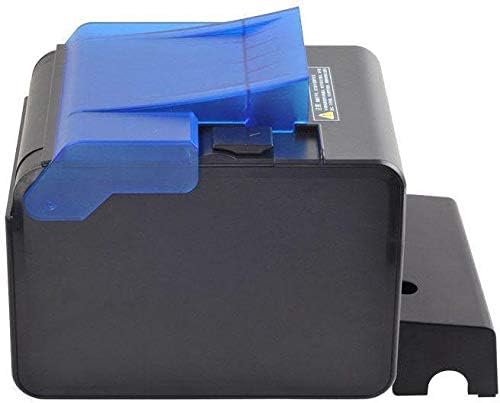
Abbildung 4.1: Seite view of the XP-C300H printer. This image shows the compact design and the blue transparent cover for the paper compartment.
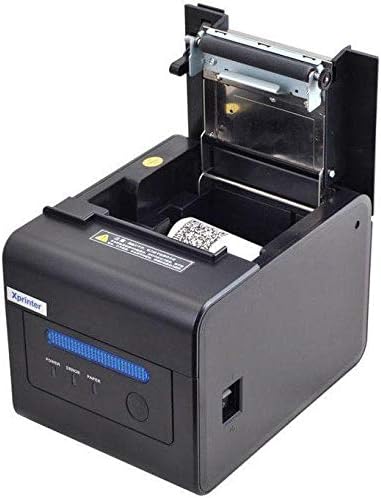
Abbildung 4.2: Oben vorne view of the XP-C300H printer with the paper cover open. This reveals the thermal print head mechanism and the area for loading the thermal paper roll. Status indicator lights (Power, Error, Paper) are visible on the front panel.
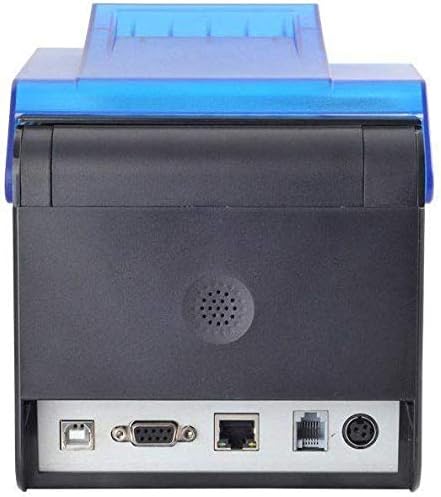
Abbildung 4.3: Hinteren view of the XP-C300H printer. This image highlights the multiple connectivity ports including USB, Serial (DB9), LAN (Ethernet), and the power input port, offering flexible integration options.
5. Einrichtung
5.1 Anschließen des Netzteils
- Stellen Sie sicher, dass der Drucker ausgeschaltet ist.
- Verbinden Sie das Netzkabel mit dem Netzteil.
- Plug the power adapter into the printer's power input port (refer to Figure 4.3).
- Stecken Sie das andere Ende des Stromkabels in eine geerdete Steckdose.
5.2 Einlegen von Thermopapier
- Open the printer's top cover by pressing the release latch (refer to Figure 4.2).
- Insert a new thermal paper roll into the compartment, ensuring the paper feeds from the bottom and the leading edge is straight.
- Ziehen Sie ein kleines Stück Papier hinter dem Schneidewerkzeug heraus.
- Close the top cover firmly until it latches.
5.3 Anschließen an einen Computer
The XP-C300H supports USB, Serial, and LAN connections.
- USB-Verbindung: Verbinden Sie ein Ende des USB-Kabels mit dem USB-Anschluss des Druckers und das andere Ende mit Ihrem Computer.
- Serielle Verbindung: Connect a serial cable (DB9) from the printer's serial port to your computer's serial port.
- LAN-Verbindung: Verbinden Sie den LAN-Anschluss des Druckers mit einem Ethernet-Kabel mit Ihrem Netzwerkrouter oder -switch.
5.4 Treiberinstallation
After connecting the printer, you may need to install the appropriate drivers for your operating system (Windows, Linux, etc.). Drivers are typically provided on a CD with the printer or can be downloaded from the Xprinter official webFolgen Sie den Anweisungen auf dem Bildschirm zur Treiberinstallation.
6. Bedienungsanleitung
6.1 Ein-/Ausschalten
Press the power switch located on the printer to turn it on or off. The 'Power' indicator light will illuminate when the printer is on.
6.2 Statusanzeigen
The printer features indicator lights on the front panel:
- Leistung: Zeigt an, dass der Drucker eingeschaltet ist.
- Fehler: Illuminates or flashes to indicate an error condition (e.g., paper out, print head overheat, cover open).
- Papier: Illuminates when paper is present, flashes when paper is low, or off when paper is out.
6.3 Drucken
Once the printer is connected and drivers are installed, you can print receipts or other documents from your POS software or application. The printer supports EPSON ESC/POS command sets for various printing functions.
6.4 Automatischer Cutter
The XP-C300H features an auto-cutter that can perform full or partial cuts of the thermal paper, depending on the software commands sent to the printer.
7. Wartung
7.1 Reinigung des Druckkopfes
Regular cleaning of the print head ensures optimal print quality. Turn off the printer and disconnect the power cable before cleaning. Use a soft cloth dampened with isopropyl alcohol to gently wipe the thermal elements on the print head. Allow it to dry completely before use.
7.2 Außenreinigung
Wipe the exterior of the printer with a soft, dry cloth. For stubborn dirt, use a cloth lightly dampened with water and mild detergent. Do not use strong solvents or abrasive cleaners.
7.3 Austauschen der Papierrolle
When the 'Paper' indicator shows low paper or is off, replace the paper roll following the steps in Section 5.2.
8. Fehlerbehebung
| Problem | Mögliche Ursache | Lösung |
|---|---|---|
| Der Drucker lässt sich nicht einschalten | Stromkabel nicht angeschlossen; Steckdose defekt | Überprüfen Sie den Netzanschluss; versuchen Sie es mit einer anderen Steckdose. |
| Kein Drucken | Paper out; Printer cover open; Incorrect driver/connection; Error state | Load paper; Close cover; Verify driver installation and cable connection; Check error indicator |
| Schlechte Druckqualität | Print head dirty; Low quality thermal paper | Clean print head (Section 7.1); Use recommended thermal paper |
| Papierstau | Falsch eingelegtes Papier; Fremdkörper | Open cover and clear jammed paper; Reload paper correctly (Section 5.2) |
If the problem persists after trying these solutions, please contact technical support.
9. Spezifikationen
| Besonderheit | Beschreibung |
|---|---|
| Modell | XP-C300H |
| Druckverfahren | Thermodirekt |
| Druckgeschwindigkeit | 300 mm/Sekunde |
| Schnittstelle | USB, Serial (RS232), LAN (Ethernet) |
| Papierbreite | Max 198 mm (Note: Standard receipt printers typically use 80mm or 58mm width. Please verify actual supported paper width with product documentation.) |
| Automatischer Cutter | Full/Partial Cut |
| Zuverlässigkeit | Water, Oil, and Dust Resistant |
| Befehlssatz | Kompatibel mit EPSON ESC / POS |
| Betriebssystemunterstützung | Windows, Linux, various others |
| Abmessungen (T x B x H) | 198 x 148 x 138 mm |
| Gewicht | 1.78 kg |
| Farbe | Schwarz |
| Im Lieferumfang enthaltene Komponenten | Printer, Power Cable |
| Printmedien | Labels (Primary media for receipt printers is typically thermal paper rolls) |
| Duplexdruck | Ja (Note: This feature is generally not applicable to thermal receipt printers. Please refer to official product documentation for clarification.) |
10. Garantie und Support
For detailed warranty information, technical support, and service inquiries, please refer to the documentation included with your purchase or visit the official Xprinter webWebsite. Sie können sich auch an Ihren Händler oder Vertriebspartner vor Ort wenden, um Unterstützung zu erhalten.
Bewahren Sie Ihren Kaufbeleg als Kaufnachweis für Garantieansprüche auf.


