Einführung
Thank you for choosing the Opal Selfie Stick OP-Sel-BT-01. This manual provides essential information for the safe and effective use of your device. Please read it thoroughly before operation and retain it for future reference.
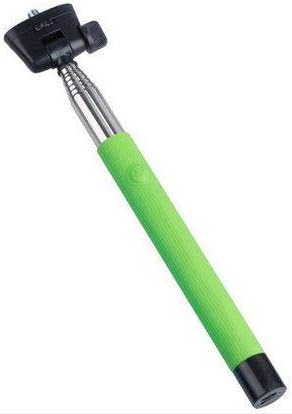
Abbildung 1: The Opal Selfie Stick OP-Sel-BT-01 in green, showing its extendable arm, phone holder, and comfortable grip.
Produkteigenschaften
- Farbe: Grün
- Hauptmaterial: Stahl
- Max Belastbarkeit: 500 g
- Konnektivität: Kabellos (Bluetooth)
- Kompatible Systeme: Android 3.0 und höher, iOS 4.0 und höher
Aufstellen
- Unfold the Selfie Stick: Gently pull the phone holder section upwards to extend the stick.
- Telefonhalterung einstellen: Öffne das Telefon clamp and securely place your smartphone within it. Ensure the phone is centered and stable. The clamp is designed to hold various phone sizes.
- Einschalten: Locate the power button (if applicable, usually on the handle) and press it to turn on the selfie stick. An indicator light may illuminate.
Bedienungsanleitung
Bluetooth-Kopplung
- Ensure the selfie stick is powered on and in pairing mode (indicator light may flash rapidly).
- Gehen Sie auf Ihrem Smartphone zu Einstellungen > Bluetooth.
- Schalten Sie Bluetooth ein und suchen Sie nach verfügbaren Geräten.
- Select "Opal OP-Sel-BT-01" or a similar name from the list of devices.
- Once paired, the indicator light on the selfie stick may turn solid or turn off, indicating a successful connection.
Fotos/Videos aufnehmen
- Öffnen Sie die Kamera-App Ihres Smartphones.
- Verlängern Sie den Selfie-Stick auf die gewünschte Länge.
- Positionieren Sie Ihr Smartphone für die gewünschte Aufnahme.
- Press the shutter button on the selfie stick handle to capture a photo or start/stop video recording.
Wartung
- Reinigung: Reinigen Sie den Selfie-Stick mit einem weichen, trockenen Tuch. Verwenden Sie keine Scheuermittel oder Lösungsmittel.
- Lagerung: Store the device in a cool, dry place away from direct sunlight and extreme temperatures. Retract the stick fully before storage.
- Batteriepflege: If the selfie stick has a rechargeable battery, ensure it is charged periodically even when not in use to maintain battery health.
Fehlerbehebung
| Problem | Mögliche Ursache | Lösung |
|---|---|---|
| Kopplung mit dem Telefon nicht möglich | Selfie stick not in pairing mode; Bluetooth off on phone; battery low. | Ensure stick is on and in pairing mode. Turn phone's Bluetooth off/on. Charge the selfie stick. |
| Shutter button not working | Not paired; camera app settings. | Verify successful Bluetooth pairing. Check camera app settings for volume button shutter control. |
| Telefon in CL nicht stabilamp | Phone not centered; clamp nicht vollständig gesichert. | Re-position phone to be centered. Ensure clamp is firmly gripping the phone. |
Technische Daten
- Modell: OP-Sel-BT-01
- Marke: Opal
- Farbe: Grün
- Hauptmaterial: Stahl
- Max Belastbarkeit: 500 g
- Konnektivität: Kabellos (Bluetooth)
- Unterstützte Betriebssysteme: Android 3.0+, iOS 4.0+
- ASIN: B091DBB122
- Frühestmöglicher Termin: 30 2021. März
Garantie und Support
For information regarding warranty coverage or technical support, please refer to the documentation included with your purchase or visit the official Opal webDie genauen Garantiebedingungen können je nach Region und Händler variieren.
Sicherheitshinweise
- Setzen Sie das Gerät nicht über längere Zeit extremen Temperaturen, Feuchtigkeit oder direkter Sonneneinstrahlung aus.
- Außerhalb der Reichweite von Kindern aufbewahren.
- Versuchen Sie nicht, das Gerät zu zerlegen oder zu verändern. Dies kann zum Erlöschen der Garantie und zu Schäden führen.
- Ensure your phone is securely fastened in the clamp before extending the stick.


