Einführung
This instruction manual provides comprehensive guidance for the SOAR NFL True Wireless Earbuds V.4. These earbuds feature Bluetooth 5.0 technology, a built-in microphone, and touch controls, offering 3-4 hours of playtime per charge. The included charging case ensures portability and extended use. Please read this manual thoroughly before using your earbuds to ensure proper operation and longevity.
Lieferumfang
Upon opening your SOAR NFL True Wireless Earbuds V.4 package, you should find the following items:
- One (1) Pair of True Wireless Earbuds
- Ein (1) Ladecase
- One (1) Micro-USB Charging Cable

The image above displays the SOAR NFL True Wireless Earbuds V.4 in their retail packaging. The package includes the earbuds, the charging case, and a micro-USB charging cable.
Produkt überview
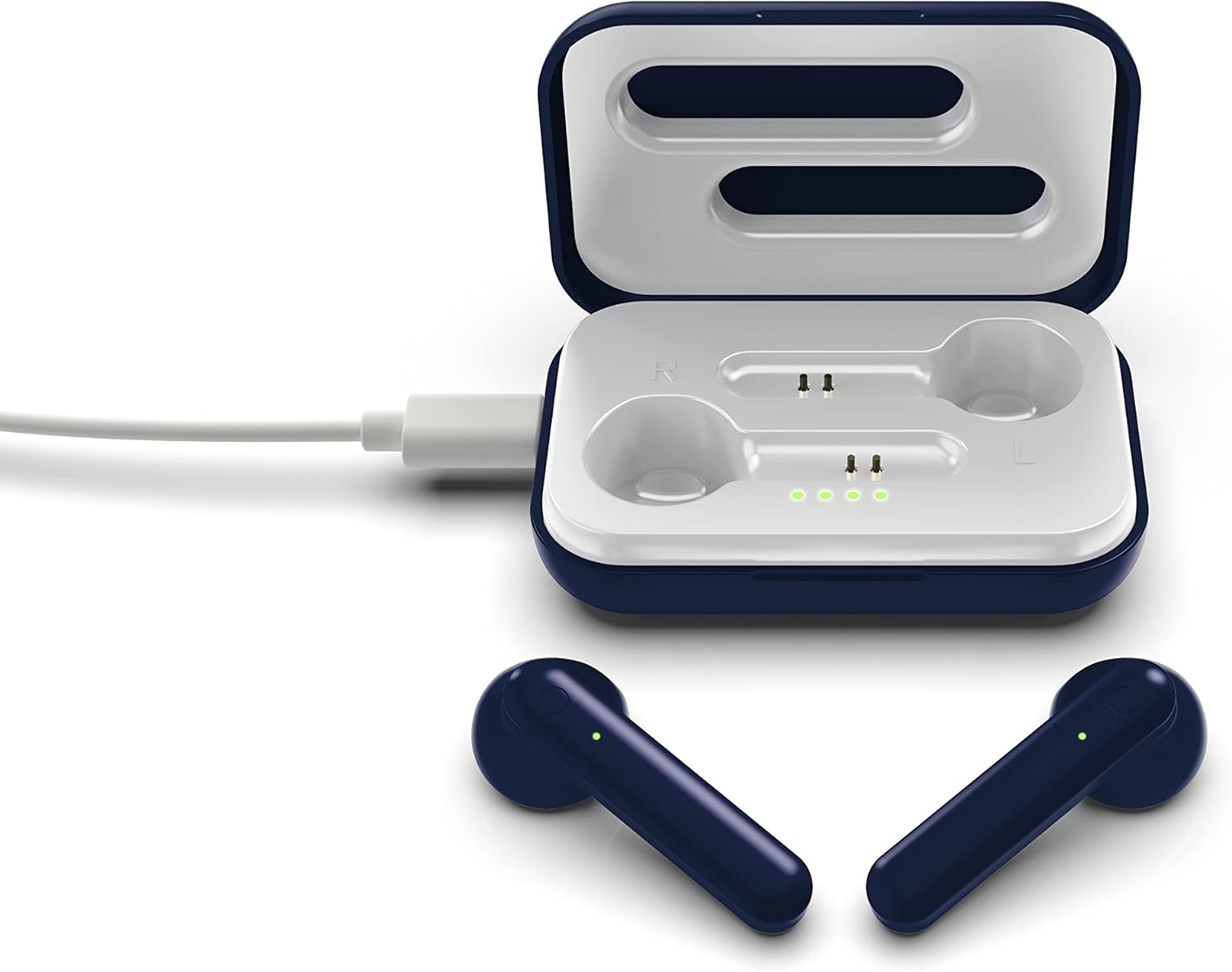
The SOAR NFL True Wireless Earbuds V.4 consist of two individual earbuds and a portable charging case. Each earbud features a touch-sensitive area for controls and an LED indicator. The charging case has a lid, charging ports for the earbuds, and LED indicators to show its battery status.

This image shows the earbuds outside their charging case, which is open and connected to a charging cable. The charging case has designated slots for each earbud (Left and Right) and LED indicators for charging status.
The image above illustrates the earbuds securely placed within their charging case. The illuminated LED lights on the case indicate the charging status of both the case and the earbuds.
Aufstellen
1. Aufladen der Ohrhörer und des Ladecase
Vor dem ersten Gebrauch müssen sowohl die Ohrhörer als auch das Ladecase vollständig aufgeladen werden.
- Aufladen des Gehäuses: Connect the provided Micro-USB cable to the charging port on the case and the other end to a USB power source (e.g., computer, wall adapter). The LED indicators on the case will illuminate to show charging progress.
- Aufladen der Ohrhörer: Place the earbuds into their respective slots in the charging case. Ensure they are correctly seated. The earbuds will begin charging automatically from the case's internal battery. The LED indicators on the earbuds will show their charging status.
- Eine vollständige Ladung ermöglicht eine Spielzeit von etwa 3-4 Stunden.
2. Bluetooth-Kopplung
So verbinden Sie Ihre Ohrhörer mit einem Gerät:
- Stellen Sie sicher, dass die Ohrhörer aufgeladen sind.
- Open the charging case. The earbuds will automatically power on and enter pairing mode. The LED indicator on one earbud will flash, indicating it is ready to pair.
- Aktivieren Sie Bluetooth auf Ihrem Gerät (Smartphone, Tablet usw.).
- Suchen nach available Bluetooth devices and select "SOAR TWS4" from the list.
- Once connected, the earbud LED indicator will stop flashing. You will hear an audible confirmation.
- Die Ohrhörer verbinden sich beim Herausnehmen aus dem Ladecase automatisch wieder mit dem zuletzt gekoppelten Gerät, sofern Bluetooth auf dem Gerät aktiviert ist.
Bedienungsanleitung
The SOAR NFL True Wireless Earbuds V.4 feature touch controls for easy management of audio and calls.
Ein-/Ausschalten
- Einschalten: Öffnen Sie das Ladecase oder halten Sie die Touch-Fläche an beiden Ohrhörern 3 Sekunden lang gedrückt.
- Ausschalten: Legen Sie die Ohrhörer zurück in das Ladecase und schließen Sie den Deckel, oder halten Sie die Touch-Fläche an beiden Ohrhörern 5 Sekunden lang gedrückt.
Musikwiedergabe
- Abspielen/Pause: Tippen Sie einmal auf einen der Ohrhörer.
- Nächster Titel: Tippen Sie zweimal auf den rechten Ohrhörer.
- Vorheriges Lied: Tippen Sie zweimal auf den linken Ohrhörer.
Anruf-Management
- Anruf annehmen/beenden: Einmaliges Tippen auf einen der Ohrhörer während eines eingehenden oder aktiven Anrufs.
- Anruf ablehnen: Drücken Sie während eines eingehenden Anrufs 2 Sekunden lang auf einen der Ohrhörer.
Sprachassistent
- Sprachassistenten aktivieren: Dreimaliges Tippen auf einen der Ohrhörer.
Wartung
Durch die richtige Pflege verlängern Sie die Lebensdauer Ihrer Ohrhörer.
- Reinigung: Reinigen Sie die Ohrhörer und das Ladecase mit einem weichen, trockenen Tuch. Verwenden Sie keine scharfen Chemikalien oder Scheuermittel.
- Lagerung: Bewahren Sie die Ohrhörer bei Nichtgebrauch in ihrem Ladeetui auf, um sie zu schützen und geladen zu halten.
- Wasserbeständigkeit: Diese Ohrhörer sind nicht wasserbeständig. Avoid exposure to liquids, moisture, and extreme temperatures.
- Laden: Use only the provided Micro-USB cable or a certified equivalent for charging.
Fehlerbehebung
Sollten Sie Probleme mit Ihren Ohrhörern haben, beachten Sie bitte die folgenden gängigen Lösungsansätze:
| Problem | Lösung |
|---|---|
| One earbud is not connecting or producing sound. |
|
| Earbuds are not pairing with my device. |
|
| Ohrhörer werden nicht aufgeladen. |
|
Technische Daten
| Besonderheit | Detail |
|---|---|
| Modellname | Echte drahtlose Ohrhörer V.4 |
| Artikelmodellnummer | NFL-TWS4-SHKS |
| Konnektivitätstechnologie | Bluetooth, kabellos |
| Drahtlose Kommunikationstechnologie | Bluetooth 5.0 |
| Bluetooth-Reichweite | Bis zu 30 Fuß (9.14 Meter) |
| Akkulaufzeit (Spielzeit) | 3-4 Stunden pro Ladung |
| Steuerungstyp | Touch- und Mediensteuerung |
| Besonderheit | Mikrofon enthalten |
| Platzierung des Ohrs | Im Ohr |
| Wasserbeständigkeit | Nicht wasserfest |
| Material | Plastik |
| Technische Daten | 1.25 x 4.5 x 6.5 Zoll |
| Artikelgewicht | 3.52 Unzen |
| Hersteller | Prime Brands Group, Inc. |
| UPC | 192129070757 |
Offizielles Produktvideo
Dieses Video bietet einen visuellen Überblick überview of the SOAR TWS4 True Wireless Earbuds V.4, highlighting key features such as the wireless charging case, touch controls, and Bluetooth 5.0 technology. It demonstrates the product's design and functionality.
Garantie und Support
Your SOAR NFL True Wireless Earbuds V.4 are covered by a 1 Jahr eingeschränkte Garantie. This warranty covers manufacturing defects and issues arising from normal use. It does not cover damage caused by misuse, accidents, unauthorized modifications, or exposure to liquids.
For warranty claims, technical support, or further assistance, please contact the manufacturer, Prime Brands Group, Inc., or visit their official webBewahren Sie Ihren Kaufbeleg zur Überprüfung der Garantie auf.


