1. Einleitung
This manual provides comprehensive instructions for the installation, operation, maintenance, and troubleshooting of your TP-Link TL-SG3210XHP-M2 Jetstream 8-Port Multi-Gigabit L2+ Managed PoE Switch. Please read this manual thoroughly before using the device to ensure proper functionality and safety.
2. Hauptmerkmale
- Eight 2.5Gbps Ports: Features 8x 2.5-Gigabit ports for high-performance multi-gigabit connections.
- 10G SFP+ Uplink: Includes 2x 10 Gbps SFP+ slots for high-bandwidth connectivity and non-blocking switching capacity.
- Flexible PoE Port Configuration: Equipped with 8x PoE+ (802.3at/af) 10/100/1000 Mbps RJ45 ports, providing up to 30W per port with a total PoE budget of 240W.
- Omada SDN-Integration: Supports the Omada Software Defined Networking platform, integrating network devices like switches, APs, and gateways with multiple control options (Omada Hardware Controller, Software Controller, or Standalone Mode).
- Cloud-Zugriff: Offers remote cloud access and an Omada app for centralized cloud management of the entire network from various sites, all controlled from a single interface.
- Verbesserte Netzwerksicherheit: Advanced security features include 802.1Q VLAN, IP-MAC-Port binding, ACL, Port Security, DoS defense, Storm control, DHCP Snooping, and 802.1X radius authentication.
- L2+ Features: Static Routing helps optimize internal traffic for efficient use of network resources.
3. Packungsinhalt
Überprüfen Sie, ob Ihr Paket die folgenden Artikel enthält:
- TL-SG3210XHP-M2 Switch
- Netzkabel
- Schnellinstallationsanleitung (QIG)
- Rackmount-Kit
- Gummifüße
4. Körperliche Übergriffeview
Familiarize yourself with the ports, LEDs, and physical features of the switch.

Abbildung 1: Vorderseite view of the TL-SG3210XHP-M2 switch, showing the TP-Link logo, model number, LED indicators, 8x 2.5Gbps PoE+ ports, and 2x 10G SFP+ slots.
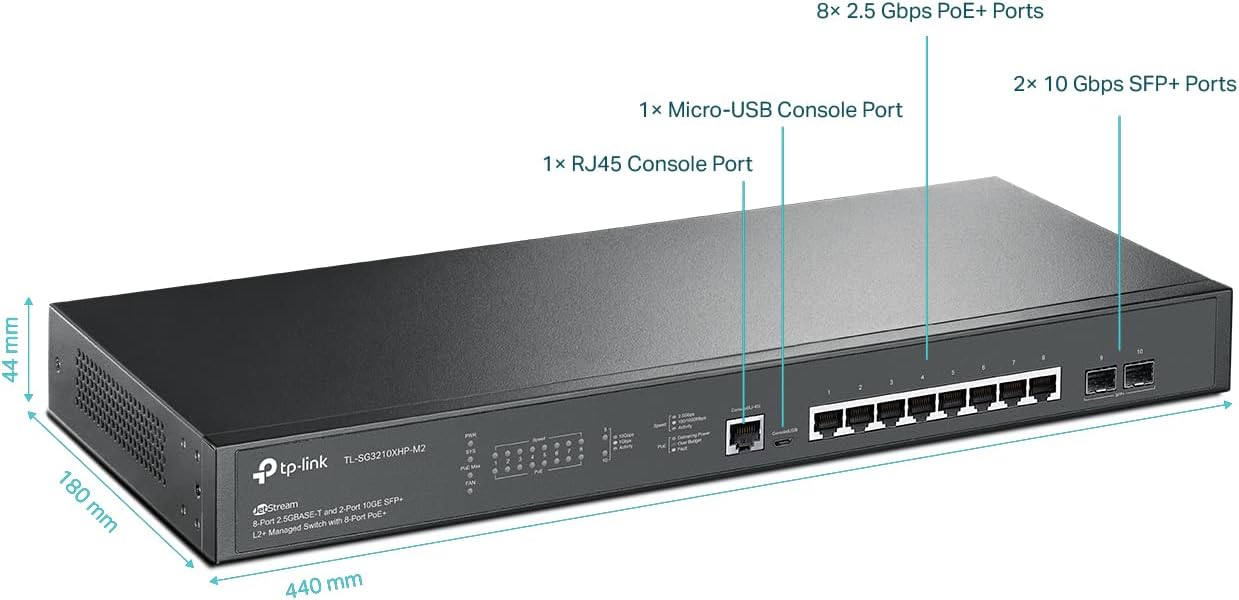
Abbildung 2: Ausführlich view highlighting the dimensions (440 mm length, 180 mm depth, 44 mm height) and port types: 8x 2.5 Gbps PoE+ Ports, 1x Micro-USB Console Port, 1x RJ45 Console Port, and 2x 10 Gbps SFP+ Ports.
5. Einrichtung
Follow these steps to set up your TL-SG3210XHP-M2 switch:
- Stromanschluss: Connect the provided power cord to the switch's power inlet and then to a power outlet. Ensure the power LED illuminates.
- Netzwerkverbindungen: Connect your network devices (e.g., computers, servers, access points, IP cameras) to the 2.5Gbps RJ45 ports using Ethernet cables. For high-speed uplinks, connect to the 10G SFP+ slots using appropriate SFP+ modules and fiber optic cables.
- PoE-Geräteanschluss: For PoE-powered devices, simply connect them to the PoE+ RJ45 ports. The switch will automatically detect and provide power.
- Management Access: For initial configuration or advanced management, connect a computer to any RJ45 port. You can access the switch's web-based GUI or use the Omada SDN controller for centralized management.
Video 1: Dieses Video bietet einen Überblickview of the TP-Link 8-Port 2.5G L2+ Managed Omada Switch with 2 10G SFP+ slots, demonstrating its features and connectivity options.
6. Bedienungsanleitung
The TL-SG3210XHP-M2 switch can operate in standalone mode via its web GUI or be integrated into the Omada SDN for centralized management.
6.1 Standalone Mode (Web GUI)
Greifen Sie auf den Schalter zu web-based management interface by entering its IP address into a web browser. Refer to the Quick Installation Guide for default IP address and login credentials. The GUI allows for configuration of VLANs, QoS, security features, and other L2+ functionalities.
6.2 Omada SDN-Integration
For seamless network management across multiple devices, integrate the switch into the Omada SDN platform. This allows for centralized control, monitoring, and configuration through the Omada Software Controller, Hardware Controller, or cloud-based controller.

Figure 3: This diagram shows the Omada Centralized Cloud Management system, illustrating how an Omada Hardware Controller or Software Controller can manage networks remotely via the cloud.
Video 2: This video demonstrates how to upgrade an office network using a 2.5G + 10G switch, showcasing its practical application in a business environment.
7. Wartung
Regular maintenance ensures optimal performance and longevity of your switch:
- Firmware-Updates: Überprüfen Sie regelmäßig den TP-Link website for firmware updates to ensure your device has the latest features and security enhancements.
- Reinigung: Halten Sie den Schalter sauber und staubfrei. Verwenden Sie zum Reinigen ein weiches, trockenes Tuch. Verwenden Sie keine flüssigen oder Aerosol-Reinigungsmittel.
- Umgebungsbedingungen: Ensure the switch is operated within the recommended temperature and humidity ranges to prevent overheating or damage.
- PoE-Auto-Wiederherstellung: The switch supports PoE Auto Recovery, which automatically reboots unresponsive PoE-powered devices, minimizing manual intervention.

Figure 4: This diagram illustrates the System Self-Healing with PoE Auto Recovery feature, showing how the switch automatically detects and reboots an unresponsive IP camera.
8. Fehlerbehebung
Sollten Sie Probleme mit Ihrem Switch haben, beachten Sie die folgenden gängigen Schritte zur Fehlerbehebung:
- Kein Strom: Stellen Sie sicher, dass das Netzkabel fest mit dem Schalter und der Steckdose verbunden ist. Prüfen Sie, ob die Steckdose funktioniert.
- Keine Verknüpfung/Aktivität: Check that Ethernet cables are properly connected to both the switch and the network device. Ensure the connected device is powered on and functioning correctly.
- PoE-Gerät schaltet sich nicht ein: Verify that the connected device is PoE-compatible and within the switch's PoE budget. Check cable integrity.
- Langsame Netzwerkgeschwindigkeit: Ensure all connected devices and cables support the desired speed (e.g., 2.5G or 10G). Check for network congestion or duplex mismatches.
- Zugriff Web Benutzeroberfläche (GUI): Confirm your computer's IP address is in the same subnet as the switch's management IP. Clear browser cache or try a different browser.
9. Spezifikationen
| Attribut | Wert |
|---|---|
| Modellnummer | TL-SG3210XHP-M2 |
| Marke | TP-Link |
| Anzahl der Ports | 8 (2.5Gbps PoE+ RJ45) + 2 (10Gbps SFP+) |
| Schnittstellentyp | PoE, RJ45, SFP+ |
| Datenübertragungsrate | 2.5 Gigabit per second (RJ45), 10 Gigabit per second (SFP+) |
| PoE-Budget | 240W total, up to 30W per port |
| Technische Daten | 17.32 x 7.09 x 1.73 Zoll |
| Artikelgewicht | 4.71 Pfund (2.14 Kilogramm) |
| Farbe | Schwarz |
| Obere Temperaturbewertung | 50 Grad Celsius |
| Kompatible Geräte | Camera, Desktop, Laptop, Printer, VoIP phone, Wireless access point |
| Im Lieferumfang enthaltene Komponenten | TL-SG3210XHP-M2, Power Cord, QIG, Rackmount Kit, Rubber Feet |
10. Garantie und Support
Your TP-Link TL-SG3210XHP-M2 switch is backed by an industry-leading 5-year manufacturer warranty. For technical assistance, please contact TP-Link support. Free technical support is available from 6am to 6pm PST, Monday to Friday.
For further support, visit the official TP-Link webBesuchen Sie die Website oder konsultieren Sie die Kontaktinformationen in Ihrer Kurzanleitung.
Video 3: This is a general product overview video from Amazon Product Imaging, providing a visual summary of the switch's features and design.


