1. Einleitung
This user manual provides comprehensive instructions for the operation, maintenance, and troubleshooting of the JXCT Soil Sensor Speed Meter (Model JXBS-3001-SCY). This device is designed for precise measurement of various soil parameters including pH, Electrical Conductivity (EC), Nitrogen (N), Phosphorus (P), Potassium (K) (NPK), temperature, and humidity. It features a handheld terminal for data display and storage, making it an essential tool for agricultural and environmental monitoring.
2. Sicherheitshinweise
- Always handle the device with care to prevent damage to the sensors or the handheld unit.
- Do not immerse the handheld terminal in water or expose it to extreme moisture. The soil sensor probe is designed for soil insertion only.
- Ensure the device is powered off before connecting or disconnecting sensors.
- Store the device in a dry, cool place away from direct sunlight and corrosive materials.
- Außerhalb der Reichweite von Kindern aufbewahren.
3. Produktüberschreitungview
The JXCT Soil Sensor Speed Meter consists of a handheld terminal and a detachable soil sensor probe. The terminal features a 4.3-inch display, a keypad for navigation, and internal storage for data logging. The sensor probe is equipped with multiple prongs for accurate soil parameter measurement.
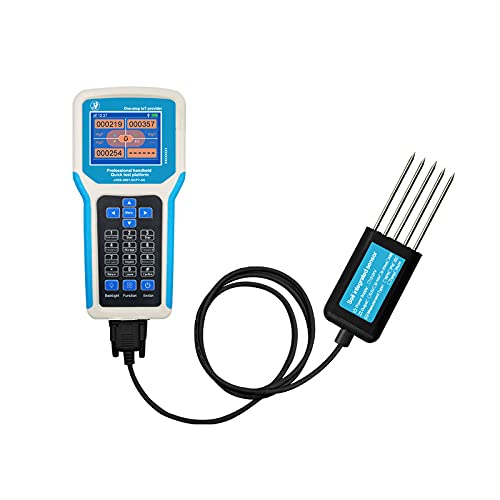
Figure 3.1: JXCT Soil Sensor Speed Meter showing the handheld terminal connected to the soil sensor probe.
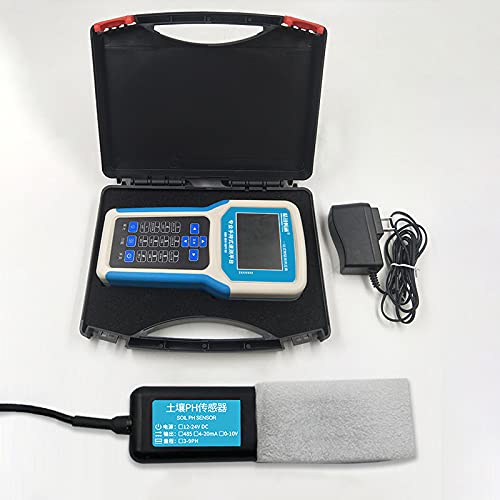
Figure 3.2: The JXCT Soil Sensor Speed Meter and its accessories, including the charging adapter, neatly packed in its protective carrying case.
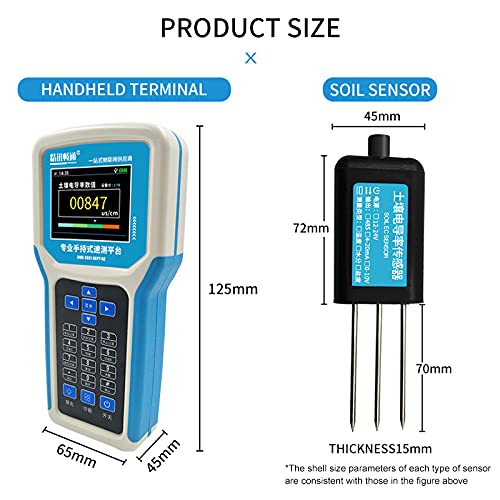
Figure 3.3: Dimensional specifications of the JXCT handheld terminal (125mm x 65mm x 45mm) and the soil sensor probe (72mm x 45mm x 15mm, with 70mm prongs).
4. Einrichtung
4.1 Aufladen des Geräts
Before first use, ensure the handheld terminal is fully charged. Connect the provided charging adapter to the terminal's charging port and plug it into a standard power outlet. The charging indicator on the device will show its status.
4.2 Connecting the Soil Sensor
- Ensure the handheld terminal is powered off.
- Align the connector of the soil sensor probe with the port on the handheld terminal.
- Gently push the connector until it clicks securely into place. Do not force the connection.
5. Bedienungsanleitung
5.1 Ein-/Ausschalten
Press and hold the power button (usually marked with a power symbol) on the handheld terminal for a few seconds to turn the device on or off.
5.2 Messungen durchführen
- Once the device is powered on and the sensor is connected, navigate to the measurement mode using the keypad.
- Carefully insert the soil sensor probe into the soil to the desired depth. Ensure the prongs are fully submerged and making good contact with the soil.
- Wait for the readings to stabilize on the display. The device will show real-time values for pH, EC, NPK, temperature, and humidity.
- Record the data manually or use the device's data logging function if available.
- Gently remove the sensor from the soil after measurement.
5.3 Datenspeicherung und -übertragung
The handheld terminal features 4MB of standard data storage. Data can be transferred to a computer via a USB connection (DB9 interface). Refer to the device's on-screen menu for specific instructions on data export.
6. Wartung
6.1 Cleaning the Sensor Probe
After each use, clean the soil sensor probe thoroughly with a soft, damp cloth to remove any soil residue. Do not use abrasive cleaners or solvents. Ensure the probe is dry before storage.
6.2 Batteriepflege
The device is battery-powered. To prolong battery life, avoid fully discharging the battery frequently. Recharge the device when the battery level is low. If storing for extended periods, charge the battery to approximately 50% and recharge every few months.
6.3 Speicherung
Store the JXCT Soil Sensor Speed Meter in its original carrying case or a similar protective container when not in use. Keep it in a dry, temperature-controlled environment.
7. Fehlerbehebung
| Problem | Mögliche Ursache | Lösung |
|---|---|---|
| Gerät lässt sich nicht einschalten. | Schwache Batterie. | Laden Sie das Gerät vollständig auf. |
| Ungenaue Messwerte. | Sensor not properly inserted; Sensor dirty; Sensor damaged. | Ensure full insertion and good soil contact; Clean the sensor probe; Contact support for replacement. |
| Der Bildschirm ist leer oder eingefroren. | Software glitch; Extreme temperature exposure. | Restart the device; Move to a suitable operating temperature range. |
| Kann keine Verbindung zum Computer herstellen. | Incorrect cable; Driver issue. | Use the provided USB cable; Install necessary drivers if prompted. |
8. Spezifikationen

Figure 8.1: Detailed technical parameters for the Handheld Terminal and various Soil Sensors (EC, Temp, Humi, NPK, pH).
8.1 Handheld Terminal Specifications
- Connectable Equipment: 1-4 ModBus device connections
- Letter of Agreement: ModBus serial communication protocol
- Anzeigedaten: Device raw data
- Betriebstemperatur: -20°C bis 50°C
- Arbeitsfeuchtigkeit: <90%RH without condensation
- Arbeitsleistung: 12V DC charging, 2500mAh (standard) lithium battery
- Anzeigemethode: 2.8-Zoll-LCD-Bildschirm
- Kommunikationsmethode: USB (read, see DB9 interface for details information)
- Datenspeicherung: 4MB storage space (standard)
- Ladezeit: ≤4H (standard configuration)
- Größe: 125*65*45 mm
- Gewicht: 500g
- Energiequelle: Batteriebetrieben
8.2 Soil EC TEMP HUMI (Three-in-one) Sensor Specifications
- Stromversorgung: 12-24V DC
- Feuchtigkeitsmessbereich: 0-100 %
- Moisture Accuracy: ±3% in the range of 0-53%, ±5% in the range of 53-100%
- Temperaturmessbereich: -40°C to 80°C (customizable)
- Temperaturgenauigkeit: ±0.5 °C
- Conductivity Resolution: 10 µs/cm
- Conductivity Measurement Range: 0-10000 µs/cm
- Speicherumgebung: -45°C bis 115°C
- Ausgangssignal: RS485
- Ansprechzeit: <1er Jahre
- Schutzstufe: IP68
- Energieverbrauch: ≤0.15W (@12V DC, 25°C)
- Arbeitsdruckbereich: 0.9-1.1 atm
8.3 Soil NPK Sensor Specifications
- Messbereich: 0-1999mg/kg
- Messgenauigkeit: ±2 % FS
- Auflösung: 1mg/kg (mg/L)
- Betriebstemperatur: 5-45°C
- Arbeitsfeuchtigkeit: 5-95% (relative humidity) no condensation
- Baudrate: 2400
- Kommunikationsanschluss: RS485
- Stromversorgung: 12V-24V DC
- Response Time (T90%): Weniger als 10s
8.4 Soil PH Sensor Specifications
- Gleichstromversorgung: 12-24V DC
- Energieverbrauch: ≤ 0.15 W
- Messgenauigkeit: ±0.3PH
- PH Measuring Range: 3-9PH
- Langzeitstabilität: ≤5 %/Jahr
- Ausgangssignal: RS485 output (Modbus protocol)
- Betriebstemperatur: 0-55°C
- Responding Speed: ≤15 s
9. Garantie und Support
This product comes with a standard manufacturer's warranty. For warranty details, technical support, or service inquiries, please contact JXCT customer service or the authorized distributor from whom you purchased the product. Please have your model number (JXBS-3001-SCY) and purchase date available when contacting support.
Hersteller: Weihai Jingxun Changtong Electronic Technology Co., Ltd.
Importeur (Indien): TREE-D HUBS LLP, GAJUWAKA, VISAKHAPATNAM, ANDHRA PRADESH- 530026