1. Einleitung
Thank you for choosing the Moultrie MCG-14001 A-900 Game and Trail Camera. This manual provides essential information for setting up, operating, and maintaining your camera to ensure optimal performance. The A-900 camera is designed for outdoor surveillance, featuring a 30 MP resolution, a rapid 0.4-second trigger speed, and 1280x720 HD video recording capabilities. Its Illumi-Night Sensor enhances nighttime image clarity, and the 70-foot flash range ensures clear captures at a distance. Please read this manual thoroughly before use.
2. Einrichtung
2.1 Auspacken und Komponenten
Vor Beginn der Arbeiten sicherstellen, dass alle Komponenten vorhanden sind:
- Moultrie A-900 Game Camera
- Heavy-duty Camera Strap
- 16 GB SD-Karte
- 8 AA-Batterien

Image 2.1: The Moultrie A-900 Game Camera shown with the included 16GB SD card and 8 AA batteries.
2.2 Einlegen der Batterie
- Öffnen Sie den Verschluss des Kameragehäuses.
- Suchen Sie das Batteriefach.
- Legen Sie 8 AA-Batterien ein und achten Sie dabei auf die richtige Polarität (+/-).
- Verschließen Sie das Batteriefach fest.
2.3 Einlegen der SD-Karte
- Suchen Sie bei geöffnetem Kameragehäuse den SD-Kartensteckplatz.
- Insert the 16GB SD card into the slot until it clicks into place. Ensure the card is oriented correctly.
- Zum Entfernen die Karte leicht andrücken, um sie zu lösen.
2.4 Montage der Kamera
The camera can be mounted using the provided heavy-duty strap.
- Thread the strap through the mounting slots on the back of the camera.
- Secure the camera to a tree or post at the desired height and angle.
- Stellen Sie sicher, dass die Kamera stabil steht und auf den Bereich gerichtet ist, den Sie überwachen möchten.
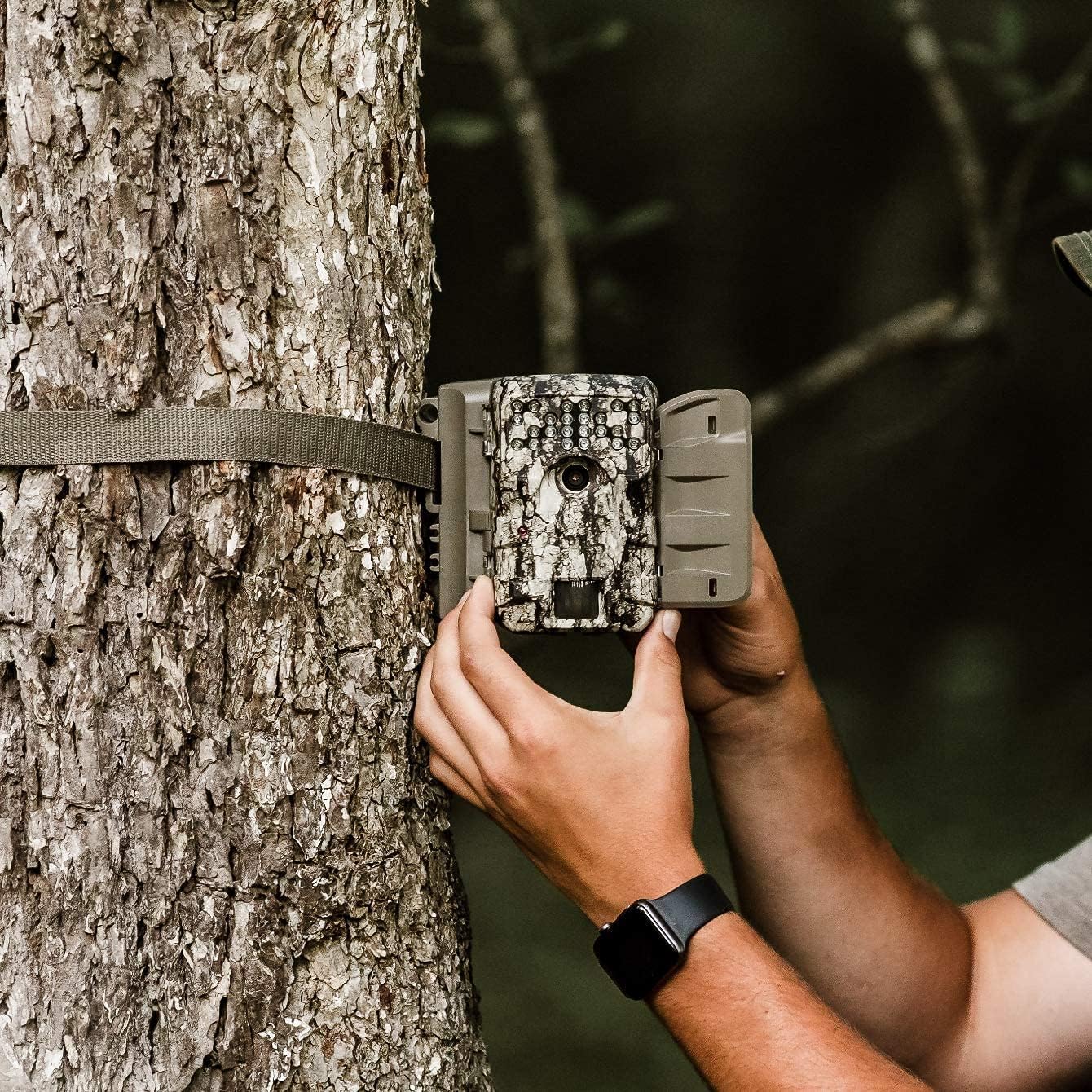
Image 2.2: A user demonstrating the process of securing the camera to a tree.

Image 2.3: The Moultrie A-900 Game Camera shown securely mounted to a tree, ready for operation.
2.5 Erstes Einschalten
After installing batteries and the SD card, close the camera housing. Power on the camera using the designated power switch. The camera will perform a self-check and enter standby mode.
3. Bedienungsanleitung
3.1 Grundlegende Betriebsarten
The A-900 camera offers several capture options:
- Fotomodus: Erstellt Standbilder.
- Videomodus: Records 1280x720 HD video clips.
- Foto- und Videomodus: Nimmt ein Standbild und anschließend einen Videoclip auf.
Refer to the camera's internal menu for selecting and configuring these modes.
3.2 Capture Options
Within Photo Mode, you can configure the number of photos taken per trigger event:
- Foto 1: Takes a single image per trigger.
- 3 Fotos: Takes three consecutive images per trigger.
Image resolution can also be set to either low or high resolution for both single and multiple photo captures.
3.3 Illumi-Night Sensor and Night Vision
The camera is equipped with an Illumi-Night Sensor to produce bright and clear images during nighttime operation. This feature automatically activates in low-light conditions, utilizing the 70-foot flash range to illuminate subjects.
3.4 Funktionalität des Bewegungssensors
The integrated motion sensor detects movement within its range, triggering the camera to capture images or videos. The 0.4-second trigger speed ensures that fast-moving subjects are captured effectively. Adjust the sensor sensitivity in the camera settings if needed.
4. Wartung
4.1 Batteriewechsel
When the battery indicator shows low power, replace all 8 AA batteries with new ones. Always use high-quality alkaline or lithium batteries for best performance and longevity.
4.2 SD-Kartenverwaltung
Regularly check the SD card capacity. It is recommended to format the SD card periodically using the camera's menu function to ensure optimal performance and prevent data corruption. Always back up important files vor der Formatierung.
4.3 Reinigung der Kamera
To maintain image quality, periodically clean the camera lens and the motion sensor window with a soft, lint-free cloth. For the camera housing, use a damp cloth to wipe away dirt and debris. Do not use abrasive cleaners or solvents.
5. Fehlerbehebung
| Problem | Mögliche Ursache | Lösung |
|---|---|---|
| Kamera lässt sich nicht einschalten | Leere oder falsch eingelegte Batterien | Batterien ersetzen, Polarität prüfen |
| Schlechte Bildqualität | Dirty lens, low light, incorrect settings | Clean lens, check Illumi-Night settings, adjust resolution |
| Bewegungssensor löst nicht aus | Obstruction, incorrect sensitivity, out of range | Clear sensor path, adjust sensitivity, reposition camera |
| SD-Kartenfehler | Karte voll, beschädigt oder inkompatibel | Format SD card (backup data first), replace with compatible card |
Bei Problemen, die hier nicht behandelt werden, finden Sie die Kontaktinformationen im Abschnitt Garantie & Support.
6. Spezifikationen
- Auflösung: 30 Megapixel
- Auslösegeschwindigkeit: 0.4 Sekunden
- Videoauflösung: 1280 x 720 HD
- Blitzreichweite: 70 Fuß
- Sensor: Illumi-Night Motion Sensor
- Lagerung: Unterstützt bis zu 16 GB SD-Karte
- Leistung: 8 AA Batteries (not included in all bundles)
- Verwendung: Im Freien
- Besondere Merkmale: Bewegungssensor, Nachtsicht
7. Garantie und Support
Moultrie products are manufactured to high-quality standards. For specific warranty details, please refer to the warranty card included with your product or visit the official Moultrie website. If you encounter any issues or require technical assistance, please contact Moultrie customer support through their official channels. Keep your purchase receipt as proof of purchase for warranty claims.


