1. Einleitung
This user manual provides comprehensive instructions for the setup, operation, and maintenance of your Sangoma P315 IP Phone. Please read this manual thoroughly to ensure proper use and to maximize the features of your device. For additional support, refer to the official Sangoma documentation and support resources.
2. Produktüberschreitungview
The Sangoma P315 is a 2-line SIP IP Phone designed for clear communication with HD Voice quality. It features a 2.4-inch color display and supports Gigabit Ethernet connectivity. This phone is compatible with Sangoma's UC offerings, including Switchvox, PBXact, FreePBX, and Asterisk, offering seamless auto-provisioning.
2.1 Hauptmerkmale
- 2-line appearance keys for managing multiple calls.
- 2.4-inch (320 x 240 pixel) backlit color LCD display for clear visibility.
- High-definition call quality for superior audio.
- Power over Ethernet (PoE) support with 2 switched 10/100/1000 Mbps Gigabit Ethernet ports.
- Built-in EHS support for Sangoma H10 and H20 wireless headsets.
- Secure deployments with SRTP/TLS and VLAN support.
- Compatibility with Switchvox 7.7, FreePBX v14, PBXact v14, Asterisk v16, Endpoint Manager v14/v15, DPMA 3.6.x.
2.2 Telefonkomponenten
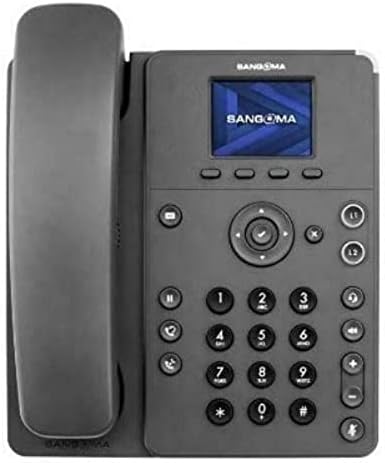
Figure 1: Sangoma P315 IP Phone Front View
The Sangoma P315 IP Phone features a standard telephone handset on the left, connected to the main unit. The main unit includes a 2.4-inch color display at the top, below which are four context-sensitive soft keys. A navigation cluster with a central 'OK' button is located below the soft keys. To the left of the navigation cluster are dedicated buttons for message, headset, and speakerphone. To the right are line keys (L1, L2) and call management buttons (hold, transfer, conference, mute, volume up/down). A standard numeric keypad (0-9, *, #) is positioned centrally on the lower part of the unit.
3. Einrichtung
3.1 Packungsinhalt
Bevor Sie fortfahren, vergewissern Sie sich, dass alle Komponenten vorhanden sind:
- Sangoma P315 IP Phone unit
- Hörer und Hörerkabel
- Ethernet-Kabel
- Telefonständer
- Note: A 12V Power Adapter (1TELP001LF) is not included and may be required if PoE is not available.
3.2 Physische Verbindung
- Bringen Sie den Telefonständer an: Richten Sie den Ständer an den Schlitzen auf der Rückseite des Telefons aus und lassen Sie ihn einrasten.
- Anschließen des Mobilteils: Stecken Sie ein Ende des spiralförmigen Hörerkabels in den Hörer und das andere Ende in die Hörerbuchse am Telefon (normalerweise mit einem Hörersymbol gekennzeichnet).
- Mit Netzwerk verbinden:
- Bei Verwendung Stromversorgung über Ethernet (PoE): Connect one end of the Ethernet cable to the LAN port on the phone and the other end to a PoE-enabled network switch or router.
- Bei Verwendung eines Netzteil (sold separately): Connect the AC adapter to the power port on the phone, then connect one end of the Ethernet cable to the LAN port on the phone and the other end to a standard network switch or router.
- Anschluss an PC (optional): If you wish to connect a computer through the phone, connect an Ethernet cable from your PC to the PC port on the phone.
3.3 Initial Boot-up and Provisioning
Once connected to the network and powered on, the phone will begin its boot-up sequence. The Sangoma P315 supports auto-provisioning with Sangoma's UC platforms. The phone will attempt to obtain network settings and configuration from your PBX system automatically. This process may take a few minutes. Once complete, the display will show your line status and be ready for use.
4. Bedienungsanleitung
4.1 Grundlegende Aufruffunktionen
- Einen Anruf tätigen:
- Pick up the handset, press the speakerphone button, or press an available line key.
- Wählen Sie die gewünschte Nummer über die Zifferntastatur.
- Drücken Sie die Wählen Tastendruck oder warten, bis der Anruf automatisch verbunden wird.
- Anruf annehmen: When the phone rings, pick up the handset, press the speakerphone button, or press the flashing line key.
- Anruf beenden: Hang up the handset, press the speakerphone button again, or press the Anruf beenden Softkey.
4.2 Erweiterte Anruffunktionen
- Halten: Drücken Sie während eines aktiven Anrufs die Halten Drücken Sie die Taste erneut, um das Gespräch fortzusetzen.
- Übertragung: Drücken Sie während eines aktiven Anrufs die Überweisen Taste. Wählen Sie die Zielnummer und drücken Sie dann die Taste. Überweisen soft key again (blind transfer) or wait for the party to answer and then press Überweisen (begleiteter Transfer).
- Konferenz: Drücken Sie während eines aktiven Anrufs die Konferenz Wählen Sie die Nummer des Drittanbieters und drücken Sie nach der Verbindung die entsprechende Taste. Konferenz Erneut die Softkey-Taste drücken, um alle Parteien zusammenzubringen.
- Stumm: Drücken Sie die Stumm Drücken Sie diese Taste, um Ihr Mikrofon während eines Anrufs stummzuschalten. Drücken Sie sie erneut, um die Stummschaltung aufzuheben.
- Voicemail: Drücken Sie die Nachricht button to access your voicemail. Follow the voice prompts.
- Lautstärkeregelung: Verwenden Sie die Lautstärke erhöhen/verringern Tasten zum Einstellen der Lautstärke am Hörer, Headset oder Lautsprecher während eines Anrufs bzw. der Klingeltonlautstärke im Ruhezustand.
4.3 Displaynavigation
The 2.4-inch color display provides access to various phone features and settings. Use the navigation cluster (up, down, left, right arrows, and central OK button) to scroll through menus and select options. The soft keys below the display change their function based on the current screen or call status.
5. Wartung
5.1 Reinigung des Telefons
So erhalten Sie das Aussehen und die Funktionalität Ihres Telefons:
- Benutzen Sie ein weiches, leichtamp, lint-free cloth to wipe the phone's surface.
- Avoid using harsh chemicals, abrasive cleaners, or aerosol sprays, as these can damage the phone's finish and internal components.
- Reinigungsmittel nicht direkt auf das Telefon sprühen.
5.2 Softwareaktualisierungen
Your Sangoma P315 IP Phone may receive software updates to improve performance, add features, or address security vulnerabilities. These updates are typically managed by your system administrator through the PBX. Do not attempt to manually update firmware unless instructed by your administrator or Sangoma support.
6. Fehlerbehebung
If you encounter issues with your Sangoma P315 IP Phone, refer to the following common problems and solutions:
| Problem | Mögliche Ursache | Lösung |
|---|---|---|
| Kein Wählton / Anrufe können nicht getätigt oder empfangen werden | Network cable disconnected, no power, incorrect network configuration, PBX issue. |
|
| Der Bildschirm ist leer oder eingefroren. | Stromproblem, Softwarefehler. |
|
| Schlechte Audioqualität (Echo, Rauschen) | Network congestion, faulty cable, environmental interference. |
|
For issues not covered here, please contact your IT department or Sangoma technical support.
7. Spezifikationen
| Besonderheit | Detail |
|---|---|
| Modell | P315 |
| Teilenummer | 1TELP315LF |
| Anzeige | 2.4-inch (320 x 240 pixel) backlit color LCD |
| Leitungstasten | 2 |
| Ethernet-Anschlüsse | 2 x 10/100/1000 Mbps Gigabit Ethernet (switched) |
| Stromquelle | PoE (Power over Ethernet) and AC Adapter (12V, not included) |
| Headset-Unterstützung | EHS support for Sangoma H10 and H20 wireless headsets |
| Sicherheit | SRTP/TLS, VLAN support |
| Abmessungen (ca.) | 27.9 x 21.3 x 8.9 cm (10.98 x 8.39 x 3.5 Zoll) |
| Gewicht ca.) | 1.08 kg |
| UPC | 797734603330 |
8. Garantie und Support
8.1 Produktgarantie
The Sangoma P315 IP Phone comes with a standard manufacturer's warranty. For detailed information regarding warranty terms, duration, and coverage, please refer to the warranty card included with your product or visit the official Sangoma webBewahren Sie Ihren Kaufbeleg für Garantieansprüche auf.
8.2 Technischer Support
For technical assistance, troubleshooting beyond this manual, or advanced configuration, please contact your system administrator or Sangoma technical support. You can find contact information and additional resources on the official Sangoma support portal.
Online-Ressourcen: www.sangoma.com/support


