Einführung
This manual provides instructions for the proper use and maintenance of your Bousnic Replacement USB Charging Cable. This cable is specifically designed to charge both the remote transmitter and the receiver collar simultaneously for Bousnic P-Collar 650 and P-Collar 680 dog training systems.
Produkt überview
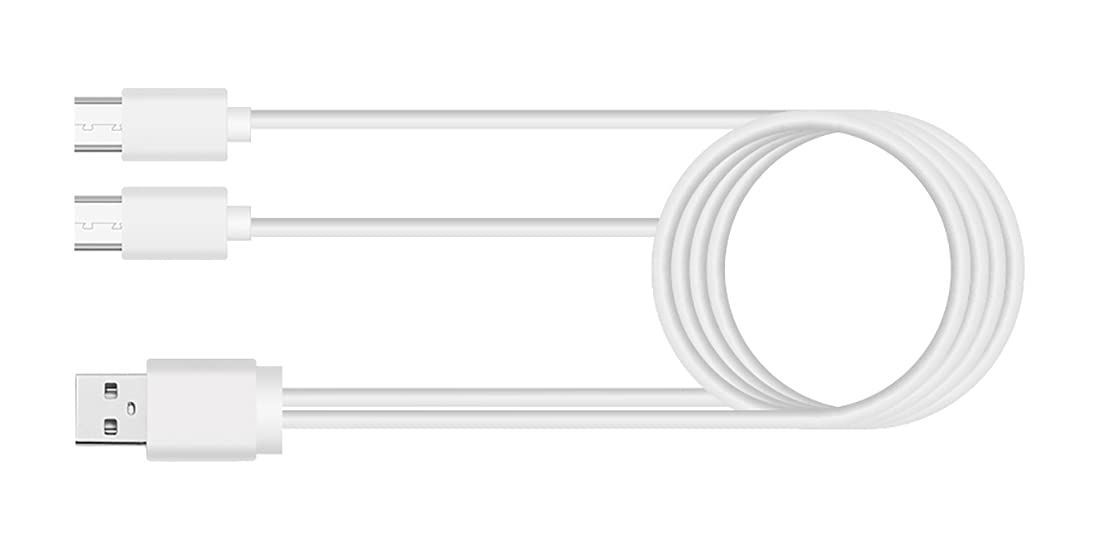
The Bousnic Replacement USB Charging Cable features a standard USB-A connector on one end and two Micro-USB connectors on the other. This dual-port design allows for convenient charging of two devices at once, such as your Bousnic training collar's remote and receiver.
Installationsanweisungen
- An Stromquelle anschließen: Insert the standard USB-A end of the charging cable into a compatible USB power adapter (not included) or a USB port on a computer. Ensure the power source provides 5V output.
- Mit Geräten verbinden: Carefully insert each of the two Micro-USB ends into the charging ports of your Bousnic P-Collar 650 or P-Collar 680 remote transmitter and receiver collar.
- Verbindung überprüfen: Once connected, the charging indicator lights on your remote and receiver should illuminate, typically red or orange, to indicate that charging has begun. Refer to your specific P-Collar model's manual for exact indicator light behavior.
Operating Instructions (Charging)
The charging cable facilitates the power transfer from a USB source to your Bousnic P-Collar devices. No operational steps are required for the cable itself beyond proper connection.
- Ladezeit: Charging times may vary depending on the battery level of your devices and the power output of your USB adapter. Typically, a full charge takes approximately 2-3 hours.
- Anzeige für volle Ladung: The charging indicator lights on your remote and receiver will usually change color (e.g., from red to green) or turn off when the devices are fully charged. Consult your P-Collar manual for specific details.
- Sicherheit: Always ensure the charging cable is not bent sharply or placed under heavy objects during use. Disconnect the cable from the power source and devices once charging is complete.
Wartung
- Reinigung: Use a soft, dry cloth to wipe the cable clean. Avoid using liquid cleaners or abrasive materials.
- Lagerung: Store the cable in a cool, dry place away from direct sunlight and extreme temperatures. Avoid tightly coiling the cable to prevent internal wire damage.
- Inspektion: Überprüfen Sie das Kabel regelmäßig auf Abnutzungserscheinungen, Ausfransungen oder Beschädigungen der Anschlüsse. Stellen Sie die Verwendung ein, wenn Sie Beschädigungen feststellen.
Fehlerbehebung
- Geräte werden nicht aufgeladen:
- Ensure both the USB-A end and the Micro-USB ends are securely connected.
- Try a different USB power adapter or computer USB port to rule out a faulty power source.
- Verify that your Bousnic P-Collar remote and receiver are powered off or in a charging-compatible state (refer to their respective manuals).
- Langsamer Ladevorgang:
- Ensure your USB power adapter provides sufficient output (e.g., 5V/2A). Lower power output may result in slower charging.
- Kabelschaden: If the cable shows any signs of physical damage, such as cuts, fraying, or bent connectors, discontinue use immediately to prevent potential hazards.
Technische Daten
| Marke | BOUSNIC |
| Kompatible Geräte | Bousnic P-Collar 650, Bousnic P-Collar 680 |
| Steckertyp | USB-A to Dual Micro-USB |
| Ausgangsvolumentage | 5 Volt |
| Ausgangsstrom | 2 Amps |
| Wastage | 10 Watt |
| Stromquelle | DC |
| Farbe | Black (Note: Product image may show white cable for illustration) |
| Artikelgewicht | 0.634 Unzen (0.02 Kilogramm) |
| Verpackungsabmessungen | 4.06 x 3.07 x 0.59 Zoll |
Garantieinformationen
Specific warranty details for this replacement charging cable may be included with your original product packaging or available on the official Bousnic website. Please retain your proof of purchase for any warranty claims. Generally, Bousnic products come with a limited warranty against manufacturing defects.
Kundenservice
For further assistance, technical support, or inquiries regarding your Bousnic Replacement USB Charging Cable, please contact Bousnic customer service. You can typically find contact information on the Bousnic official weboder über den Händler, bei dem Sie das Produkt gekauft haben.


