1. Einleitung
Thank you for choosing the Ciciglow Mini MP3 Player. This ultra-lightweight, clip-on device is designed for portable music playback, featuring an LCD screen for easy navigation and a durable metal shell. This manual will guide you through the setup, operation, and maintenance of your new MP3 player.

Bild 1: Vorderseite view of the Ciciglow Mini MP3 Player.
2. Produktüberschreitungview
2.1 Funktionen
- Mini LCD Screen Display: Provides clear visibility of song progress and menu options.
- Ultra-Lightweight Clip-on Design: Allows for secure attachment to clothing or other devices, ideal for sports and active use.
- Memory Card Expansion Slot: Supports a maximum extension of 32GB (memory card not included).
- Lange Akkulaufzeit: Offers over 5 hours of continuous playback on a single charge.
- Durable Aluminum Alloy Material: Ensures a firm and long-lasting service life.
2.2 Was ist in der Box?
- 1 x Ciciglow Mini MP3 Player
- 1 x Kopfhörer
- 1 x USB-Kabel
2.3 Produktdiagramm

Image 2: Close-up of the MP3 player's screen and control buttons.
The MP3 player features a central control panel with 'M' (Menu/Mode), Play/Pause, Previous Track, Next Track, and 'VOL' (Volume) buttons. The LCD screen displays current mode and song information.
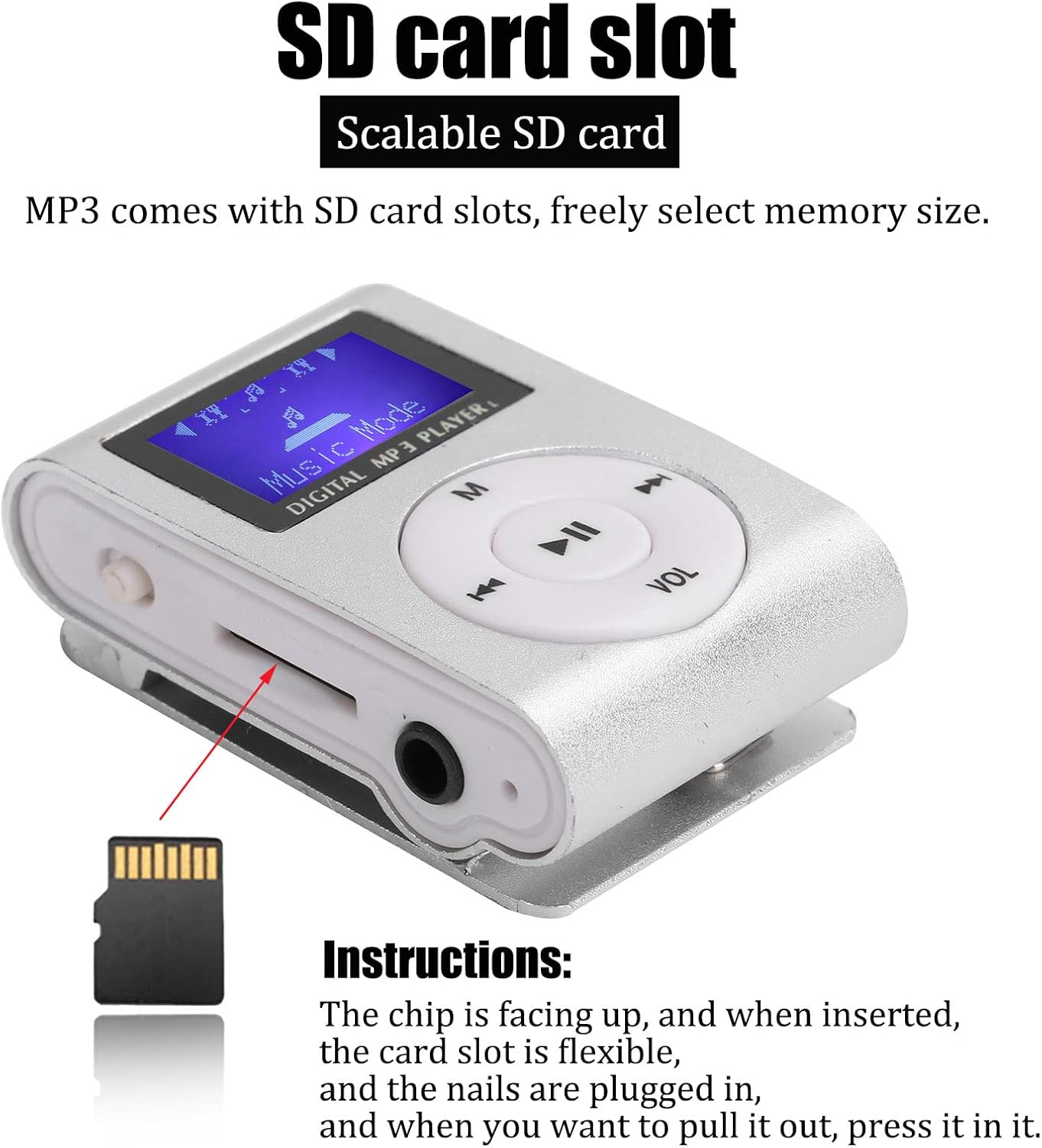
Abbildung 3: Seite view showing the Micro SD card slot, 3.5mm headphone jack, and power switch.
On the side, you will find the Micro SD card slot, a 3.5mm headphone jack, and the power switch. The USB charging port is located on the opposite side.
3. Einrichtung
3.1 Aufladen des Geräts
Before first use, fully charge the MP3 player. Connect the included USB cable to the player's USB port and to a computer's USB port or a compatible USB wall adapter. The device will indicate when charging is complete.
3.2 Einlegen einer Micro SD-Karte
The MP3 player requires a Micro SD card (not included) to store music files. Locate the Micro SD card slot on the side of the device. Insert the Micro SD card with the metal contacts facing up until it clicks into place. To remove, gently press the card until it springs out.
Image 4: Instructions for inserting the Micro SD card. Ensure the chip is facing up.
3.3 Anschließen von Kopfhörern
Plug the 3.5mm jack of the included earphones into the headphone port on the side of the MP3 player.
4. Bedienungsanleitung
4.1 Ein-/Ausschalten
To power on the device, slide the power switch to the 'ON' position. To power off, slide the switch to the 'OFF' position.
4.2 Musikübertragung Files
Connect the MP3 player to your computer using the USB cable. The player will appear as a removable disk. Drag and drop your MP3 format music files into the player's storage (Micro SD card). Ensure files are in MP3 format for compatibility.
4.3 Musik abspielen
- Schalten Sie das Gerät ein.
- The LCD screen will display "Music Mode".
- Drücken Sie die Abspielen/Pause Taste, um die Wiedergabe zu starten.
- Drücken Vorheriger Titel or Nächster Titel buttons to skip songs.
- Drücken Sie die 'M' button to cycle through different modes or menu options.
4.4 Lautstärkeregelung
Drücken Sie die 'VOL' Taste, dann verwenden Sie die Vorheriger Titel Und Nächster Titel buttons to adjust the volume level. Press 'VOL' again to confirm or wait a few seconds for the volume adjustment to exit.
Video 1: A short demonstration of the Mini MP3 Player's features and operation.
Video 2: Product show and introduction, highlighting the design and functionality.
5. Wartung
- Halten Sie das Gerät trocken. Vermeiden Sie den Kontakt mit Feuchtigkeit oder Flüssigkeiten.
- Reinigen Sie das Gerät mit einem weichen, trockenen Tuch. Verwenden Sie keine scharfen Chemikalien oder Lösungsmittel.
- Vermeiden Sie extreme Temperaturen.
- Lassen Sie das Gerät nicht fallen und setzen Sie es keinen starken Stößen aus.
- Store the device in a protective case when not in use to prevent scratches.

Image 5: The MP3 player stored in a protective case.
6. Fehlerbehebung
- Das Gerät lässt sich nicht einschalten: Stellen Sie sicher, dass der Akku geladen ist. Schließen Sie das Gerät an eine Stromquelle an und versuchen Sie es erneut. Prüfen Sie, ob der Netzschalter auf „EIN“ steht.
- No music playback: Verify that a Micro SD card with MP3 files is correctly inserted. Check earphone connection and volume level.
- Übertragung nicht möglich files zum Gerät: Ensure the MP3 player is properly connected to the computer via USB. The computer should recognize it as a removable drive.
- Kurze Akkulaufzeit: Ensure the device is fully charged before use. Battery performance may decrease over time.
7. Spezifikationen
| Marke | Ciciglow |
| Modellnummer | CiCiglowyiwue9a2km1039-11 |
| Farbe | Silber |
| Anzeige | LCD Mini Screen (1 inch) |
| Konnektivitätstechnologie | Aux, USB |
| Speicherkapazität | Supports up to 32 GB (Micro SD card not included) |
| Unterstützte Standards | MP3 |
| Akku-Typ | Eingebauter 250mAh Lithium-Akku |
| Akkulaufzeit | Mehr als 5 Stunden |
| Artikelgewicht | 47 Gramm |
| Material | Aluminiumlegierung |
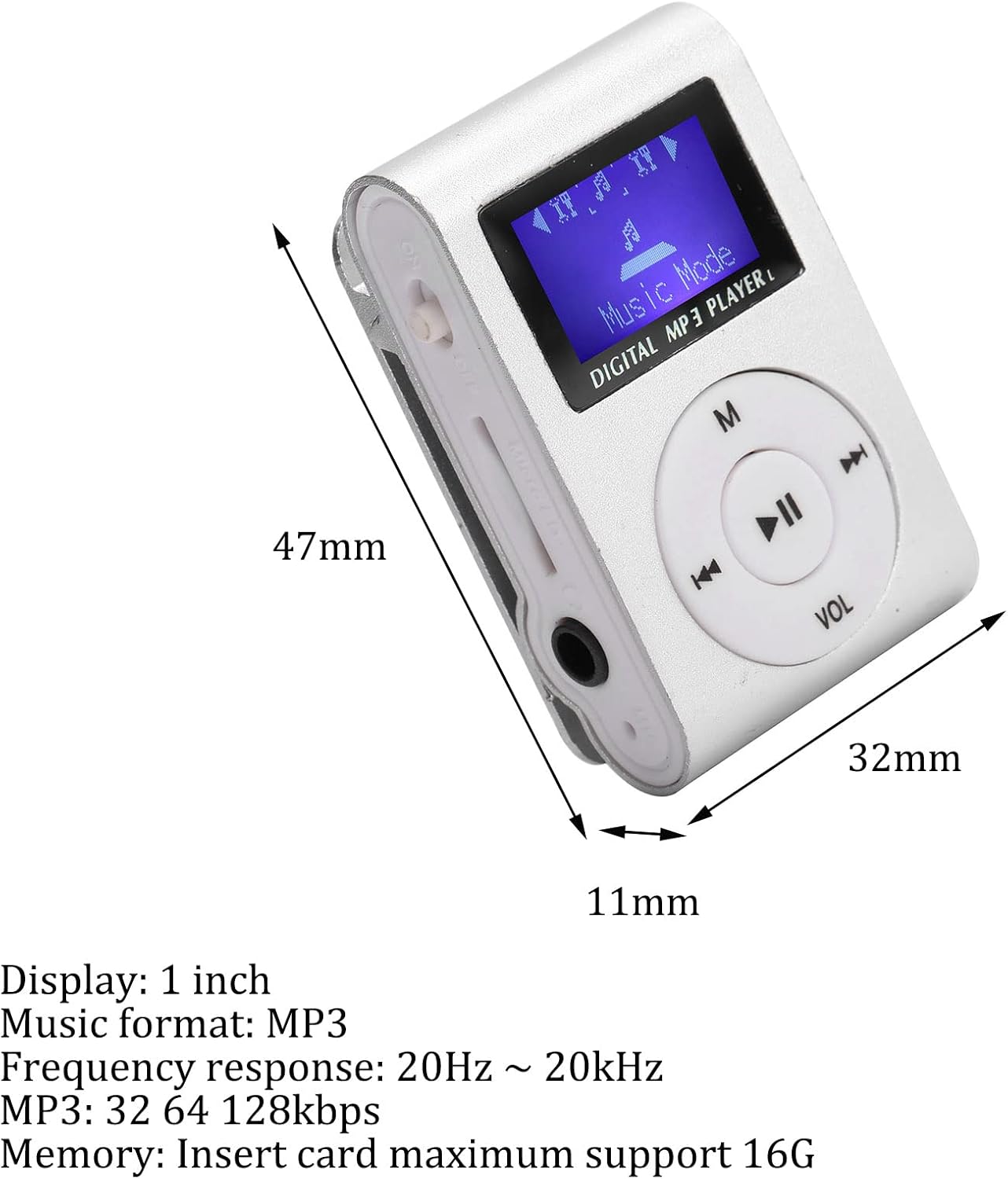
Image 6: Dimensions of the MP3 player.
8. Garantie und Support
For warranty information or technical support, please refer to the product packaging or contact Ciciglow customer service through the retailer where the product was purchased. Keep your purchase receipt for warranty claims.


