1. Einleitung
This manual provides essential information for the safe and efficient use of your TECLAST F7 Plus3 14-inch Laptop. Please read this manual thoroughly before operating the device and retain it for future reference.

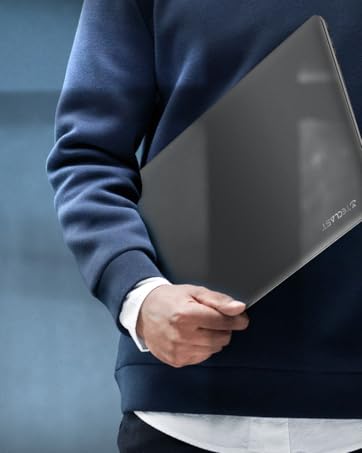
The TECLAST F7 Plus3 14-inch laptop in a closed position, showcasing sein elegantes Design.

Ein Überview of the TECLAST F7 Plus3 laptop's key features, including Intel N4120 processor, 2.4G+5G WiFi, 38000mWh battery, 14-inch FHD IPS display, full-size keyboard, 8GB RAM, and 256GB SSD.
2. Einrichtung
2.1 Auspacken und Erstbeladung
Carefully remove the laptop and all accessories from the packaging. Before first use, connect the power adapter to the laptop and a power outlet. It is recommended to charge the device for at least 30 minutes before powering it on for the first time.
Im Lieferumfang enthalten:
- TECLAST F7 Plus3 Laptop
- Netzteil
- Tastatur
- Stromkabel
2.2 Einschalten und erste Windows-Einrichtung
- Halten Sie den Ein-/Ausschalter oben rechts auf der Tastatur gedrückt, bis der Bildschirm aufleuchtet.
- Follow the on-screen instructions to complete the Windows 10 (or Windows 11 if upgraded) initial setup. This includes selecting your region, language, and creating a user account.
- Connect to a Wi-Fi network when prompted to enable internet access and download necessary updates.
3. Bedienungsanleitung
3.1 Laptop Overview

The TECLAST F7 Plus3 14-inch laptop with its screen open, showing a high-resolution display.
3.2 Anschlüsse und Steckverbinder
The TECLAST F7 Plus3 laptop is equipped with various ports for connectivity. Refer to the image below for port locations.
This image illustrates the various ports on the TECLAST F7 Plus3 laptop, including Micro Card slot, Headphone Jack, USB 2.0, USB 3.0, DC Power input, and Mini-HDMI output.
- Micro Card Slot: Zur Speichererweiterung mit einer MicroSD-Karte.
- Kopfhöreranschluss: Schließen Sie Kopfhörer oder externe Lautsprecher an.
- USB 2.0-Anschluss: Zum Anschließen von USB-Geräten.
- USB 3.0-Anschluss: Zum Anschluss von Hochgeschwindigkeits-USB-Geräten.
- Gleichstromeingang: Schließen Sie das Netzteil zum Aufladen an.
- Mini-HDMI Output: Anschluss an ein externes Display oder einen Projektor.

The TECLAST F7 Plus3 laptop connected to multiple external monitors via its USB 3.0 and Mini-HDMI ports, demonstrating its expandability.
3.3 Tastatur und Touchpad
The laptop features a full-size keyboard and a large, sensitive touchpad for efficient input.

Detaillierte view of the full-size keyboard and large touchpad (97mm x 64mm), indicating 20mm key spacing and built-in stereo speakers.
- Tastatur: Full-size layout with 20mm key spacing for comfortable typing.
- Touchpad: Large 97mm x 64mm sensitive touchpad for precise navigation.
3.4 Anzeige
The 14-inch Full HD (1920x1080) IPS display offers clear visuals and wide viewing angles with narrow 6mm bezels.

The laptop screen highlighting its narrow 6mm bezels and IPS display technology for wide viewing angles and 1920x1080 resolution.
3.5 Drahtlose Konnektivität
- W-lan: Unterstützt 2.4G- und 5G-Dualband-WLAN für stabile und schnelle Internetverbindungen.
- Bluetooth 4.2: Zum Anschluss drahtloser Peripheriegeräte wie Kopfhörer, Mäuse und Tastaturen.

An illustration highlighting the laptop's 2.4G+5G Wi-Fi, Bluetooth 4.2, 867Mbps maximum speed, and 45.6Wh battery for reliable wireless connections and long battery life.
3.6 Betriebssystem
The laptop comes with Windows 10 pre-installed and is upgradeable to Windows 11. Ensure your system is updated regularly for optimal performance and security.
4. Wartung
4.1 Reinigung
- Bildschirm: Mit einem weichen, fusselfreien Tuch leichtampMit Wasser oder einem Bildschirmreiniger abspülen. Scharfe Chemikalien vermeiden.
- Tastatur und Gehäuse: Use a soft, dry cloth. A can of compressed air can help remove dust from between keys.
4.2 Batteriepflege
The laptop is equipped with a 45600mWh battery. To prolong battery life:
- Vermeiden Sie extreme Temperaturen.
- Entladen Sie den Akku nicht häufig vollständig.
- Wenn Sie den Laptop über einen längeren Zeitraum lagern, laden Sie ihn auf etwa 50-60 % auf.

The TECLAST F7 Plus3 laptop is designed for a longer work-life balance, featuring Intel 9th UHD Graphics 600 for 4K video playback and a 45600mAh safe design battery.
4.3 Speicherverwaltung
The laptop includes a 256GB SSD and supports expansion up to 1TB via an SSD slot or TF Card slot. Regularly manage your files and uninstall unused applications to maintain performance.
5. Fehlerbehebung
This section addresses common issues you might encounter with your TECLAST F7 Plus3 laptop.
| Problem | Mögliche Lösung |
|---|---|
| Der Laptop lässt sich nicht einschalten. | Ensure the power adapter is securely connected and the laptop has been charged for at least 30 minutes. Try pressing and holding the power button for 10-15 seconds. |
| Charger is not charging the laptop. | Verify the power adapter and cable are not damaged. Ensure the power outlet is functional. Try a different outlet if available. |
| Probleme mit der WLAN-Verbindung. | Restart your router and modem. Check if other devices can connect to the Wi-Fi. Ensure Wi-Fi is enabled on the laptop (often via a function key or Windows settings). |
| Langsame Leistung. | Schließen Sie unnötige Anwendungen. Überprüfen Sie Hintergrundprozesse. Stellen Sie sicher, dass ausreichend Speicherplatz auf der SSD vorhanden ist. Führen Sie einen Systemscan auf Schadsoftware durch. |
Sollten diese Lösungsansätze das Problem nicht beheben, wenden Sie sich bitte an den Kundendienst.
6. Spezifikationen
Below are the technical specifications for the TECLAST F7 Plus3 14-inch Laptop:
| Besonderheit | Detail |
|---|---|
| Modellname | F7 Plus3 |
| Bildschirmgröße | 14 Zoll |
| Bildschirmauflösung | 1920 x 1080 Pixel (FHD IPS) |
| Prozessor | Intel N4120 (bis zu 2.6 GHz) |
| RAM | 8 GB DDR4 SDRAM |
| Festplatte | 256 GB SSD (1TB Extensible) |
| Grafikkarte | Integrierte Intel UHD-Grafik 600 |
| Betriebssystem | Windows 10 (Windows 11 Upgradeable) |
| Kabelloser Typ | 2.4-GHz- und 5-GHz-WLAN, Bluetooth 4.2 |
| Häfen | USB 3.0, USB 2.0, Mini-HDMI, Headphone Jack, Micro Card Slot, DC Power |
| Artikelgewicht | 2.86 Pfund (ca. 1.3 kg) |
| Technische Daten | 12.6 x 8.6 x 0.8 Zoll |
| Batterie | 45600mWh Lithium Polymer |
7. Garantie und Support
7.1 Produktgarantie
Your TECLAST F7 Plus3 laptop is covered by a 1 Jahr Garantie from the date of purchase. This warranty includes a 1-year unconditional replacement service for eligible issues.
7.2 Kundendienst
For any questions, concerns, or technical assistance, please contact TECLAST customer service. Our professional staff will respond within 1 working day.

TECLAST offers reliable support before and after purchase, with professional staff available to assist with any issues.
7.3 Offizielles Produktvideo
Sehen Sie sich das offizielle Produktvideo an, um einen visuellen Eindruck zu erhalten.view of the TECLAST F7 Plus3 laptop's features and design.
Ein offizielles Produktvideo zeigtasing the TECLAST F7 Plus3 14-inch laptop's design, features, and connectivity options.


