1. Einleitung
Thank you for choosing the REXING PRD615 Smart Home Projector. This device is designed to transform your living space into an immersive entertainment hub, offering high-definition visuals, robust audio, and smart connectivity features. This manual provides essential information for setting up, operating, and maintaining your projector to ensure optimal performance and longevity.

Image: The REXING PRD615 Smart Home Projector, a sleek, rectangular device with a lens on the front and ventilation grilles on the sides.
2. Sicherheitshinweise
- Stromversorgung: Verwenden Sie ausschließlich das mitgelieferte Netzteil. Stellen Sie sicher, dass die Lautstärketage entspricht den Anforderungen des Projektors.
- Belüftung: Blockieren Sie nicht die Lüftungsöffnungen. Sorgen Sie für ausreichende Luftzirkulation um den Projektor herum, um eine Überhitzung zu vermeiden.
- Flüssigkeitsexposition: Halten Sie den Projektor von Wasser und anderen Flüssigkeiten fern. Betreiben Sie ihn nicht in der Sonne.amp Umgebungen.
- Reinigung: Vor der Reinigung die Stromzufuhr unterbrechen. Ein weiches, trockenes Tuch verwenden. Scheuermittel vermeiden.
- Linsenpflege: Berühren Sie die Projektorlinse nicht direkt. Verwenden Sie gegebenenfalls ein Linsenreinigungstuch.
- Augensicherheit: Schauen Sie nicht direkt in die Projektorlinse, wenn der lamp ist eingeschaltet, da das helle Licht zu Augenbelastung oder -schäden führen kann.
- Demontage: Versuchen Sie nicht, den Projektor selbst zu zerlegen oder zu reparieren. Überlassen Sie alle Wartungsarbeiten qualifiziertem Fachpersonal.
3. Packungsinhalt
Bitte kreuzen Sie das Kästchen für die folgenden Elemente an:
- REXING PRD615 Smart Home Projector
- Netzteil
- Fernbedienung
- Bedienungsanleitung
- HDMI-Kabel (kann je nach Verpackung variieren)
4. Produktüberschreitungview und Funktionen
The REXING PRD615 is equipped with advanced features for a superior home entertainment experience:
- Theatre Experience: Projects stunning ultra-bright 750 ANSI DLP HD video (1280x800 resolution) with a throw ratio of 1.2:1, supporting projection sizes from 40 to 150 inches.
- Unglaublicher Klang: Features dual built-in 3W stereo speakers for clear, lag-free audio. Supports external audio via 3.5mm headphone jack or Bluetooth.
- Autofokus: Automatically calculates the distance to the projection surface for crystal-clear imaging without manual adjustment.
- 3D-Funktionalität: Supports 3D movies and games for an immersive viewing experience (3D glasses not included).
- Multimedia-Konnektivität: Access thousands of apps via the Google Play Store (Android TV 9.0). Connect devices via HDMI, USB, SD card, or wirelessly via Wi-Fi and Miracast.

Image: The REXING PRD615 projector displaying its smart interface with icons for Airplay, Miracast, HDMI, App Store, YouTube, Netflix, and other apps, along with various multimedia ports on the rear.
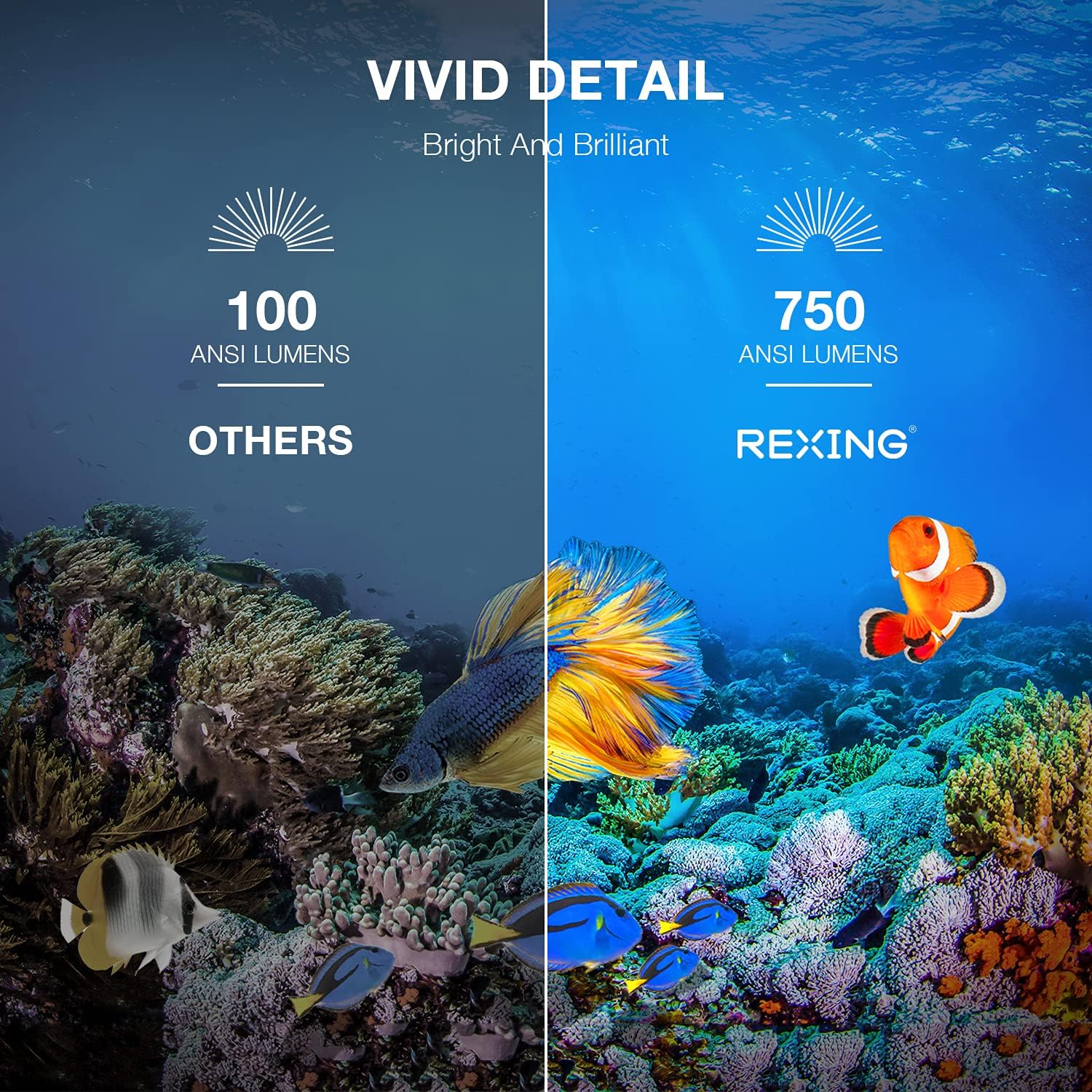
Image: A visual comparison showing the vivid detail of 750 ANSI Lumens (REXING) versus 100 ANSI Lumens (Others) in an underwater scene with colorful fish.

Image: A split screen comparison of a cityscape, demonstrating the clarity of 1080P resolution (REXING) compared to 720P (Other Projectors).
5. Einrichtung
5.1 Platzierung
Stellen Sie den Projektor auf eine stabile, ebene Fläche. Für optimale Ergebnisse viewing, ensure the projection surface (wall or screen) is clean and smooth. The projector can create an image size from 40 to 150 inches diagonally, depending on the distance from the screen.
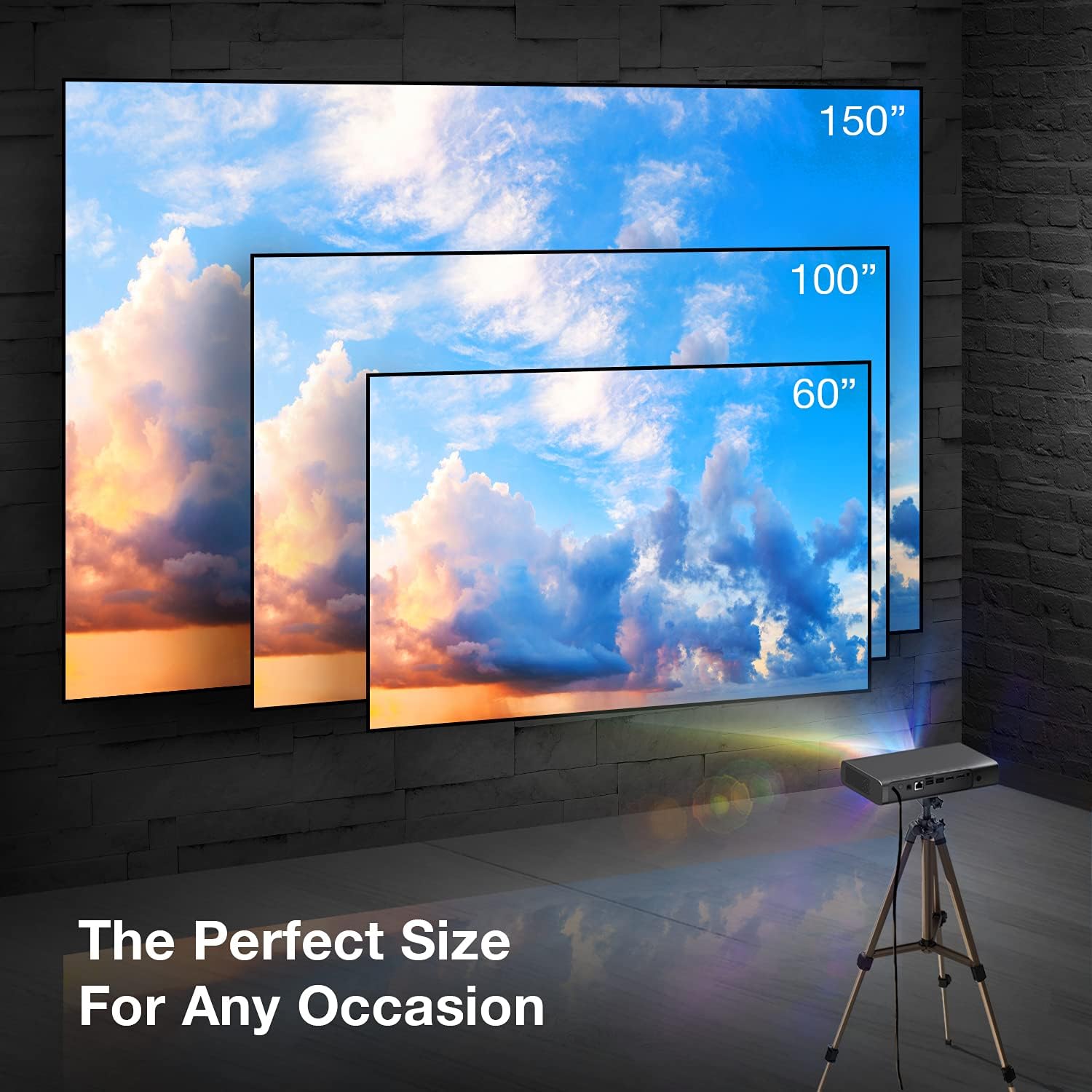
Image: A visual representation showing different projection sizes (60", 100", 150") achievable with the REXING PRD615 projector, illustrating its versatility for various room sizes.
5.2 Stromanschluss
- Schließen Sie das Netzteil an den DC IN-Anschluss des Projektors an.
- Stecken Sie das Netzteil in eine Wandsteckdose.
- Drücken Sie die Einschalttaste am Projektor oder auf der Fernbedienung, um das Gerät einzuschalten.
5.3 Initial Configuration (Autofocus & Auto Keystone)
Upon startup, the PRD615 will automatically adjust the focus and keystone correction. This feature ensures a clear, rectangular image even if the projector is not perfectly aligned with the screen.

Bild: Eine Luftaufnahme view showing the REXING PRD615 projector on a table, projecting an image onto a wall, with an overlay illustrating the automatic focus and keystone correction capabilities.
5.4 Netzwerkverbindung
To access smart features and online content, connect the projector to your Wi-Fi network:
- Navigieren Sie im Bedienfeld des Projektors zum Menü „Einstellungen“.
- Wählen Sie „Netzwerk“ oder „WLAN“.
- Wählen Sie das gewünschte WLAN-Netzwerk aus der Liste aus und geben Sie gegebenenfalls das Passwort ein.
6. Bedienungsanleitung
6.1 Externe Geräte anschließen
- HDMI: Connect Blu-ray players, gaming consoles, laptops, or other HDMI-enabled devices to the HDMI 1 or HDMI 2 ports.
- USB: Insert USB flash drives into the USB 2.0 ports to play media files direkt.
- Bluetooth: Pair Bluetooth speakers or headphones for enhanced audio.
- TF-Karte: Insert a TF (microSD) card into the designated slot to access media.
6.2 Using Smart Features (Android TV, Apps, Miracast)
The REXING PRD615 runs on Android TV 9.0, providing access to a wide range of applications:
- App Store/Google Play: Download and install your favorite streaming apps like Netflix, YouTube, Chrome, and more.
- Miracast: Wirelessly mirror content from compatible smartphones, tablets, or computers to the projector screen.
- 3D-Wiedergabe: For 3D content, ensure your media is in a compatible 3D format and use active shutter 3D glasses (sold separately).

Image: Two individuals playing a racing video game projected onto a large screen by the REXING PRD615, demonstrating the ability to cast content from a phone to the projector.
7. Wartung
- Reinigung der Linse: Use a professional lens cleaning cloth or air blower to gently remove dust. Do not use liquid cleaners directly on the lens.
- Reinigung des Casing: Wischen Sie die Außenseite des Projektors mit einem weichen, trockenen Tuch ab. Bei hartnäckigen Flecken kann ein leicht klopfender Reflektor helfen.amp Man kann ein Tuch verwenden, anschließend ein trockenes.
- Lagerung: Bei längerer Nichtbenutzung sollte der Projektor an einem kühlen, trockenen Ort aufbewahrt werden, geschützt vor Staub und extremen Temperaturen.
8. Fehlerbehebung
| Problem | Mögliche Ursache | Lösung |
|---|---|---|
| Kein Bild projiziert | Power off; input source incorrect; cable loose | Überprüfen Sie den Stromanschluss; wählen Sie die richtige Eingangsquelle; stellen Sie sicher, dass die Kabel fest angeschlossen sind. |
| Bild verschwommen | Out of focus; projector too close/far | Allow autofocus to adjust; reposition projector within recommended throw distance. |
| Kein Ton | Volume too low; audio output incorrect; external device muted | Increase projector volume; check audio settings; unmute external device. |
| Fernbedienung funktioniert nicht | Batteries low/dead; obstruction; not pointed at IR receiver | Replace batteries; remove obstructions; point remote directly at the projector's IR receiver. |
| Probleme mit der Wi-Fi-Verbindung | Falsches Passwort; Router zu weit entfernt; Netzwerkstörungen | Passwort überprüfen; Projektor näher an den Router heranführen; Router neu starten. |
9. Spezifikationen
| Besonderheit | Detail |
|---|---|
| Marke | REXING |
| Modell | PRD615 |
| Display-Technologie | DLP |
| Helligkeit | 750 ANSI-Lumen |
| Native Auflösung | 1280 x 800 (HD) |
| Maximale Bildschirmauflösung | 1280 x 800 |
| Projektionsgröße | 40-150 Zoll |
| Projektionsverhältnis | 1.2:1 |
| Lautsprechertyp | Dual 3W Stereo, Built-In |
| Konnektivitätstechnologie | Bluetooth, USB, HDMI, Wi-Fi |
| Besondere Merkmale | Wireless, Portable, Built-In Wi-Fi, Autofocus, Auto Keystone Correction |
| Betriebssystem | Android TV 9.0 |
| Artikelgewicht | 4.8 Pfund |
| Verpackungsabmessungen | 11.2 x 8 x 4.6 Zoll |
| Datum der ersten Verfügbarkeit | 4. Juni 2021 |
10. Garantie und Support
REXING stands behind its products. The PRD615 Smart Home Projector comes with an 18 Monate Garantie Diese Garantie gilt ab Kaufdatum und deckt Herstellungsfehler ab. Sie gewährleistet, dass Ihr Produkt wie vorgesehen funktioniert.
For any questions, technical assistance, or warranty claims, please contact our US-Based Customer Support team. Our dedicated team is ready to assist you.
- E-Mail: Refer to your product packaging or the official REXING webWebsite für Kontakt-E-Mail.
- Telefon: Refer to your product packaging or the official REXING webWebseite mit der Telefonnummer des Kundendienstes.

Image: A customer support representative with a headset, indicating the availability of US-based customer support for the REXING PRD615 projector.


