Einführung
Thank you for choosing the Audiotek AT804 4 Channel Stereo Car Amplifier. Dies amplifier is designed to enhance your car audio system with powerful and clear sound reproduction. This manual provides essential information for proper installation, operation, and maintenance to ensure optimal performance and longevity of your ampschwerer.

Bild: Oben view of the Audiotek AT804 ampVerstärker, Showcasing its sleek silver finish and the Audiotek logo.
Sicherheitshinweise
Bitte lesen Sie alle Anweisungen sorgfältig durch, bevor Sie Ihr Gerät installieren und in Betrieb nehmen. ampVerstärker. Die Nichtbeachtung dieser Richtlinien kann zu Schäden am Verstärker führen. ampVerstärker, Fahrzeug oder Personenschaden.
- Vor Beginn jeglicher elektrischer Arbeiten muss immer der Minuspol der Fahrzeugbatterie abgeklemmt werden.
- Stellen Sie eine ordnungsgemäße Erdung für das amplifier to prevent electrical issues and noise.
- Use appropriate gauge wiring for power, ground, and speaker connections as recommended.
- Montieren Sie die ampDer Verstärker sollte sicher an einem Ort aufgestellt werden, der für ausreichende Belüftung sorgt und vor Feuchtigkeit und übermäßiger Hitze geschützt ist.
- Avoid running wires near sharp edges or moving parts to prevent damage.
- Wenn Sie sich bei einzelnen Installationsschritten unsicher sind, wenden Sie sich an einen professionellen Car-Audio-Einbauer.
Produkteigenschaften
The Audiotek AT804 amplifier incorporates advanced features for superior audio performance:
- 4 Channel Stereo Car AmpReiniger: Provides versatile audio configuration for multiple speakers.
- 1000 Watts Max Power: Delivers significant power output for dynamic sound.
- 2 Ohm Stable Operation: Allows for flexible speaker impedance configurations.
- Überbrückbarer MOSFET AmpReiniger: Offers options for increased power output to specific channels.
- Class A-B Operation: Combines efficiency with high-fidelity sound.
- Hochleistungs-Kühlkörper aus Aluminiumlegierung: Ensures efficient heat dissipation for reliable performance.
- Continuously Variable Crossover: Adjustable high-pass and low-pass filters for precise sound tuning.
- Bassverstärkung: Adjustable bass enhancement from 0 to +18dB.
- Nickel Plated RCA and Speaker Level Inputs: Provides flexible input options and corrosion resistance.
- Remote Turn-On/Turn-Off Circuit: Integrates seamlessly with your car's head unit.
- MOSFET Pulse Width Modulated Power Supply: Delivers stable and efficient power.
- Thermal and Speaker Short Protection Circuitry: Schützt die ampBeschädigung des Verstärkers und der Lautsprecher.
- LED Power and Protection Indicators: Provides visual status of the ampBetrieb des Verstärkers.
Technische Daten
| Besonderheit | Spezifikation |
|---|---|
| Modellnummer | AT804 |
| Hersteller | AUDIOTEK |
| Anzahl der Kanäle | 4 |
| Montagetyp | Oberflächenmontage |
| Leistungsabgabe | 1000 Watt (max.) |
| Impedanzstabilität | 2 Ohm stabil |
| Amplifier-Klasse | Klasse AB |
| Bass Boost | 0 bis +18dB |
Setup und Installation
Eine fachgerechte Installation ist entscheidend für die Leistung und Sicherheit Ihres Produkts. amplifier. Ensure all connections are secure and correctly wired.
1. Montageort
Wählen Sie einen Montageort, der trocken, gut belüftet und vor direkter Sonneneinstrahlung sowie Wärmequellen geschützt ist. Achten Sie auf ausreichend Platz um das Gerät herum. amplifier for air circulation. Secure the amplifier firmly to a solid surface using appropriate hardware.
2. Kabelverbindungen
Refer to the diagrams below for proper wiring. Always use high-quality, appropriate gauge wiring.
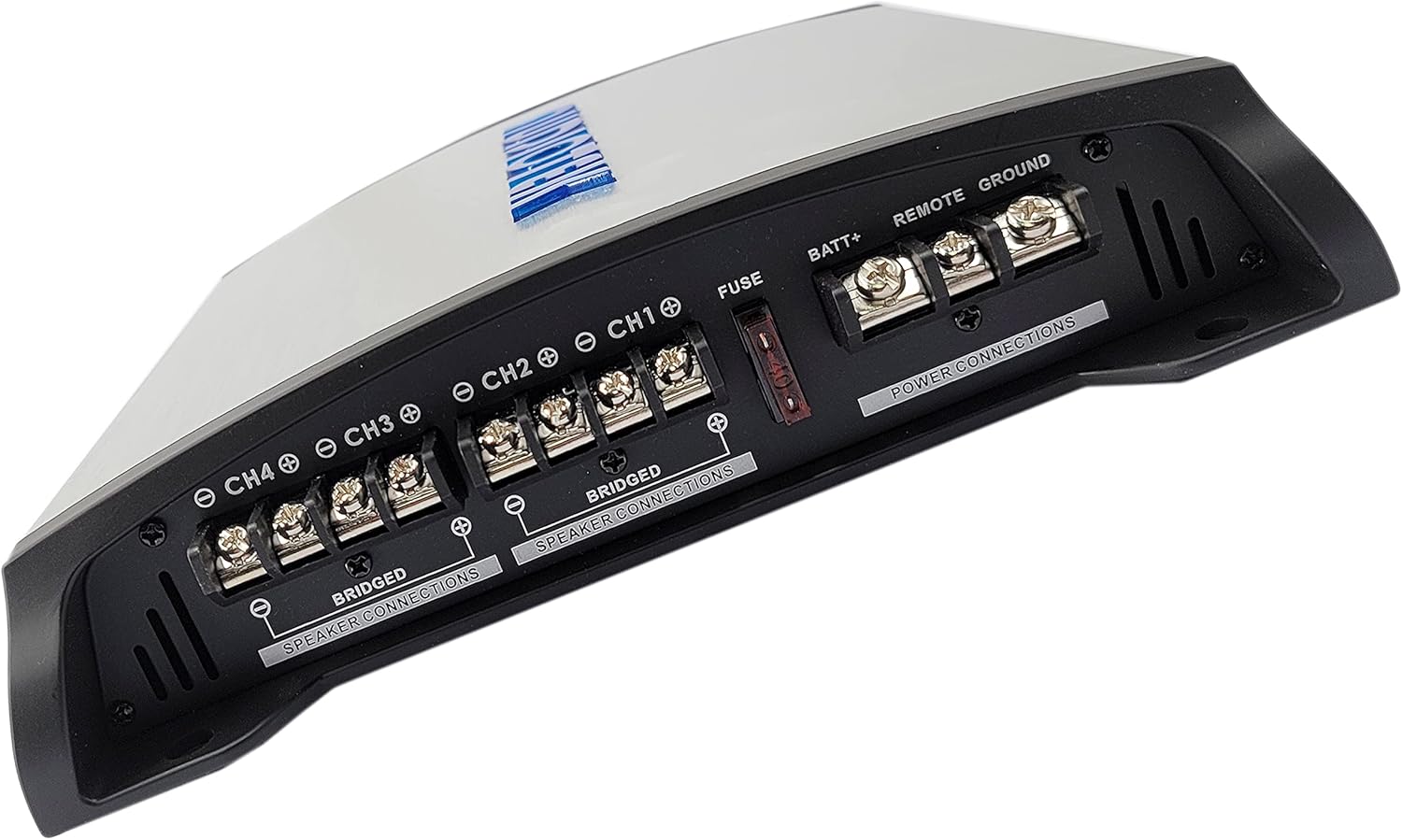
Bild: Rückseite view of the Audiotek AT804 amplifier, showing the power input terminals (BATT+, REMOTE, GROUND) and speaker output terminals (CH1, CH2, CH3, CH4) with bridging options clearly labeled.
Stromanschlüsse:
- BATT+ (12V Power): Connect directly to the positive terminal of the vehicle's battery. Install an in-line fuse (not supplied) within 18 inches of the battery.
- BODEN: Schließen Sie das Kabel an eine saubere, unlackierte Metalloberfläche des Fahrzeugchassis an. Achten Sie auf eine sichere elektrische Verbindung.
- FERNBEDIENUNG: Connect to the remote turn-on lead from your head unit. This wire turns the ampVerstärker mit Ihrer Stereoanlage ein- und ausschalten.
Lautsprecheranschlüsse:
- Connect your speakers to the CH1, CH2, CH3, and CH4 output terminals. Observe correct polarity (+ to + and - to -).
- For bridged operation (e.g., for a subwoofer), use the designated "BRIDGED" terminals as indicated on the amplifier. Refer to the diagram for specific bridged wiring.

Bild: Vorderseite view of the Audiotek AT804 amplifier, displaying the input level controls, crossover settings (High Pass, Full Range, Low Pass), and RCA/High-Level inputs for channels 1-4.
Eingangsanschlüsse:
- Niedrigpegeleingänge (RCA): Schließen Sie RCA-Kabel von den Vor-/Unterbuchsen Ihres Autoradios an.amp Ausgänge zum amplifier's RCA inputs (CH1, CH2, CH3, CH4).
- High-Level-Eingänge: If your head unit does not have RCA outputs, use the high-level inputs. Connect speaker wires from your head unit's speaker outputs to the ampdie Hochpegel-Eingangsklemmen des Verstärkers.
Bedienungsanleitung
Nach der Installation einstellen ampVerstärkereinstellungen für optimale Klangqualität.
1. Erste Inbetriebnahme
- Nachdem alle Verbindungen hergestellt sind, schließen Sie die Fahrzeugbatterie wieder an.
- Turn on your car's ignition and head unit. The "POW" (Power) LED on the amplifier should illuminate, indicating it is receiving power.
- If the "PRO" (Protection) LED illuminates, there is an issue. Refer to the Troubleshooting section.
2. Adjusting Input Level (Gain)
The "INPUT LEVEL" control matches the amplifier's input sensitivity to the output level of your head unit. This is not a volume control.
- Set the head unit volume to about 75% of its maximum.
- Drehen Sie den amplifier's "INPUT LEVEL" control to its minimum (MIN) position.
- Slowly increase the "INPUT LEVEL" control until you hear slight distortion, then back it off slightly until the sound is clear.
3. Frequenzweicheneinstellungen
The crossover controls allow you to direct specific frequency ranges to your speakers, optimizing sound quality and protecting speakers.
- FULL RANGE: Passes all frequencies to the speakers. Suitable for full-range speakers.
- HPF (Hochpassfilter): Allows frequencies above the set point to pass. Use for tweeters or mid-range speakers to prevent low bass.
- LPF (Tiefpassfilter): Allows frequencies below the set point to pass. Use for subwoofers to prevent high frequencies.
Adjust the frequency knobs (e.g., 50Hz-250Hz) according to your speaker types and desired sound profile.
4. Bassverstärkung
The "BASS BOOST" control (0 to +18dB) enhances low-frequency output. Use sparingly to avoid distortion and speaker damage. Adjust to your preference.
Wartung
Regelmäßige Wartung trägt dazu bei, die Langlebigkeit und Leistungsfähigkeit Ihres Geräts zu gewährleisten. ampschwerer.
- Reinigung: Wischen Sie regelmäßig ab ampReinigen Sie die Außenseite des Verstärkers mit einem weichen, trockenen Tuch. Vermeiden Sie die Verwendung von scharfen Chemikalien oder Scheuermitteln.
- Verbindungen: Check all wiring connections periodically to ensure they are secure and free from corrosion. Loose connections can cause performance issues or damage.
- Belüftung: Stellen Sie sicher, dass die amplifier's heat sink fins are free from dust and debris to maintain proper cooling. Do not obstruct airflow around the ampschwerer.
Fehlerbehebung
If you experience issues with your Audiotek AT804 amplifier, beachten Sie die folgenden häufigen Probleme und Lösungen:
| Problem | Mögliche Ursache | Lösung |
|---|---|---|
| No Power (POW LED off) | Durchgebrannte Sicherung, lose Strom-/Masse-/Fernbedienungsleitung, fehlerhafter Batterieanschluss. | Check in-line fuse, verify all power connections are secure, test battery voltage. |
| Protection LED (PRO) is on | Speaker short circuit, overheating, low impedance load, DC offset. | Check speaker wiring for shorts, ensure proper ventilation, verify speaker impedance, allow ampabkühlen lassen. |
| Keine Tonausgabe | No input signal, incorrect gain setting, faulty RCA/speaker cables, amplifier im Schutzmodus. | Check RCA/high-level input connections, adjust gain, test cables, check PRO LED. |
| Verzerrter Klang | Gain set too high, improper crossover settings, poor speaker connections, damaged speakers. | Reduce gain, adjust crossover, check speaker wiring, inspect speakers for damage. |
| Engine Noise/Whine | Poor grounding, RCA cables too close to power wires, ground loop. | Ensure solid ground connection, reroute RCA cables away from power wires, consider a ground loop isolator. |
Garantieinformationen
Audiotek products are designed and manufactured to the highest quality standards. This product is covered by a limited warranty against defects in materials and workmanship. The specific terms and duration of the warranty may vary by region and retailer.
Please retain your proof of purchase for warranty claims. For detailed warranty information, including coverage, exclusions, and how to make a claim, please refer to the official Audiotek webBesuchen Sie unsere Website oder wenden Sie sich an Ihren autorisierten Händler.
Kundenservice
If you have any questions, require technical assistance, or need further support regarding your Audiotek AT804 amplifier, please contact Audiotek customer service or your authorized dealer.
For the most up-to-date contact information, please visit the official Audiotek webWebsite: www.audiotek.com (Hinweis: Dies ist ein Platzhalter) URL, please refer to actual product documentation for correct support links).


