Einführung
This manual provides detailed instructions for the Google Pixel Buds A-Series wireless earbuds. These earbuds are designed to deliver high-quality audio and feature a comfortable, secure fit with multiple eartip sizes and a stabilizer arc. They are compatible with Android, iOS, and other Bluetooth 4.0+ devices.
Lieferumfang
- Google Pixel Buds A-Series Earbuds
- Ladeetui
- USB-C-Ladekabel
- Eartips (Small, Medium, Large)
- Kurzanleitung (nicht in diesem digitalen Handbuch enthalten)

Image: Google Pixel Buds A-Series earbuds securely placed within their white charging case, which is open to reveal the earbuds.
Aufstellen
1. Erstes Pairing
For Android Devices (One-Tap Pairing):
- Ensure your Android device is unlocked and has Bluetooth enabled.
- Open the charging case of your Pixel Buds A-Series next to your Android device.
- A pairing notification will appear on your device's screen. Tap to connect.
- Follow any on-screen prompts to complete the setup, including installing the Pixel Buds app for additional features.
For iOS and Other Bluetooth 4.0+ Devices:
- Öffnen Sie den Deckel, während sich die Ohrhörer im Ladecase befinden.
- Press and hold the pairing button on the back of the charging case until the status light begins to pulse white.
- On your device, navigate to Bluetooth settings and select "Pixel Buds A-Series" from the list of available devices.
- Confirm the pairing on your device.
2. Sichere Passform erreichen
The Pixel Buds A-Series come with three sizes of eartips (small, medium, large) and a flexible stabilizer arc to ensure a comfortable and secure fit.
- Experiment with different eartip sizes to find the best seal for your ears. A good seal is crucial for optimal sound quality and bass response.
- Gently insert each earbud into your ear, rotating slightly until the stabilizer arc tucks comfortably into your ear's concha.

Bild: Eine Nahaufnahme view of a single Google Pixel Bud A-Series earbud, highlighting its ergonomic design, eartip, and stabilizer arc.
Bedienungsanleitung
1. Tippen Sie auf Steuerung
The Pixel Buds A-Series feature touch controls on the outer surface of each earbud.
- Einmaliges Tippen: Audio abspielen/pausieren, Anruf annehmen/beenden.
- Doppeltippen: Skip forward a track, Decline call.
- Dreifacher Tipp: Skip backward a track.
- Drücken und halten: Activate Google Assistant (Android only), or hear notifications.
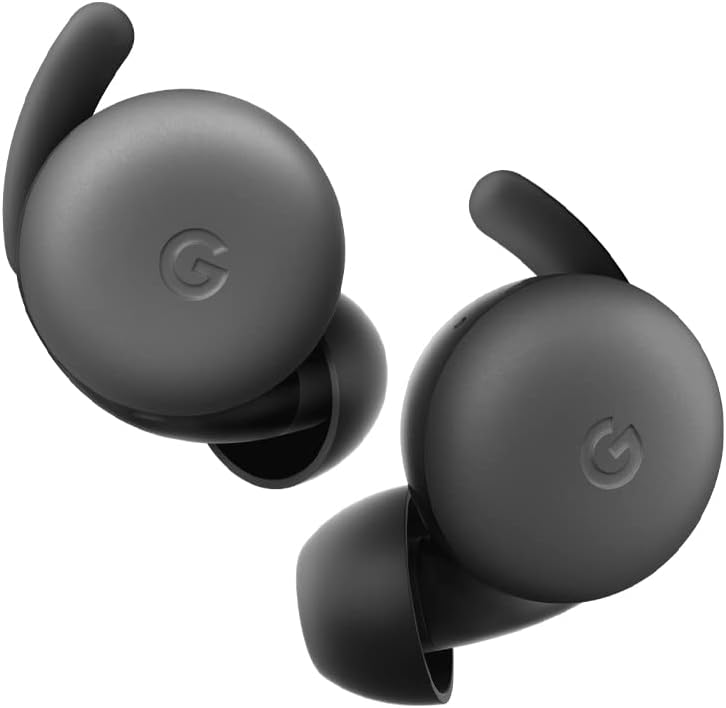
Image: A pair of Google Pixel Buds A-Series earbuds, showcasing their compact design and the 'G' logo on the touch-sensitive surface.
2. Google Assistant-Integration
With a compatible Android device, you can access Google Assistant directly from your Pixel Buds A-Series.
- Say "Hey Google" or "Ok Google" to activate the Assistant hands-free.
- Alternatively, press and hold either earbud to speak to Google Assistant.
- You can ask for directions, check weather, control music, or have notifications read aloud.
3. Aufladen
The Pixel Buds A-Series provide up to 5 hours of listening time or 2.5 hours of talk time on a single charge. The charging case extends this to up to 24 hours of total listening time.
- To charge the earbuds, place them inside the charging case. The indicator light on the case will show their charging status.
- To charge the case, connect it to a USB-C power source using the provided cable. The case's indicator light will show its charging status.
Wartung
1. Reinigung
- Reinigen Sie Ihre Ohrhörer und das Ladecase regelmäßig, um Leistung und Hygiene zu erhalten.
- Use a soft, dry, lint-free cloth to wipe the exterior of the earbuds and case.
- For eartips, gently remove them and clean with a mild soap solution and water, then rinse and dry thoroughly before reattaching.
- Vermeiden Sie die Verwendung von Scheuermitteln oder aggressiven Chemikalien.
2. Speicherung
- Always store the Pixel Buds A-Series in their charging case when not in use to protect them and keep them charged.
- An einem kühlen, trockenen Ort lagern. Vor extremen Temperaturen und direkter Sonneneinstrahlung schützen.
Fehlerbehebung
If you encounter issues with your Pixel Buds A-Series, try the following steps:
- Kein Ton oder zeitweise Verbindungsabbrüche:
- Stellen Sie sicher, dass beide Ohrhörer aufgeladen sind.
- Prüfen Sie, ob Bluetooth auf Ihrem Gerät aktiviert ist und die Ohrhörer verbunden sind.
- Try placing the earbuds back in the case, closing the lid for a few seconds, then reopening to reset the connection.
- Entferne das Gerät aus den Bluetooth-Einstellungen deines Telefons und koppele es erneut.
- Stellen Sie sicher, dass sich Ihr Gerät in Bluetooth-Reichweite befindet (bis zu 10 Meter).
- Ohrhörer werden nicht aufgeladen:
- Stellen Sie sicher, dass das Ladecase selbst aufgeladen ist.
- Vergewissern Sie sich, dass die Ohrhörer korrekt im Ladecase sitzen.
- Reinigen Sie die Ladekontakte sowohl an den Ohrhörern als auch im Inneren des Ladecase mit einem trockenen Wattestäbchen.
- Versuchen Sie es mit einem anderen USB-C-Kabel und Netzteil.
- Schlechte Tonqualität:
- Ensure you have a secure fit with the correct eartip size.
- Clean the earbud mesh and eartips.
- Überprüfen Sie die Audioeinstellungen und den Equalizer Ihres Geräts.
Technische Daten
| Modellname | Pixel Buds A-Series |
| Konnektivitätstechnologie | Kabellos (Bluetooth 5.0) |
| Kompatible Geräte | Android, iOS, and Bluetooth 4.0+ devices |
| Akkulaufzeit (Ohrhörer) | Bis zu 5 Stunden Hörzeit, 2.5 Stunden Sprechzeit |
| Akkulaufzeit (mit Ladecase) | Up to 24 hours listening |
| Wasserbeständigkeit | Water Resistant (IPx4 rating for earbuds) |
| Steuerungstyp | Touch (Media Control, Google Assistant) |
| Artikelgewicht | 1.9 Unzen (insgesamt) |
| Abmessungen (Ohrhörer) | 0.81 x 1.15 x 0.69 Zoll |
| Frequenzbereich | 20 Hz – 20,000 Hz |
| Bluetooth-Reichweite | 10 Meter |
Garantie und Support
For detailed warranty information and customer support, please refer to the official Google Pixel Buds support website. You can typically find support resources, FAQs, and contact options at g.co/pixelbuds/help.
The Pixel Buds A-Series are designed to be repairable, but any repair, disassembly, or damage may affect the water resistance rating.


